Viewing 30 results - 5,551 through 5,580 (of 18,736 total)
  • Author
    Search Results
  • #1067250

    Topic: DropCap Not Appearing

    in forum Enfold
    envatojlc
    Participant

    The dropcap1 is not appearing on my pages (see Private Content a link to one of the pages).

    Previously, Kriesi support had provided the CSS below so that I could make adjustments to the dropcaps and the change was implemented in Appearance > Editor > Enfold Child: Stylesheet.

    .av_dropcap1 {
    font-family: arvo!important;
    font-size: 60px;
    line-height: 60%!important;
    margin: 4px 8px 0 0 !important;}

    I disabled the above CSS to determine if it made a difference, but the dropcaps are not appearing on any of my pages. There are hundreds of pages without any dropcaps.

    It seems that the dropcaps are not appearing since the latest update. Can you help me understand why? Were there any modification in the latest update?

    Thank you for the help.

    #1067159

    Hey Jill,

    Here is the code you can put in Enfold > General Styling > Quick Css,  if it does not work, put into themes/enfold/css/custom.css

    
    #top #av-layout-grid-1 .av_font_icon a,
    #top #av-layout-grid-2 .av_font_icon a {
        font-size: 83px !important;
        line-height: 89px !important;
    }
    

    If you need further assistance please let us know.

    Best regards,
    Victoria

    #1067148

    Hi there,

    should be no problem with the Login Icon…. go to the design —> menu and select your secondary menu for the header
    Screen: https://d.pr/i/LXGDOO
    wrap the wording in a span tag.

    add this to your css…. in the content you can put the icon code of the icon you want to show

    #menu-item-1555 a::before {
        content: "\e80a";
        color: #d97b88;
        position: absolute;
        font-family: 'entypo-fontello';
        font-size: 24px;
    }
    
    #menu-item-1555 a span{
    	visibility: hidden;
    }

    Regards
    Alex

    #1066987

    Topic: Rounded Buttons

    in forum Enfold
    craig_whiteblaze
    Participant

    Hi all,

    I’m wanting round buttons for a site I’m working on and am having no luck applying some custom CSS code that I’ve found in previous searches.

    The button is embedded in a color section, pretty much like the Enfold Construction demo. Likewise, it appears that font size changes to a text block inside the color section aren’t working either, does it have something to do with being embedded in the color section?

    #1066934
    Grobi
    Participant

    Hi,
    on my website I use a sticky full width sub menu on which I styled the links.
    The background is darker blue, each link has a lighter blue background with rounded corners. During mouse-over the background-color changes to the color of the section that the link is heading to.
    To get an effect that looks like a little transparent window in the sub menue, I want the link’s background to pick up the hover color and keep it until the section is reached – and until another link is clicked. (as you have it, when you use an iPad for example)

    I thought I could do that in the quick css-box using the pseudo element :visited.
    The hover-effect is working, but not the :visited-effect.

    This is, what I wrote:
    #mg_navikiste_hallo {
    background: #4C5B8C; color: white; padding-left: 15px; padding-right: 15px; padding-top: 7px; padding-bottom: 7px; border-radius: 12px; font-size: 18px;}
    #mg_navikiste_hallo:visited {background: #7682A9;}
    #mg_navikiste_hallo:hover {background: #7682A9;}

    Can you give me a hint what I did wrong?

    Best regards
    Grobi

    conversionmedia
    Participant

    Hello there,

    we found out that using HTML Elements like link or strong inside of Avia Text Element, causing problems with saving pages / posts.

    Environment:
    WordPress 5.0.3
    Enfold: 4.5.3

    Steps to reproduce problem:
    1. Set user default editor = Gutenberg
    2. Add a new page
    3. Toggle to “Advanced Layout Editor” ( Avia ) on new page
    4. Set page title
    5. Insert 2 “full width columns”
    6. Insert Text Blocks on each “full width column” with Loremipsum text
    7. Save page
    8. Refresh edit page
    9. Go into any text block, and toggle from “Visual Editor” to “Text Editor”
    10. Add Link HTML, or strong HTML to any part of Loremipsum text
    11. Save page
    12. Open developer console ( Chrome Dev tools )
    13. Watch JS console section while refreshing page

    After refresh you’ll see an error message like this:

    blocks.min.js?ver=6.0.5:2 Block validation: Block validation failed for core/shortcode
    Expected:

    [av_one_full first min_height='' vertical_alignment='' space='' custom_margin='' margin='0px' row_boxshadow='' row_boxshadow_color='' row_boxshadow_width='10' link='' linktarget='' link_hover='' padding='0px' highlight='' highlight_size='' border='' border_color='' radius='0px' column_boxshadow='' column_boxshadow_color='' column_boxshadow_width='10' background='bg_color' background_color='' background_gradient_color1='' background_gradient_color2='' background_gradient_direction='vertical' src='' background_position='top left' background_repeat='no-repeat' animation='' mobile_breaking='' mobile_display='' av_uid='']

    [av_textblock size='' font_color='' color='' av-medium-font-size='' av-small-font-size='' av-mini-font-size='' av_uid='av-js4cbvdt' admin_preview_bg='']
    Lorem ipsum dolor sit amet, consetetur sadipscing elitr, sed diam nonumy eirmod tempor invidunt ut labore et dolore magna aliquyam erat, sed diam voluptua. At vero eos et accusam et justo duo dolores et ea rebum. Stet clita kasd gubergren, no sea takimata sanctus est Lorem ipsum dolor sit amet. Lorem ipsum dolor sit amet, consetetur sadipscing elitr, sed diam nonumy eirmod tempor invidunt ut labore et dolore magna aliquyam erat, sed diam voluptua. At vero eos et accusam et justo duo dolores et ea rebum. Stet clita kasd gubergren, no sea takimata sanctus est Lorem ipsum dolor sit amet.
    [/av_textblock]

    [/av_one_full][av_one_full first min_height='' vertical_alignment='' space='' custom_margin='' margin='0px' row_boxshadow='' row_boxshadow_color='' row_boxshadow_width='10' link='' linktarget='' link_hover='' padding='0px' highlight='' highlight_size='' border='' border_color='' radius='0px' column_boxshadow='' column_boxshadow_color='' column_boxshadow_width='10' background='bg_color' background_color='' background_gradient_color1='' background_gradient_color2='' background_gradient_direction='vertical' src='' background_position='top left' background_repeat='no-repeat' animation='' mobile_breaking='' mobile_display='' av_uid='']

    [av_textblock size='' font_color='' color='' av-medium-font-size='' av-small-font-size='' av-mini-font-size='' av_uid='av-js4cbz1r' admin_preview_bg='']
    Lorem ipsum dolor sit amet, consetetur sadipscing elitr, sed diam nonumy eirmod tempor invidunt ut labore et dolore magna aliquyam erat, sed diam voluptua. At vero eos et accusam et justo duo dolores et ea rebum. Stet clita kasd gubergren, no sea takimata sanctus est Lorem ipsum dolor sit amet. Lorem ipsum dolor sit amet, consetetur sadipscing elitr, sed diam nonumy eirmod tempor invidunt ut labore et dolore magna aliquyam erat, sed diam voluptua. At vero eos et accusam et justo duo dolores et ea rebum. Stet clita kasd gubergren, no sea takimata sanctus est Lorem ipsum dolor sit amet.
    [/av_textblock]

    [/av_one_full]

    Actual:

    [av_one_full first min_height='' vertical_alignment='' space='' custom_margin='' margin='0px' row_boxshadow='' row_boxshadow_color='' row_boxshadow_width='10' link='' linktarget='' link_hover='' padding='0px' highlight='' highlight_size='' border='' border_color='' radius='0px' column_boxshadow='' column_boxshadow_color='' column_boxshadow_width='10' background='bg_color' background_color='' background_gradient_color1='' background_gradient_color2='' background_gradient_direction='vertical' src='' background_position='top left' background_repeat='no-repeat' animation='' mobile_breaking='' mobile_display='' av_uid='']

    [av_textblock size='' font_color='' color='' av-medium-font-size='' av-small-font-size='' av-mini-font-size='' av_uid='av-js4cbvdt' admin_preview_bg='']
    Lorem ipsum dolor sit amet, consetetur sadipscing elitr, sed diam nonumy eirmod tempor invidunt ut labore et dolore magna aliquyam erat, sed diam voluptua. At vero eos et accusam et justo duo dolores et ea rebum. Stet clita kasd gubergren, no sea takimata sanctus est Lorem ipsum dolor sit amet. Lorem ipsum dolor sit amet, consetetur sadipscing elitr, sed diam nonumy eirmod tempor invidunt ut labore et dolore magna aliquyam erat, sed diam voluptua. At vero eos et accusam et justo duo dolores et ea rebum. Stet clita kasd gubergren, no sea takimata sanctus est Lorem ipsum dolor sit amet.
    [/av_textblock]

    [/av_one_full][av_one_full first min_height='' vertical_alignment='' space='' custom_margin='' margin='0px' row_boxshadow='' row_boxshadow_color='' row_boxshadow_width='10' link='' linktarget='' link_hover='' padding='0px' highlight='' highlight_size='' border='' border_color='' radius='0px' column_boxshadow='' column_boxshadow_color='' column_boxshadow_width='10' background='bg_color' background_color='' background_gradient_color1='' background_gradient_color2='' background_gradient_direction='vertical' src='' background_position='top left' background_repeat='no-repeat' animation='' mobile_breaking='' mobile_display='' av_uid='']

    [av_textblock size='' font_color='' color='' av-medium-font-size='' av-small-font-size='' av-mini-font-size='' av_uid='av-js4cbz1r' admin_preview_bg='']
    Lorem ipsum dolor sit amet, consetetur sadipscing elitr, sed diam nonumy eirmod tempor invidunt ut labore et dolore magna aliquyam erat, sed diam voluptua. At vero eos et accusam et justo duo dolores et ea rebum. Stet clita kasd gubergren, no sea takimata sanctus est Lorem ipsum dolor sit amet. Lorem ipsum dolor sit amet, consetetur sadipscing elitr, sed diam nonumy eirmod tempor invidunt ut labore et dolore magna aliquyam erat, sed diam voluptua. At vero eos et accusam et justo duo dolores et ea rebum. Stet clita kasd gubergren, no sea takimata sanctus est Lorem ipsum dolor sit amet.
    [/av_textblock]

    [/av_one_full]

    This is just an example for getting this error, we naturally have much more complex pages built with AVIA + Gutenberg in this combination like the given example, and these pages have also problems with saving changes. But these pages show same errors on console.

    We hope you’ll fix this soon

    Regards

    Also: we only have the problem when we want to use an image as a background of a content block.
    When we use an external hosted image in the image-widget, then there is no problem. So I checked the shortcode and I saw that that ” attachment=” ” isn’t there …

    [av_image src='https://nordic.swingcontent.be/SwingContent/FileCache/0/1819/Caraïben-NY-Miami.png' attachment_size='full' align='center' styling='' hover='' link='' target='' caption='' font_size='' appearance='' overlay_opacity='0.4' overlay_color='#000000' overlay_text_color='#ffffff' animation='no-animation' custom_class='' admin_preview_bg=''][/av_image]

    So the solution is that that ” attachment=” ” doesn’t has to be in the shortcode of a content block … But how on earth can I do that?

    #1066445
    zetharia
    Participant

    I would like to add to the top of the header on the navigation bar a YELP Social Profile Icon.

    I have looked at this thread (https://kriesi.at/support/topic/enfold-yelp-social-profiles-icon/) and followed the procedures to add a Yelp Icon to the header / navigation in Social Profiles. I uploaded the font fontello, added code to functions.php, I am able to add an icon there, but instead of a Yelp Icon, I have a Pencil Icon.

    Can anyone help me figure out what the problem is? Credentials in private. Thanks.

    ALSO, I would like to increase the size of the icons in the navigation. How do I do that with a Quick CSS code? Is there a list of all the Quick CSS codes out there for all the different features?

    #1066441
    mpq1470
    Participant

    Where to change the H1, H2, H3, H4… font family, font size and color? in Enfold

    • This topic was modified 7 years, 1 month ago by mpq1470.
    #1066231

    In reply to: Breakpoints

    Hey meanster99,

    Can you try adding this css code in Quick CSS (located in Enfold > General Styling):

    @media only screen and (max-width:1292px) {
      .home #fullscreen_slider_1 .slideshow_caption {
        width: 60%;
      }
    
      .home #fullscreen_slider_1 .slideshow_caption h2 {
        font-size: 44px !important;
      }
    }

    Best regards,
    Nikko

    #1066180

    In reply to: Font size of blog page

    Hi,
    Please try this code in the General Styling > Quick CSS field or in the WordPress > Customize > Additional CSS field:

    .title_container .main-title a {
    font-size: 40px !important;
    }

    This makes the “Blog” title large also.

    Best regards,
    Mike

    #1066178
    Anj27
    Participant

    Hello,
    I need to change the size of the permanent links in the alternate content, exactly in the grey bar, on the left of the breadcumbs. In one page the title “Chi sono” is big. In the blog page is very small.
    Can you please help me?

    #1066162

    Topic: Font size of blog page

    in forum Enfold
    Anj27
    Participant

    Hello, excuse me but I would lijke to change the line height of the title of the posts in the BLOG page. What should I write down?
    Thank you

    #1065975

    Hi,

    Thank you for the update.

    I put this code in the Quick CSS field to adjust the size of the logo and menu padding.

    @media only screen and (max-width: 1024px) and (min-width: 768px) {
    .responsive .logo img {
        margin: 0;
        max-width: 80%;
    }
    
    .responsive .main_menu ul:first-child > li > a {
        padding: 0 7px;
        font-size: 12px;
    }
    }
    

    Best regards,
    Ismael

    #1065776

    Hi,
    Please try this code in the General Styling > Quick CSS field or in the WordPress > Customize > Additional CSS field:

    h2.post-title.entry-title a {
    font-size: 22px !important;
    color: rgb(31, 135, 139) !important;
    font-weight: 700 !important; 
    }

    Best regards,
    Mike

    #1065774

    Hi,
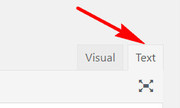
    Thank you for the screenshots, when I check the source code of some of your text areas, there are line brakes that are causing the undesired brakes in the sentences, please try viewing these text blocks in the editor with the “text” tab and remove them.
    text-tab
    Please see the screenshots 1, 2 & 3 in Private Content area.
    For your paragraph font, it seems to be “esteban” for desktop and mobile because of this rule in your theme settings:

    body#top{font-size:20px;font-weight:normal;font-family: 'esteban', 'HelveticaNeue', 'Helvetica Neue', 'Helvetica-Neue', Helvetica, Arial, sans-serif;}

    and your headings are “montserrat”
    Please try going to Enfold Theme Options > Advanced Styling and choose the body element and choose the “montserrat” font.
    Or if you prefer, Please try this code in the General Styling > Quick CSS field or in the WordPress > Customize > Additional CSS field:

    #top #main .avia_textblock p {
    font-family: "Montserrat" !important; 
    }

    As for the burger menu font, it shows as “montserrat” for me, but assuming that it is different on your iPhone, Please try this code in the General Styling > Quick CSS field or in the WordPress > Customize > Additional CSS field:

    #top .av-burger-overlay-inner li a span.avia-menu-text {
    font-family: "Montserrat" !important; 
    }

    Best regards,
    Mike

    #1065746

    Hey Anj27,

    Add this to quick css:

    .home h1{
    font-size:30px!important;
    }

    Change the size to whatever you want.

    Best regards,
    Jordan Shannon

    #1065745
    Anj27
    Participant

    Hello,
    at the top of my homepage it is written: Angela Petrella copywriter appassionata di SEO e web marketing, I have added h1 and h2 tag. So now it is like this:

    <h1>ANGELA PETRELLA</h1>
    <h2>
    copywriter appassionata </br> di SEO e web marketing </h2>

    It is a caption of a slide element.
    I would like to know how it is possible to change the font size of H1 only of this page, but not the other ones.

    Thank you

    #1065646
    chris
    Participant

    Hello lovely Enfold Team,
    i have a strange Problem:
    Sometimes the second line of toolbars won´t show when i´m in my textblock editor. There is no second toolline and the “toggle toolbar” is also missing. I can´t narrow it down since i have the problem on both languages and can´t see a pattern why its sometimes showing and why not. : /

    Problem

    I did add some code in my functions.php file which i removed days ago because i thought maybe thats the reason, but nothing changed. Sometimes its showing, sometimes not.
    Right now its still commented out.

    //font and fontsize picker @ editor
    if ( ! function_exists( 'wdm_add_mce_fontoptions' ) ) {
               function wdm_add_mce_fontoptions( $buttons ) {
                     array_unshift( $buttons, 'fontselect' );
                     array_unshift( $buttons, 'fontsizeselect' );
                     return $buttons;
               }
    }
    add_filter( 'mce_buttons_3', 'wdm_add_mce_fontoptions' );
    
    //Custom fonts showing in editor
    function load_custom_fonts($init) {
    
        $stylesheet_url = '/wp-content/themes/enfold-child/fonts/custom-fonts.css';
    
        if(empty($init['content_css'])) {
            $init['content_css'] = $stylesheet_url;
        } else {
            $init['content_css'] = $init['content_css'].','.$stylesheet_url;
        }
    		$font_formats = isset($init['font_formats']) ? $init['font_formats'] : 'Trebuchet MS=trebuchet ms';
    
    		$custom_fonts = ';'.'WorstveldSling=WorstveldSling';
    
    		$init['font_formats'] = $font_formats . $custom_fonts;
    
        return $init;
    }
    add_filter('tiny_mce_before_init', 'load_custom_fonts');
    
    function load_custom_fonts_frontend() {
    
        echo '<link type="text/css" rel="stylesheet" href="/wp-content/themes/enfold-child/fonts/custom-fonts.css">';
    }
    add_action('wp_head', 'load_custom_fonts_frontend');
    add_action('admin_head', 'load_custom_fonts_frontend');

    The only thing left in my functions.php file – regarding to my Problem – is this:

    /* Adds Worstveld Sling @ the enfold theme */
    add_filter( 'avf_google_heading_font',  'avia_add_heading_font');
    function avia_add_heading_font($fonts)
    {
    $fonts['Worstveld Sling'] = 'Worstveld Sling';
    return $fonts;
    }
    
    add_filter( 'avf_google_content_font',  'avia_add_content_font');
    function avia_add_content_font($fonts)
    {
    $fonts['Worstveld Sling'] = 'Worstveld Sling';
    return $fonts;
    }

    Maybe you have a clue for me or can point me in the right direction? :)

    Best regards,
    chris

    • This topic was modified 7 years, 1 month ago by chris.
    #1065575

    Hey the88project,

    You are using id=”latestnews” in the html and in the anchor you use #LatestNews, they have to be the same.

    If you need to have all the post data out of the box, you need to use The Classic editor.

    Here is the code you can put in Enfold > General Styling > Quick Css,  if it does not work, put into themes/enfold/css/custom.css

    
    @media only screen and (min-width:768px) and (max-width: 1200px) {
        .av-masonry-entry .av-inner-masonry-content {
            padding: 10px;
        }
        #top  #wrap_all .av-masonry-entry .av-masonry-entry-title {
            font-size: 20px;
        }
    } 
    

    If you need further assistance please let us know.

    Best regards,
    Victoria

    #1065251

    Hey Ken,

    Try adding this css code in Quick CSS (located in Enfold > General Styling):

    @media only screen and (max-width:767px) {
      #top .avia_ajax_form label {
        font-size: 12px !important;
      }
    }

    Just adjust the 12px value.
    Hope it helps.

    Best regards,
    Nikko

    #1065200

    In reply to: Font and font size

    Hello Nikko,
    Thank you for detailed instructions – for some reason, it just does not do the work. What am I missing out?
    When I change the font size to eg 22. nothing changes.
    Pls see enclosed link (could not find out how to enclose screen dump – guess it can only be links)

    And I also, in the footer, would like to “pull up” the SoMe icons from the socket to the footer.
    They are now placed at the right hand corner of the front page in the socket, but I would like them to appear in the footer next to the text links in the footer eg Contact…etc.

    All the best and again thank you…Audrey2019

    #1065196

    Hi,
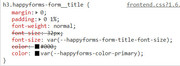
    Sorry for the late reply, I took a look at your form and the main issue the I see is specificity, for example, while the happy forms is adding color the label titles it doesn’t include the “span” which the theme is assigning color to.
    But in other cases the happy form is assigning the color to the form title at the top of the page:
    2019-02-10-130756
    I tried changing the order that the css loads, but because of specificity it didn’t help, I also tried removing the base.css for the one page, but that broke the header and footer.
    So for the solution, I copied the happy forms customized css for the one page and added specificity to it and added it to the page in a code block element.

    <style>
    #top #main #happyforms-form-449 {
    happyforms-form-width: 100 !important; 
    happyforms-form-title-font-size: 32px !important; 
    happyforms-part-title-font-size: 22px !important; 
    happyforms-part-description-font-size: 18px !important; 
    happyforms-part-value-font-size: 18px !important; 
    happyforms-submit-button-font-size: 18px !important; 
    happyforms-color-primary: #000000 !important; 
    happyforms-color-success: #39b54a !important; 
    happyforms-color-error: #ff7550 !important; 
    happyforms-color-part-title: #000000 !important; 
    happyforms-color-part-value: #000000 !important; 
    happyforms-color-part-placeholder: #888888 !important; 
    happyforms-color-part-border: #dbdbdb !important; 
    happyforms-color-part-border-focus: #407fff !important; 
    happyforms-color-part-background: #ffffff !important; 
    happyforms-color-part-background-focus: #ffffff !important; 
    happyforms-color-submit-background: #a81010 !important; 
    happyforms-color-submit-background-hover: #3567cc !important; 
    happyforms-color-submit-border: transparent !important; 
    happyforms-color-submit-text: #ffffff !important; 
    happyforms-color-submit-text-hover: #ffffff !important; 
    happyforms-color-rating: #cccccc !important; 
    happyforms-color-rating-hover: #f39c00 !important; 
    happyforms-color-rating-bg: #efefef !important; 
    happyforms-color-rating-bg-hover: #407fff !important; 
    happyforms-color-table-row-odd: #fcfcfc !important; 
    happyforms-color-table-row-even: #efefef !important; 
    happyforms-color-table-row-odd-text: #000000 !important; 
    happyforms-color-table-row-even-text: #000000 !important; 
    happyforms-color-choice-checkmark-bg: #ffffff !important; 
    happyforms-color-choice-checkmark-bg-focus: #000000 !important; 
    happyforms-color-choice-checkmark-color: #ffffff !important; 
    happyforms-color-dropdown-item-bg: #ffffff !important; 
    happyforms-color-dropdown-item-text: #000000 !important; 
    happyforms-color-dropdown-item-bg-hover: #dbdbdb !important; 
    happyforms-color-dropdown-item-text-hover: #000000 !important; 
    }
    </style>

    From what I can see it is working correctly, the field click is getting the blue border, the titles are black, ect.
    Please clear your browser cache and check, and let us know if something is missing so we can assist.

    Best regards,
    Mike

    #1065195
    KenMarshall
    Participant

    Hi,

    Is there a way to reduce the size of the font of the text in the contact form labels (the text that says Name: Email Address: etc.) on the mobile.

    Here’s the page to view via mobile so you can see the issue I have: View the contact form on a mobile

    Would be good to get the font to reduce in a size a bit.

    Thanks,
    Regards, Ken

    #1065130

    Hi tammiviestinta,

    Here is the code you can put in Enfold > General Styling > Quick Css,  if it does not work, put into themes/enfold/css/custom.css

    
    @media only screen and (max-width: 767px) {
      .responsive #top .slideshow_caption h2 {
          font-size: 30px !important;
      }
    }
    

    If you need further assistance please let us know.

    Best regards,
    Victoria

    #1065127

    Hey dorikoren,

    Here is the code you can put in Enfold > General Styling > Quick Css,  if it does not work, put into themes/enfold/css/custom.css

    
    .single-product .product_meta {
      display: none;
    }
    .single-product div.product .product_title {
      font-size: 28px;
    }
    

    If you need further assistance please let us know.

    Best regards,
    Victoria

    #1065087

    In reply to: Logo position problem

    i would do it with this code in telephone extra input field:

    <a href="https://link-to-map"><span class="map">XXX</span></a><a href="https://link-to-contact"><span class="contact">YYY</span></a><a href="tel:+492289768293"><span class="tel">ZZZ</span></a>

    And this would be my quick css entry for it:

    .phone-info {
        float: left !important;
        position: relative;
        left: 50%;
        transform: translateX(-50%);
    }
    
    .responsive #header_meta .phone-info span {
        color: #aaa;
        margin-left: 15px;
    }
    
    .phone-info span::before {
        font-family: entypo-fontello;
        font-size: 24px;
        padding-right: 5px;
        position: relative;
        top: 4px;
    }
    .map::before { content: "\e842"}
    .contact::before { content: "\e805"}
    .tel::before { content: "\e854"}

    you need to adjust that to your needs.
    F.e. if you like to colorize the icons:
    replace the part above with:

    .map::before { content: "\e842"; color: #900}
    .contact::before { content: "\e805"; color: #090}
    .tel::before { content: "\e854"; color: #009}

    see here example: https://webers-testseite.de/

    • This reply was modified 7 years, 1 month ago by Guenni007.
    #1065075

    Hi Thomas,

    I got in now using a VPN again, my regular IP just leads to a 404 page so I’m guessing you have IP or country blocking active on the page. I had a look at the page you referenced and I’m guessing you are talking about this content:

    <p>[av_one_full first min_height='' vertical_alignment='' space='' custom_margin='' margin='0px' padding='0px' border='' border_color='' radius='0px' background_color='' src='' background_position='top left' background_repeat='no-repeat' animation='']<br />[av_heading heading='Familientörn Abenteuer segeln - Ihr Ausflug am Neusiedlersee wird zum ganz besonderen Erlebnis' tag='h2' style='' size='' subheading_active='' subheading_size='15' padding='10' color='' custom_font='' admin_preview_bg=''][/av_heading]<br />[/av_one_full][av_hr class='default' height='50' shadow='no-shadow' position='center' custom_border='av-border-thin' custom_width='50px' custom_border_color='' custom_margin_top='30px' custom_margin_bottom='30px' icon_select='yes' custom_icon_color='' icon='ue808'][av_one_half first min_height='' vertical_alignment='' space='' custom_margin='' margin='0px' padding='0px' border='' border_color='' radius='0px' background_color='' src='' background_position='top left' background_repeat='no-repeat' animation='']<br />[av_image src='https://www.witzany.org/time4sail/wp-content/uploads/2015/10/iStock_000077610889_Large-red.jpg' attachment='389' attachment_size='full' align='center' styling='' hover='' link='' target='' caption='' font_size='' appearance='' overlay_opacity='0.4' overlay_color='#000000' overlay_text_color='#ffffff' animation='no-animation' admin_preview_bg=''][/av_image][av_image src='https://www.witzany.org/time4sail/wp-content/uploads/2016/01/time4sail-LOGO-TRANSPARENT-WEB.png' attachment='374' attachment_size='full' align='center' styling='' hover='' link='' target='' caption='' font_size='' appearance='' overlay_opacity='0.4' overlay_color='#000000' overlay_text_color='#ffffff' animation='no-animation' admin_preview_bg=''][/av_image]<br />[/av_one_half][av_one_half min_height='' vertical_alignment='' space='' custom_margin='' margin='0px' padding='0px' border='' border_color='' radius='0px' background_color='' src='' background_position='top left' background_repeat='no-repeat' animation='']<br />[av_textblock size='' font_color='' color='' av-medium-font-size='' av-small-font-size='' av-mini-font-size='' admin_preview_bg='']Leinen los - ein Familienausflug der anderen, besonderen Art kann beginnen - Familientörn - Abenteuer segeln am Neusiedlersee!Spaß an Board - schwimmen, segeln, ankern, selbst steuern - einfach TOLL!Wir starten in Heimathafen unserer Segelyacht. Ihr checkt ein - unser Skipper gibt euch die wichtigsten und notwendigen Informationen, die zum Gelingen eines wunderschönen Familienerlebnisses Voraussetzung sind. Sicherheit an Bord wird großgeschrieben, daher erhalten eure Kinder Schwimmwesten.Gemeinsam gestalten wir unseren Tagestörn und gehen dabei auf eure individuellen Bedürfnisse und Wünsche ein:</p>
    <li>Ihr wollt hart am Wind in schräger Lage erleben?</li>
    <li>Ihr wollt lieber chilllen, ankern und baden, fern ab vom überlaufenen Badestrand?</li>
    <li>Ihr wollt selbst ans Steuer - na dann nur zu - unter Anweisung unseres Skippers werden Sie viel Spaß und Freude dabei haben!</li>
    <li>Ihr wollt aktiv mitmachen und verschiedene Segelmanöver miterleben? Aktiv oder passiv?</li>
    <li>Alles ist möglich - Ihr bestimmt mit!</li>
    <p>Spaß und Erlebnis stehen im Vordergrund. Ihr werdet es lieben!Am Ende unseres Törns bringt euch euer Skipper wieder zurück zum Heimathafen unserer Segelyacht, wo Ihr eure Erlebnisse nochmals beplaudern könnt!Am Familien Ausflug können bis zu 8 Personen teilnehmen.<br />[/av_textblock]<br />[/av_one_half][av_one_full first min_height='' vertical_alignment='' space='' custom_margin='' margin='0px' padding='0px' border='' border_color='' radius='0px' background_color='' src='' background_position='top left' background_repeat='no-repeat']<br />[av_textblock size='' font_color='' color='']<br />Die Preise Familienabenteuer Segeln (inklusive Skipper, Soft-Getränke, Snacks):[/av_textblock]<br />[/av_one_full][av_one_fifth first min_height='' vertical_alignment='' space='' custom_margin='' margin='0px' padding='0px' border='' border_color='' radius='0px' background_color='' src='' background_position='top left' background_repeat='no-repeat'][/av_one_fifth][av_three_fifth min_height='' vertical_alignment='' space='' custom_margin='' margin='0px' padding='0px' border='' border_color='' radius='0px' background_color='' src='' background_position='top left' background_repeat='no-repeat']<br />[av_table purpose='pricing' pricing_table_design='avia_pricing_default' pricing_hidden_cells='avia_show_empty_cells' caption='' responsive_styling='avia_responsive_table']<br />[av_row row_style='avia-heading-row'][av_cell col_style='']Anzahl Stunden[/av_cell][av_cell col_style='']Preis in € brutto[/av_cell][/av_row]<br />[/av_table]<br />[/av_three_fifth][av_one_fifth min_height='' vertical_alignment='' space='' custom_margin='' margin='0px' padding='0px' border='' border_color='' radius='0px' background_color='' src='' background_position='top left' background_repeat='no-repeat'][/av_one_fifth][av_one_fifth first min_height='' vertical_alignment='' space='' custom_margin='' margin='0px' padding='0px' border='' border_color='' radius='0px' background_color='' src='' background_position='top left' background_repeat='no-repeat'][/av_one_fifth][av_three_fifth min_height='' vertical_alignment='' space='' custom_margin='' margin='0px' padding='0px' border='' border_color='' radius='0px' background_color='' src='' background_position='top left' background_repeat='no-repeat'][av_table purpose='pricing' pricing_table_design='avia_pricing_default' pricing_hidden_cells='avia_show_empty_cells' caption='' responsive_styling='avia_responsive_table']<br />[av_row row_style='avia-heading-row'][av_cell col_style='']Wochentags[/av_cell][av_cell col_style=''][/av_cell][/av_row]<br />[av_row row_style=''][av_cell col_style='']1/2 Tag *[/av_cell][av_cell col_style='']330,--[/av_cell][/av_row]<br />[av_row row_style=''][av_cell col_style='']1 Tag - 9:00 bis 17:00 Uhr[/av_cell][av_cell col_style='']525,--[/av_cell][/av_row]<br />[av_row row_style=''][av_cell col_style='']wochentags am Feiertag[/av_cell][av_cell col_style='']630,--[/av_cell][/av_row]<br />[av_row row_style='avia-heading-row'][av_cell col_style='']Wochenende[/av_cell][av_cell col_style=''][/av_cell][/av_row]<br />[av_row row_style=''][av_cell col_style='']1 Tag - 9:00 bis 17:00 Uhr[/av_cell][av_cell col_style='']630,--[/av_cell][/av_row]<br />[av_row row_style=''][av_cell col_style='']* 9:00 bis 12:30 oder<br />13:30 bis 17:00 Uhr[/av_cell][av_cell col_style=''][/av_cell][/av_row]<br />[/av_table][/av_three_fifth][av_one_fifth min_height='' vertical_alignment='' space='' custom_margin='' margin='0px' padding='0px' border='' border_color='' radius='0px' background_color='' src='' background_position='top left' background_repeat='no-repeat'][/av_one_fifth][av_one_fifth first min_height='' vertical_alignment='' space='' custom_margin='' margin='0px' padding='0px' border='' border_color='' radius='0px' background_color='' src='' background_position='top left' background_repeat='no-repeat'][/av_one_fifth][av_three_fifth min_height='' vertical_alignment='' space='' custom_margin='' margin='0px' padding='0px' border='' border_color='' radius='0px' background_color='' src='' background_position='top left' background_repeat='no-repeat']<br />[av_table purpose='pricing' pricing_table_design='avia_pricing_default' pricing_hidden_cells='avia_show_empty_cells' caption='' responsive_styling='avia_responsive_table']<br />[av_row row_style='avia-heading-row'][av_cell col_style='']Rabatte[/av_cell][av_cell col_style='']in %[/av_cell][/av_row]<br />[av_row row_style=''][av_cell col_style='']Wiederholte Buchung - Stammkunde[/av_cell][av_cell col_style='']5%[/av_cell][/av_row]<br />[/av_table]<br />[/av_three_fifth][av_one_fifth min_height='' vertical_alignment='' space='' custom_margin='' margin='0px' padding='0px' border='' border_color='' radius='0px' background_color='' src='' background_position='top left' background_repeat='no-repeat'][/av_one_fifth][av_one_fifth first min_height='' vertical_alignment='' space='' custom_margin='' margin='0px' padding='0px' border='' border_color='' radius='0px' background_color='' src='' background_position='top left' background_repeat='no-repeat'][/av_one_fifth][av_three_fifth min_height='' vertical_alignment='' space='' custom_margin='' margin='0px' padding='0px' border='' border_color='' radius='0px' background_color='' src='' background_position='top left' background_repeat='no-repeat']<br />[av_textblock size='' font_color='' color='']<br />Alle Preise inklusive 20% MwSt.<br />[/av_textblock]<br />[/av_three_fifth][av_one_fifth min_height='' vertical_alignment='' space='' custom_margin='' margin='0px' padding='0px' border='' border_color='' radius='0px' background_color='' src='' background_position='top left' background_repeat='no-repeat'][/av_one_fifth][av_one_full first min_height='' vertical_alignment='' space='' custom_margin='' margin='0px' padding='0px' border='' border_color='' radius='0px' background_color='' src='' background_position='top left' background_repeat='no-repeat']<br />[av_textblock size='' font_color='' color='']Buchen:Das Familien-Abenteuer kann beginnen - check gleich die Termine und trage deine Reservierung ein - <a href="http://www.witzany.org/time4sail/reservierung-buchung/" data-mce-href="http://www.witzany.org/time4sail/reservierung-buchung/">Jetzt buchen:</a><br />[/av_textblock]<br />[/av_one_full]</p>

    Did you copy that from somewhere? It looks like a mix or custom html markup and Enfold shortcode. Maybe you could try to recreate that content in several text blocks, one for each paragraph maybe? Also, what happens if you switch to the Classic Editor in the main page of the theme options?

    Best regards,
    Rikard

    #1065037

    Hey algkent,
    I took a look at both sites and the titles are both H1
    2019-02-09-175322
    2019-02-09-175206
    If you would like to increase the size of the font, Please try this code in the General Styling > Quick CSS field or in the WordPress > Customize > Additional CSS field:

    h1.post-title a {
    font-size: 30px !important;
    }

    Best regards,
    Mike

    #1065029

    Topic: Logo position problem

    in forum Enfold
Viewing 30 results - 5,551 through 5,580 (of 18,736 total)