
-
AuthorSearch Results
-
January 6, 2020 at 4:30 pm #1170756
Hi,
Please try adding this code to the Quick CSS section under Enfold > General Styling or to your child theme’s style.css file:
CSS Snippet:
.av-inner-tab-title {
    font-size: 20px;
    font-weight: bold;
}
Best regards,
YigitJanuary 6, 2020 at 4:17 pm #1170746In reply to: Set icon for the label in a form
Hi,
Please use the code as following
p#element_avia_1_1:before {
    content: "\e864";
    font-family: entypo-fontello;
    color: #3ec607;
    font-size: 18px;
    padding-right: 6px;
    position: absolute;
    top: 12px;
    left: 5px;
}
#top .avia_ajax_form .text_input {
    width: 90% !important;
}
Regards,
YigitJanuary 6, 2020 at 1:34 pm #1170683Hi,
Thank you for the admin login, so the reason the code crashed your site is because your sub-menu shortcode contains HTML in the menu text field which uses double quotes"so when it’s added to the PHP code above the quotes must be escaped with a backslash.
So I added this code to your functions.php:add_action('ava_after_main_title', 'ava_after_main_title_mod'); function ava_after_main_title_mod() { if(is_page()) { echo do_shortcode("[av_submenu which_menu='custom' menu='16' position='center' color='main_color' sticky='aviaTBsticky' mobile='disabled' av_uid='av-k2hq150d' custom_class='yuppie'] [av_submenu_item title='<span class=\"av-icon-char\" style=\"font-size:32px;line-height:18px;padding-right: 10px;\" aria-hidden=\"true\" data-av_icon=\"\" data-av_iconfont=\"entypo-fontello\"></span><br>Събития' link='manually,https://www.yuppie.cherry-adv.net/events/' linktarget='_blank' button_style='av-menu-button av-menu-button-colored' av_uid='av-owwd3'] [av_submenu_item title='<span class=\"av-icon-char\" style=\"font-size:32px;line-height:18px;padding-right: 10px;\" aria-hidden=\"true\" data-av_icon=\"\" data-av_iconfont=\"entypo-fontello\"></span><br>ДемоУрок' link='page,638' linktarget='_blank' button_style='av-menu-button av-menu-button-colored' av_uid='av-ne7zz'] [av_submenu_item title='<span class=\"av-icon-char\" style=\"font-size:32px;line-height:18px;padding-right: 10px;\" aria-hidden=\"true\" data-av_icon=\"\" data-av_iconfont=\"entypo-fontello\"></span><br>Блог' link='page,747' linktarget='_blank' button_style='av-menu-button av-menu-button-colored' av_uid='av-fnlwn'] [av_submenu_item title='<span class=\"av-icon-char\" style=\"font-size:32px;line-height:18px;padding-right: 10px;\" aria-hidden=\"true\" data-av_icon=\"\" data-av_iconfont=\"entypo-fontello\"></span><br>Like us' link='page,601' linktarget='_blank' button_style='av-menu-button av-menu-button-colored' av_uid='av-6phgf'] [/av_submenu]"); } }I added a custom class “yuppie” to the sub-menu to better apply the css across all of your pages and then added this css to your Quick CSS:
.yuppie.av-sticky-submenu .av-subnav-menu a,.yuppie.av-sticky-submenu,.yuppie.av-sticky-submenu .av-menu-button-colored > a .avia-menu-text {
	background-color: #ee3f6a;
    color: #ffffff;
    border-color: #ee3f6a !important;
    padding: 0px !important;
}
.yuppie.av-sticky-submenu .av-subnav-menu > li.menu-item {
    width: 24.30%;
    text-align: center;
}
So now pages such as /the-little-gym/ which don’t have the sub-menu element in the backend now show the sub-menu on the frontend on mobile. But pages that do have the old sub-menu element on the backend such as /detski-centar-yuppie/ now show the old sub-menu on top of the new sub-menu, so please remove these.
Please clear your browser cache and check.Best regards,
MikeJanuary 6, 2020 at 10:33 am #1170646Hello Victoria,
Thanks for replying.
Enclosed you will find the link to the relevant page. I would like to slighly increase the font size of the tab titles (inhoud, voor wie, resultaat) and make it bold.Thanks!
Egbert
January 5, 2020 at 10:23 pm #1170575OK
I did it@media only screen and (min-width:1024px){
#top #wrap_all #socket .social_bookmarks {
float: none;
margin: 0;
text-align: center;
}
#top #wrap_all #socket .social_bookmarks li {
float: none;
display: inline-block;
}
#socket .social_bookmarks li a {
width: 50px!important;
line-height: 50px!important;
min-height: 50px!important;
font-size: 20px;
}
#socket .social_bookmarks li {
height: 50px!important;
width: 50px!important;
}
#socket .social_bookmarks {
height: 60px!important;
}
#socket span.copyright {
font-size: 15px !important;
text-align: center;
width: 100%;
}
.html_bottom_nav_header.html_cart_at_menu #top .av-logo-container .social_bookmarks {
left: auto;
right: 0;
}
.html_cart_at_menu.html_bottom_nav_header #menu-item-shop {
float: none;
right: 0;
}
#menu-item-shop .dropdown_widget {
right: auto !important;
top: 91px;
left: 0 !important;
}
}-
This reply was modified 6 years, 2 months ago by
Yossi Yerushalmi.
January 5, 2020 at 4:03 pm #1170454In reply to: Set icon for the label in a form
Hi,
To add your page ID to the css you would add it to the beginning of the rule like this:
.page-id-206 label[for="avia_1_1"]:before {
but if you are not using the labels and want the icon before the fields we will use this css instead:p#element_avia_1_1:before { content: "\e864"; font-family: entypo-fontello; color: #3ec607; font-size: 18px; padding-right: 6px; } #top .avia_ajax_form .text_input { width: 90% !important; }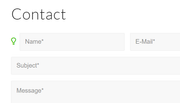
but you will still need to find the ID of each field to target.
If you need further help with this please link to the form on your site so we can be of more assistance.Best regards,
MikeJanuary 4, 2020 at 11:31 pm #1170377Hi,
I have the same problem. I have created a custom sub menu, which I want to appear only on mobile. But now i set it up on only one page. I want to set it up to every page.
I tried the given code, but it broke my website.The shortcodes that appear in the admin in the debug mode after I set the menu are:
[av_submenu which_menu='custom' menu='16' position='center' color='main_color' sticky='aviaTBsticky' mobile='disabled' av_uid='av-k2hq150d']
[av_submenu_item title='<span class="av-icon-char" style="font-size:32px;line-height:18px;" aria-hidden="true" data-av_icon="" data-av_iconfont="entypo-fontello"></span><br>Събития' link='manually,https://www.yuppie.cherry-adv.net/events/' linktarget='_blank' button_style='av-menu-button av-menu-button-colored' av_uid='av-owwd3']
[av_submenu_item title='<span class="av-icon-char" style="font-size:32px;line-height:18px;" aria-hidden="true" data-av_icon="" data-av_iconfont="entypo-fontello"></span><br>ДемоУрок' link='page,638' linktarget='_blank' button_style='av-menu-button av-menu-button-colored' av_uid='av-ne7zz']
[av_submenu_item title='<span class="av-icon-char" style="font-size:32px;line-height:18px;" aria-hidden="true" data-av_icon="" data-av_iconfont="entypo-fontello"></span><br>Блог' link='page,747' linktarget='_blank' button_style='av-menu-button av-menu-button-colored' av_uid='av-fnlwn']
[av_submenu_item title='<span class="av-icon-char" style="font-size:32px;line-height:18px;" aria-hidden="true" data-av_icon="" data-av_iconfont="entypo-fontello"></span><br>Like us' link='page,601' linktarget='_blank' button_style='av-menu-button av-menu-button-colored' av_uid='av-6phgf']
[/av_submenu]Thanks!
January 4, 2020 at 11:18 pm #1170375In reply to: remove h3 heading from cookie display message
Hey megamazl,
Try adding this code to the end of your functions.php file in Appearance > Editor:function custom_consent_tag_script(){ ?> <script> (function($) { $(document).ready(function(){ function replaceElementTag(targetSelector, newTagString) { $(targetSelector).each(function(){ var newElem = $(newTagString, {html: $(this).html()}); $.each(this.attributes, function() { newElem.attr(this.name, this.value); }); $(this).replaceWith(newElem); }); } replaceElementTag('#av-consent-extra-info h3.av-special-heading-tag', '<span></span>'); }); }(jQuery)); </script> <?php } add_action('wp_footer', 'custom_consent_tag_script');and add this code in the General Styling > Quick CSS field:
#av-consent-extra-info span.av-special-heading-tag {
	font-size: 20px;
	font-weight: 300;
}
Then clear your browser cache and any cache plugin, and check.
Best regards,
MikeJanuary 4, 2020 at 10:49 pm #1170372In reply to: Cookie modal – av_privacy_cookie_info does not work
Omg – this so weird ..
In Chrome:
“No cookies from this domain”In Firefox:
PHPSESSID ( 82a66b5dff86f78334d87a8ca712dc65 ) – Trackt deinen Seitenbesuch
aviaPrivacyEssentialCookiesEnabled ( true ) – Erlaube das Speichern von notwendigen Cookies, anderen Cookies und die Verwendung von Erweiterungen, wenn diese nicht abgelehnt wurden (Opt-Out)aviaPrivacyGoogleMapsDisabled ( true ) – Google Maps nicht zulassenaviaPrivacyGoogleReCaptchaDisabled ( true ) – Google reCaptcha nicht zulassenaviaPrivacyGoogleWebfontsDisabled ( true ) – Google Webfonts nicht zulassenaviaPrivacyMustOptInSetting ( true ) – Einstellungen sind für Nutzer, die Cookies und Erweiterungen zustimmen müssen (Opt-In)aviaPrivacyRefuseCookiesHideBar ( true ) – Bei weiteren Seitenaufrufen die Cookie-Bar ausblenden und Cookies verweigern, die nicht erlaubt wurden – aviaPrivacyEssentialCookiesEnabled muss gesetzt seinaviaPrivacyVideoEmbedsDisabled ( true ) – Video-Einbettungen nicht zulassenwordpress_test_cookie ( WP+Cookie+check ) – Unbekannte Verwendungwp-settings-11 ( editor%3Dhtml%26m10%3Do%26m7%3Do%26ngg_show_update_notice196%3D1%26hidetb%3D1%26ed_size%3D543%26wplink%3D1%26posts_list_mode%3Dlist%26libraryContent%3Dbrowse%26align%3Dleft%26imgsize%3Dthumbnail ) – Unbekannte Verwendungwp-settings-time-11 ( 1578159579 ) – Unbekannte VerwendungaviaCookieConsent ( 7ff4260bf2a119ba1df3579f1c898b80||v1.0 ) – Die Benutzung und Speicherung von Cookies wurde akzeptiert. Bei anderen Cookies wurden Einschränkungen festgelegtThis is so weird because of many things:
1: “Unbekannte Verwendung” is not allowed. Website owners are obliged to give a clear information what the cookie does
2: The translation is totaly absurd. This for example suggests that there is an option to disable/enable – but it does not: Google Maps nicht zulassenSo the shortcode does NOT ALL ALL what it is supposed to.
Its supposed to just show a list with information and not to confuse or mislead a userMeanwhile i removed the shortcode because leaving it there – messy like it is – brings me in severe danger to catch a lawsuit
Danny
January 4, 2020 at 8:28 pm #1170342In reply to: Set icon for the label in a form
Hey Alexander,
You can do this with css in your Quick CSS like this:label[for="avia_1_1"]:before { content: "\e864"; font-family: entypo-fontello; color: #3ec607; font-size: 18px; padding-right: 6px; }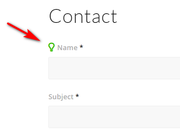
the only trick is that you will have to examine the form html to determine the code for each label, and you should preced the css with the page ID so the icon doesn’t show on every contact form on your site.If you need further help with this please link to the form on your site so we can be of more assistance.
Best regards,
MikeJanuary 4, 2020 at 7:11 pm #1170317Hi m s ,
You can try using span elements or p elements and the font sizes for the text block should work.
Best regards,
Victoria-
This reply was modified 6 years, 2 months ago by
Victoria.
January 3, 2020 at 8:13 pm #1170115In reply to: Widget Area in Top Bar
Thank you! I switched to this plugin instead so that I could use the shortcode in the extra elements and it worked perfectly. Thanks for your help!
January 3, 2020 at 4:50 pm #1170007In reply to: Mega menu layout
1 – Great thank you !
2 – so that I make no mistakes how do I update the enfold theme ?
3 – Did you see the font size of te categorie menu on the right colom (see here) is also to smal, where can i change here the font size?January 3, 2020 at 4:29 pm #1169992In reply to: Mega menu layout
Hi again
i managed to put back the fontsize of the menu Thanks !I see that the font size of te categorie menu on the right colom (see here) is also to smal, where can i change here the font size?
January 3, 2020 at 4:18 pm #1169665In reply to: Mega menu layout
Hey,
1 – is working , thank you
2 – is not working even now that a change the font size the space is the menu is bigger ?By the way i did something wrong and now my font-size of the menu is smaller? Where do i change this back ?
January 3, 2020 at 4:07 pm #1169359In reply to: Mega menu layout
Hey,
1- You can go to Enfold theme options > Advanced Styling and edit “Main Menu sublevel Links” to increase font size of sub menu items.
2- Please try adding following code to Quick CSS in Enfold theme options > General Styling#header .nine.units { width: 590px; }Best regards,
YigitJanuary 3, 2020 at 3:51 pm #1169353In reply to: Picture behind Mainmenue
sure
first of all i wrote two headlines, create an button below and chosse a link to another page from webcontent.
then i create with my quick css a color for the button ( Customer CI orange )
finally i give the caption an the subline more space ( width: 65% )
font-size : 38px
———-
and refresh the site:
Uhhhhhhhhhhhhhhhhhh, than i saw:
lost my slider with content and headline etcbest HUHU7777
January 3, 2020 at 3:44 pm #1169351In reply to: Font Size in Secondary Menu
Hi,
Please try using the code as following
.sub_menu li a {
    font-size: 14px!important;
}
Best regards,
YigitJanuary 3, 2020 at 3:28 pm #1169346In reply to: Font Size in Secondary Menu
Thank you – that size seems to only adjust the menu bar but not the actual font.
January 3, 2020 at 3:13 pm #1169340In reply to: Font Size in Secondary Menu
Shalom!
Please add following code to Quick CSS field in Enfold theme options > General Styling tab and adjust as needed
.sub_menu li {
    font-size: 16px;
}
Cheers!
YigitJanuary 3, 2020 at 3:09 pm #1169339In reply to: Font Size in Secondary Menu
Thank you. However, that is not the font size I am trying to change. I am trying to change the one above that which says:
Contact Us Calendar Member Login Give back
January 3, 2020 at 1:51 pm #1169297In reply to: Image caption text gets misaligned with long words
Hi,
Thanks for contacting us!
That seems to be related to padding and quite honestly expected when font size is big for mobile. Possible solutions would be decreasing font size or decreasing padding on mobile.
Please add following code to Quick CSS in Enfold theme options under General Styling tab
@media only screen and (max-width: 480px) {
.av-image-caption-overlay-center {
    font-size: 24px!important;
}}
If that does not help, please post a link of your page :)
Cheers!
YigitJanuary 3, 2020 at 1:38 pm #1169292Yossi Yerushalmi
ParticipantI can’t sort the icons at the top of the site
I have a code for desktop mode and I don’t know how to set the order of icons for mobileThe order of icons for desktop is good I don’t want to change it
This is the code I currently have
#top #wrap_all #socket .social_bookmarks {
float: none;
margin: 0;
text-align: center;
}
#top #wrap_all #socket .social_bookmarks li {
float: none;
display: inline-block;
}
#socket .social_bookmarks li a {
width: 50px!important;
line-height: 50px!important;
min-height: 50px!important;
font-size: 20px;
}
#socket .social_bookmarks li {
height: 50px!important;
width: 50px!important;
}
#socket .social_bookmarks {
height: 60px!important;
}
#socket span.copyright {
font-size: 15px !important;
text-align: center;
width: 100%;
}
.html_bottom_nav_header.html_cart_at_menu #top .av-logo-container .social_bookmarks {
left: auto;
right: 0;
}
.html_cart_at_menu.html_bottom_nav_header #menu-item-shop {
float: none;
right: 0;
}
#menu-item-shop .dropdown_widget {
right: auto !important;
top: 91px;
left: 0 !important;
}Thank you
YossiJanuary 3, 2020 at 8:39 am #1169253In reply to: Font Size in Secondary Menu
Hey solomita,
Thank you for contacting us.
You can edit the font size for the submenu items from
Enfold options > Advanced styling > Main menu sublevel links > Font SizeYou may not see the changes until the cached files are cleared in your browser.
Please perform the below steps to clear the browser cache:
1. Disable “merging and compression” for CSS and JS files from Enfold > Performance.
2. If a caching plugin is installed check the plugin settings and clear the cache and deactivate the plugins for testing purpose.
3. Hard refresh by pressing Ctrl + Shift + F5 on your browser or press the F12 key to open chrome dev tools and right click on the refresh button and select “Empty Cache and Hard Reload”.

Let us know if you have any questions.
Best regards,
VinayJanuary 2, 2020 at 11:53 pm #1169211Topic: Font Size in Secondary Menu
in forum Enfoldsolomita
ParticipantHello,
I would like to change the font size in the secondary menu. It is much smaller and several members are having trouble seeing it (see the orange circle in link); Also please note the red rectangle had some font hovering over the menu items.
-
This topic was modified 6 years, 2 months ago by
solomita.
January 2, 2020 at 10:36 pm #1169207Topic: Widget Area in Top Bar
in forum EnfoldMJM
ParticipantHello,
I am using the InoPlugs Font Resizer Widget and followed your documentation to add a widget area to the header. I was wondering if there is a way to move it to the top bar instead of the header. If not, it is possible to move it to the right of the menu after the search icon? Right now, it overlaps the logo and is difficult to click on. Let me know if you can help, thanks!
January 2, 2020 at 5:59 pm #1169181In reply to: Kopfzeile Infotext Formatierung
Hi, that’s what I thought. But it doesn’t seem to work well. Especially spacing and positioning if icons react funny. I need some extra space between phone no. and opening hours.
See: wordpress.pauly-umzuege.deThe code I’m using right where the phone info ist entered is: [av_font_icon icon='ue854' font='entypo-fontello' style='' caption='' link='' linktarget='' size='15px' position='left' color='' custom_class='' admin_preview_bg='' av_uid='av-6f14vz'][/av_font_icon] 06172–92370 [av_font_icon icon='ue862' font='entypo-fontello' style='' caption='' link='' linktarget='' size='15px' position='left' color='' custom_class='' admin_preview_bg='' av_uid='av-6f14vz'][/av_font_icon] Mo-Fr:09:30–16:30
Thx Jo
December 23, 2019 at 1:58 pm #1168733Topic: Change font size and – weight of tab titles in tab section
in forum Enfoldehoogstad
ParticipantHi,
I would like to change the font size and font weight of the tab titles in the tab section.I have seen some css codes in past support questions, but when placing these in the general styling quick css box. it doesn’t change anything.
Any ideas?
Thanks!-
This topic was modified 6 years, 3 months ago by
ehoogstad.
December 23, 2019 at 1:50 pm #1168729In reply to: Change Size of Tab Fonts
Just wondering… has this been solved?
I am also looking to increase the font size of the tab titles in the tab section and to make these titles bold.
Any ideas?
Thanks!December 22, 2019 at 7:36 pm #1168605In reply to: Text size 10px in color-section (socket)
Hey Jak73,
Add this to quick css:
.socket-h2 h2 span{
font-size:10px!important;
}
I tested and it should work.
Best regards,
Jordan Shannon -
This reply was modified 6 years, 2 months ago by
-
AuthorSearch Results
-
Search Results
-
I can’t sort the icons at the top of the site
I have a code for desktop mode and I don’t know how to set the order of icons for mobileThe order of icons for desktop is good I don’t want to change it
This is the code I currently have
#top #wrap_all #socket .social_bookmarks {
float: none;
margin: 0;
text-align: center;
}
#top #wrap_all #socket .social_bookmarks li {
float: none;
display: inline-block;
}
#socket .social_bookmarks li a {
width: 50px!important;
line-height: 50px!important;
min-height: 50px!important;
font-size: 20px;
}
#socket .social_bookmarks li {
height: 50px!important;
width: 50px!important;
}
#socket .social_bookmarks {
height: 60px!important;
}
#socket span.copyright {
font-size: 15px !important;
text-align: center;
width: 100%;
}
.html_bottom_nav_header.html_cart_at_menu #top .av-logo-container .social_bookmarks {
left: auto;
right: 0;
}
.html_cart_at_menu.html_bottom_nav_header #menu-item-shop {
float: none;
right: 0;
}
#menu-item-shop .dropdown_widget {
right: auto !important;
top: 91px;
left: 0 !important;
}Thank you
YossiTopic: Font Size in Secondary Menu
Topic: Widget Area in Top Bar
Hello,
I am using the InoPlugs Font Resizer Widget and followed your documentation to add a widget area to the header. I was wondering if there is a way to move it to the top bar instead of the header. If not, it is possible to move it to the right of the menu after the search icon? Right now, it overlaps the logo and is difficult to click on. Let me know if you can help, thanks!
Hi,
I would like to change the font size and font weight of the tab titles in the tab section.I have seen some css codes in past support questions, but when placing these in the general styling quick css box. it doesn’t change anything.
Any ideas?
Thanks!


