Viewing 30 results - 361 through 390 (of 18,701 total)
  • Author
    Search Results
  • #1473269

    In reply to: add custom icon

    Hi,
    For the css, each icon has a different code number, for your shield with the check mark it is \e802

    div[data-av_icon="\e802"] {
    	content: " ";
    	background-image: url(/wp-content/uploads/2024/12/Goering_Icon1_eCheck_farbig_RGB.png) !important;
    	background-size: contain;
    	background-repeat: no-repeat;
           font-size: 0 !important
    }

    I adjusted your css and now it works.
    Enfold Support 6559
    Please review the thread on how to find the icon code:
    Enfold Support 6561

    Best regards,
    Mike

    #1473241

    In reply to: add custom icon

    This reply has been marked as private.

    maybe this is then the way it works:

    ok – try now – change to your needs and transition timings:

    /*** ===============================***/
    /* Basisstil für alle Weiter Lesen "buttons" */
    .more-link {
      display: inline-flex !important; /* Flexbox für zentrierten Inhalt */
      flex-flow: row nowrap;
      justify-content: center; /* Horizontale Zentrierung */
      align-items: center; /* Vertikale Zentrierung */
      font-weight: 800; /* Fettschrift */
      text-align: center !important;
      white-space: nowrap;
      vertical-align: middle;
      user-select: none;
      border: 2px solid #ff3366 !important; /* Rahmenfarbe */
      padding: 0.95rem 2.5rem 0.95rem 2rem !important; /* Innenabstand */
      font-size: 1rem; /* Schriftgröße */
      line-height: 1rem; /* Zeilenhöhe */
      border-radius: 100px !important; /* Abgerundete Ecken */
      color: #ffffff !important; /* Schriftfarbe Weiß */
      font-family: 'Montserrat', sans-serif; /* Schriftart */
      letter-spacing: 0.25px; /* Buchstabenabstand */
      text-transform: uppercase; /* Großbuchstaben */
      background-color: #ff3366; /* Hintergrundfarbe */
      position: relative; /* Für die Animation */
      overflow: hidden; /* Inhalt begrenzen */
      transition: all 300ms ease-in-out; /* Sanfter Übergang */
      width: auto !important;
    }
    
    /* Stil für den Text und die Pfeile */
    .more-link span {
      display:  inline-flex; /* Flexbox für Text und Pfeile */
      flex: 0 1 auto;
      transition: all 700ms ease-in-out; /* Sanfte Bewegung */
      padding: 0px;
    }
    
    .more-link:hover span {
      padding: 0 3px;
    }
    
    /* Stil für die Pfeile */
    .more-link .more-link-arrow::after {
      content: ">>"; /* Pfeile */
      font-family : inherit;
      opacity: 0; /* Unsichtbar im Standardzustand */
      visibility: hidden;
      position: absolute;
      top: 14px;
      right: 0.5ch;
      color: #ffffff; /* Pfeile in Weiß */
      font-size: inherit;
      font-weight: 800;
      line-height: inherit;
      transition: all 700ms ease-in-out;
    }
    
    /* Hover-Effekt für die Pfeile */
    .more-link:hover .more-link-arrow::after {
      visibility: visible;
      opacity: 1; /* Pfeile werden sichtbar */
     
    }
    
    .more-link:hover .read-more-text {
      transform: translateX(-1ch); /* Text verschiebt sich leicht nach links */
    }
    
    Jak73
    Participant

    Hi,

    i added a animated style to a button, which works well:

    /* Basisstil für alle Buttons */
    .avia-button, .avia-button.avia-size-small, .avia-button.avia-size-large {
        display: inline-flex; /* Flexbox für zentrierten Inhalt */
        justify-content: center; /* Horizontale Zentrierung */
        align-items: center; /* Vertikale Zentrierung */
        font-weight: 800; /* Fettschrift */
        text-align: center;
        white-space: nowrap;
        vertical-align: middle;
        user-select: none;
        border: 2px solid #ff3366; /* Rahmenfarbe */
        padding: 0.95rem 2.5rem; /* Innenabstand */
        font-size: 1rem; /* Schriftgröße */
        line-height: 1; /* Zeilenhöhe */
        border-radius: 100px; /* Abgerundete Ecken */
        color: #ffffff !important; /* Schriftfarbe Weiß */
        font-family: 'Montserrat', sans-serif; /* Schriftart */
        letter-spacing: 0.25px; /* Buchstabenabstand */
        text-transform: uppercase; /* Großbuchstaben */
        background-color: #ff3366; /* Hintergrundfarbe */
        position: relative; /* Für die Animation */
        overflow: hidden; /* Inhalt begrenzen */
        transition: all 300ms ease-in-out; /* Sanfter Übergang */
    }
    
    /* Stil für den Text und die Pfeile */
    .avia-button span {
        display: inline-flex; /* Flexbox für Text und Pfeile */
        align-items: center; /* Vertikale Zentrierung */
        transition: transform 300ms ease-in-out; /* Sanfte Bewegung */
    }
    
    /* Stil für die Pfeile */
    .avia-button span::after {
        content: ">>"; /* Pfeile */
        opacity: 0; /* Unsichtbar im Standardzustand */
        position: absolute;
        color: #ffffff; /* Pfeile in Weiß */
        font-size: 1rem;
        font-weight: 800;
        left: 100%; /* Start direkt rechts neben dem Text */
        margin-left: 1ch; /* Zwei Leerzeichen Abstand */
        transition: opacity 300ms ease-in-out, transform 300ms ease-in-out;
    }
    
    /* Hover-Effekt für den Text */
    .avia-button:hover span {
        transform: translateX(-1ch); /* Text verschiebt sich leicht nach links */
    }
    
    /* Hover-Effekt für die Pfeile */
    .avia-button:hover span::after {
        opacity: 1; /* Pfeile werden sichtbar */
        transform: translateX(0); /* Pfeile bleiben an ihrer Position */
    }

    Now i’m trying to have the same effect on the read more button from the blog, but it seems not to work properly.
    What am i missing here?

    kind regards

    Jak

    it is not only the double button – you can insert on caption for example this:
    ( just style it on the page bottom – copy that enfold button shortcode and insert it on captions field )

    [av_button label='Click me' icon_select='yes-right-icon' icon='ue82b' font='entypo-fontello' icon_hover='aviaTBicon_hover' title_attr='' button_type='' link='manually,#' link_dynamic='' link_target='' download_file='https://' attachment='' attachment_size='' downloaded_file_name='' size='large' position='center' label_display='' size-text='' av-desktop-font-size-text='' av-medium-font-size-text='' av-small-font-size-text='' av-mini-font-size-text='' margin='' margin_sync='true' padding='' padding_sync='true' av-desktop-margin='' av-desktop-margin_sync='true' av-desktop-padding='' av-desktop-padding_sync='true' av-medium-margin='' av-medium-margin_sync='true' av-medium-padding='' av-medium-padding_sync='true' av-small-margin='' av-small-margin_sync='true' av-small-padding='' av-small-padding_sync='true' av-mini-margin='' av-mini-margin_sync='true' av-mini-padding='' av-mini-padding_sync='true' color_options='' color='theme-color' custom_bg='#444444' custom_font='#ffffff' btn_color_bg='theme-color' btn_custom_grad_direction='vertical' btn_custom_grad_1='#000000' btn_custom_grad_2='#ffffff' btn_custom_grad_3='' btn_custom_grad_opacity='0.7' btn_custom_bg='#444444' btn_color_bg_hover='theme-color-highlight' btn_custom_bg_hover='#444444' btn_color_font='theme-color' btn_custom_font='#ffffff' btn_color_font_hover='white' btn_custom_font_hover='#ffffff' border='' border_width='' border_width_sync='true' border_color='' border_radius='' border_radius_sync='true' box_shadow='' box_shadow_style='0px,0px,0px,0px' box_shadow_color='' animation='' animation_duration='' animation_custom_bg_color='' animation_z_index_curtain='100' hover_opacity='' sonar_effect_effect='' sonar_effect_color='' sonar_effect_duration='1' sonar_effect_scale='' sonar_effect_opac='0.5' css_position='' css_position_location=',,,' css_position_z_index='' av-desktop-css_position='' av-desktop-css_position_location=',,,' av-desktop-css_position_z_index='' av-medium-css_position='' av-medium-css_position_location=',,,' av-medium-css_position_z_index='' av-small-css_position='' av-small-css_position_location=',,,' av-small-css_position_z_index='' av-mini-css_position='' av-mini-css_position_location=',,,' av-mini-css_position_z_index='' id='' custom_class='conversion' template_class='' element_template='' one_element_template='' av_uid='av-lu0tlroy' sc_version='1.0' admin_preview_bg='']
    

    As you can see on that second image – not all of the code is needed. This is the main you need for a button – change size and position to your need and maybe remove icon_hover attribute. maybe set a custom class or ID. How to get the icon codes ? … ask.

    
    [av_button label='your button label' icon_select='yes' icon='ue859' font='entypo-fontello' icon_hover='aviaTBicon_hover' link='manually,#' link_target='' size='medium' position='center' label_display='' title_attr='' color='light' custom_bg='' custom_font='' id='abc' custom_class='def']
    #1472855

    Hey evadietetique,

    It might be easier if you simply add the shortcodes for that demo to a new page, since it’s only a single page. Please activate debug mode under Enfold->Layout Builder->Show Advanced Options, then paste this shortcode in the window which will appear under the regular layout window:

    [av_layout_row border='' min_height_percent='100' min_height='0' color='main_color' mobile='av-flex-cells' id='welcome' av_element_hidden_in_editor='0' mobile_breaking='' av_uid='av-busuf8']
    [av_cell_one_half vertical_align='middle' padding='200px,0px,200px,0px' background_color='' src='https://kriesi.at/themes/enfold-freelancer/files/2017/09/freelancer-girl.jpg' attachment='219' attachment_size='full' background_attachment='scroll' background_position='center center' background_repeat='stretch' mobile_display='' av_uid='av-bqgyjg']
    
    [/av_cell_one_half][av_cell_one_half vertical_align='middle' padding='100px' padding_sync='true' background_color='' src='https://kriesi.at/themes/enfold-freelancer/files/2017/09/bg.jpg' attachment='217' attachment_size='full' background_attachment='scroll' background_position='center center' background_repeat='stretch' mobile_display='' av_uid='av-bjr95g']
    
    [av_heading tag='h1' padding='0' heading='Welcome!' color='' style='blockquote modern-quote' custom_font='' size='60' subheading_active='' subheading_size='15' custom_class='' admin_preview_bg='' av-desktop-hide='' av-medium-hide='' av-small-hide='' av-mini-hide='' av-medium-font-size-title='' av-small-font-size-title='' av-mini-font-size-title='' av-medium-font-size='' av-small-font-size='' av-mini-font-size='' av_uid='av-bclyt0'][/av_heading]
    
    [av_hr class='custom' height='50' shadow='no-shadow' position='left' custom_border='av-border-fat' custom_width='50px' custom_border_color='#0a0a0a' custom_margin_top='30px' custom_margin_bottom='30px' icon_select='no' custom_icon_color='' icon='ue808' font='entypo-fontello' admin_preview_bg='' av_uid='av-b880uk']
    
    [av_textblock size='25' font_color='custom' color='#000000' av-medium-font-size='' av-small-font-size='' av-mini-font-size='' admin_preview_bg='' av_uid='av-13rf10']
    I am Sarah, an experienced California based freelancer. I specialise in graphic design & user interfaces as well as photo, video & audio editing.
    [/av_textblock]
    
    [av_hr class='invisible' height='10' shadow='no-shadow' position='left' custom_border='av-border-fat' custom_width='50px' custom_border_color='#0a0a0a' custom_margin_top='30px' custom_margin_bottom='30px' icon_select='no' custom_icon_color='' icon='ue808' font='entypo-fontello' admin_preview_bg='' av_uid='av-awl6x0']
    
    [av_button label='Learn more!' link='manually,#next-section' link_target='' size='large' position='left' icon_select='no' icon='ue800' font='entypo-fontello' color='custom' custom_bg='#c3aca1' custom_font='#ffffff' admin_preview_bg='' av_uid='av-am3mbo']
    
    [/av_cell_one_half]
    [/av_layout_row]
    
    [av_layout_row border='' min_height_percent='100' min_height='0' color='main_color' mobile='av-flex-cells' id='recent' av_element_hidden_in_editor='0' mobile_breaking='' av_uid='av-ajcq50']
    [av_cell_one_half vertical_align='middle' padding='100px' padding_sync='true' background_color='#d3c3bc' src='' attachment='' attachment_size='' background_attachment='scroll' background_position='center center' background_repeat='contain' mobile_display='' av_uid='av-ab65z0']
    
    [av_heading tag='h1' padding='0' heading='Recent Projects' color='custom-color-heading' style='blockquote modern-quote modern-centered' custom_font='#ffffff' size='60' subheading_active='' subheading_size='15' custom_class='' admin_preview_bg='rgb(34, 34, 34)' av-desktop-hide='' av-medium-hide='' av-small-hide='' av-mini-hide='' av-medium-font-size-title='' av-small-font-size-title='' av-mini-font-size-title='' av-medium-font-size='' av-small-font-size='' av-mini-font-size='' av_uid='av-a8puyk'][/av_heading]
    
    [av_hr class='custom' height='50' shadow='no-shadow' position='center' custom_border='av-border-fat' custom_width='50px' custom_border_color='#ffffff' custom_margin_top='30px' custom_margin_bottom='30px' icon_select='no' custom_icon_color='' icon='ue808' font='entypo-fontello' admin_preview_bg='rgb(34, 34, 34)' av_uid='av-a2eatw']
    
    [av_textblock size='' font_color='custom' color='#ffffff' av-medium-font-size='' av-small-font-size='' av-mini-font-size='' admin_preview_bg='rgb(34, 34, 34)' av_uid='av-9v34ak']
    <p style="text-align: center;">Lorem ipsum dolor sit amet, consectetuer adipiscing elit. Aenean commodo ligula eget dolor. Aenean massa. Cum sociis natoque penatibus et magnis dis parturient montes, nascetur ridiculus mus.</p>
    [/av_textblock]
    
    [av_hr class='invisible' height='10' shadow='no-shadow' position='left' custom_border='av-border-fat' custom_width='50px' custom_border_color='#0a0a0a' custom_margin_top='30px' custom_margin_bottom='30px' icon_select='no' custom_icon_color='' icon='ue808' font='entypo-fontello' admin_preview_bg='' av_uid='av-9piuf0']
    
    [av_masonry_gallery ids='230,229,228,227,226,225' items='6' columns='2' paginate='none' size='fixed' orientation='av-orientation-square' gap='large' overlay_fx='active' container_links='active' id='' caption_elements='none' caption_styling='' caption_display='always' color='custom' custom_bg='#bfada5' av-medium-columns='' av-small-columns='' av-mini-columns='' av_uid='av-9g38c4']
    
    [av_hr class='invisible' height='10' shadow='no-shadow' position='left' custom_border='av-border-fat' custom_width='50px' custom_border_color='#0a0a0a' custom_margin_top='30px' custom_margin_bottom='30px' icon_select='no' custom_icon_color='' icon='ue808' font='entypo-fontello' admin_preview_bg='' av_uid='av-9eclpg']
    
    [/av_cell_one_half][av_cell_one_half vertical_align='middle' padding='100px' padding_sync='true' background_color='' src='https://kriesi.at/themes/enfold-freelancer/files/2017/09/sketches.jpg' attachment='223' attachment_size='full' background_attachment='fixed' background_position='center right' background_repeat='stretch' mobile_display='av-hide-on-mobile' av_uid='av-96xub8']
    
    [/av_cell_one_half]
    [/av_layout_row]
    
    [av_layout_row border='' min_height_percent='100' min_height='0' color='main_color' mobile='av-flex-cells' id='services' av_element_hidden_in_editor='0' mobile_breaking='' av_uid='av-90wqq4']
    [av_cell_one_half vertical_align='middle' padding='100px' padding_sync='true' background_color='' src='https://kriesi.at/themes/enfold-freelancer/files/2017/09/laptop-hands.jpg' attachment='220' attachment_size='full' background_attachment='fixed' background_position='center center' background_repeat='stretch' mobile_display='av-hide-on-mobile' av_uid='av-8tm1xo']
    
    [/av_cell_one_half][av_cell_one_half vertical_align='middle' padding='100px' padding_sync='true' background_color='' src='' attachment='' attachment_size='' background_attachment='scroll' background_position='center center' background_repeat='contain' mobile_display='' av_uid='av-8pbwjw']
    
    [av_heading tag='h1' padding='0' heading='Services' color='custom-color-heading' style='blockquote modern-quote modern-centered' custom_font='#c3aca1' size='60' subheading_active='' subheading_size='15' custom_class='' admin_preview_bg='rgb(255, 255, 255)' av-desktop-hide='' av-medium-hide='' av-small-hide='' av-mini-hide='' av-medium-font-size-title='' av-small-font-size-title='' av-mini-font-size-title='' av-medium-font-size='' av-small-font-size='' av-mini-font-size='' av_uid='av-8hz9jo'][/av_heading]
    
    [av_hr class='custom' height='50' shadow='no-shadow' position='center' custom_border='av-border-fat' custom_width='50px' custom_border_color='#c3aca1' custom_margin_top='30px' custom_margin_bottom='30px' icon_select='no' custom_icon_color='' icon='ue808' font='entypo-fontello' admin_preview_bg='rgb(255, 255, 255)' av_uid='av-8abezo']
    
    [av_textblock size='' font_color='custom' color='#c3aca1' av-medium-font-size='' av-small-font-size='' av-mini-font-size='' admin_preview_bg='rgb(255, 255, 255)' av_uid='av-86jvd0']
    <p style="text-align: center;">Lorem ipsum dolor sit amet, consectetuer adipiscing elit. Aenean commodo ligula eget dolor. Aenean massa. Cum sociis natoque penatibus et magnis dis parturient montes, nascetur ridiculus mus.</p>
    [/av_textblock]
    
    [av_hr class='invisible' height='60' shadow='no-shadow' position='left' custom_border='av-border-fat' custom_width='50px' custom_border_color='#0a0a0a' custom_margin_top='30px' custom_margin_bottom='30px' icon_select='no' custom_icon_color='' icon='ue808' font='entypo-fontello' admin_preview_bg='' av_uid='av-82hb4k']
    
    [av_one_half first min_height='' vertical_alignment='' space='' custom_margin='' margin='0px' padding='0px' border='' border_color='' radius='0px' background_color='' src='' background_position='top left' background_repeat='no-repeat' animation='' mobile_breaking='' mobile_display='' av_uid='av-7sqofw']
    
    [av_font_icon icon='ue826' font='entypo-fontello' style='' caption='' link='' linktarget='' size='60px' position='center' color='#c3aca1' admin_preview_bg='rgb(255, 255, 255)' av_uid='av-7rluj8'][/av_font_icon]
    
    [av_hr class='invisible' height='20' shadow='no-shadow' position='left' custom_border='av-border-fat' custom_width='50px' custom_border_color='#0a0a0a' custom_margin_top='30px' custom_margin_bottom='30px' icon_select='no' custom_icon_color='' icon='ue808' font='entypo-fontello' admin_preview_bg='' av_uid='av-7kegkk']
    
    [av_textblock size='' font_color='custom' color='#c3aca1' av-medium-font-size='' av-small-font-size='' av-mini-font-size='' admin_preview_bg='rgb(255, 255, 255)' av_uid='av-7fhz6c']
    <h4 style="text-align: center;">Research</h4>
    <p style="text-align: center;">Donec pede justo, fringilla vel, aliquet nec, vulputate eget, arcu.</p>
    [/av_textblock]
    
    [av_hr class='custom' height='8' shadow='no-shadow' position='center' custom_border='av-border-fat' custom_width='50px' custom_border_color='#c3aca1' custom_margin_top='40px' custom_margin_bottom='0px' icon_select='no' custom_icon_color='' icon='ue808' font='entypo-fontello' av-small-hide='aviaTBav-small-hide' av-mini-hide='aviaTBav-mini-hide' admin_preview_bg='' av_uid='av-75qm98']
    
    [/av_one_half][av_one_half min_height='' vertical_alignment='' space='' custom_margin='' margin='0px' padding='0px' border='' border_color='' radius='0px' background_color='' src='' background_position='top left' background_repeat='no-repeat' animation='' mobile_breaking='' mobile_display='' av_uid='av-737w1w']
    
    [av_font_icon icon='ue8c0' font='entypo-fontello' style='' caption='' link='' linktarget='' size='60px' position='center' color='#c3aca1' admin_preview_bg='rgb(255, 255, 255)' av_uid='av-6ty4mc'][/av_font_icon]
    
    [av_hr class='invisible' height='20' shadow='no-shadow' position='left' custom_border='av-border-fat' custom_width='50px' custom_border_color='#0a0a0a' custom_margin_top='30px' custom_margin_bottom='30px' icon_select='no' custom_icon_color='' icon='ue808' font='entypo-fontello' admin_preview_bg='' av_uid='av-6p8lzw']
    
    [av_textblock size='' font_color='custom' color='#c3aca1' av-medium-font-size='' av-small-font-size='' av-mini-font-size='' admin_preview_bg='rgb(255, 255, 255)' av_uid='av-6iw7rw']
    <h4 style="text-align: center;">Design</h4>
    <p style="text-align: center;">Lorem ipsum dolor sit amet, consectetlit. Aenean eget dolor.</p>
    [/av_textblock]
    
    [av_hr class='custom' height='8' shadow='no-shadow' position='center' custom_border='av-border-fat' custom_width='50px' custom_border_color='#c3aca1' custom_margin_top='40px' custom_margin_bottom='0px' icon_select='no' custom_icon_color='' icon='ue808' font='entypo-fontello' av-small-hide='aviaTBav-small-hide' av-mini-hide='aviaTBav-mini-hide' admin_preview_bg='' av_uid='av-6d8t8s']
    
    [/av_one_half][av_one_half first min_height='' vertical_alignment='' space='' custom_margin='' margin='0px' padding='0px' border='' border_color='' radius='0px' background_color='' src='' background_position='top left' background_repeat='no-repeat' animation='' mobile_breaking='' mobile_display='' av_uid='av-66pnys']
    
    [av_font_icon icon='ue80e' font='entypo-fontello' style='' caption='' link='' linktarget='' size='60px' position='center' color='#c3aca1' admin_preview_bg='rgb(255, 255, 255)' av_uid='av-5zd8oc'][/av_font_icon]
    
    [av_hr class='invisible' height='20' shadow='no-shadow' position='left' custom_border='av-border-fat' custom_width='50px' custom_border_color='#0a0a0a' custom_margin_top='30px' custom_margin_bottom='30px' icon_select='no' custom_icon_color='' icon='ue808' font='entypo-fontello' admin_preview_bg='' av_uid='av-5xjz50']
    
    [av_textblock size='' font_color='custom' color='#c3aca1' av-medium-font-size='' av-small-font-size='' av-mini-font-size='' admin_preview_bg='rgb(255, 255, 255)' av_uid='av-5os6b8']
    <h4 style="text-align: center;">Photography</h4>
    <p style="text-align: center;">Lorem ipsum dolor sit amet, consectetlit. Aenean eget dolor.</p>
    [/av_textblock]
    
    [/av_one_half][av_one_half min_height='' vertical_alignment='' space='' custom_margin='' margin='0px' padding='0px' border='' border_color='' radius='0px' background_color='' src='' background_position='top left' background_repeat='no-repeat' animation='' mobile_breaking='' mobile_display='' av_uid='av-5jx5dw']
    
    [av_font_icon icon='ue856' font='entypo-fontello' style='' caption='' link='' linktarget='' size='60px' position='center' color='#c3aca1' admin_preview_bg='rgb(255, 255, 255)' av_uid='av-5d2kuc'][/av_font_icon]
    
    [av_hr class='invisible' height='20' shadow='no-shadow' position='left' custom_border='av-border-fat' custom_width='50px' custom_border_color='#0a0a0a' custom_margin_top='30px' custom_margin_bottom='30px' icon_select='no' custom_icon_color='' icon='ue808' font='entypo-fontello' admin_preview_bg='' av_uid='av-59xkxw']
    
    [av_textblock size='' font_color='custom' color='#c3aca1' av-medium-font-size='' av-small-font-size='' av-mini-font-size='' admin_preview_bg='rgb(255, 255, 255)' av_uid='av-50iuhw']
    <h4 style="text-align: center;">Development</h4>
    <p style="text-align: center;">Donec pede justo, fringilla vel, aliquet nec, vulputate eget, arcu.</p>
    [/av_textblock]
    
    [/av_one_half][/av_cell_one_half]
    [/av_layout_row]
    
    [av_layout_row border='' min_height_percent='100' min_height='0' color='main_color' mobile='av-flex-cells' id='about' av_element_hidden_in_editor='0' mobile_breaking='' av_uid='av-4usz8c']
    [av_cell_one_half vertical_align='middle' padding='100px' padding_sync='true' background_color='#d3c3bc' src='' attachment='' attachment_size='' background_attachment='scroll' background_position='center center' background_repeat='contain' mobile_display='' av_uid='av-4pxp1o']
    
    [av_heading tag='h1' padding='0' heading='About me' color='custom-color-heading' style='blockquote modern-quote' custom_font='#ffffff' size='60' subheading_active='' subheading_size='15' custom_class='' admin_preview_bg='rgb(34, 34, 34)' av-desktop-hide='' av-medium-hide='' av-small-hide='' av-mini-hide='' av-medium-font-size-title='' av-small-font-size-title='' av-mini-font-size-title='' av-medium-font-size='' av-small-font-size='' av-mini-font-size='' av_uid='av-4k9wmk'][/av_heading]
    
    [av_hr class='custom' height='50' shadow='no-shadow' position='left' custom_border='av-border-fat' custom_width='50px' custom_border_color='#ffffff' custom_margin_top='30px' custom_margin_bottom='30px' icon_select='no' custom_icon_color='' icon='ue808' font='entypo-fontello' admin_preview_bg='rgb(34, 34, 34)' av_uid='av-4dvesc']
    
    [av_textblock size='' font_color='custom' color='#ffffff' av-medium-font-size='' av-small-font-size='' av-mini-font-size='' admin_preview_bg='rgb(34, 34, 34)' av_uid='av-46o1lg']
    Lorem ipsum dolor sit amet, consectetuer adipiscing elit. Aenean commodo ligula eget dolor. Aenean massa. Cum sociis natoque penatibus et magnis dis parturient montes, nascetur ridiculus mus. Donec quam felis, ultricies nec, pellentesque eu, pretium quis, sem. Nulla consequat massa quis enim.
    [/av_textblock]
    
    [av_hr class='invisible' height='10' shadow='no-shadow' position='left' custom_border='av-border-fat' custom_width='50px' custom_border_color='#0a0a0a' custom_margin_top='30px' custom_margin_bottom='30px' icon_select='no' custom_icon_color='' icon='ue808' font='entypo-fontello' admin_preview_bg='' av_uid='av-41bgq4']
    
    [av_heading tag='h1' padding='0' heading='Skills' color='custom-color-heading' style='blockquote modern-quote' custom_font='#ffffff' size='30' subheading_active='' subheading_size='15' custom_class='' admin_preview_bg='rgb(34, 34, 34)' av-desktop-hide='' av-medium-hide='' av-small-hide='' av-mini-hide='' av-medium-font-size-title='' av-small-font-size-title='' av-mini-font-size-title='' av-medium-font-size='' av-small-font-size='' av-mini-font-size='' av_uid='av-3x52dg'][/av_heading]
    
    [av_hr class='custom' height='50' shadow='no-shadow' position='left' custom_border='av-border-fat' custom_width='50px' custom_border_color='#ffffff' custom_margin_top='30px' custom_margin_bottom='30px' icon_select='no' custom_icon_color='' icon='ue808' font='entypo-fontello' admin_preview_bg='rgb(34, 34, 34)' av_uid='av-3o141o']
    
    [av_textblock size='' font_color='custom' color='#ffffff' av-medium-font-size='' av-small-font-size='' av-mini-font-size='' admin_preview_bg='rgb(34, 34, 34)' av_uid='av-3kiqnw']
    Donec quam felis, ultricies nec, pellentesque eu, pretium quis, sem. Nulla consequat massa quis enim.
    [/av_textblock]
    
    [av_one_full first min_height='' vertical_alignment='av-align-top' space='' custom_margin='aviaTBcustom_margin' margin='10px' margin_sync='true' padding='30px' padding_sync='true' border='5' border_color='#c3aca1' radius='0px' radius_sync='true' background_color='#ffffff' src='' attachment='' attachment_size='' background_position='top left' background_repeat='no-repeat' animation='' mobile_breaking='' mobile_display='' av_uid='av-c0rn0']
    
    [av_progress bar_styling='av-flat-bar' bar_animation='av-animated-bar' bar_styling_secondary='av-small-bar' show_percentage='av-show-bar-percentage' bar_height='4' admin_preview_bg='' av_uid='av-39fubo']
    [av_progress_bar title='Web Design' progress='100' color='theme-color' icon_select='no' icon='43' font='entypo-fontello' av_uid='av-30j064']
    [av_progress_bar title='Web Development' progress='90' color='theme-color' icon_select='no' icon='43' font='entypo-fontello' av_uid='av-2ubch0']
    [av_progress_bar title='Photography' progress='90' color='theme-color' icon_select='no' icon='43' font='entypo-fontello' av_uid='av-2t3k30']
    [/av_progress]
    
    [/av_one_full][/av_cell_one_half][av_cell_one_half vertical_align='middle' padding='100px' padding_sync='true' background_color='' src='https://kriesi.at/themes/enfold-freelancer/files/2017/09/freelance-girl-relax.jpg' attachment='218' attachment_size='full' background_attachment='fixed' background_position='center right' background_repeat='stretch' mobile_display='av-hide-on-mobile' av_uid='av-2ietrw']
    
    [/av_cell_one_half]
    [/av_layout_row]
    
    [av_layout_row border='' min_height_percent='100' min_height='0' color='main_color' mobile='av-flex-cells' id='contact' av_element_hidden_in_editor='0' mobile_breaking='' av_uid='av-2extrw']
    
    [av_cell_one_half vertical_align='middle' padding='100px' padding_sync='true' background_color='' src='https://kriesi.at/themes/enfold-freelancer/files/2017/09/tochscreen.jpg' attachment='224' attachment_size='full' background_attachment='fixed' background_position='center center' background_repeat='stretch' mobile_display='av-hide-on-mobile' av_uid='av-280shw']
    
    [/av_cell_one_half][av_cell_one_half vertical_align='middle' padding='100px' padding_sync='true' background_color='#85a7ca' src='' attachment='' attachment_size='' background_attachment='scroll' background_position='center right' background_repeat='contain' mobile_display='' av_uid='av-23kzes']
    
    [av_heading tag='h1' padding='0' heading='Get in touch' color='custom-color-heading' style='blockquote modern-quote' custom_font='#ffffff' size='60' subheading_active='' subheading_size='15' custom_class='' admin_preview_bg='rgb(34, 34, 34)' av-desktop-hide='' av-medium-hide='' av-small-hide='' av-mini-hide='' av-medium-font-size-title='' av-small-font-size-title='' av-mini-font-size-title='' av-medium-font-size='' av-small-font-size='' av-mini-font-size='' av_uid='av-1z2mi4'][/av_heading]
    
    [av_hr class='custom' height='50' shadow='no-shadow' position='left' custom_border='av-border-fat' custom_width='50px' custom_border_color='#ffffff' custom_margin_top='30px' custom_margin_bottom='30px' icon_select='no' custom_icon_color='' icon='ue808' font='entypo-fontello' admin_preview_bg='rgb(34, 34, 34)' av_uid='av-1rakpo']
    
    [av_one_half first min_height='' vertical_alignment='av-align-top' space='' margin='0px' margin_sync='true' padding='0px' padding_sync='true' border='' border_color='#a95e33' radius='0px' radius_sync='true' background_color='' src='' attachment='' attachment_size='' background_position='top left' background_repeat='no-repeat' animation='' mobile_breaking='' mobile_display='' av_uid='av-1lcqes']
    
    [av_textblock size='' font_color='custom' color='#ffffff' av-medium-font-size='' av-small-font-size='' av-mini-font-size='' admin_preview_bg='' av_uid='av-1f2rdo']
    <h2>Address</h2>
    10800 West Pico Boulevard Infinity Loop
    Cupertino, Los Angeles, USA
    <h2></h2>
    [/av_textblock]
    
    [/av_one_half][av_one_half min_height='' vertical_alignment='av-align-top' space='' margin='0px' margin_sync='true' padding='0px' padding_sync='true' border='' border_color='#a95e33' radius='0px' radius_sync='true' background_color='' src='' attachment='' attachment_size='' background_position='top left' background_repeat='no-repeat' animation='' mobile_breaking='' mobile_display='' av_uid='av-172ues']
    
    [av_textblock size='' font_color='custom' color='#ffffff' av-medium-font-size='' av-small-font-size='' av-mini-font-size='' admin_preview_bg='' av_uid='av-10nq70']
    <h2>Opening Hours:</h2>
    Mo-Fr: 8:00-19:00
    Sa: 8:00-14:00
    So: closed
    <h2></h2>
    [/av_textblock]
    
    [/av_one_half][av_contact email='' title='' button='Submit' on_send='' sent='Your message has been sent!' link='manually,http://' subject='' autorespond='' captcha='' hide_labels='aviaTBhide_labels' form_align='' color='av-custom-form-color av-light-form' admin_preview_bg='rgb(34, 34, 34)' av_uid='av-vk6xw']
    [av_contact_field label='Name' type='text' check='is_empty' options='' multi_select='' av_contact_preselect='' width='' av_uid='av-2fvqs'][/av_contact_field]
    [av_contact_field label='E-Mail' type='text' check='is_email' options='' multi_select='' av_contact_preselect='' width='' av_uid='av-k3aqs'][/av_contact_field]
    [av_contact_field label='Subject' type='text' check='is_empty' options='' multi_select='' av_contact_preselect='' width='' av_uid='av-hlg6c'][/av_contact_field]
    [av_contact_field label='Message' type='textarea' check='is_empty' options='' multi_select='' av_contact_preselect='' width='' av_uid='av-pq38'][/av_contact_field]
    [/av_contact]
    
    [/av_cell_one_half][/av_layout_row]

    Best regards,
    Rikard

    #1472820

    Hey Jak73,

    It looks like you found a solution for the space already?

    Please try this CSS for the & character:

    .special_amp {
      font-family: inherit;
      font-style: inherit;
      font-size: inherit;
      line-height: inherit;
      font-weight: inherit;
    }

    Best regards,
    Rikard

    #1472791

    Hey bellwetherroofing,

    Please try the following in Quick CSS under Enfold->General Styling:

    .home #av_section_5 .iconbox_icon {
      font-size: 14px;
    }

    Best regards,
    Rikard

    #1472683

    the icon you like to insert – is it a colored icon or do you like to use the white globe icon with that green background?

    if you like to use it as monochrome icon – i would upload that monochrome globe as svg to fontello and create your custom icon font set.
    Then you can use it like all the other entypo-fontello icons.

    if you like to use that bicolor globe icon – you can set those icons to display none and insert via pseudo container your colored icon:

    #top #main ul.avia-icon-list.av-iconlist-small  li:before {
        content: "" !important;
        width: 40px;
        height: 40px;
        float: left;
        margin-left: -10px;
        margin-right: 10px;
        background-color: transparent;  /**** with background - replace  ***/
        background-image: url(/wp-content/uploads/globe-color.png);
        background-size: 30px 30px;
        background-repeat: no-repeat;
        background-position: center;
        border-radius: 100%;
        top: -3px;
        position: relative;
    }
    
    #top .avia-icon-list-container .iconlist_icon {
      display: none 
    }

    But: to better select your small icon list – it would certainly be advisable to use a custom class.

    #1472345

    Hello Ismael,

    Thank you very much. We have now been able to adjust the font size. However, the font is slightly “thicker” than <p> elements. Why is that? We suspect that the font size can be changed, but not the font style.

    Best regards.

    #1472335

    Hey reqonsult,

    Thank you for the inquiry.

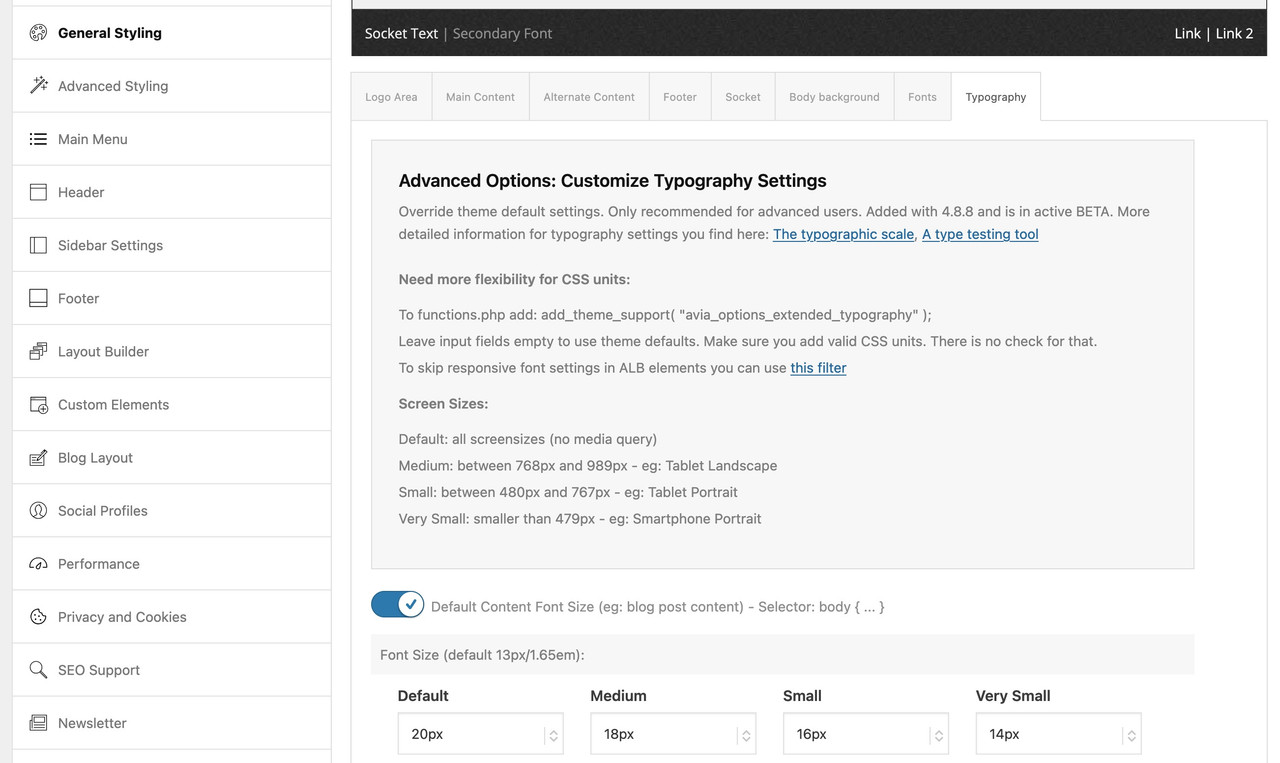
    The lists and content of table cells should inherit the default font size, which can be adjusted in the Enfold > General Styling > Typography panel. You can adjust the Default Content Font Size for different screen sizes as well.

    Best regards,
    Ismael

    #1472322
    nyoung_web
    Participant

    I’m still new to WordPress/Enfold and I’m trying to set the thumbnail for a post slider to the same height.
    In the link of the test page, the post slider after the first image has one thumbnail that is at 1210 x 420, and the others 1080 x 420.
    I want them all to appear at a certain height, preferably the same height as the one with the 1210 x 420 dimension.
    The slider’s image size is set to “Entry without sidebar (1210×423)”.

    Below is the custom css I added over the course of solving multiple issues, so some of them may be working against each other. I would appreciate any advice about the custom css below or any additional one(s) that could achieve the look I want.

    #top .avia-content-slider .slide-entry-title { font-size: 1em; }
    
    #top .post-entry .blog-categories {
      	font-size: 0.9em;
        font-weight: normal; }
    
    #top .content .entry-content-wrapper {
    	padding-right: 0px;
    }
    
    #top .avia-slideshow-inner {
    	float: center;
    }
    
    #top .avia-content-slider .slide-entry-wrap {
    	float: center;
    }
    
    #top .avia-content-slider-inner {
    	margin: 0px;
    	overflow: hidden !important;
    }
    
    #top .avia-content-slider {
    	display: flex;
    }
    
    #top .avia-content-slider .slide-image img{
    	height: auto !important;
    }
    
    .avia_desktop .avia-content-slider .avia-slideshow-arrows a{ opacity: 1; }
    
    @media only screen and (max-width: 479px)
    {
    	.responsive #top #wrap_all .slide-entry{width:48%; margin-left:4%}
    	.responsive #top #wrap_all .avia-content-slider-even .slide-entry.slide-parity-odd,
    	.responsive #top #wrap_all .avia-content-slider-odd .slide-entry.slide-parity-even{margin:0; clear:both;}
    	.responsive #top #wrap_all .avia-content-slider-odd  .slide-entry.first{margin-left:0; width:100%;}
    	.responsive .avia-content-slider .slide-image img { width: 100%; }
    	.responsive #top .avia-slideshow-arrows a{ 
    		display:block !important; 
    		opacity: 1; 
    		font-size: 20px; 
    		width: 60px;
    		height: 60px;
    		top: 30%;
        margin: -30px 0 0;
    		text-align: center;
    	}
    }
    
    #top .scroll-down-link {
        height: 60px;
        width: 80px;
        margin: 0px 0 0 -40px;
        line-height: 60px;
        position: absolute;
        left: 50%;
        bottom: 25px;
        color: #263238;
        text-align: center;
        font-size: 70px;
        z-index: 100;
        text-decoration: none;
    	  text-shadow: 0px 0px 5px rgba(0, 0, 0, 0);
    }
    #1472310
    reqonsult
    Participant

    Hello, is it possible to define the font size for lists and the content of table cells? Under Enfold > Advanced Styling > Enfold Theme Options we cannot find any options for this. Please see the attached URL, in which the font size in lists and tables is slightly smaller. Thank you.

    #1472274
    mary301187
    Participant

    Hi guys,

    I would like to have the color of the availability of the article “Lieferrückstand” red. I have entered this in the CSS. But nothing happens

    .woocommerce div.product .stock {
    color: #ab2c2c!important;
    font-size: 24px!important;
    }

    Can you help me, thank you

    #1472273
    mary301187
    Participant

    HAllo Leute,

    ich möchte die Farbe der Verfügbarkeit der Artikels “Lieferrückstand” rot haben. Habe ich im CSS eingetragen. Aber es passiert nichts

    .woocommerce div.product .stock {
    color: #ab2c2c!important;
    font-size: 24px!important;
    }

    Könnt ihr mir helfen?

    Danke

    #1472219

    Hey BC-Clients,

    Thank you for the inquiry.

    Are you trying to decrease the space between the mega menu items? Try to add this css code:

    #top #header .avia_mega_div > .sub-menu {
    	padding: 2px 40px !important;
    	border-top-width: 0;
    }

    And to adjust the style of the links, include this:

    #header .mega_menu_title {
    	margin-bottom: 8px;
    	font-size: 13px;
    	line-height: 1em;
    	font-weight: 600;
    	display: block;
    	font-weight: 400;
    }

    You may need to leave the titles of the mega menu columns blank and add an actual menu item to each column.

    Best regards,
    Ismael

    #1472154

    Hi Vera,

    Thanks for the information.

    I changed the code to the following one and that worked

    
    .av-masonry-entry-content {
    font-size: 19px;
    font-family: 'Chambersitalic';
    font-style: italic;
    }
    

    Please clear your browser’s cache and review your website.

    Best regards,
    Yigit

    #1472126

    Hi,

    Instead of using the italic font, please try setting it to italic in theme options or using custom CSS as follows:

    
    .av-masonry-entry-content {
    font-size: 19px;
    font-style: italic;
    }
    

    Best regards,
    Yigit

    #1472080

    Hi Mike

    Sorry, but I don’t get it.
    I defined the font in quick CSS by using this:

    .av-masonry-entry-content {
    font-size: 19px;
    font-family: 'Chambersitalic';
    }

    Best regards,
    Vera

    Hi @mike.
    I’ll break the questions down:
    so, look at :
    https://img.savvyify.com/images/2024/11/24/Schermafbeelding-2024-11-24-171312.png
    ‘rug’, ‘schouders’, ‘elleboog’ are now H3 (due to some code you gave, which is what I wanted)
    Under the advanced settings in the child time I’ve set all H3 to be grey.
    but in this case I want to make an exception.
    If you check the settings I have set the text on white, in the preview it shows white. I even added CSS to make it white. (image-caption-weight)
    https://img.savvyify.com/images/2024/11/24/Schermafbeelding-2024-11-24-171456.png

    Yet, it remains grey. how can I still make it white? (I want to keep the other h3’s, except for the ones over images, grey). Also, the line height should be 30px and the font size 23. basically i want to achieve the same as
    https://img.savvyify.com/images/2024/11/24/Schermafbeelding-2024-11-24-172057.png

    #1472066

    Hi,
    Try this CSS in your Enfold Theme Options ▸ General Styling ▸ Quick CSS field:

    @media only screen and (min-width: 767px) and (max-width: 1487px) { 
    #avia-menu #menu-item-1510 {
    	right: -167px;
    }
    #avia-menu #menu-item-1510 .avia-menu-text {
    	font-size: 10px;
    }
    }

    Please ensure to copy the code from the forum and not an email notification so the symbols are not converted.
    After applying the css, please clear your browser cache and check.

    Best regards,
    Mike

    @mike, ah! I guess i added that piece of code in the child theme from way before when it wasn’t possible to change the H-tag yet. Thanks for disabling it.

    Two challenges/issues:

    1. A new problem that occurs is that I set the H3 tag font colour and size in the Enfold Child panel under advanced. I notice that this is overrulling CSS and even settings that I make manually in the advanced layout builder. (in this case I set the image with the tilte ‘rug’ to white text PLUS i added CSS which should set the color to white and to the desired font weight.
    is there a way to overrule the adjustments I’ve made under the advanced panel with CSS? (this was more relevant to this: https://kriesi.at/support/topic/change-caption-of-image-to-h3/)
    It’s not really desired from my perspective that I change the setting of all H3 captions manually / via other CSS

    2. Basically, what I want to achieve, is to get display the same content I have placed in columns (‘rug’, ‘schouders’, ‘elleboog’) into a slider. perhaps there is another way to achieve this, rather than putting the same content into a easy slider and hide/diplay elements on mobile vs desktop. I want to do this throughout the site, for example you see https://fysiobreda.thedigitalmanager.nl/behandelingen/dry-needling/ , then I want to but all those ‘body parts’ into a slider as well.

    Hi,
    On mobile, I see that you are using the “easy slider” to change the H tag, click on the element and go to each slide, under the advanced tab change the heading tag:
    Screen Shot 2024 11 23 at 11.56.21 AM
    you had this code in your child theme function.php causing a conflict:
    Screen Shot 2024 11 23 at 12.00.52 PM
    I disabled it for you.
    Change the font size under the styling tab:
    Screen Shot 2024 11 23 at 12.04.45 PM
    to center add this css:

    .avia-slideshow.av-desktop-hide.av-medium-hide .avia-caption {
        bottom: 30%;
        left: 30%;
    }

    Best regards,
    Mike

    Hi @mike,
    I added the code to function.php but it doesnt seem to work, also, this doesn’t provide me with an answer/solution for the design question.
    >add a transparant overlay
    >center the title
    >configure the font size of the title

    (see above questions). you have the login to my site:)

    best regards, Peter

    Der Dev / Mods : I read about this filter in the link at Typography : avf_el_styling_responsive_font_size_skip

    so i can skip the responsive settings for some ALB Elements : like headings:

    
    function custom_responsive_font_size_skip( $skip, array $atts, \aviaShortcodeTemplate $sc_context, $font_id, $selector_container ){
    	if( $sc_context instanceof avia_sc_heading ){
    		return true;
    	}
    	return $skip;
    }
    add_filter( 'avf_el_styling_responsive_font_size_skip', 'custom_responsive_font_size_skip', 10, 5 );

    looking which elements do have this i read about another filter : avf_responsive_media_sizes
    is it possible to redefine those settings?

    apply_filters( 'avf_responsive_media_sizes', array(
    		'av-desktop'		=> array( 990, 0 ),
    		'av-medium'		=> array( 768, 989 ),
    		'av-small'		=> array( 480, 767 ),
    		'av-mini'		=> array( 0, 479 )
    ) );

    Wegen etwas höherer Browser Kompatibilität (so war es jedenfalls mal bei Safari und clamp) nutze ich für fluide font-size Definitionen die min/max Methode.
    Siehe Link in Enfold Typography Sektion: https://spencermortensen.com/articles/typographic-scale/ wählte ich die musikalische Skala – und zwar einmal mit Faktor 2 und dann 3 ergeben sich folgende font-size Größen:
    40-60, 36-50, 32-42, 28-34, 25-29, 22-24
    was zu folgenden fluid Werten führt (ausgehend von einem viewport von 320px bis 1500px (Fluid-Font Calculator)
    ____
    Due to slightly higher browser compatibility, I use the min/max method for fluid font-size definitions.
    See link in Enfold Typography section: https://spencermortensen.com/articles/typographic-scale/ I chose the musical scale – once with factor 2 and then 3 the following font-size sizes result:
    40-60, 36-50, 32-42, 28-34, 25-29, 22-24
    which leads to the following fluid values (based on a viewport of 320px to 1500px (Fluid-Font Calculator)

    da Enfold selbst mit CSS Variablen arbeitet:
    as Enfold itself works with CSS variables:

    :root {
      --enfold-font-size-theme-content: 13px;
      --enfold-font-size-theme-h1: 34px;
      --enfold-font-size-theme-h2: 28px;
      --enfold-font-size-theme-h3: 20px;
      --enfold-font-size-theme-h4: 18px;
      --enfold-font-size-theme-h5: 16px;
      --enfold-font-size-theme-h6: 14px;
    }

    könnte man die mittels Filter überschreiben:
    you could overwrite them using a filter:

    function my_avf_dynamic_css_after_vars( $output = '' ){
      $output .= "\n";
      $output .= ":root {\n";
      $output .=    "--enfold-font-size-theme-h1: min(max(40px, calc(2.5rem + (60 - 40) * ((100vw - 320px) / (1500 - 320)))), 60px);\n";
      $output .=    "--enfold-font-size-theme-h2: min(max(36px, calc(2.25rem + (50 - 36) * ((100vw - 320px) / (1500 - 320)))), 50px);\n";
      $output .=    "--enfold-font-size-theme-h3: min(max(32px, calc(2rem + (42 - 32) * ((100vw - 320px) / (1500 - 320)))), 42px);\n";
      $output .=    "--enfold-font-size-theme-h4: min(max(28px, calc(1.75rem + (34 - 28) * ((100vw - 320px) / (1500 - 320)))), 34px);\n";
      $output .=    "--enfold-font-size-theme-h5: min(max(25px, calc(1.5625rem + (29 - 25) * ((100vw - 320px) / (1500 - 320)))), 29px);\n";
      $output .=    "--enfold-font-size-theme-h6: min(max(22px, calc(1.375rem + (24 - 22) * ((100vw - 320px) / (1500 - 320)))), 24px);\n";
      $output .=    "--enfold-font-size-theme-content: min(max(16px, calc(1rem + (20 - 16) * ((100vw - 320px) / (1500 - 320)))), 20px);\n";  // p-tags  
      $output .= "}\n";
    
      return $output;
    }
    add_filter( 'avf_dynamic_css_after_vars', 'my_avf_dynamic_css_after_vars', 10, 1 );

    ich behielt mal die long-hand Version der min-max schreibweise – so wird deutlich wie die font-sizes berechnet werden.
    I kept the long-hand version of the min-max notation – this makes it clear how the font sizes are calculated.

    um es dann global durchzusetzen dies in die quick css:
    to then globally enforce this here in the quick css:

    
    body {font-size: var(--enfold-font-size-theme-content);}
    #top h1 {font-size: var(--enfold-font-size-theme-h1);  }
    #top h2 {font-size: var(--enfold-font-size-theme-h2); }
    #top h3 {font-size: var(--enfold-font-size-theme-h3);  }
    #top h4 {font-size: var(--enfold-font-size-theme-h4); }
    #top h5 {font-size: var(--enfold-font-size-theme-h5);  }
    #top h6 {font-size: var(--enfold-font-size-theme-h6);  }
    

    btw: on Layout Builder – Typography Input Fields – you can activate that switch to have:
    “Activate to replace predefined selectboxes with font sizes with text fields to use custom units. Only recommended for experienced users who know, what they are doing. This is in active beta (since 5.0.1).”
    – you then can insert those fluid values to that input field. e.g. for extremly big h1 headings (80-120px) etc.

    Oder sollte man diesen Ansatz wählen und auf Media Queries verzichten bzgl. der typogarfischen Gestaltung?
    Or should you choose this approach and do without media queries with regard to typographical design?

    /* Basis-Schriftgröße für das gesamte Dokument festlegen */
    html {
    font-size: 16px; /* Basisschriftgröße ist 16px */

    /* CSS-Variablen für Schriftgrößen mit clamp() */
    –font-h1: clamp(2.5rem, 5vw + 1rem, 6.25rem); /* Mindestens 40px, ideal mit Viewport skaliert, maximal 100px */
    –font-h2: clamp(1.8rem, 3.5vw + 0.5rem, 2.5rem); /* Mindestens 28.8px, maximal 40px */
    –font-h3: clamp(1.6rem, 3vw + 0.5rem, 2rem); /* Mindestens 25.6px, maximal 32px */
    –font-h4: clamp(1.4rem, 2.5vw + 0.5rem, 1.75rem); /* Mindestens 22.4px, maximal 28px */
    –font-h5: clamp(1.2rem, 2vw + 0.5rem, 1.5rem); /* Mindestens 19.2px, maximal 24px */
    –font-h6: clamp(1.1rem, 1.5vw + 0.5rem, 1.25rem); /* Mindestens 17.6px, maximal 20px */
    –font-p: clamp(1rem, 1.5vw + 0.5rem, 1.2rem); /* Mindestens 16px, maximal 19.2px */
    –font-menu: clamp(0.9rem, 1vw + 0.5rem, 1.1rem); /* Mindestens 14.4px, maximal 17.6px */

    /* Schriftglättung aktivieren */
    -webkit-font-smoothing: antialiased; /* Glättet die Schrift */
    -moz-osx-font-smoothing: grayscale; /* Optimiert für Mac-Geräte */
    }

    /* Verwenden der CSS-Variablen für die Überschriften und Textelemente */
    h1 {
    font-size: var(–font-h1);
    line-height: 1.2; /* Kompakter für große Headlines */
    text-transform: none !important;
    }

    h2 {
    font-size: var(–font-h2);
    line-height: 1.3; /* Etwas großzügiger als H1 */
    text-transform: none !important;
    }

    h3 {
    font-size: var(–font-h3);
    line-height: 1.4;
    text-transform: none !important;
    }

    h4 {
    font-size: var(–font-h4);
    line-height: 1.4;
    text-transform: none !important;
    }

    h5 {
    font-size: var(–font-h5);
    line-height: 1.5; /* Noch großzügiger */
    text-transform: none !important;
    }

    h6 {
    font-size: var(–font-h6);
    line-height: 1.5;
    text-transform: none !important;
    }

    p {
    font-size: var(–font-p);
    line-height: 1.6; /* Optimal für Fließtexte */
    }

    .main_menu li a {
    font-size: var(–font-menu);
    line-height: 1.4; /* Angemessen für Menüpunkte */
    }

    /* Schriftglättung und Font-Weight für Überschriften */
    h1, h2, h3, h4, h5, h6 {
    -webkit-font-smoothing: antialiased;
    -moz-osx-font-smoothing: grayscale;
    font-weight: 400 !important; /* Verhindert Überschreibungen */
    }

    #1471874
    whdsolutions
    Participant

    We have a problem!
    We need to mpve the shoping cart icon and box left and the burger menu also, but doing so the hover and click of the cart icon makes the burger menu appear.
    How can we fix this?
    The site needs to be signed off n the nex couple of hours, or I don’t get paid :-(
    Sorry!
    you will need to be logged in to see the store, so I have added a login for you!

    This is the code we have added:

    `/* CART AND BURGER MENU */
    .cart_dropdown_first .cart_dropdown_link {
    display: block;
    padding: 0 0 0 0;
    text-decoration: none;
    line-height: 44px;
    font-size: 20px;
    position: absolute;
    z-index: 2;
    width: 100%;
    height: 100%;
    background: #dad2c7 !important;
    }
    @media only screen and (max-width: 1650px) {
    .responsive #top .cart_dropdown {
    margin-right: 20px !important;
    }
    }

    Screenshot-2024-11-21-191254

    #1471720

    Following on from this

    I can 100% confirm this was the cause of our server issues.

    Essentially ALL Enfold websites with WooCommerce installed will gradually use up the ram and see mysql memory usage rise until the server crashes.

    The bots getting stuck crawling all of the ?avia_extended_shop_select=yes queries includes:
    Even with the rel-nofollow:
    Bing bot
    Google bot
    A majority of major search engines
    AI crawlers – New aggressive bots that ignore all instructions

    See screenshot of the before and after. Our Ram use fell from almost 90GB of ram used to 8GB used on average.
    Physical Ram usage screenshot
    https://www.dropbox.com/scl/fi/tw8p399gfdr9cclorc5j9/ramuse-screenshot.PNG?rlkey=d9ty4xvui4w3m2ycb9b9ez94s&st=28aameqn&dl=0
    Mysql memory usage screenshot
    https://www.dropbox.com/scl/fi/iixhdd5vpe7253tbavbxf/mysql-memory-usage.PNG?rlkey=15061shf0haiu3d36cdy0be3t&st=ep9fncx5&dl=0

    SOLUTION
    I propose that Enfold removes the custom sort by options and reinstates the default Woocommerce ones.
    The defaults use form fields and JS so there are no a href links in the default woo sort by dropdown. Bots cannot follow these links because there are no urls in the HTML.

    In your child theme functions.php add the following to remove the enfold filters and reinstate the woo ones.

    // remove the enfold sort by filters
    function avia_woocommerce_frontend_search_params()
    {
       return;
    }
    // reinstate the woo default sort by filters
    add_action( 'woocommerce_before_shop_loop', 'woocommerce_catalog_ordering', 20 );

    Add the following CSS to quick CSS and tweak depending on your sidebar position:

    .sort-param-count {
    display:none;
    }
    .product-sorting {
    padding-top:0px;
    }
    div .product-sorting ul, div .product-sorting li {
    font-size: 16px;
    }
    div .product-sorting ul {
    width: 200px;
    }
    .main_color .sort-param a {
        color: #000000;
    }
    .sort-param-sort a, ul.sort-param-order {
    border: 1px;
    border-color: #969696;
    border-style: solid;
    }
    @media only screen and (max-width: 767px) {
        .responsive #top .woocommerce-ordering {
            position: relative;
            float: left;
            clear: both;
            margin: 0;
            padding-bottom: 25px;
            padding-top: 15px;
            top: 0px;
        }
    }
    @media only screen and (min-width: 768px) {
        .responsive #top .woocommerce-ordering {
            position: relative;
            float: left;
            clear: both;
            margin: 0;
            padding-bottom: 25px;
            padding-top: 15px;
            top: 0px;
        }
    }
    #top.woocommerce-page .woocommerce-ordering select {
    width: 100%;
    font-size:16px;
    }

    Install the Redirection Plugin:

    Add the following RegEX expression to redirect the queries so that the URL redirects BEFORE the query runs on the DB

    Source URL: ^/(.*?)/\?avia_extended_shop_select=.*
    Enable: Ignore Case, Regex and Ignore Slash
    Target URL: /$1/
    Hit Save
    This will redirect any attempt to crawl the enfold filters back to the current category

    #1471631

    Hey Tanja,

    Please try the following in Quick CSS under Enfold->General Styling:

    @media only screen and (max-width: 400px) {
      .responsive #top #header_main #menu-item-548 a {
        padding: 0 0 0 10px;
        font-size: 12px;
      }
    }

    Best regards,
    Rikard

Viewing 30 results - 361 through 390 (of 18,701 total)