

Forum Replies Created
-
AuthorPosts
-
Hey talkshop787,
I took a look at your site and the advanced layout builder seems to be working correctly, I started in the Layout elements and dragged a element into the edit area, then switched to the Content elements and dragged a element into the edit area, and the so forth with the Media elements, using Chrome on Windows 10.
Which browser are you using?
I also tested the default editor in text & visual.Best regards,
MikeHey catatonique,
I have included a link to the 2017 Demo layerslider export in the Private Content area.
Please try importing it. If this doesn’t help, Can you please include a admin login in the private content area so we can take a closer look.Best regards,
MikeHey Biggy,
Your first issue was solved with the latest update v4.3.2
Please update and check.Best regards,
MikeMay 20, 2018 at 1:37 am in reply to: The Events Calendar – Date Picker Disappearing Behind Header #959271Hi,
Glad we were able to help, we will close this now. Thank you for using Enfold.For your information, you can take a look at Enfold documentation here
And if there are features that you wish Enfold had, you can request them and vote the requested ones here
For any other questions or issues, feel free to start new threads under Enfold sub forum and we will gladly try to help you :)Best regards,
MikeHi,
Glad we were able to help, we will close this now. Thank you for using Enfold.For your information, you can take a look at Enfold documentation here
And if there are features that you wish Enfold had, you can request them and vote the requested ones here
For any other questions or issues, feel free to start new threads under Enfold sub forum and we will gladly try to help you :)Best regards,
MikeHi,
No you can delete all the pages, you don’t need to import any of the demos, you could just start building.
Let me ask, are you having a issue with the page I created? I thought the color section background video was working correctly.Best regards,
MikeMay 20, 2018 at 1:29 am in reply to: Issues with Layerslider and website loading speed after latest update #959267Hi,
Perhaps you should disable JetPack. As for your slow load times it’s mostly to the images in your slider and a slow webhost, I ran this test and as you can see it took your webhost 4 seconds to start serving your site (first byte)
There are a lot of things you can do to improve your speed, but you have no control over “first byte”, it your server.
Perhaps if you talk to them they will move you to different server.Best regards,
MikeHey Andre,
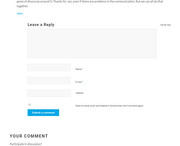
Try this code in the General Styling > Quick CSS field:#top .commentlist #commentform label { float: right !important; left: 245px !important; position: absolute; } #top .commentlist .comment-form-author input,#top .commentlist .comment-form-email input,#top .commentlist .comment-form-url input { max-width: 220px; !important; } #top .commentlist span.required { display: inline-block !important; }Expected results:
Best regards,
MikeHey steviger,
How about this layout:
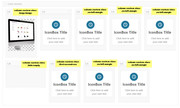
this css:.no-left-margin { margin-left: 0px !important; } .hide-empty { display: none !important; } .large-image { min-width: 30%!important; } .first-second-row { margin-left: 13%!important; }result:
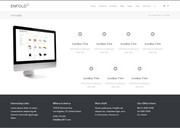
Avia Layout Builder Debug code:[av_section min_height='' min_height_px='500px' padding='default' shadow='no-border-styling' bottom_border='no-border-styling' bottom_border_diagonal_color='#333333' bottom_border_diagonal_direction='scroll' bottom_border_style='scroll' scroll_down='' custom_arrow_bg='' id='' color='main_color' background='bg_color' custom_bg='' background_gradient_color1='' background_gradient_color2='' background_gradient_direction='vertical' src='' attach='scroll' position='top left' repeat='no-repeat' video='' video_ratio='16:9' video_mobile_disabled='' overlay_enable='' overlay_opacity='0.5' overlay_color='' overlay_pattern='' overlay_custom_pattern='' av-desktop-hide='' av-medium-hide='' av-small-hide='' av-mini-hide='' av_element_hidden_in_editor='0' av_uid='av-gqiqn1'] [av_one_fifth first min_height='' vertical_alignment='av-align-top' space='' margin='0px' margin_sync='true' link='' linktarget='' link_hover='' padding='0px' padding_sync='true' border='' border_color='' radius='0px' radius_sync='true' background='bg_color' background_color='' background_gradient_color1='' background_gradient_color2='' background_gradient_direction='vertical' src='' attachment='' attachment_size='' background_position='top left' background_repeat='no-repeat' animation='' mobile_breaking='' mobile_display='' av_uid='av-1jsljh' custom_class='large-image'] [av_image src='https://127.0.0.1/2017demo1/wp-content/uploads/2018/05/Computer_Left.png' attachment='3166' attachment_size='full' align='center' styling='' hover='' link='' target='' caption='' font_size='' appearance='' overlay_opacity='0.4' overlay_color='#000000' overlay_text_color='#ffffff' copyright='' animation='no-animation' av_uid='av-jhdrcmnr' admin_preview_bg=''][/av_image] [/av_one_fifth][av_one_fifth min_height='' vertical_alignment='' space='' custom_margin='' margin='0px' link='' linktarget='' link_hover='' padding='0px' border='' border_color='' radius='0px' background='bg_color' background_color='' background_gradient_color1='' background_gradient_color2='' background_gradient_direction='vertical' src='' background_position='top left' background_repeat='no-repeat' animation='' mobile_breaking='' mobile_display='' av_uid='av-eue3vx'] [av_icon_box position='top' icon_style='' boxed='av-no-box' icon='ue862' font='entypo-fontello' title='IconBox Title' link='' linktarget='' linkelement='' font_color='' custom_title='' custom_content='' color='' custom_bg='' custom_font='' custom_border='' av-medium-font-size-title='' av-small-font-size-title='' av-mini-font-size-title='' av-medium-font-size='' av-small-font-size='' av-mini-font-size='' av_uid='av-jhdr7h82' admin_preview_bg=''] Click here to add your own text [/av_icon_box] [/av_one_fifth][av_one_fifth min_height='' vertical_alignment='av-align-top' space='' margin='0px' margin_sync='true' link='' linktarget='' link_hover='' padding='0px' padding_sync='true' border='' border_color='' radius='0px' radius_sync='true' background='bg_color' background_color='' background_gradient_color1='' background_gradient_color2='' background_gradient_direction='vertical' src='' attachment='' attachment_size='' background_position='top left' background_repeat='no-repeat' animation='' mobile_breaking='' mobile_display='' av_uid='av-chz20t' custom_class='no-left-margin'] [av_icon_box position='top' icon_style='' boxed='av-no-box' icon='ue862' font='entypo-fontello' title='IconBox Title' link='' linktarget='' linkelement='' font_color='' custom_title='' custom_content='' color='' custom_bg='' custom_font='' custom_border='' av-medium-font-size-title='' av-small-font-size-title='' av-mini-font-size-title='' av-medium-font-size='' av-small-font-size='' av-mini-font-size='' av_uid='av-jhdr7h82' admin_preview_bg=''] Click here to add your own text [/av_icon_box] [/av_one_fifth][av_one_fifth min_height='' vertical_alignment='av-align-top' space='' margin='0px' margin_sync='true' link='' linktarget='' link_hover='' padding='0px' padding_sync='true' border='' border_color='' radius='0px' radius_sync='true' background='bg_color' background_color='' background_gradient_color1='' background_gradient_color2='' background_gradient_direction='vertical' src='' attachment='' attachment_size='' background_position='top left' background_repeat='no-repeat' animation='' mobile_breaking='' mobile_display='' av_uid='av-be0vbx' custom_class='no-left-margin'] [av_icon_box position='top' icon_style='' boxed='av-no-box' icon='ue862' font='entypo-fontello' title='IconBox Title' link='' linktarget='' linkelement='' font_color='' custom_title='' custom_content='' color='' custom_bg='' custom_font='' custom_border='' av-medium-font-size-title='' av-small-font-size-title='' av-mini-font-size-title='' av-medium-font-size='' av-small-font-size='' av-mini-font-size='' av_uid='av-jhdr7h82' admin_preview_bg=''] Click here to add your own text [/av_icon_box] [/av_one_fifth][av_one_fifth min_height='' vertical_alignment='av-align-top' space='' margin='0px' margin_sync='true' link='' linktarget='' link_hover='' padding='0px' padding_sync='true' border='' border_color='' radius='0px' radius_sync='true' background='bg_color' background_color='' background_gradient_color1='' background_gradient_color2='' background_gradient_direction='vertical' src='' attachment='' attachment_size='' background_position='top left' background_repeat='no-repeat' animation='' mobile_breaking='' mobile_display='' av_uid='av-91o6cd' custom_class='no-left-margin'] [av_icon_box position='top' icon_style='' boxed='av-no-box' icon='ue862' font='entypo-fontello' title='IconBox Title' link='' linktarget='' linkelement='' font_color='' custom_title='' custom_content='' color='' custom_bg='' custom_font='' custom_border='' av-medium-font-size-title='' av-small-font-size-title='' av-mini-font-size-title='' av-medium-font-size='' av-small-font-size='' av-mini-font-size='' av_uid='av-jhdr7h82' admin_preview_bg=''] Click here to add your own text [/av_icon_box] [/av_one_fifth][av_one_fourth first min_height='' vertical_alignment='av-align-top' space='' margin='0px' margin_sync='true' link='' linktarget='' link_hover='' padding='0px' padding_sync='true' border='' border_color='' radius='0px' radius_sync='true' background='bg_color' background_color='' background_gradient_color1='' background_gradient_color2='' background_gradient_direction='vertical' src='' attachment='' attachment_size='' background_position='top left' background_repeat='no-repeat' animation='' mobile_breaking='' mobile_display='' av_uid='av-893l0t' custom_class='hide-empty'] [/av_one_fourth][av_one_fifth min_height='' vertical_alignment='av-align-top' space='' margin='0px' margin_sync='true' link='' linktarget='' link_hover='' padding='0px' padding_sync='true' border='' border_color='' radius='0px' radius_sync='true' background='bg_color' background_color='' background_gradient_color1='' background_gradient_color2='' background_gradient_direction='vertical' src='' attachment='' attachment_size='' background_position='top left' background_repeat='no-repeat' animation='' mobile_breaking='' mobile_display='' av_uid='av-577tm5' custom_class='first-second-row'] [av_icon_box position='top' icon_style='' boxed='av-no-box' icon='ue862' font='entypo-fontello' title='IconBox Title' link='' linktarget='' linkelement='' font_color='' custom_title='' custom_content='' color='' custom_bg='' custom_font='' custom_border='' av-medium-font-size-title='' av-small-font-size-title='' av-mini-font-size-title='' av-medium-font-size='' av-small-font-size='' av-mini-font-size='' av_uid='av-jhdr7h82' admin_preview_bg=''] Click here to add your own text [/av_icon_box] [/av_one_fifth][av_one_fifth min_height='' vertical_alignment='av-align-top' space='' margin='0px' margin_sync='true' link='' linktarget='' link_hover='' padding='0px' padding_sync='true' border='' border_color='' radius='0px' radius_sync='true' background='bg_color' background_color='' background_gradient_color1='' background_gradient_color2='' background_gradient_direction='vertical' src='' attachment='' attachment_size='' background_position='top left' background_repeat='no-repeat' animation='' mobile_breaking='' mobile_display='' av_uid='av-4tns65' custom_class='no-left-margin'] [av_icon_box position='top' icon_style='' boxed='av-no-box' icon='ue862' font='entypo-fontello' title='IconBox Title' link='' linktarget='' linkelement='' font_color='' custom_title='' custom_content='' color='' custom_bg='' custom_font='' custom_border='' av-medium-font-size-title='' av-small-font-size-title='' av-mini-font-size-title='' av-medium-font-size='' av-small-font-size='' av-mini-font-size='' av_uid='av-jhdr7h82' admin_preview_bg=''] Click here to add your own text [/av_icon_box] [/av_one_fifth][av_one_fifth min_height='' vertical_alignment='av-align-top' space='' margin='0px' margin_sync='true' link='' linktarget='' link_hover='' padding='0px' padding_sync='true' border='' border_color='' radius='0px' radius_sync='true' background='bg_color' background_color='' background_gradient_color1='' background_gradient_color2='' background_gradient_direction='vertical' src='' attachment='' attachment_size='' background_position='top left' background_repeat='no-repeat' animation='' mobile_breaking='' mobile_display='' av_uid='av-30xqzx' custom_class='no-left-margin'] [av_icon_box position='top' icon_style='' boxed='av-no-box' icon='ue862' font='entypo-fontello' title='IconBox Title' link='' linktarget='' linkelement='' font_color='' custom_title='' custom_content='' color='' custom_bg='' custom_font='' custom_border='' av-medium-font-size-title='' av-small-font-size-title='' av-mini-font-size-title='' av-medium-font-size='' av-small-font-size='' av-mini-font-size='' av_uid='av-jhdr7h82' admin_preview_bg=''] Click here to add your own text [/av_icon_box] [/av_one_fifth][/av_section]You can tweak it some more, but it should be a good start.
Best regards,
MikeMay 19, 2018 at 8:40 pm in reply to: Layer Slider is not importing properly for Enfold 2017's home page slider #959197Hi,
I have linked to the 2017 Demo layerslider export in the Private Content area.
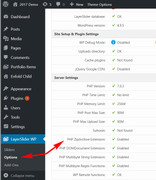
But please ensure the PHP ZipArchive Extension has been enabled on your webhost, typically this is one reason the layerslider import fails.
To check, go to WordPress > Dashboard > LayerSlider > Options and click “System Status” and look under “Server Settings”
Best regards,
MikeHi,
To make text capital, use css “text-transform: uppercase;”
for example:label { text-transform: uppercase; }once we see your new form we can give you the exact code.
Best regards,
MikeHi,
Glad to see you have it sorted out, shall we take a look at the blog images on your site now?
Can you please include a admin login in the private content area so we can take a closer look, and can we disable plugins to test, if need be?Best regards,
MikeHi,
Try this code in the General Styling > Quick CSS field:body .alignleft.wp-image-7473 { margin: 4px 20px 0 0 !important; }please feel free to adjust the 20px to suit, it is 10px on your site now.
Do you wish this to be for the one image only, and only on one page?Best regards,
MikeHi,
I read that you removed the “jquery.smoothState.functions.js” but it is still loading when I view your page, please try to remove it.
Can you please include a admin login in the private content area so we can take a closer look.Best regards,
MikeMay 19, 2018 at 6:46 pm in reply to: Masonry element only loads when scrolling the page – bug? #959131Hi,
I believe you are referring to the masonry animation, please try this code in the General Styling > Quick CSS field to remove:.avia_desktop.avia_transform3d .av-masonry-entry.av-masonry-item-loaded .av-inner-masonry{ -webkit-animation: none !important; -moz-animation: none !important; animation: none !important; } .av-masonry-entry { opacity: 1 !important; visibility: visible !important; }Best regards,
MikeHey izubeldia,
Please read this comment from the plugin author on how to use the plugin with WPML
If you have any further questions about the plugin, please ask in that thread, as we can not offer support for third party plugins.
Thanks for your patience and understanding.Best regards,
MikeMay 19, 2018 at 6:23 pm in reply to: Removing Space Between Boxes on Mobile View (revisited) #959123Hi,
Sorry I’m not seeing the error on my Android device using Chrome, what browser are you using on your device?
Try clearing your mobile cache and history.Best regards,
MikeHi,
I believe this may help: Problems with Gravity Forms Visual Editor when using Enfold themeBest regards,
MikeHi,
Try adding this code to the end of your functions.php file in Appearance > Editor:if(!function_exists('av_blog_entry_markup_helper')) { function av_blog_entry_markup_helper( $id , $exclude = array()) { if( !in_array('publisher', $exclude) ) { $output .= "<span class='av-structured-data' {$publisher_markup}> <span itemprop='name'>{$author_name}</span> <span itemprop='logo' itemscope itemtype='http://schema.org/ImageObject'> <span itemprop='url'>url-to-logo-image</span> </span> </span>"; } return $output; } }then replace “url-to-logo-image” in the code with your logo url
Best regards,
MikeHi,
When I look at your blog page I see the two latest posts are not showing because the category they are in is excluded from the widget.
Please check the categories selected, as there are a number of them excluded from the blog roll.
Please see screenshot in Private Content area.Best regards,
MikeMay 19, 2018 at 5:10 pm in reply to: Issues with Layerslider and website loading speed after latest update #959113Hi,
I tried disabling your plugins, which solved the slider issues, and then I enabled them expecting JetPack to brake the sliders again, but it didn’t. I believe this is because when JetPack is disabled you need to set it up again, which will most likely brake your sliders.
I remember seeing this error before on the JetPack support forum, but I can’t find that thread now.
At the time it was under investigation, but since I’ve only seen it twice now and not widespread, there is a chance that it is a conflict with another plugin.
You could choose to not use JetPack, or try disabling all other plugins, and test one at a time with JetPack to find the error.
Or perhaps it was a one time blop, in which disabling and resetting solved?I guess the important thing is that your sliders are working again.
Best regards,
MikeHi,
Glad we were able to help, we will close this now. Thank you for using Enfold.Best regards,
MikeHi,
Thanks for the login, I tested by moving all of the pages to the trash, and then created a new homepage, added the color section and background video, which seems to work correctly.
Please check, if you which you can restore the other pages from the trash.Best regards,
MikeHi,
Thanks for the image, I think that this can be accomplished with just a couple of tweaks,
first I commented out your css,
then I set the 1/2 column to no space between columns:
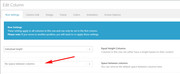
then I set the image and button to align center from align left, I thought align right was too close to the other element, but you can test if you wish.
I’m suggesting these tweaks because the theme will automatically readjust for different screen sizes, vs, manually calculating them.
Please clear your browser cache and check, and advise.
Please see screenshot in Private Content area.By the way it looks as though your screen is much wider than my 1920px, if the above doesn’t help, please let us know your screen size.
Best regards,
MikeHi,
Sorry, not able to login, Please see screenshot in Private Content area.
Please note that some security plugins may block foreign IPs.Best regards,
MikeHey ZacharyKnight,
When you use the css method above to add a font, you will need to apply the changes to your elements via css. Such as:h1.entry-title { font-family: 'YOUR-FONT-NAME'; font-size: 18px; }Then all other elements will follow the built in Google fonts.
Here is our latest documentation: Using custom fonts
There you will also find how to add your custom font to the theme options.Best regards,
MikeHey Els,
Sorry I was not able to login to see this issue, seems the user in wrong, please check.
Without seeing the issue, I would suggest deactivating all plugins you are not using today, typically bad plugins are the biggest issue some have.
After we can login we can assist better.Best regards,
Mike -
AuthorPosts
