

Forum Replies Created
-
AuthorPosts
-
Hey Dogmut,
Please check your PHP version, it needs to be v5.6 or higher, also if you updated via FTP you need to remove the old enfold folder before adding the new one. Please don’t try to overwrite your enfold folder, as this leaves old files in place.
If this doesn’t help, Can you please include a admin login in the private content area so we can take a closer look.Best regards,
MikeHey MSM,
Please try using the plugin Really Simple SSL
This should solve it for you.Best regards,
MikeHey Sujohn,
I changed your script to have it not effect your gallery:/* Remove image titles that show up when you hover on images */ function remove_title_attr(){ ?> <script> jQuery(window).load(function(){ jQuery('#wrap_all a.avia_image').removeAttr('title'); jQuery('#wrap_all img.avia_image').removeAttr('title'); }); </script> <?php } add_action('wp_footer', 'remove_title_attr'); /* END Remove image titles that show up when you hover on images */Please clear your browser cache and check.
Best regards,
MikeHi,
Sorry, I don’t see it, I made a video with the pages on top of each other, please see Private Content area.Best regards,
MikeJune 2, 2018 at 5:21 pm in reply to: ENFOLD 4.4: How to show manual exerpt above single post's content #965909Hey Gitte,
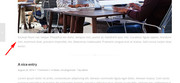
I tested your code:// show manual excerpt only if there is one if ( is_single() ) { if ( $post->post_excerpt ) echo '<div class="manual-excerpt">' . get_the_excerpt() . '</div><div class="hr hr-short hr-center avia-builder-el-9 el_after_av_textblock avia-builder-el-last "> <span class="hr-inner "> <span class="hr-inner-style"></span> </span> </div> '; }on the includes > loop-index.php file, line 171 just above:
$content_output = '<div class="entry-content" '.avia_markup_helper(array('context' => 'entry_content','echo'=>false)).'>';using “default/business” blog layout
and it seem to work good:
Best regards,
MikeJune 2, 2018 at 5:05 pm in reply to: Content Title & Div (.entry-content-wrapper) now have a max width 40em? #965905Hi,
I’m sorry, I see the code above is missing a {
on the first line:
Please try this:#top .fullsize .template-blog .post .entry-content-wrapper > * { max-width: 50em !important; margin-left: auto; margin-right: auto; }Best regards,
MikeJune 2, 2018 at 4:50 pm in reply to: Adding titles to specific portfolio item when displayed in Lightbox #965898Hi,
I see that the lightbox, enlarged image, has the bottom bar hidden in your custom css, the class is “.mfp-bottom-bar” I commented out to allow this to show.
But this is not why the title element is empty, I believe it is due to the old header.php in your child theme, many people are having issues with their lightbox because of the header.php in their child themes, different issues than you, but it’s worth a try.
via ftp, please save a copy of your child theme header.php and then update to the new one and see if that helps.
I also see that you are using a custom script in your child theme for the “magnific-popup” which is the other name for the lightbox, I wonder if that is causing a conflict?
Perhaps try removing it and the code calling to it in your child theme functions.php via ftp, if updating the header.php doesn’t help.Best regards,
MikeJune 2, 2018 at 2:47 pm in reply to: Adding titles to specific portfolio item when displayed in Lightbox #965869Hi,
Thanks, I’m in now :)
I’ll take a look and see what is going on.Best regards,
MikeJune 2, 2018 at 2:45 pm in reply to: Content Title & Div (.entry-content-wrapper) now have a max width 40em? #965868Hi,
Thank you, it looks as you are using the boxed lay out, I tested the above code and seems to work good, try
“max-width: 50em” or adjust to suit.
Let us know how it works for you.Best regards,
MikeJune 2, 2018 at 2:37 pm in reply to: Purchase theme in one person's name and credit card but register to another email address #965865Hi,
Try this code in the General Styling > Quick CSS field:#top.home .avia-builder-el-5 .hr-inner.inner-border-av-border-thin { display: none !important; }Please clear your browser cache and check.
Please see screenshot in Private Content area.Best regards,
MikeJune 2, 2018 at 2:14 pm in reply to: Adding titles to specific portfolio item when displayed in Lightbox #965860June 2, 2018 at 2:01 pm in reply to: Adding titles to specific portfolio item when displayed in Lightbox #965856June 2, 2018 at 1:52 pm in reply to: Purchase theme in one person's name and credit card but register to another email address #965854June 2, 2018 at 1:34 pm in reply to: Adding titles to specific portfolio item when displayed in Lightbox #965851Hi,
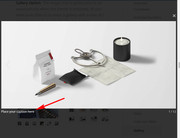
Sorry “mfp-title” is the class of the element that shows the caption in lightbox, that means enlarged. Yours is empty. Please see the second image above, the arrow points to where it is suppose to show.
I do see that in grid view it is showing. Can you please include a admin login in the private content area so we can take a closer look.
Now that you see from the second image above, where the title is suppose to show, do you mean that you want the title centered below the image, or did you want the title centered over the image?Best regards,
MikeHi,
Thanks for the login, I see your file permissions are 700 for all folders, but they need to be 755, this is why you can’t upload the files. Please follow this guide to solve: How to Fix File and Folder Permissions Error in WordPress
If you can’t change the file permissions, please ask your webhost to fix, they will have greater permissions.Best regards,
MikeJune 2, 2018 at 12:33 pm in reply to: Content Title & Div (.entry-content-wrapper) now have a max width 40em? #965833Hey DrHariri,
I didn’t find this in my setup, but we could have different settings, have you tried adding this your your Quick CSS with a new max-width, like this:#top .fullsize .template-blog .post .entry-content-wrapper > * max-width: 50em !important; margin-left: auto; margin-right: auto; } #top .fullsize .template-blog .post .entry-content-wrapper > * { max-width: 50em !important; margin-left: auto; margin-right: auto; }Please adjust to suit, or Please include the url to the page in question so we can take a closer look.
Best regards,
MikeHey Katie,
I see you are using a child theme, if you have a copy of header.php in your child theme please update it with the newest header.php as the file has changed.Best regards,
MikeJune 2, 2018 at 12:03 pm in reply to: Adding titles to specific portfolio item when displayed in Lightbox #965801Hey ofekw,
Right now your “mfp-title” is empty for the image in lightbox, please try adding your title to the “caption” field:
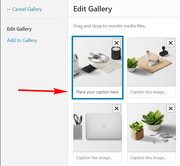
so it will show in lightbox:
Best regards,
MikeHi,
I wanted to try to assist, but I don’t see the slider with the “Sneak Peak”, please include a screenshot of the one you which to hide.
I done note that your layerslider ID’s go from #1 to #11 on your homepage.Best regards,
MikeJune 2, 2018 at 11:24 am in reply to: How to avoid ENFOLD's password protected posts to appear in the RSS feed? #965770Hi,
@kevinmcgillivray thanks for sharing.Best regards,
MikeHi,
Sorry, this thread is from 2015, please open a new thread so we can assist, and include your url in the Private Content area.Best regards,
MikeHi,
@Vesna Please open a new thread so we can assist, and include your admin login in the Private Content area, but as this is not your thread your login info will not be private.Best regards,
MikeHi,
It was just more text than expected for the element.
Glad we were able to help, we will close this now. Thank you for using Enfold.For your information, you can take a look at Enfold documentation here
And if there are features that you wish Enfold had, you can request them and vote the requested ones here
For any other questions or issues, feel free to start new threads under Enfold sub forum and we will gladly try to help you :)Best regards,
MikeHi,
Glad we were able to help, we will close this now. Thank you for using Enfold.For your information, you can take a look at Enfold documentation here
And if there are features that you wish Enfold had, you can request them and vote the requested ones here
For any other questions or issues, feel free to start new threads under Enfold sub forum and we will gladly try to help you :)Best regards,
MikeHi,
Your option at: Enfold Theme Options > Lightbox Modal Window was not set, I checked the box and now your images open in lightbox.
Please clear your cache and check.Best regards,
MikeHey shirtandsimple,
I have been working on another report of this, but it turns out that the Vimeo demo link in the video element does work. Please try to confirm. I believe since GDPR you may need to agree to something in your account, please check if this is the case for you.Best regards,
MikeHey vbonora,
Sorry you are having this issue, Please try re-merging your stylesheets by adding a blank space in the Quick CSS box to enable the “Save all changes” button in the theme, then save.
Typically when someone adds Quick CSS they then save the theme options and re-merge the styles. Since you are saving your changes directly in the theme files, the merging is not taking place.If you want you test your css quickly, try using the WordPress > Customize > Additional CSS
Then once you are happy with the code, move it to the theme stylesheet and save the theme options.
Hope this helps explain.Best regards,
MikeHi,
@goldengate415 Thanks for sharing the solution.Best regards,
Mike -
AuthorPosts
