

Forum Replies Created
-
AuthorPosts
-
Hey SandraSquires,
If I understand correctly, you would like the white grid rows to show after the blue rows, in order for each column.
Try adding this code to the end of your functions.php file in Appearance > Editor:function custom_order_script(){ ?> <script> $(window).on('load resize', function() { if ($(window).width() <= 766) { $(function() { $('#top.home .avia-builder-el-11').insertAfter('#top.home .avia-builder-el-2'); $('#top.home .avia-builder-el-16').insertAfter('#top.home .avia-builder-el-4'); $('#top.home .avia-builder-el-21').insertAfter('#top.home .avia-builder-el-6'); }); } else { $(function() { $('#top.home .avia-builder-el-4').insertAfter('#top.home .avia-builder-el-2'); $('#top.home .avia-builder-el-6').insertAfter('#top.home .avia-builder-el-4'); $('#top.home .avia-builder-el-8').insertAfter('#top.home .avia-builder-el-6'); }); }; }); </script> <?php } add_action('wp_footer', 'custom_order_script');This script works on page load, and while it works now, it would be best to add custom ids or classes to each cell of your grid rows and adjust the script because the classes above will change if you add or remove elements from the page.
Best regards,
MikeHey mattb1169,
Please try this solutionBest regards,
MikeHi,
Try this code in the General Styling > Quick CSS field:#top .av-main-nav ul a { font-size: 18px !important; }Please adjust the font-size number to suit.
Then clear your browser cache.Best regards,
MikeHey philthebass,
You could be running into issues with the serialized data or overlap with syntax issues.
You may have a better chance with exporting the production site via a WordPress export file, and then import it into your staging site. Please see this article.Best regards,
MikeJuly 14, 2018 at 7:31 pm in reply to: Copyright Text under featured Image no longer displayed in grid view #985496Hi,
Sorry for the late reply, it seems the script was not loading, so I added the script to your child theme functions.php so that your customizations will stay in effect after the next update. Just to ensure you don’t have to deal with this again.
I tested your site with the maintenance mode off to ensure it worked, and then turned the maintenance mode back on. When you check please clear your site & browser cache well.
Sorry for the interruption, thanks for using Enfold.Best regards,
MikeHey Katrin,
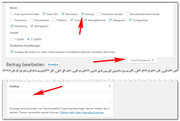
1: Sorry for the confusion, the blog options check boxes are for the blog posts, to remove the date & categories from the blog grid I added this code in the General Styling > Quick CSS field:.avia-content-slider .slide-meta { display: none !important; }2: The reason this category is not showing the excerpt is because the posts have been created with the advanced layout builder, to show the excerpts please look for the drop down at the top of your posts screen “Screen Options” and check the Excerpts box, which will give you a text area below your post area to manually create your excerpts.
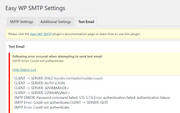
3: I found that the contact form didn’t have a email address filled in, so I tested with mine, yet it still didn’t work, so I tried testing the “Easy WP SMTP” plugin settings using the “Test email” option and received the error “SMTP Error: Could not authenticate.” Please check your mail login & password.
4: Sorry I couldn’t find any posts that suggest a facebook widget, I did find that the top reason for these widgets to not work is the country restrictions on the users Facebook page and privacy settings. Please keep this in mine as you test different plugins, and please share your findings.5: To show the blog grid one post wide for mobile devices, I added this code in the General Styling > Quick CSS field:
@media only screen and (max-width: 767px) {
.responsive #top #wrap_all .slide-entry {
    width: 100% !important;
    margin-left: 0% !important;
}
}
Please clear your browser cache and check that these solutions are satisfactory.
Best regards,
MikeHi,
Glad we were able to help, we will close this now. Thank you for using Enfold.For your information, you can take a look at Enfold documentation here
For any other questions or issues, feel free to start new threads under Enfold sub forum and we will gladly try to help you :)Best regards,
MikeHi,
I took a look at your site but I didn’t see the image titles that normally show on hover, perhaps you have solved this?
One solution for this is to try adding this code to the end of your functions.php file in Appearance > Editor:function custom_script(){ ?> <script> jQuery(window).load(function(){ jQuery('a').removeAttr('title'); jQuery('img').removeAttr('title'); }); </script> <?php } add_action('wp_footer', 'custom_script');Best regards,
MikeHi,
I cloned your content slider and set the screen options to only show on mobile, then set the number of columns to show to one.
Then I set your other content slider to hide on mobile. This way only one content slider will show at a time, but the mobile one will only show one image at a time.Best regards,
MikeHi,
Glad we were able to help, we will close this now. Thank you for using Enfold.For your information, you can take a look at Enfold documentation here
For any other questions or issues, feel free to start new threads under Enfold sub forum and we will gladly try to help you :)Best regards,
MikeHi,
Glad we were able to help, we will close this now. Thank you for using Enfold.For your information, you can take a look at Enfold documentation here
For any other questions or issues, feel free to start new threads under Enfold sub forum and we will gladly try to help you :)Best regards,
MikeHi,
I tried to add a class to your login/logout button in your functions.php, but received an error to try via ftp. Please try to do this by chainging this line:$items .= '<li class="login-btn">'. $loginoutlink .'</li>';Then you can add this code to the end of your functions.php file in Appearance > Editor:
function move_login_btn(){
  ?>
  <script>
  jQuery(window).load(function(){
  jQuery( ".login-btn" ).appendTo( ".login-loc" );
  });
  </script>
  <?php
  }
 add_action('wp_footer', 'move_login_btn');
I have added this code to your phone-info field as the target:
<span class="login-loc"></span>Then please add this code in the General Styling > Quick CSS field to remove the list bullet:
 .login-loc {
list-style-type:none;
}
Best regards,
MikeHi,
Glad to hear that it is as you wanted.
Unfortunately I had to reset the site to remove the errors so I could install a fresh demo, so you will need to re configure the extensions, I also used a temporary admin, which I have removed, but it had changed the site’s email address at:
WordPress > Settings > General > Email Address
To correct I added your email address, but you need to confirm it for it to take effect.
Please take a quick look at all of the settings at:
WordPress > Settings >
Unless there is anything else we can assist with on this issue, shall we close this then?Best regards,
MikeHi,
Glad we were able to help, we will close this now. Thank you for using Enfold.For your information, you can take a look at Enfold documentation here
For any other questions or issues, feel free to start new threads under Enfold sub forum and we will gladly try to help you :)Best regards,
MikeHi,
I added this code to the end of your functions.php file in Appearance > Editor:function remove_masonry_link(){ ?> <script> jQuery(window).load(function(){ jQuery('#top.page-id-3351 a.av-masonry-entry').removeAttr('href'); }); </script> <?php } add_action('wp_footer', 'remove_masonry_link');which has removed the link for the masonry items for that one page, but has kept the hover action.
Please clear your browser cache and check.Best regards,
MikeHi,
@Perrine
I have installed the default demo for you, you can login now and go to the woocommerce plugin and “Launch the configuration wizard ” to set it up so you will have the “Shop” page.
If you don’t want to sell online with woocommerce then you don’t have to done this step, but you won’t have a “Shop” page.
Also, the site has sent you a email to setup the email address for the site, please click the link to do so.
Let us know if we can help with anything else, Thank you for using Enfold.Best regards,
MikeHi,
Can you please include a admin login in the private content area so we can take a closer look.Best regards,
MikeHi,
I received an error when trying to login, invalid user, please check.Best regards,
MikeHi,
Glad we were able to help, we will close this now. Thank you for using Enfold.For your information, you can take a look at Enfold documentation here
For any other questions or issues, feel free to start new threads under Enfold sub forum and we will gladly try to help you :)Best regards,
MikeHi,
Please try adding this for your shop pages:@media only screen and (max-width: 767px) { .responsive.html_custom #top.woocommerce #wrap_all #header.all_colors { height: 80px !important; }Best regards,
MikeHi,
Yes, I have seen that on sites that have Enfold installed, yet other sites that have removed Enfold have shown the shortcode. It can depend on the theme you replace Enfold with.
Naturally we hope you will always use Enfold, but if you do decide to switch themes you will probably need to copy your content as pain text, and rebuild your site with the new builder that you choose.Best regards,
MikeHi,
Can you please include a admin login in the private content area, I would like to add a class to the login link, right now it doesn’t have any.Best regards,
MikeHi,
Ok, will this be for one page or all of the masonry on the site? Please include a link to your masonry page in the Private Content area.Best regards,
MikeHi,
Sorry I thought you were using the “masonry gallery” element, to make the masonry items not clickable please try this code in the General Styling > Quick CSS field:.av-masonry-entry { pointer-events: none !important; }Do you want this to effect only one page? If so please link to the page so we can determine the page ID.
Best regards,
MikeHi,
This is because the sub-heading “Impressions” is not within the “h2” or “h3” tag, but it is in a “p” tag so your code was setting the rule:#top .all_colors p { font-size: 16px; }Also in your other code above, the “.av-subheading_below-h2” is not a class that is used, so it has no effect.
I see that you are trying to have a different sub-heading font-size based on the heading size, h2 or h3.
Please try this for h2 sub-headings:#top .all_colors .av-special-heading-h2 .av-subheading_below p { font-size: 30px !important; }and this for h3 sub-headings:
#top .all_colors .av-special-heading-h3 .av-subheading_below p {
font-size: 22px !important;
}
Best regards,
MikeJuly 12, 2018 at 12:54 pm in reply to: Widget content (part of the menu) is not showing on Mobile #984686Hi,
Try adding this code to the end of your functions.php file in Appearance > Editor:function copy_polylang_to_burger(){ ?> <script> jQuery(window).click(function(){ jQuery( "#polylang-3" ).clone().appendTo( "#av-burger-menu-ul" ); }); </script> <?php } add_action('wp_footer', 'copy_polylang_to_burger');Please test this code before and after the other code, as it’s placement may determine the order of the mobile menu.
Best regards,
MikeJuly 12, 2018 at 11:56 am in reply to: Contact form: Checkbox shows additional form field when selected #984643Hi,
I didn’t find this suggestion in the feature requests, but currently we are re-designing the feature request section, if you there in over the next few weeks you will be able to add it to the requests.
Unless there is anything else we can assist with on this issue, shall we close this then?Best regards,
MikeHi,
Glad we were able to help, we will close this now. Thank you for using Enfold.For your information, you can take a look at Enfold documentation here
For any other questions or issues, feel free to start new threads under Enfold sub forum and we will gladly try to help you :)Best regards,
MikeHi,
Vielen Dank, dass Sie uns Ihre Lösung mitgeteilt haben, es sei denn, wir können Ihnen in dieser Angelegenheit weiterhelfen. Sollen wir das dann schließen?————-
Thanks for sharing your solution, unless there is anything else we can help with on this issue, shall we close this then?
Best regards,
Mike -
AuthorPosts
