

Forum Replies Created
-
AuthorPosts
-
Hi,
Oh, I see. No Enfold doesn’t have a built-in function for that, did you find a plugin that allows posting from the front end?
These are the ones I found: Frontend Posting Plugins But I don’t have any experience with them.Best regards,
MikeHi,
Glad we were able to help, we will close this now. Thank you for using Enfold.For your information, you can take a look at Enfold documentation here
For any other questions or issues, feel free to start new threads under Enfold sub forum and we will gladly try to help you :)Best regards,
MikeHi,
If I understand the issue correctly, your video is not playing on Android Firefox, yet I tested on my Android Firefox & Chrome and the video played good. I have made no privacy browser settings on either, have you tried resetting the browsers to the default settings & clear your browser cache? I also tested on desktop Chrome, Firefox, Edge & IE11 and found no issues playing the video.Best regards,
MikeHi,
Thanks for sharing your solution, unless there is anything else we can help with on this issue, shall we close this then?Best regards,
MikeHi,
I hope you don’t mind, I took a different approach to adding the hr with the icon, I added this code to the end of your functions.php file in Appearance > Editor:function custom_sidebar_hr(){ ?> <script> jQuery(window).load(function(){ jQuery( '<div class="hr hr-short hr-center side-bar"><span class="hr-inner "><span class="hr-inner-style"></span></span></div>' ).insertAfter( '#newsbox-2 li.news-content' ); }); </script> <?php } add_action('wp_footer', 'custom_sidebar_hr');and I added this css to your Quick CSS
.hr.hr-short.hr-center.side-bar {
margin: 0px !important;
}
.hr-short.side-bar .hr-inner {
    width: 90% !important;
    left: 15% !important;
}
Please clear your browser cache and check.
Best regards,
MikeHey Eric,
Thank you for the login, I looked at your layerslider on your homepage, which looks great, but I assume that you want the line height to be a little more, right?
I see that currently, according to the inspector the text is:
font-size: 28.672px;
line-height: 40.96px;
But it looks like the line height is really a lot less than that. Do I understand this issue correctly?Best regards,
MikeSeptember 2, 2018 at 1:03 am in reply to: Burger/Mobile Menu / How can I get it bigger/thicker? #1004518Hi,
Glad we were able to help, we will close this now. Thank you for using Enfold.For your information, you can take a look at Enfold documentation here
For any other questions or issues, feel free to start new threads under Enfold sub forum and we will gladly try to help you :)Best regards,
MikeSeptember 2, 2018 at 12:20 am in reply to: Uploading Google Fonts, No 'Custom Font Manager' #1004511Hey Translibrium,
Please update to 4.4.1 and you will see the font manager, it is very easy to use:
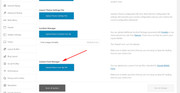
Please note that if you update via FTP, you will need to remove the old theme folder “enfold” first then upload the new “enfold” folder at /wp-content/themes/enfold/
Please don’t try to overwrite the theme folder, as this will leave old files behind and cause errors.Best regards,
MikeSeptember 2, 2018 at 12:15 am in reply to: Show placeholder texts in mailchimp newsletter form (Enfold) + remove label text #1004509Hi,
Glad we were able to help, we will close this now. Thank you for using Enfold.For your information, you can take a look at Enfold documentation here
For any other questions or issues, feel free to start new threads under Enfold sub forum and we will gladly try to help you :)Best regards,
MikeSeptember 2, 2018 at 12:01 am in reply to: How to change default enfold theme to flat business theme. #1004502Hey Amol,
This can be done two ways, the first and best is to reset the site with WordPress Reset it will clear all content, styles, images and be like you started from day one.
Then activate Enfold, and install the demo. Remember, you will lose everything.The second option is if you need to keep your posts & pages & images, you will need to export your posts and pages though WordPress > Settings > tools > export, and then use a plugin like downML – Download Media Library and save your media library to your desktop, which you will upload again one by one later.
Then continue with the steps above.If you must try to save all of your content, then please make a backup with the tools your webhost has to use, just in case you make a error and need to try again.
You can try to just install the new demo over your current demo, but your menus will double up with items from both demos, and you may still lose some posts, maybe not. Either way you will need to spend some time cleaning up the site afterwards, it’s not the best way to do it
Best regards,
MikeHey DJQuad,
To clear all of Enfold’s css for tables, please go to: \enfold\css\base.css and comment out lines 272 – 324
It starts like this:/* #Table ================================================== */ table { width: 100%; padding: 0; margin: 0 0 20px 0; font-size: 13px; }to comment out css add a /* at the start, and a */ at the end, like this:
/*
table {
	width: 100%;
	padding: 0;
	margin: 0 0 20px 0;
	font-size: 13px;
}
*/
Best regards,
MikeHey LuizBase,
If I understand correctly, you need 2 list style colors?
Which colors do you want and what classes do you need to be, that is I assume you will add classes to them to choose where they will go.
Can you link to the page they will be on so we can see the classes?Best regards,
MikeHi,
Thank you for the login, I checked your css and found that you were missing a }
I added it and now Vinay’s code works.
Please clear your browser cache and check.Best regards,
MikeSeptember 1, 2018 at 11:00 pm in reply to: Event Espresso Featured Image not showing in liste #1004483Hi,
Glad we were able to help, we will close this now. Thank you for using Enfold.For your information, you can take a look at Enfold documentation here
For any other questions or issues, feel free to start new threads under Enfold sub forum and we will gladly try to help you :)Best regards,
MikeHi,
This is the css causing it:#top .all_colors u, #top .all_colors span[style*='underline;']{color:#719430;line-height:1.4em;font-family: 'Caveat', 'Helvetica Neue', Helvetica, Arial, sans-serif;text-decoration:none !important;display:inline-block;}Please try this code in the General Styling > Quick CSS field, or in the WordPress > Customize > Additional CSS:
#top .all_colors .av_textblock_section p span[style*='underline;']{
color: inherit !important;
line-height: inherit !important;
font-family: inherit !important;
text-decoration: underline !important;
display:inline-block;
}
Best regards,
MikeSeptember 1, 2018 at 10:45 pm in reply to: Burger/Mobile Menu / How can I get it bigger/thicker? #1004479Hi,
Thank you, Glad we could help, unless there is anything else we can help with on this issue, shall we close this then?Best regards,
MikeSeptember 1, 2018 at 10:42 pm in reply to: Event Espresso Featured Image not showing in liste #1004477Hi,
Glad we could help, unless there is anything else we can help with on this issue, shall we close this then?Best regards,
MikeHi,
We will close this now. Thank you for using Enfold.For your information, you can take a look at Enfold documentation here
For any other questions or issues, feel free to start new threads under Enfold sub forum and we will gladly try to help you :)Best regards,
MikeHey sommersystems,
I took a look and see you are getting this error from your server:Failed to load resource: the server responded with a status of 403 (Forbidden)Please see this article: Fixing 403 Forbidden Error
Best regards,
MikeSeptember 1, 2018 at 9:59 pm in reply to: Event Espresso Featured Image not showing in liste #1004469Hey 360airwalk,
To show the image, Please try this code in the General Styling > Quick CSS field:#top.post-type-archive-espresso_events .small-preview { display: block !important; }Best regards,
MikeHi,
Glad Vinay could help, unless there is anything else we can help with on this issue, shall we close this then?Best regards,
MikeHey tavomenas,
You can allow users to do this, but they would need to have the role of “Author” which will allow them to create, upload, & publish.
Since you don’t want them to publish, you should use a plugin such as: User Role Editor
Here is a article about How to Add Custom User Roles in WordPressBest regards,
MikeSeptember 1, 2018 at 9:26 pm in reply to: Show placeholder texts in mailchimp newsletter form (Enfold) + remove label text #1004465Hey sandrameyer,
To hide the form labels open your mailchimp element & go to the form styling tab and check the Hide Form Labels box: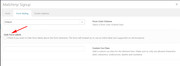
This will make the form use gray placeholder text instead.
To change the font, Please try this code in the General Styling > Quick CSS field:::-webkit-input-placeholder { color: #919191 !important; font-family: Roboto !important; font-size: 10px !important; } :-moz-placeholder { color: #919191 !important; font-family: Roboto !important; font-size: 10px !important; } ::-moz-placeholder { color: #919191 !important; font-family: Roboto !important; font-size: 10px !important; } :-ms-input-placeholder { color: #919191 !important; font-family: Roboto !important; font-size: 10px !important; }Best regards,
MikeHey thomasoo,
This looks like a css rule overriding the default, please link to the page so we can examine it.Best regards,
MikeHi,
I took a look at your site and I notice this warning when I click on your image, while the lightbox is trying to openVM5738 wpforms-form-abandonment.min.js:1 Resource interpreted as Document but transferred with MIME type image/jpeg: "your-ulr/wp-content/uploads/2014/02/rectangular-gallery_0000_main_mlc_on_chairlift.jpg.jpg". abandonClick @ VM5738 wpforms-form-abandonment.min.js:1 dispatch @ VM5679 jquery.js:3 r.handle @ VM5679 jquery.js:3 Navigated to your-url/wp-content/uploads/2014/02/rectangular-gallery_0000_main_mlc_on_chairlift.jpg.jpgI believe your “Form Abandonment Addon” for WPForms is redirecting the lightbox clicks, please try ddisabling the addon and/or WPforms temporary to test.
Best regards,
MikeHey patde22,
Sorry for the late reply, unfortunately I don’t have v5.5 to test with, so please try to install on your server.
If you would like to use a free server for testing Hyper.Host offers a free plan.Best regards,
MikeHi,
Sorry for the late reply, I believe you are looking for:
\enfold\config-templatebuilder\avia-shortcodes\blog\blog.phpBest regards,
MikeHi,
I understand that at first you were using the WordPress default editor and when you added your page breaks your anchor links didn’t point to the right pages anymore, to correct you will need to adjust the links in your table of contents, because they needed to point to a different page. Here is and example:<a href="#Anchor2">Fish & Seafood</a> <a href="?your-page&page=2#Anchor3">Poultry</a> <a href="?your-page&page=3#Anchor4">Meat</a>Note how the first link doesn’t have the page added, because it is pointing to the anchor on the same page, where the others need to point to other pages.
If you want to use the advanced layout builder you will need to break your content into your pages and manually create them.
Best regards,
MikeSeptember 1, 2018 at 4:59 pm in reply to: Change woocommerce price position on single product page #1004427Hi,
I believe I have it this time, I changed the function in your functions.php to this:function move_price(){ ?> <script> jQuery(window).load(function(){ jQuery( '.av-woo-purchase-button p.price:nth-child(odd)' ).insertBefore( '.special-heading-border' ); }); </script> <?php } add_action('wp_footer', 'move_price');and I added this code in the General Styling > Quick CSS field:
.single-product.woocommerce-page .av-special-heading-h3 p.price:nth-child(odd)  {
display: none !important;
}
to remove the second price.
Please clear your browser cache and check.Best regards,
MikeHi,
Ok, can I at least see your site without logging in?
Ok, so let’s talk about your site not updating after you make changes…
Please explain how you are making your font choice, from within the theme option or with custom code?
Please disable: Enfold Theme Options > Performance > JS & CSS file merging and compression
and change this setting to: Enfold Theme Options > Performance > Disable Template Builder Elements > Always load all elements
Please disable any and all caching plugins, and any CDN (content delivery network) plugins/settings, please note that Jetpack has a CDN setting.
Please check your webhost and disable any server side caching.Best regards,
Mike -
AuthorPosts
