

Forum Replies Created
-
AuthorPosts
-
January 6, 2019 at 5:53 pm in reply to: SEO Tool Pagerangers shows dead links _wp_link_placeholder #1050595
Hi,
I will so keep an eye out for this error and if I see anything else about it I’ll report here.Best regards,
MikeHi,
Thanks for the admin login, but I will need FTP access also to upload the files.
Please include.Best regards,
MikeHi,
Glad to hear, we will close this now. Thank you for using Enfold.For your information, you can take a look at Enfold documentation here
For any other questions or issues, feel free to start new threads under Enfold sub forum and we will gladly try to help you :)Best regards,
MikeHi,
I made the change for you:
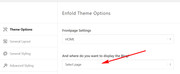
Please clear your browser cache and check.

Best regards,
MikeJanuary 6, 2019 at 4:19 am in reply to: How to use the Avia Layout Editor in New Enfold Version #1050479Hey GeoCreo,
If you are using Enfold v4.0.5 with WordPress v5 then you may not see the ALB button.
Please update Enfold to v4.5.2
or your can downgrade WordPress to v4.9.9 with the WP Downgrade plugin.If you want you update Enfold, Theme Forest has changed their API for Token keys so you will need to update manually.
There is a free plugin that will allow you to manually update via the WordPress Theme panel by uploading the enfold.zip file.
Otherwise you can update via FTP, please remember, if you update manually you will need to delete the current enfold folder and then upload the new one. Please don’t try to overwrite the theme folder, as this will leave old files behind and cause errors.
My recommendation is to go to your Theme Forest account and download the updated Enfold v4.5.2 and manually update it, then going forward it will use the new Token keys. All users will need to generate a new token for updates. Please see this post
Please let us know if you would like some help updating.Best regards,
MikeJanuary 6, 2019 at 4:13 am in reply to: Mobile – sub menu items vertical padding and logo size is too small #1050477Hey webWahine,
For the logo on mobile, the max-height was set to 80px, since you can’t set max-height to auto, try 134px or what you choose:@media only screen and (max-width: 767px) { .responsive .logo img { max-height: 134px !important; } }For the menu, try this css:
#av-burger-menu-ul ul.sub-menu li {
padding: 0px !important;
margin: 0px !important;
}
Best regards,
MikeHey satucker,
Thanks for the login, your issue is because in your theme options you have your “Blog” set to your “Blog” page.
So the theme is showing your “Blog” instead of the page you created on “Blog” :)
Sorry I’m not trying to be funny, please try going to your theme options and setting to “blog” to nothing of a different page and the check your link to “Blog” again, you will see the buttons :)Best regards,
MikeHey laceym002,
Please include a admin login & FTP access in the Private Content area so we can assist.Best regards,
MikeHi,
Glad we were able to help, we will close this now. Thank you for using Enfold.For your information, you can take a look at Enfold documentation here
For any other questions or issues, feel free to start new threads under Enfold sub forum and we will gladly try to help you :)Best regards,
MikeHi,
For your shop page header what are you trying to achieve? Because the box shadow code is not correct to cover the image as in the
ourstory page.#av_product_description { box-shadow: inset 0 0 0 305px rgba(0,0,0,0.7) !important; }For the menu items please check this custom css, it is causing the issue by making the top and bottom padding zero:
.main_menu ul:first-child > li > a {
    padding: 0 15px !important;
}
Best regards,
MikeHi,
I took a look at the background image that you added to the header of the page, and it has the logo in the image, so we can’t remove it. Please try finding a new image to use without the logo in it.
Please see the image in Private Content area.Best regards,
MikeJanuary 6, 2019 at 1:55 am in reply to: Problem with the update with version 4.4.1. to 4.5.2 #1050448Hey Cora,
Bitte geben Sie ein Admin-Login und einen FTP-Zugang in den Bereich für private Inhalte ein.Mit Google übersetzt / Translated with Google
Best regards,
MikeJanuary 6, 2019 at 1:51 am in reply to: SEO Tool Pagerangers shows dead links _wp_link_placeholder #1050447Hey ak-muc,
I only found a couple of references to “_wp_link_placeholder”
once with this theme
once with this plugin and this plugin but all are old.I scanned WordPress and Enfold and found that it is coming from WordPress in:
\wp-includes\js\wplink.js or \wp-includes\js\tinymce\plugins\wplink\plugin.jsI checked your sites feeds but the link is not listed, so I’m not sure how it was created or from where, but I can’t recreate the error. If this is a new error in WordPress it could take awhile before it’s discovered.
I recommend either adding it to you robots.txt as a disallow or add a redirect in your .htaccess to a page of your choice.
Best regards,
MikeHey Anton,
It seems that you have this css causing the issue..logo {max-width: inherit !important;padding-top: inherit !important;}If you want to set a max-width please use a number, “inherent” takes it’s size from the parent element.
I assume that you are trying to have the same logo and header action as this page:
https://www.newpointdeview.com/blog/sommaire/If you didn’t add that css, or if this doesn’t help, Please include a admin login in the Private Content area so we can be of more assistance.
Best regards,
MikeHi,
Try adding this code to the end of your functions.php file in Appearance > Editor:function remove_vcard_author(){ ?> <script> (function($){ $(document).ready(function(){ $(".av-masonry-author").removeClass("vcard author"); }); })(jQuery); </script> <?php } add_action('wp_footer', 'remove_vcard_author');Best regards,
MikeHi,
Glad to hear, we will close this now. Thank you for using Enfold.For your information, you can take a look at Enfold documentation here
For any other questions or issues, feel free to start new threads under Enfold sub forum and we will gladly try to help you :)Best regards,
MikeHey paaploo,
For your older v4.2.3, Theme Forest has changed their API for Token keys so you will need to update manually.
There is a free plugin that will allow you to manually update via the WordPress Theme panel by uploading the enfold.zip file.
Otherwise you can update via FTP, please remember, if you update manually you will need to delete the current enfold folder and then upload the new one. Please don’t try to overwrite the theme folder, as this will leave old files behind and cause errors.
My recommendation is to go to your Theme Forest account and download the updated Enfold v4.5.2 and manually update it, then going forward it will use the new Token keys. All users will need to generate a new token for updates. Please see this post
Please let us know if you would like some help updating.Best regards,
MikeHey adamblakester,
Please try this code in the General Styling > Quick CSS field or in the WordPress > Customize > Additional CSS field:.av-image-caption-overlay { bottom: -20px !important; font-size: 10px !important; height: auto !important; left: 50% !important; transform: translate(-50%) !important; width: 100% !important; text-align: justify !important; }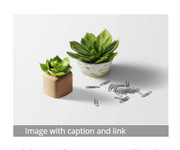
Best regards,
MikeHi,
Glad Jordan could help, unless there is anything else we can help with on this issue, shall we close this then?Best regards,
MikeJanuary 5, 2019 at 11:40 pm in reply to: Pages link not showing up and the page editor never loads #1050428Hi,
I have tested the plugin on my localhost with WordPress v5.0.2 & Enfold v4.5.2 and found no errors, I then checked your site and found you are using WordPress v4.3.1 & Enfold v2.4.2
Please try updating your site and the plugin should work fine.Best regards,
MikeHey KaJoHa,
I have taken a look and found that this issue is due to your colors for the buttons are not in the correct format:

Please check your theme color options and correct to a hex color code.
If you are still having trouble please include a admin login in the private content area so we can be of more assistance.Best regards,
MikeHey Tanguera108,
I believe that this is due to your older WordPress core, try to update to version 5.0.2 first, then update Enfold to v4.5.2
If you still experience problems Please include a admin login & FTP access in the Private Content area so we can be of more assistance.Best regards,
MikeJanuary 5, 2019 at 10:27 pm in reply to: Menu – centered on large screen, how do I set burger menu to right side? #1050411Hey c3idesign,
Please try this code in the General Styling > Quick CSS field or in the WordPress > Customize > Additional CSS field:@media only screen and (max-width: 767px) { .responsive #top #wrap_all #header .main_menu { left: 90% !important; } }Best regards,
MikeHey carmen,
Yes you can with some css like this:.create:before{ content: ""; display: block; background: url('icon_image.jpg') no-repeat; width: 25px; height: 25px; float: left; }But in order to assist further, we will need to know the url to the page and if it’s the same icon for every title or just one, and the icon you wish to use.
Best regards,
MikeHey morelon,
Please try this code in the General Styling > Quick CSS field or in the WordPress > Customize > Additional CSS field:.main_color a.av-masonry-entry { border: 1px solid #e1e1e1 !important; }Best regards,
MikeHey Jason,
I took a look at your page and your css seems to be working well, Please see the screenshot in Private Content area.
Perhaps you need to clear your browser cache to see it in your browser.Best regards,
MikeHi,
Happy New Year to you too :)
I adjusted your css to move the burger icon up to centered next to your logo when it’s in mobile view, but I noticed that this left the content of each page with a top padding of 50px, so it was down a little far.
If you agree, then you could add this css to remove that padding from the mobile view:@media only screen and (max-width: 767px) { main.template-page.content { padding-top: 0px !important; } }Please clear your browser cache and check.
Best regards,
MikeHey SDUS,
Sorry for the late reply, I took a look at one of your products built with the advanced layout builder, (Pasta alla carbonara) and see that you have not added any of the product elements from the builder
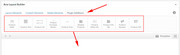
If you use the advanced layout builder for your products you will need to use the elements to create your page, please see this article in our documentation.Best regards,
MikeHi,
Sorry for the late reply, I took a look at your page and took the liberty to create a clone of it to test with, please see:
/center-icons-test/
I changed the color section ID so that none of your other css would be applied to this page.I noticed that in your text block element after your icons shortcode you have your text-align: center; I believe that you meant to wrap your icons shortcode with this.
I then added a code block with a style rule so it would only apply it to this one page:<style> .av_font_icon { display: inline-block !important; } </style>The icons are now centered in a horizontal line for all screen sizes, please check.
The vertical alignment could be adjusted some if you like.Best regards,
MikeHi,
That is odd, I was looking at the code in your screenshot:

Please try publishing your site to a temp server and include a admin login so we can be of more assistance.
Here is a list of free WordPress hosting sites that you can setup a testing site quickly and easily.Best regards,
Mike -
AuthorPosts
