

Forum Replies Created
-
AuthorPosts
-
Hey ESWEENEY113,
Sorry for the late reply, when I look at your site it looks like a site and not a landing page, Please see the screenshot in Private Content area and confirm that it is the site, or Please include an admin login in the Private Content area and a screenshot of the homepage so we can examine closer.Best regards,
MikeHey devynspirit,
Sorry for the late reply, I added this code in the General Styling > Quick CSS field:.html_stretched #top.page-id-9384 #wrap_all { background-color: #000 !important; } #top.page-id-9384.avia-blank #main .container_wrap:last-child { border-bottom-style: none !important; }This css is for the one page you linked to so it won’t interfere with your other pages.
Please clear your browser cache and check.Best regards,
MikeHey Shineonseo,
Sorry for the late reply, I see that you are using Enfold v3.8 and WordPress v5.2.1, this version of Enfold is not WP5 ready, but you can update. First please ensure that your PHP is at least v5.6
Then download the theme from Theme Forest.
Then open it and extract the “enfold.zip” file and then extract it to your desktop as /enfold/
Then rename to /enfold-new/ and upload the folder to your /wp-content/themes/ folder via FTP or your file manager in your webhost cPanel
Then via FTP or your cPanel file manager, at /wp-content/themes/ rename /enfold/ to /enfold-old/ and rename /enfold-new/ to /enfold/
Please don’t try to overwrite the theme folder, as this will leave old files behind and cause errors.Now your new version is installed, please check your site. If all is well then “Good Job!” If not then reverse the last rename step above and your site will be restored.
Should you still have issues Please include an admin login & FTP access in the Private Content area and have the latest enfold version uploaded to the theme directory.
Best regards,
MikeHi,
Glad to help, I assume we can close this now, but I like to ask first. Shall we close this then?Best regards,
MikeHey acscreativenew,
Sorry for the late reply, I have checked your page and see the sub-menu is not sticking in IE11, yet it does on our demo page please try for yourself.
I would recommend disabling your plugins or scripts to test, IE11 can be a buggy browser.
For your icon and header text, I couldn’t see why this is occurring, perhaps it will make more since when the sub-menu issue is resolved.Best regards,
MikeHey ind-image,
Sorry for the late reply, I have taken a look and tried to reproduce on your site with new icon elements, but they are correct.
I also looked at your home page, and the icons are in the correct order when compared to your backend.
Perhaps when you uploaded the second version of your icons the font css changed a little and your cache had not been cleared?
Anyways please try again.Best regards,
MikeHey antiguanice,
Sorry for the late reply, please choose your archive sidebar at: Enfold Theme Options > Sidebar Settings > Sidebar on Archive Pages:
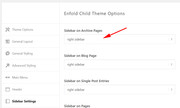
Then add your widget to the sidebar you choose, if you wish to have better control of when the widget shows you can use the Widget Options plugin.Best regards,
MikeHi,
I added some left side text for you, I changed the content in the Enfold Theme Options > Header > Extra Elements > Phone Number or small info text to this:<span class="info-left">Left Side Info</span> <span class="info-right"><a href="tel:555-555-5555">(555) 555-5555</a></span>Then I added this css in your Quick CSS:
#header_meta > div > .phone-info,#header_meta > div > .phone-info > span {
width: 100% !important;
float: none !important;
}
.phone-info span.info-right {
float:right !important;
}
.phone-info span.info-left {
float:left !important;
}
Please clear your browser cache and check.
Please see the screenshot in Private Content area.Best regards,
MikeJune 1, 2019 at 8:06 pm in reply to: Enfold Masonry images, once expanded (lightbox), don't load full size image. #1106170Hi,
Glad we were able to help, we will close this now due to it being started two years ago. Thank you for using Enfold.For your information, you can take a look at Enfold documentation here
For any other questions or issues, feel free to start new threads in the Enfold forum and we will gladly try to help you :)Best regards,
MikeHey Gitte,
Sorry for the late reply, and thanks for the login. When I check your page the images in the top section are giving the 404 error, and do not show on hover or on click.
In your ftp it does seem to have the correct image names, but when I test on my localhost the files are cached without the “?_nc_ht=scontent-frt3-1.cdninstagram.com” on the end of the file name and your instagram images work correctly.
But removing the ?_nc_ht=scontent-frt3-1.cdninstagram.com on your site doesn’t allow direct access.I believe this was some kind of error, so I added a new instagram widget with caching and it works well, Please clear your browser cache and check. It is called “New Cached Instagram” at the bottom of the page. Perhaps try deleting your widget and rebuilding it.
Best regards,
MikeHey axels1983,
Sorry for the late reply, from the screenshot it looks like the plugin may be using the “thumbnails” image size, but I can’t be sure until I can login and examine the page better.
But assuming that this is true, please try installing the plugin Simple Image Sizes and find the image size option in the WordPress > Dashboard > Settings > Media > Media Settings and adjust the thumbnails size from 80×80 to the size you wish. Then use the image regeneration option at the bottom of the same page to rebuild your images.
If this doesn’t help, please include an admin login in the private content area so we can be of more assistance.Best regards,
MikeHey Jasmer,
Sorry for the late reply, WordPress creates these sizes by default:
Thumbnail
Medium
Medium Large
Large
But your site may not use all of these.
The rest are created by Enfold, to help work smoothly, but typically multiple image sizes are available in the page for each size to help with screen sizes, so if one is not available the browser will get the next size.
The easiest way to choose which ones you want to use is to use the plugin Simple Image Sizes. So if you are not using the woocommerce shop you can uncheck those or set their size to zero, the same for other sizes.
You can also choose to not use a size, and then choose to use it in the future by using the image regeneration option in the plugin.Best regards,
MikeJune 1, 2019 at 5:58 pm in reply to: Cookie consent should not be visible on language-switch #1106155Hey Maw87,
Sorry for the late reply, the cookies are created on sessions with a unique value such as: 7fa266652189f07d9e75daa4321f2769 the WPML plugin, by default brakes this when switching languages.
The WPML plugin tries to correct this with an option, please see here.Best regards,
MikeHey guenda84gg,
Sorry for the late reply, I tried researching this and found that WordPress strips and sanitizes the apostrophe in the database.
I did find that Relevanssi offers an option to allow this, but I see you don’t want to use this plugin, perhaps there is another search plugin that will help, but I didn’t find it.
Sorry, I wish we could have been more help with this.Best regards,
MikeHi,
Thanks for the login and ftp access, I don’t think it’s the theme or the .htaccess
I believe it’s your DNS zone settings, please check to see if you have an “A” record for “www” entry of your domain. The “A” record should point to the same IP as your default main Domain.
Please check with your domain name registrar and ask them to assist. They will need to flush the nameservers and it could take a few hours or a day to take effect.Best regards,
MikeHi,
Odd, when I test on my localhost the gallery does work:
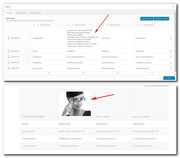
I examined your page closer and found that this custom css at the bottom of your Quick CSS is hiding the image:#top div .avia-gallery img { display: none !important; }I commented it out and now your gallery in your tables are working.
Please clear your browser cache and check.Best regards,
MikeHi,
Please try this code in the General Styling > Quick CSS field or in the WordPress > Customize > Additional CSS field:#top.home #av_section_1 { background-size: cover !important; }The WordPress > Customize > Additional CSS has been given priority over all css in WordPress, so it is a good place to check if some css is working. If you are adding your css to the child theme style.css and you are using the Enfold Theme Options > Performance > JS & CSS file merging and compression you will need to resave the Theme options, the big blue “save all changes” button for the child theme css to be re-built. Sometimes the button is not active so you can’t click it, in this case please add a blank space to the Quick CSS and then save and clear your cache.
You can add your own custom class, in the code above you can replace #av_section_1 with your custom class.
For the width of the background you will need to manually adjust because the with is automatically set to 100%, please try this css:#top #av_section_1 .av-special-heading-tag { width: 90% !important; } #top #av_section_1 .av-subheading { width: 36% !important; }Best regards,
MikeHi,
Glad we were able to help, we will close this now. Thank you for using Enfold.For your information, you can take a look at Enfold documentation here
For any other questions or issues, feel free to start new threads in the Enfold forum and we will gladly try to help you :)Best regards,
MikeJune 1, 2019 at 1:32 pm in reply to: Enfold Masonry images, once expanded (lightbox), don't load full size image. #1106073Hi,
Try adding this code to the end of your functions.php file in Appearance > Editor:add_filter('avf_avia_builder_helper_lightbox_size','avia_change_image_size_lightbox', 10, 1); function avia_change_image_size_lightbox($size){ return 'full'; }Best regards,
MikeJune 1, 2019 at 1:17 pm in reply to: Logos in Footer Widget – Partner Logos element shortcode #1106072Hi,
Thank you, but it seems the login token has expired, please renew.Best regards,
MikeHi,
I took another look at your site and found the css to be working, to demonstrate I changed the top gray bar and phone number to 60px#header_meta { min-height: 60px !important; } #header_meta .phone-info { line-height: 60px !important; font-size: 60px !important; }Please see the screenshot in Private Content area.
Please adjust to suit, and Then clear your browser cache and any cache plugin, and check.
I also adjusted your phone number in Enfold Theme Options > Header > Extra Elements > Phone Number or small info text so it is a link, please check.
You can also add more text there if you wish.Best regards,
MikeHi,
Please try this code in the General Styling > Quick CSS field or in the WordPress > Customize > Additional CSS field:#top #av_section_1 .av-special-heading-tag,#top #av_section_1 .av-subheading, #top .av-image-caption-overlay-center p { filter: alpha(opacity = 80); background: rgba(0, 0, 0, 0.5); padding: 20px !important; }Please clear your browser cache and check.
Best regards,
MikeHi,
Thanks for your feedback, Please include an admin login in the Private Content area so we can examine.Best regards,
MikeHey Banshee350,
Sorry for the late reply, Please try disabling your autoptimize plugin and include admin login and ftp access in the Private Content area so we can investigate further.Best regards,
MikeHi,
Thank you, I have researched this further and understand better now, on my localhost this is working correctly:

Please try disabling your plugins and/or updating to Enfold version 4.5.7
If this doesn’t help Please include an admin login & FTP access in the Private Content area so we can investigate further.Best regards,
MikeHi,
Thank you for sharing your solution, we will close this now. Thank you for using Enfold.For your information, you can take a look at Enfold documentation here
For any other questions or issues, feel free to start new threads in the Enfold forum and we will gladly try to help you :)Best regards,
MikeMay 31, 2019 at 1:32 pm in reply to: Where can I edit the Enfold version of the WooCommerce Checkout Page Layout #1105672Hi,
Glad we were able to help, we will close this now. Thank you for using Enfold.For your information, you can take a look at Enfold documentation here
For any other questions or issues, feel free to start new threads in the Enfold forum and we will gladly try to help you :)Best regards,
MikeMay 31, 2019 at 5:29 am in reply to: php warning(s) spamming errorlog – Enfold 4.5.6 WP 5.1.1 #1105592Hi,
Glad to help, I would say about an hour, you will want them to test your custom functions.php after it is moved to the new theme.Best regards,
Mike -
AuthorPosts
