

Forum Replies Created
-
AuthorPosts
-
Hi,
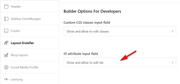
While working with you on your other thread I was also working on this one, so to add a custom ID to the blog element in the 1/4 column on your homepage I enabled the developer ID field on your elements at Enfold Theme Options > Layout Builder > Builder Options For Developers > ID attribute input field
then in the blog element on your homepage I added the ID “sidebar_blog” so it could be targeted without effecting other elements elsewhere:
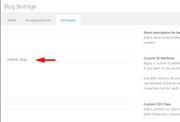
now if you add this code to the end of your functions.php file in Appearance > Editor the heading will be changed:function custom_sidebar_blog_script(){ ?> <script> (function($) { $(document).ready(function(){ function replaceElementTag(targetSelector, newTagString) { $(targetSelector).each(function(){ var newElem = $(newTagString, {html: $(this).html()}); $.each(this.attributes, function() { newElem.attr(this.name, this.value); }); $(this).replaceWith(newElem); }); } replaceElementTag('#sidebar_blog .post-title.entry-title ', '<h4></h4>'); }); }(jQuery)); </script> <?php } add_action('wp_footer', 'custom_sidebar_blog_script');Please note that the heading is H4 in the script but you can change it to whatever you want, I choose H4 because you had manually changed the php file to H5 and I wanted it to show a difference.
Now going forward any blog element that you add the ID “sidebar_blog” to will be changed.
Best regards,
MikeHi,
Actually your issue seems to be your Total Cache minify setting, when it is on you get thegagTracker is not definederror and your homepage slider doesn’t show.
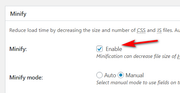
But when the minify is off you get thejQuery is not definederror because your Enfold Theme Options > Performance > Load jQuery into your footer setting is on:

So first you need to have the “Load jQuery into your footer” off and you need to disable your Total Cache minify.Best regards,
MikeHi,
Please try going to Enfold Theme Options > General Styling > Content | Sidebar Ratio and change the width of the sidebar to suit.
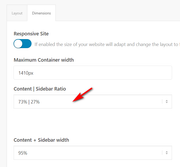
Best regards,
MikeHi,
Your javascript error has returned, please check.
When I last check the error was resolved and the h3 tag had been changed to a span, as in my screenshot.Best regards,
MikeHi,
Thanks for correcting the javascript error, now the script is working correctly, I didn’t need to login or make changes, please clear your browser cache and search your source code forCookie- und Datenschutzeinstellungenthere you will see the H3 is now a span:

that was the one we are working on correct?Best regards,
MikeHi,
Glad we could help, I used the shortcode from the test page to repair your homepage and then deleted the test page and disabled the debugger. Then reviewing your original css question I checked your Quick CSS and found a missing bracket and corrected, along with replacing your “font-color” with the correct “color” in the css.Please check the home page and the css solutions that were addressed earlier and let us know if there is anything else we can assist with.
Best regards,
MikeHi,
To add a screenshot please try using https://postimages.org/ and pasting the image URL in your post.
Sorry, our contact form doesn’t have an upload option, please try using the contact form 7 plugin.Best regards,
MikeHi,
Today I’m able to see all three language pages, you must have made a change to the settings?Best regards,
MikeHi,
Today you are getting a couple of javascript errors for your gtag script in your cache/minify plugin,
so there is either an error in the gtag script or multiple minifying broke it, or a quote was changed into a curly quote from the code I posted above when you pasted it into your functions.php
Please include an admin login in the Private Content area so we can examine.Best regards,
MikeHi,
To add your page ID to the css you would add it to the beginning of the rule like this:
.page-id-206 label[for="avia_1_1"]:before {
but if you are not using the labels and want the icon before the fields we will use this css instead:p#element_avia_1_1:before { content: "\e864"; font-family: entypo-fontello; color: #3ec607; font-size: 18px; padding-right: 6px; } #top .avia_ajax_form .text_input { width: 90% !important; }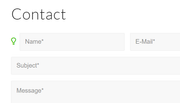
but you will still need to find the ID of each field to target.
If you need further help with this please link to the form on your site so we can be of more assistance.Best regards,
MikeHi,
Thank you for the feedback, Please include an admin login in the Private Content area and I will ask the team for someone with more WPML experience to take a look.
I assume it may help to also include the url of the strings that are not translating so they can check and test quickly, such as your example above, is it in the shopping cart or on the check out page?
Thank you for your patience.Best regards,
MikeHi,
Thanks for the login, I used the Avia Layout Builder Debugger to examine your homepage shortcode and I believe that someone may have opened or edited the homepage with the “WordPress Block Editor” instead of the Advanced Layout Builder which it was built with, and then the block editor added some paragraph and line brakes in the shortcode which broke the layout.
So I copied your homepage to a test page, please see the link in the Private Content area.
I then tried to manually correct the shortcode, please check the test page to see if it is correct, if it is I will move it to your homepage for you.I also had to temporarily disable your caching plugin to resolve a different error, after we fix your homepage I will enable your caching again and expect everything to work correctly.
Best regards,
MikeJanuary 5, 2020 at 2:04 pm in reply to: Add Fullwidth Sub Menu to Header.php across whole website #1170439Hi,
Thanks for the link, so you would like this menu to show on every page but only for mobile?
When you tried the function above how was it “broken”?
Please include an admin login in the Private Content area so we can test the function and shortcode.Best regards,
MikeHi,
Thanks for the login, typically the solution for this is to delete the fonts in the Iconfont Manager, but as you pointed out “Font: 0” returns on each page reload which is strange. Please try upgrading your PHP version to 7.2 or 7.3 and then try deleting it again. I don’t see a caching plugin on your site, is your web server caching? If so please try clearing it.Best regards,
MikeHey megamazl,
Try adding this code to the end of your functions.php file in Appearance > Editor:function custom_consent_tag_script(){ ?> <script> (function($) { $(document).ready(function(){ function replaceElementTag(targetSelector, newTagString) { $(targetSelector).each(function(){ var newElem = $(newTagString, {html: $(this).html()}); $.each(this.attributes, function() { newElem.attr(this.name, this.value); }); $(this).replaceWith(newElem); }); } replaceElementTag('#av-consent-extra-info h3.av-special-heading-tag', '<span></span>'); }); }(jQuery)); </script> <?php } add_action('wp_footer', 'custom_consent_tag_script');and add this code in the General Styling > Quick CSS field:
#av-consent-extra-info span.av-special-heading-tag {
	font-size: 20px;
	font-weight: 300;
}
Then clear your browser cache and any cache plugin, and check.
Best regards,
MikeHi,
Thanks for the ftp access, I have updated your theme.
If you would like me to look at your other error of html code showing on your page I will also need an WordPress admin login.
Do you know when this started?Best regards,
MikeHi,
On this post It looks like the WPML team got this error on their page:This element was disabled in your theme settings. You can activate it here: Performance Settings
To correct they need to go to Enfold Theme Options > Performance > Disabling of template builder elements and choose “always load all elements”
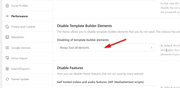
I hope that helps them to recreate your issue to solve, I’m not a WPML expert. Is the “From” the only word not translating?

I may be able to fix that with a script, or I can ask for help from someone on our team with more WPML experience.Best regards,
MikeHi,
I see on the page in the Private Content area you have an image element inside of a color section element, this typically will have margin or padding and not stretch full width, please try removing the image element and use the image as a background for the color section.
But I am not able to view this page on the frontend, I am always directed to /en/ even when I click the Italian language flag and so for mobile, I only see the screenshot I posted above and not the same as the backend?Best regards,
MikeHey Matsky1,
Thanks for the login, when I look at your page the color section background image is different than your screenshot, but it is full width, Please see the screenshot in Private Content area.
Did you sort this out, or did I misunderstand something?Best regards,
MikeJanuary 4, 2020 at 8:30 pm in reply to: Updating Fail Error: The response is not a valid JSON response. #1170344Hi,
Glad to hear you were able to sort this out, we will close this now. Thank you for using Enfold.For your information, you can take a look at Enfold documentation here
For any other questions or issues, feel free to start new threads in the Enfold forum and we will gladly try to help you :)Best regards,
MikeHey Alexander,
You can do this with css in your Quick CSS like this:label[for="avia_1_1"]:before { content: "\e864"; font-family: entypo-fontello; color: #3ec607; font-size: 18px; padding-right: 6px; }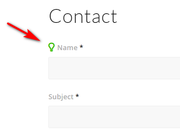
the only trick is that you will have to examine the form html to determine the code for each label, and you should preced the css with the page ID so the icon doesn’t show on every contact form on your site.If you need further help with this please link to the form on your site so we can be of more assistance.
Best regards,
MikeHi,
You won’t be able to add a link in the actual widget title, but if you use a “HTML Widget” and leave the “title” field empty you can fake a widget title by using H3 tags and a link like this:<a href="/about"><h3>widget title</h3></a>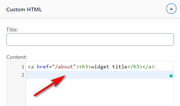
That way it will look like a widget title and have a link.Best regards,
MikeJanuary 4, 2020 at 7:30 pm in reply to: How to change colour of bullet points to white (only in colour section)? #1170329Hey Jak73,
Thanks for the link, the best approach would be to add a custom ID to the color section in the developer tab, perhaps like “bottom-section” and then use this css:#bottom-section .entry-content-wrapper div li { color: #fff !important; }otherwise, you can use this css right now:
#av_section_1.avia-builder-el-6 .entry-content-wrapper div li {
color: #fff !important;
}
Best regards,
MikeHey Jak73,
Sorry I have not seen any posts on table of content plugins for Enfold, but here is a list of ones you can try.
Alternatively, you can create your own with this article which gives you the html and css you can use in a code block element.Best regards,
MikeHey Carsten,
Thanks for the link, these two plugins are using the same classes and css, I would guess that one plugin took the code from the other.
Anyways, there seems to be an issue with their css, I recommend contacting the plugin author for updated css to correct this, as we don’t support 3rd party plugins.Best regards,
MikeHi,
It looks like you are using a blog element inside of a 1/4 column to simulate a sidebar on your homepage, is this correct?
I imagine you don’t want the blog element to show the post titles as h5 everywhere it might be used, only in this situation, is that correct?
We could help with a function that would change the heading size whenever it is used inside of a column that contains a custom class so that you can use this on multiple pages, would that help?Best regards,
Mike -
AuthorPosts

