

Forum Replies Created
-
AuthorPosts
-
January 11, 2020 at 4:31 pm in reply to: Bullet lists in text widget (sidebar right) do not appear #1172401
Hey aebli,
Thanks for the link, Please try this code in the General Styling > Quick CSS field or in the WordPress > Customize > Additional CSS field:.widget .textwidget ul { list-style: disc outside !important; margin-left: 7px !important; } .widget .textwidget ul li { margin-left: 1.1em; padding:3px 0; }Then clear your browser cache and any cache plugin, and check.
Best regards,
MikeJanuary 11, 2020 at 3:49 pm in reply to: change the submission button text color of contact form #1172397Hey ryanmeighan,
Please try this code in the General Styling > Quick CSS field or in the WordPress > Customize > Additional CSS field:#top.home #av_section_1 input[value="Get Moving"].button { color: #fff !important; border-color: #222 !important; }Then clear your browser cache and any cache plugin, and check.
Best regards,
MikeHey Lucian,
I see that your Quick CSS code was to give the button a background color, but there was a small error in the code, I adjusted for you, and is now working, and your advanced styling option is giving the button text a hover color of black, which is working. So to add the border-radius I added it to your Quick CSS, please clear your browser cache and check and adjust to suit.Your css with the error:
#top #wrap_all .av_seperator_big_border#header .av-menu-button-bordered > a {
    background-color: rgba(45, 189, 188, 1);
} !important
the corrected css:
#top #wrap_all #header.av_seperator_big_border .av-menu-button-bordered > a {
    background-color: rgba(45, 189, 188, 1) !important;
}
the corrected css with the border-radius:
#top #wrap_all #header.av_seperator_big_border .av-menu-button-bordered > a {
    background-color: rgba(45, 189, 188, 1) !important;
    border-radius: 50px !important;
}
Best regards,
MikeHey Guenter,
Thank you for sharing, I also like your icon animation :)Best regards,
MikeHey mguillou5670,
Adding the css from the instructions in the documentation corrects your issue, perhaps you forgot to add or there is an error in your css, such as a missing bracket, please check./* CSS - Subtext on right */ #top .logo, #top .logo a { overflow: visible; } /* Subtext styling */ .logo .subtext h1 { font-size: 20px; font-weight: 600; } .logo .subtext { position: absolute; top: 50%; right: 0; transform: translate(120%, -50%); z-index: 999; }Please see the screenshot in Private Content area of my test of the css on your site. If you added the css to your Enfold Theme Options > General Styling > Quick CSS field, try copying all of the code and paste into WordPress > Customize > Additional CSS this has error checking and will let you know of any errors in the code.
If this doesn’t help, please include an admin login in the private content area so we can be of more assistance.Best regards,
MikeHey Susanne,
Sorry, I have not seen this before, you could try opening the PHP files with a text editor to see if there are comments at the top of the files, typically you would find the author’s name and what program they are a part of there. It looks like it has a copy of your “wp-config.php” in it so I could be part of a backup.
Was your WordPress installed automatically by your webhost with a one click installer? It could be left over from the installer, you could ask your webhost if this is true and if you can remove it.Best regards,
MikeHey karel,
I see that you are using WordPress v5.2.5, please try updating to v5.3.2
If this doesn’t help, please include an admin login in the private content area so we can be of more assistance.Best regards,
MikeHey karel,
This is because your image is not opening in a lightbox, please ensure that the Enfold Theme Options > Lightbox Modal Window is enabled.
If this doesn’t help, please include an admin login in the private content area so we can be of more assistance.Best regards,
MikeJanuary 11, 2020 at 1:59 pm in reply to: Social Icons are not appearing in Mobile in WordPress 5.3.2 #1172380Hey geraldinetay27,
Do you mean that the social icons do not show on mobile? This is the default action of Enfold, to show the social icons in your header on mobile Please try this code in the General Styling > Quick CSS field or in the WordPress > Customize > Additional CSS field:@media only screen and (max-width: 479px) { .responsive #top #wrap_all #header .social_bookmarks, .responsive #top #wrap_all #main .av-logo-container .social_bookmarks { display: block !important; } }Best regards,
MikeHi,
Vielen Dank für das Feedback. Da dies Ihre Live-Site ist, die online bleiben muss, und Sie sagen, dass Änderungen die Site zum Absturz bringen, empfehle ich, bei Ihrem Webhost nachzusehen, ob Sie die Ein-Klick-Option für die Staging-Site haben. Dies ist in den meisten Fällen eine Option cPanels zum Erstellen eines Staging-Klons Ihrer Site, damit wir ihn testen können und Ihre Live-Site funktionsfähig bleibt. Sie können Ihren Webhost jederzeit fragen, ob Sie diese Option haben, da sie auf Ihrem Webhost möglicherweise anders aufgerufen wird.Hier sind einige Screenshots, wie es aussehen würde:
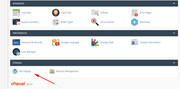
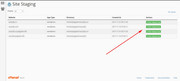
— Translated with Google —
Thank you for the feedback, since this is your live site that needs to stay online and you say making changes crashes the site, I recommend checking with your webhost to see if you have the one click staging site option, this is a option in most cPanels to create a staging clone of your site so we can test on it and your live site will stay up and running. You can always ask your webhost if you have this option as it may be called differently on your webhost.
Here are some screenshots of what it would look like:
Best regards,
MikeJanuary 11, 2020 at 1:28 pm in reply to: Add caption in lightbox under image in masonry gallery #1172377Hi,
Sorry, you will not be able to add a link inside of the description of the masonry or gallery image because this creates a nested link and breaks the structure.
Best regards,
MikeJanuary 11, 2020 at 1:04 pm in reply to: How to avoid shop listing items getting messed up (only one item per line) #1172375Hi,
Glad we were able to help, we will close this now. Thank you for using Enfold.For your information, you can take a look at Enfold documentation here
For any other questions or issues, feel free to start new threads in the Enfold forum and we will gladly try to help you :)Best regards,
MikeHi,
Glad to hear that this is working for you. I looked at your flip items and reloaded the page a few times, but the flip items flip quickly for me. Please see the screencast in Private Content area.Best regards,
MikeHi,
It looks like you have opened a new thread for this issue, let’s continue there.Best regards,
MikeHey Eva_Lutions,
Please include a user name so we can login and investigate.Best regards,
MikeHi,
I took a look at one of the pages you were having this error on, url in Private Content area, and I see that your gallery is still outside of the “wrap_all” & “main” divs, but since your script is working well the page looks fine.
I’m not sure how to rewrite your custom template to correct the structure, but this seems to be working good.
Can you post your script for future users should they have a similar issue?
Then I guess we can close this thread?Best regards,
MikeJanuary 10, 2020 at 2:05 pm in reply to: Creating columns smaller than 1/5 to enable more in a row #1172157Hi,
Glad we were able to help, we will close this now. Thank you for using Enfold.For your information, you can take a look at Enfold documentation here
For any other questions or issues, feel free to start new threads in the Enfold forum and we will gladly try to help you :)Best regards,
MikeHey gharry79,
The following css will increase the size of the rows on hover and add the text “More About” above the titles, Please try this css in the General Styling > Quick CSS field or in the WordPress > Customize > Additional CSS field:#top.home #brands .flex_column.avia-link-column.first:hover { animation: grow 2s; animation-fill-mode: forwards; } @keyframes grow { to { transform: scale(1.2) } } #top.home #brands .flex_column.avia-link-column.first:hover .av-special-heading-h1:before { content:"More About\A"; }Then clear your browser cache and any cache plugin, and check.
Here is a screenshot of the expected results (click to play gif):

Best regards,
MikeJanuary 10, 2020 at 12:22 pm in reply to: How to avoid shop listing items getting messed up (only one item per line) #1172118Hi,
Please try this code in the General Styling > Quick CSS field or in the WordPress > Customize > Additional CSS field:.html_entry_id_6219 #top.post-type-archive-product li.product.post-31871.first { clear:left !important; }Best regards,
MikeHi,
Glad we were able to help, we will close this now. Thank you for using Enfold.For your information, you can take a look at Enfold documentation here
For any other questions or issues, feel free to start new threads in the Enfold forum and we will gladly try to help you :)Best regards,
MikeJanuary 10, 2020 at 4:51 am in reply to: How to display a single complete post on i.e. the startpage #1172053Hi,
Thank you for the video and the links, first I will point out that if your “post” was on another page then you could use the “page content” element to show it on another page, as you describe.
But since you wish to get the content of a “post” we don’t have a built-in element for this, but we do have this function that you can add to your functions.php that will create a shortcode that will display the content of a post on another page as you describe.
Try adding this code to the end of your functions.php file in Appearance > Editor:function get_post_shortcode( $atts ) { $attributes = shortcode_atts( array( 'id' => null ), $atts ); $content = do_shortcode(get_post_field('post_content', $attributes['id'])); return $content; } add_shortcode( 'get-post', 'get_post_shortcode' );then on your page add a “code block element” where you want the post to show and add this shortcode:
[get-post id="1258"]note that the number “1258” is the post that you linked to and if you ever want to show a different post just change this number to the post ID of it.
here is a screenshot of the backend with the code block element:
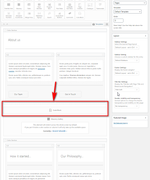
here is a screenshot of the frontend with the post showing as you described:
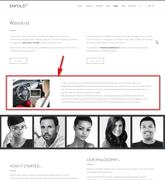
Best regards,
MikeHi,
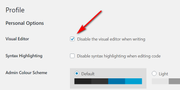
Thanks for the login, I found that you had the Visual Editor > Disable the visual editor when writing enabled in your user profile, I disabled it for you and now the visual & text tabs show, please check.
Best regards,
MikeHi,
Thank you for the login and screenshot, the read more tag is for standard editor posts to truncate the blog entries so that only the first part of a post is displayed on homepage. But the Advanced Layout Builder text element doesn’t show as a excerpt on the homepage, so the read more tag will not be seen. To show an excerpt of a post created with the Advanced Layout Builder you will have to manually create the excerpt by enabling the excerpt field from the option in the “screen options” of the default editor.The text element uses the same toolbar as the default editor, so that is the only reason why the button shows, I guess it should be hidden.
Best regards,
MikeHi,
I have updated the file for you and the social icons are now showing, please clear your browser cache and check.Best regards,
MikeHi,
Thank you, I notice that if you go to the theme panel link/wp-admin/admin.php?page=aviaand get the 404 and scroll down all of the theme settings show, incorrectly.
ops, I see you already reported that.Best regards,
MikeHi,
I have seen this occur with CDN’s and server-side caching a couple of times, where it seemed that I was not logged in unless I went to /wp-admin/ where I would go to the admin panel and not the login screen as expected if I had actually been logged out.Best regards,
MikeHi,
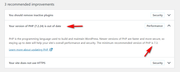
Thank you for the login, I see that you have tried downgrading your PHP version, but have you tried upgrading to v7.3?
The WordPress Site Health says PHP (7.2.24) is out of date.
Best regards,
MikeHi,
Das ist ein guter Plan. Sollten Sie weitere Hilfe benötigen, öffnen Sie bitte einen neuen Thread. Vielen Dank, dass Sie Enfold verwenden.
Übersetzt mit GoogleBest regards,
Mike -
AuthorPosts
