

Forum Replies Created
-
AuthorPosts
-
Hi,
Did you try this css?@media only screen and (max-width: 767px){ .responsive #scroll-top-link { display: block !important; } }If you are referring to “BØJNAFJORDEN” it works for that site, but the “scroll-to-top” button is black, just as your background color is, so all you see is the white
^If clearing your browser cache doesn’t help then check your custom css for a missing bracket.Best regards,
MikeHi,
Glad we were able to help, we will close this now. Thank you for using Enfold.For your information, you can take a look at Enfold documentation here
For any other questions or issues, feel free to start new threads in the Enfold forum and we will gladly try to help you :)Best regards,
MikeHi,
In your shortcode above please replace thehttp://with your link.
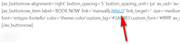
Best regards,
MikeJanuary 29, 2020 at 3:06 pm in reply to: Move Date below blog Title – using Blog Posts content element #1179438Hi,
Thank you for the login, a single post is a different element than the posts on this page, so they need a different solution.
For the slide-posts at the bottom of the page I added this function:function custom_slide_entry_date(){ ?> <script> (function($){ $(window).load(function(){ $( '.slide-entry' ).each(function() { $( this ).find( 'time.slide-meta-time' ).insertBefore( $(this).find('span.av-vertical-delimiter').css({ 'top': '10px'})); $( this ).find('.slide-entry-title').css({ 'padding-bottom': '0','margin-bottom': '0'}); $( this ).find('time.slide-meta-time').css({ 'margin-bottom': '10px'}); $( this ).find('.entry-footer').css({ 'display': 'none'}); $( this ).find('.entry-content-header').css({ 'text-align': 'center'}); }); }); })(jQuery); </script> <?php } add_action('wp_footer', 'custom_slide_entry_date');Please clear your browser cache and check that this is working and not interfering with other pages or posts.
Also please update to the latest version and check.Best regards,
MikeJanuary 29, 2020 at 12:56 pm in reply to: set the same font for different languages frontpage #1179401Hi,
Glad to hear it’s working well now, we look forward to assisting again. We will close this now. Thank you for using Enfold.For your information, you can take a look at Enfold documentation here
For any other questions or issues, feel free to start new threads in the Enfold forum and we will gladly try to help you :)Best regards,
MikeHi,
On the old site the widget area is after the menu, and on the new site it’s before the logo, I think for the old site you used this function:add_action( 'ava_after_main_menu', 'enfold_customization_header_widget_area_after_main_menu' ); function enfold_customization_header_widget_area_after_main_menu() { dynamic_sidebar( 'after_main_menu' ); }call this sidebar
after_main_menu
I also believed you had header set to “logo left, menu below”
Here’s the css:#header .widget { position: absolute; right: 10px; top: -90px; z-index: 999; } @media only screen and (min-width: 990px) { #avia-menu { text-align: center!important; display:flex!important; } .av-main-nav > li { flex-grow: 1; justify-content: center; width: auto!important; } .av-main-nav > li > a { display: block; } .avia_image { border: 7px solid transparent; } #custom_html-4 .avia-button-wrap.avia-button-left { float: left; margin-left: 4px; } #custom_html-4 { width: 400px !important; } #header .widget { height: 80px; } #top #header .av-main-nav > li > a{ font-size:18px !important; } }in my test I used a “custom html” widget to add the buton shortcode, thus the ID “custom_html-4” above.

Give this a try.Best regards,
MikeJanuary 28, 2020 at 5:48 pm in reply to: Enfold – Fullwidth Easy Slider – Mute Video Player option #1179100Hi,
Sorry for the late reply, unfortunately, the browsers are muting videos automatically based on the user’s engagement with the website.
The mute option doesn’t override the user’s browser it is an option to assist with video autoplay, some browser versions will not autoplay a video unless it is muted.As for the videos where you can’t change the volume slider, this HTML5 video player is the WordPress built-in “mejs-mediaelement” and the text for the volume control is hidden, but it says this:
Utilisez les flèches haut/bas pour augmenter ou diminuer le volume.
Use the up / down arrows to increase or decrease the volume.
which is not much help if you can’t see it.
I couldn’t change this behavior with css but I was able to add a title that will show on hover with this script.
Try adding this code to the end of your functions.php file in Appearance > Editor:function custom_mejs_script(){ ?> <script> (function($){ $(document).ready(function(){ $(".mejs-controls").attr('title', 'Utilisez les flèches haut/bas pour augmenter ou diminuer le volume.'); }); })(jQuery); </script> <?php } add_action('wp_footer', 'custom_mejs_script');Best regards,
MikeHi,
Sorry for the late reply, and thank you for the login. I added this css to your Quick CSS to adjust the slider captions for mobile devices:@media only screen and (max-width: 479px) { h2.avia-caption-title { font-size: 12px !important; } .avia-caption .avia-caption-content p,.avia-caption .avia-caption-title { padding: 2px 15px !important; } .avia-caption { bottom: 2px !important; left: 8px !important; padding: 2px 20px !important; } }Please clear your browser cache and check.
Best regards,
MikeJanuary 28, 2020 at 2:07 pm in reply to: Move Date below blog Title – using Blog Posts content element #1179006Hi,
Sorry for the late reply, for the first 3 posts where the date appears on the bottom, it looks like a script is moving it there, are you using a script or function to move the date or meta for another page or element?
Perhaps we should login to check if another function is causing this by mistake?The last 4 posts are not showing the date because of this css in your child theme, possibility in your Quick CSS:
  /*remove comment and date from blog page*/
  .slide-meta {
  display: none!important;
  }
So removing the would solve, but it seems you added this for a reason, perhaps a different page?
If we can figure out for where you did want this we can adjust is to only work for that place and to not work on the /news/ page.Best regards,
MikeHi,
Thank you for the feedback, I tweaked a little more.
please clear your browser cache and check.Best regards,
MikeHi,
Please try adding this css:@media only screen and (max-width: 769px){ .responsive #top #wrap_all #header { height: 150px !important; } }After applying the css, Please clear your browser cache and check.
Best regards,
MikeHi,
@Kahil, sorry, I probably didn’t explain my solution well, while it is true that typically you would add?iframe=truefor a popup, in your case you are adding multiple options so to join them you use the&the question mark is only used once at the beginning, notice the&between “post” and “action”
/wp-admin/post.php?post=626&action=edit&iframe=true
I remember this rule from back when you could add a bunch of options to YouTube links and you would string them together with&.Best regards,
MikeHi,
To remove the 7 sizes that you don’t want please see the article above it lists the functions to use to remove many of the common WordPress sizes, and in the section “Disable Other Sizes” it explains how to remove custom sizes. You already commented out the Enfold sizes and you said that is working correct?Best regards,
MikeJanuary 28, 2020 at 11:21 am in reply to: set the same font for different languages frontpage #1178956January 27, 2020 at 3:04 pm in reply to: How to replace helper-main-menu.php on child theme #1178713Hey beachtourshawaii,
Sorry for the late reply, I tested adding a “helper-main-menu.php” to the child theme by creating a directory “includes” in the child theme and then adding the “helper-main-menu.php” and this does work.
\wp-content\themes\enfold-child\includes\helper-main-menu.php
Please try again, or perhaps explain your changes in the file so we can test.I corrected your function above, Try adding this code to the end of your child theme functions.php file in Appearance > Editor:
function custom_class_script(){
  ?>
  <script>
(function($){
$(window).scroll(function() {
var scroll = $(window).scrollTop();

if (scroll >= 50) {
$("#header").addClass("header-scrolled");
} else {
$("#header").removeClass("header-scrolled");
}
});
})(jQuery);
</script>
<?php
}
add_action('wp_footer', 'custom_class_script');
please clear your browser cache and check.
Best regards,
MikeHi,
@Karamba69, sorry for the late reply, in the contact form you can add a datepicker, it is available as an option, but it will not have the option to block out dates or use other conditions.
You could try using the Contact Form 7 with the Contact Form 7 Datepicker or perhaps try a different datepicker that is ment more for hotel booking.
For our Hotel Demo we recommend the WooCommerce Bookings plugin.Best regards,
MikeHey grundin,
Sorry for the late reply, I assume that you are using 3 masonry elements to create your 3 blocks and they are showing the same posts. The masonry element doesn’t have an “off-set” option for multiple elements on the same page.
If you were to use one masonry element showing 3 posts then you should not see duplicate posts.
Am I understanding the situation correctly?
To solve your situation try assigning different categories or tags to your posts grouping them how you would like them to be shown, and then filter the posts in each masonry element.Best regards,
MikeJanuary 27, 2020 at 1:39 pm in reply to: unable to change the main menu items font to 'font-family: entypo-fontello;' #1178691Hi,
Sorry for the late reply, I see that there is some confusion here, “entypo-fontello” is not a font for text, it is a font file that contains svg icons, for yourcontent: "\e894";so “entypo-fontello” can not be applied to text and work.
In your screenshot the font for the text is “open sans” and the font to create the icon is “entypo-fontello”

The “entypo-fontello” only applys to the pseudo-element “:before” which displays the icon.
So to use the css that you posted above you need to include the pseudo-element “:before” like this:#top #header .main_menu ul:first-child > li > a:before { font-family: entypo-fontello; content: "\e894"; font-size: 16px; padding-right: 5px; }
I removed thetext-transform: uppercase;because it does nothing for “entypo-fontello”.
I hope this helps.Best regards,
MikeJanuary 27, 2020 at 1:02 pm in reply to: main menu is not moving when scrolling down the page #1178674Hi,
Sorry for the late reply, please add this css to move the menu up after scroll:#top #header.header-scrolled #header_main > .container .main_menu .avia-menu { top: 10px !important; }Best regards,
MikeHi,
Glad we were able to help, we will close this now. Thank you for using Enfold.For your information, you can take a look at Enfold documentation here
For any other questions or issues, feel free to start new threads in the Enfold forum and we will gladly try to help you :)Best regards,
MikeJanuary 27, 2020 at 12:37 pm in reply to: set the same font for different languages frontpage #1178658Hi,
Glad to hear, sorry the css you added was not quite what I ment, so I added both sliders to your homepage and this css:@media only screen and (max-width: 1700px) { #layer_slider_1 { display: block; } #layer_slider_2 { display: none; } } @media only screen and (min-width: 1750px) { #layer_slider_2 { display: block; } #layer_slider_1 { display: none; } }so for screens smaller than 1700px like your tablet the first slider will show, and for screens larger than 1750px like your laptop, the second slider will show.
Now it just a matter of verifying that this is the correct breakpoint between your two screens.
Please clear your browser cache and check.
If this is correct then to make your text larger edit your slides where you put the font-size: 24px and for the big screen slides change the font-size to 44px or so until the text fits for you:
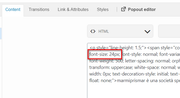
Best regards,
MikeHi,
I just tested and it’s working fine, but I don’t have 80k in images. This plugin uses a WP core function that doesn’t change so it doesn’t get updated often. The nice thing about the plugin was it listed all of the sizes in use. So for WP reserved sizes it is recommend to set them to zero to stop them from being created and for theme and plugin sizes you can unset them. Here is a good article about it.
This user reported a function for removing all of the image sizes perhaps give it a try.Best regards,
MikeHey MikeOlbinski,
Sorry for the late reply, please try using the plugin Simple Image Sizes this will show you all of the image sizes from WordPress, Enfold, and any plugins and allow you to remove them.Best regards,
MikeHey dreamreader,
Is this for one page of for all of the?
Please try this code in the General Styling > Quick CSS field or in the WordPress > Customize > Additional CSS field:#wrap_all #header_main, #wrap_all #header_meta { background-color: red !important; }Feel free to adjust to suit.
After applying the css, Please clear your browser cache and check.Best regards,
MikeHey KeyshaunSmith,
Is this what you are trying to do?
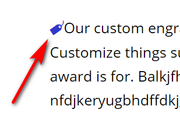
Please try this code in the General Styling > Quick CSS field or in the WordPress > Customize > Additional CSS field:#top.postid-77 #main > div.fullsize > div > main > div > div > div.flex_column.av_three_fifth.flex_column_div > section:nth-child(3) > div > p:before { content:""; font-family: 'entypo-fontello'; color: #3038cc; }but I assume you would like this for every product? Perhaps we can assist with a new shortcode, can you include a admin login so we can see how you are appling it.
Are you also going to use the price?Best regards,
Mike -
AuthorPosts
