Forum Replies Created
-
AuthorPosts
-
Hey Guenter,
I once found a WP filter that added body classes to posts based on categories, but I didn’t find one better than what you have found,add_filter( 'body_class', 'add_category_class' ); function add_category_class( $classes ) { if( is_single() && has_category('news') ) $classes[] = 'news-cat'; return $classes; }Best regards,
MikeHey RicPolasek,
Sorry for the late reply, thanks for the links, yes everything is supposed to be in the #main div, even with the latest version, which it is for me. Did you create a custom template?
Your new site repeats<!-- close content main div -->6 times where your old one says it once and mine only says<!-- close main -->
All of the shortcode elements have had a major rewrite so if you altered the grid row element for your child theme you should compare it to the new grid row element to make your changes correct.Best regards,
MikeFebruary 2, 2020 at 2:09 pm in reply to: Hide logo (mobile only) when scroll down stopped working since last update #1180663Hi,
Sorry for the late reply, since you were trying to hide the logo on scroll, please give this function a try, it will work for all screens smaller than 1024px, I believe that is the iPad landscape width, but you can adjust to suit.
Try adding this code to the end of your functions.php file in Appearance > Editor:function custom_hide_logo_script(){ ?> <script> (function ($) { $(window).scroll(function() { var width = $(window).width(), height = $(window).height(); var scroll = $(window).scrollTop(); if (scroll >= 20 && width <= 1024) { $('.logo').hide(); } else { $('.logo').show(); } }); })(jQuery); </script> <?php } add_action('wp_footer', 'custom_hide_logo_script');or if you want to add and remove the header-scrolled class, try this function:
function custom_header_class_script(){
  ?>
  <script>
(function ($) {
  $(window).scroll(function() {
    var width = $(window).width(), height = $(window).height();
    var scroll = $(window).scrollTop();
      if (scroll >= 20 && width <= 1024) {
    $('#header').addClass('header-scrolled');
   } else {
    $('#header').removeClass('header-scrolled');
   }
  });
 })(jQuery);
 </script>
<?php
}
add_action('wp_footer', 'custom_header_class_script');
Best regards,
MikeHi,
it seems that your live site is down. Please check.
I went to the login page and saw the error, I have not logged in yet.Best regards,
MikeHey marsh1984,
Sorry for the late reply and thanks for the screenshots and link.
2: So for your custom footer I’m not sure what size you would like the blue section so as an example I set the color section to “no padding” and it became 100px high because of the button, I then centered the button vertically in the space by adding this css to your Quick CSS:#av_section_8 > .container { min-height: 100px; padding-top: 0px !important; display: flex !important; align-items: center !important; justify-content: center !important; }Please feel free to change the color section padding to suit.
1: I’m not sure where you would like the heading, when the header is transparent the page moves up typically about 116px so the image can be under the header and show though, so for mobile when the header is not transparent everything comes down. So can you explain where you want the “Dry Needling” perhaps centered in the image as it is for mobile?Best regards,
MikeHi,
Thank you, so I went to create a page to see your problem and I found you have “WPBakery Page Builder” installed please disable, you can not use the “WPBakery Page Builder” with Enfold, it has it’s own builder the “Advanced Layout Builder” they do not work together. There is a chance that “Re-add text underline and justify” will cause problems, you can try it but if you have problems then disable it.
After you disable the “WPBakery Page Builder” create a test page we can see and let us know if you still have problems.Best regards,
MikeHi,
Sorry for the late reply, Please try this code in the General Styling > Quick CSS field or in the WordPress > Customize > Additional CSS field:@media only screen and (max-width: 767px) { .avia_scrollable_table .avia-table:before { content: "Scroll \27A4"; font-size: 16px; float:right; } .avia_scrollable_table .avia-table > tbody > tr:nth-child(1) > td:nth-child(4):after { content: "Scroll \27A4"; font-size: 16px; top:-77px; position: relative; } }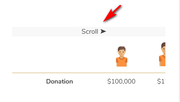
Best regards,
MikeHey amanrajveer,
Sorry for the late reply, the IDs are unique, please see the highlighted IDs, perhaps the test only looked at the first few characters?
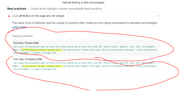
Typically the text for the burger menu and the next & previous post navigation is hidden from screen readers, thus the aria-hidden=”true” this was advised by the aria screen reader documentation, but if you really want this you can adjust, please see this post
On your final screenshot the first one is for the animation of the mobile menu when it opens, it is not a tap item and it will aways overlap. The second one is the “shopping cart icon” I guess we can make it bigger but it will still overlap the hidden text “shopping cart” which is hidden from screen readers, thus the “aria_hidden_link_text”.
The aria documentation advised us to use these for these situations because they are not adding confusing prompt or removing functions that would be needed or wanted.Best regards,
MikeHi,
Sorry for the late reply, I have tested your contact form and saw your “2 day” message:
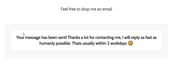
please let us know if you get the email.
I don’t see an admin login for your site, Please include an admin login in the Private Content area so we can investigate further.Best regards,
MikeHi,
Thanks for the screenshot, but that is a different class and rule:ls-thumbnail-slide{ display: none!important; }vs
.ls-slide {
    visibility: hidden !important;
}
On your live site please check the visibility of the slider in these plases:
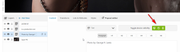
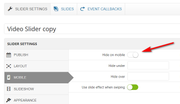
I took a closer look at your homepage on the test site, and I see you have included strange classes that don’t seem to belong to a plugin, are you migrating from a different theme? The source code includesdata-slideshow="true"
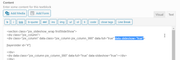
since it is calling a different slideshow where the layerslider is, I wonder if there is a conflict somehow?
On the test site I recreated your homepage using the Advanced Layout Builder, please the url in the Private Content area.
Please clear your browser cache and check this with your mobile device to see if this works for you.
As I understand the iPhone can be difficult to clear the cache, please try a couple of times.Best regards,
MikeHi,
Sorry for the late reply, I tried to login to assist but the login didn’t work,
is the information in the Private Content area still correct?Best regards,
MikeHi,
Sorry for the late reply and thanks for the links, I see one is a single product page and the other is an archive page and they have different background images, so I worked those images into this css for the transparent headers.
Please try this code in the General Styling > Quick CSS field or in the WordPress > Customize > Additional CSS field:#top.woocommerce-page #header { position: absolute; background: rgba(255,255,255,0.6); } #top.woocommerce-page #header .header_bg { background: transparent; opacity: 0; filter: alpha(opacity=0); } #top.archive.woocommerce-page .template-shop,#top.archive.woocommerce-page #main { top:-116px !important; background-image: url(https://aussiehiddentreasures.com/wp-content/uploads/2020/01/bg5-light.jpg); background-repeat: repeat; background-position: top left; } #top.single-product.woocommerce-page .template-shop,#top.single-product.woocommerce-page #main { top:-116px !important; background-image: url(https://aussiehiddentreasures.com/wp-content/uploads/2020/01/bg1.jpg); background-repeat: repeat; background-position: top left; } #top.woocommerce-page .template-shop > .container { margin-top: 116px !important; }After applying the css, Please clear your browser cache and check.
Best regards,
MikeHi,
Sorry for the late reply, in your example http://www.spiegel.de the expressions in orange look like category links to me because they lead to pages with multiple posts on the same key topic.
If you look here
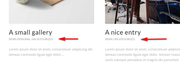
Here the categories are below because the “modern business” layout is used, but if you change to “elegant” the categories will be above:
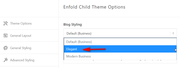
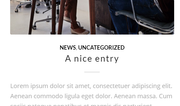
which includes the post pages also:

Naturally they can be fine tuned with colors and text aligment to match your needs.
Within WordPress you can name your categories anything you like.Best regards,
MikeHi,
Sorry for the late reply, if I understand correctly all of the images are the same size and the cause is that some titles are longer so a second row is created?
So would a solution be to clip all titles to one row, or to make all titles two rows even if the titles are short?
I’m trying to see which would be acceptable for you.Best regards,
MikeFebruary 1, 2020 at 6:39 pm in reply to: Move Date below blog Title – using Blog Posts content element #1180530Hi,
For the top 3 I added this function:function custom_post_entry_date(){ ?> <script> (function($){ $(window).load(function(){ $( '.post-entry.single-big' ).each(function() { $( this ).find( 'time.date-container:first' ).insertAfter( $(this).find('.post-title.entry-title').css({'text-align': 'center'})); $( this ).find('.post-title.entry-title ').css({ 'padding-bottom': '0','margin-bottom': '0'}); $( this ).find('time.date-container').css({ 'margin-bottom': '10px'}); $( this ).find('.post-meta-infos').css({ 'display': 'none'}); $( this ).find('.entry-content-header').css({ 'text-align': 'center'}); }); }); })(jQuery); </script> <?php } add_action('wp_footer', 'custom_post_entry_date');Please clear your browser cache and check, also check other pages for conflicts with dates & titles so we can correct.
On your homepage I removed the “IN” with this css:
#top.home .av-magazine-text-sep.text-sep-cats {
	display: none !important;
}
Best regards,
MikeHi,
They work when I add them to my site, are they old links from a while back that contained manual options? Many of the control codes are no longer allowed by YouTube. Try updating your links and follow the recommended example that uses “watch” in the link.
https://www.youtube.com/watch?v=G0k3kHtyoqcBest regards,
MikeHey iCarla,
Sorry for the late reply and thanks for the link, I only have a Android phone but your demo site slider is showing for me. Please see the screenshot in Private Content area. But your live site slider is not, it looks like it has this applied:.ls-slide { visibility: hidden !important; }Please check your layerslider general settings for mobile and the individual slider settings for mobile visibility.
It’s odd the demo site doesn’t have the same settings, I assume it is a clone of the live site?
Please check or include an admin login to your live site.Best regards,
MikeHi,
Sorry for the late reply and thanks for the login, I downloaded your youtube video and found that for the 36 second clip only the first 14:20 is used the rest of it is a black space:
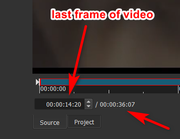
so that explains the long wait for it to loop. I recommend adjusting your video.Best regards,
MikeHi,
Sorry for the late reply, I see this thread was started in 2017 and is about using the Advanced Layout Builder video element with Vimeo. I tested and found it works fine with the latest version.I believe the suggestion of clearing the WordPress oembed cache was to ensure an error was not present based on the suggestion from a user that it did help back in 2015. But WordPress and Enfold have changed a lot since then.
If you feel that you need to clear the WordPress oembed cache then please try Optimize Database after Deleting Revisions plugin.If you are having trouble with this situation today please ensure you are using the latest version of Enfold, and try disabling any plugins to ensure there are no conflicts.
If this doesn’t solve, please open a new thread and describe the steps you are taking and include a link to your site with admin login. Since this is not your thread posting your login here will not be private and you will not see anything we write in the Private Content area.
Best regards,
MikeFebruary 1, 2020 at 2:47 pm in reply to: Enfold seems to overwrite different even and odd rows styling #1180508Hi,
Sorry for the late reply, and thanks for the login, but the login doesn’t give admin access so I was limited to my investigation.
When reviewing the loaded plugins I don’t see the plugin directory “bbp-style-pack” or css as expected, is the plugin activated?
I do see your bbp classes so I can give you some css to change your row colors, but that is about as much as I can help.#bbpress-forums li.bbp-body ul.forum.even { background-color: #e1e1e1; }Please see the screenshot in Private Content area.
Please upgrade our login to admin so we can be of more assistance.Best regards,
MikeHi,
Glad we were able to help, we will close this now. Thank you for using Enfold.For your information, you can take a look at Enfold documentation here
For any other questions or issues, feel free to start new threads in the Enfold forum and we will gladly try to help you :)Best regards,
MikeFebruary 1, 2020 at 2:12 pm in reply to: Enfold – Fullwidth Easy Slider – Mute Video Player option #1180503Hi,
Glad to hear the workaround is helping for now, I have reported my findings to the dev team for their review and a better solution.
Thank you for your patience.Best regards,
MikeFebruary 1, 2020 at 11:08 am in reply to: Move Date below blog Title – using Blog Posts content element #1180489Hi,
Thanks for the feedback, I had thought you wanted the date under the title and above the divider, did you want the date over the title and under the category for the bottom 4 on /news/ page?
In order to show the categories for the top 3 I enabled categories to show on your Enfold Theme Options > Blog Layout > Blog meta elements options page. Your front page magazine element didn’t have the option to show the categories enabled, I did this for you.Best regards,
MikeJanuary 31, 2020 at 2:52 pm in reply to: Enfold – Fullwidth Easy Slider – Mute Video Player option #1180277Hi,
@dangavin2 Sorry for the late reply I’ve been researching this further and found there is a WordPress filter to change the start volume, but I have not been able to get this to work yet.add_filter('mejs_settings', function ($settings) { $settings['/*setting here*/ '] = /*value here*/; return $settings; });I’m going to ask for some help for the rest of the team with this.
But I was able to make the necessary change directly in the WordPress file so when the player is unmuted the volume is up so you can hear it, but it would be better to use the filter so the setting doesn’t revert with every WordPress update.
If you want to try it, you would place the linked file in[wordpress]\wp-includes\js\mediaelement\mediaelement-and-player.min.jsand save a copy of your original for fallback.
File: https://www.dropbox.com/sh/el0xjrlnp4fyjfh/AAAXiWNZ_-VZaOQr3xbBWPsta?dl=0Interesting though, this was reported as a working solution but it didn’t work for me.
Best regards,
MikeHi,
To switch the search bar and social icons around, Please try this code in the General Styling > Quick CSS field or in the WordPress > Customize > Additional CSS field:#header_meta > .container { display: flex !important; flex-direction: row !important; } #header_meta { float: right !important; }After applying the css, Please clear your browser cache and check.
The reason the logo is lower is because the Phone info div is above the logo and menu, Please see the screenshot in Private Content area, the colored area is the logo and menu div.Best regards,
MikeJanuary 30, 2020 at 2:06 pm in reply to: Add dropdown buttons to Enfold widget Header + Search bar #1179865Hey mailywinn,
You can use this html code to create a dropdown button in a html widget.Best regards,
MikeHi,
Sorry for the late reply, please try this code in the General Styling > Quick CSS field or in the WordPress > Customize > Additional CSS field:#js_sort_items > .sort_by_cat > a.active_sort span { color: #808080 !important; }Best regards,
Mike -
AuthorPosts