

Forum Replies Created
-
AuthorPosts
-
Hey rainerknappeham,
Thank you for the link, to remove the title on hover Try adding this code to the end of your functions.php file in Appearance > Editor:function remove_title_on_hover(){ ?> <script> (function($){ $("*").hover(function(){ $(this).removeAttr("title"); }); })(jQuery); </script> <?php } add_action('wp_footer', 'remove_title_on_hover');Typically we would recommend adding this to your child theme functions.php so you will not lose it after the next update, but it looks like you are not using a child theme. Another option is to add this function as a plugin, which you can download here.
Best regards,
MikeHey tivo_designs,
Thank you for the link, I see in your socket you have two twitter icons and assume one of these is meant to be the “imdb”
Please include and admin login so I can check your new icon settings.Best regards,
MikeHey Mohamad,
Sorry for the late reply, You should be fine migrating to a new server and removing the theme from the old server so it is not pinged anymore.Best regards,
MikeHi,
Please remove all of the custom css for this button so we can try againBest regards,
MikeHi,
Glad we were able to help, we will close this now. Thank you for using Enfold.For your information, you can take a look at Enfold documentation here
For any other questions or issues, feel free to start new threads in the Enfold forum and we will gladly try to help you :)Best regards,
MikeFebruary 20, 2020 at 1:18 pm in reply to: How to change "Save my name, email, and website …" text in comment section #1186330Hi,
Glad to see you have found a solution for this, we will close this now. Thank you for using Enfold.Best regards,
MikeHi,
@dondela as I understand it the custom files @Guenni007 created do not work anymore because of changes to Enfold a couple of updates ago and there is a new option in Enfold for setting the H tag.

Best regards,
MikeHi,
Sorry, I don’t see any, not all feature requests make it into development.
But I understand a new feature requests page is going to be added shortly so it will be another opportunity to submit it for review.Best regards,
MikeFebruary 20, 2020 at 12:48 pm in reply to: Add icon list on all pages of my website, including product page? #1186318Hi,
Are we seeing the CTA twice because we are adding it twice, once with the original “woocommerce_after_single_product_summary” and again with the new “ava_before_footer”?
I’m thinking we don’t need the original shortcode anymore because the new one works on all pages and not just the product pages?Best regards,
MikeFebruary 19, 2020 at 2:03 pm in reply to: How to change "Save my name, email, and website …" text in comment section #1186037Hey bcerin,
Thank you for the link, but I’m not seeing “Save my name, email, and website in this browser for the next time I comment” in your comment section. I also don’t see the “website” field, were you already able to make these changes?Best regards,
MikeHi,
Please try this code in the General Styling > Quick CSS field or in the WordPress > Customize > Additional CSS field instead:@media only screen and (max-width: 767px) { .intro-box-main > .av-parallax { background: #fff; background-image: unset !important;}}Best regards,
MikeHi,
Sorry for the late reply, this seems to be related to another post of yours that was answered here. Please check.Best regards,
MikeHi,
Try adding this css:#top .main_color .BGbiancoTXTblu .avia-button > span.avia_iconbox_title:hover { color: #fff !important; z-index: 0 !important; } #top .main_color .BGbiancoTXTblu > .avia-button > .avia-button:hover { color: #fff !important; background-color: #24305e !important; }Best regards,
MikeHi,
Glad you found a solution that works better for you, and thanks for sharing.
Shall we close this then?Best regards,
MikeHi,
Thank you, I found the text in the de_DE language file:Aufgrund deiner Datenschutz-Einstellungen können wir Ihnen die Karte nicht anzeigen. Klicken Sie hier, um die Karte in einem neuen Fenster zu öffnen.and changed to your request:
Aufgrund Ihrer Datenschutz-Einstellungen können wir Ihnen die Karte nicht anzeigen. Klicken Sie hier, um die Karte in einem neuen Fenster zu öffnen.Please download the modified files here and save a copy of your current files for fallback and upload these to /enfold/lang/ then clear your browser cache and check.
Best regards,
MikeHi,
Very good then, please feel free to open a new topic if you have further questions about this.Best regards,
MikeHey DirkB,
Please check your settings at Enfold Theme Options > Cookie Consent > Cookie Handling > Show advanced options > Refuse Cookie Warning
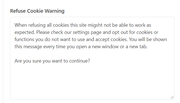
to see if this is matchs your message, I checked my install in German but the message is not the same, perhaps you are using a different version.
We can make the text change in the German language file for you once we find it, please link to your site where we can see the message and let us know if you are using “de_DE” or “de_DE_formal” for the language, and which translation above to wish to use.Best regards,
MikeHi,
Thank you for the screenshot and link, I see your custom red buttons for the next / previous, if you add a custom class or ID to these then you can add the next and previous links to them with this function:function custom_script(){ ?> <script> (function($){ $(document).ready(function(){ var getprev = $("a.avia-post-nav.avia-post-prev").attr("href"); var getnext = $("a.avia-post-nav.avia-post-next").attr("href"); $(".woocommerce-product-details__short-description .avia-buttonrow-wrap a.avia-button:nth-child(2)").attr("href", getprev); $(".woocommerce-product-details__short-description .avia-buttonrow-wrap a.avia-button:nth-child(3)").attr("href", getnext); }); })(jQuery); </script> <?php } add_action('wp_footer', 'custom_script');This code example was successfully used for products in a shop that had custom buttons similar to yours, but it needs to be modified to work for you.
After you add a custom class or ID we can assist further.Best regards,
MikeHey pabloeduardo,
Sorry for the late reply, I do not use the plugin “Toolset” but my research finds that “there isn’t a good workaround right now.”
Right now Toolset asks that we make some changes that would break our logic and we can not do.
I have seen some customers using Toolset on their projects, but I’m unsure what parts they are using or not.
I have also seen customers use Pods – Custom Content Types and Fields so perhaps looking into this as an alternative would help?Best regards,
MikeHi,
I was not asking you why, I was reporting what I found, so remove this:include 'shortcodes.php';and
/* Proper way to enqueue styles and scripts
*/
function theme_name_scripts() {
wp_enqueue_style( 'style-name', get_stylesheet_uri() );
}
add_action( 'wp_enqueue_scripts', 'theme_name_scripts' );
Sorry, I don’t know what you mean by “My site was completely foobar”
Best regards,
MikeHi,
In the css above you added #BLU to the beginning of the rules, this indicates a page wide ID not a class.
You need to add the class beforeavia-buttonbut not connected to it like this#top .main_color .blu .avia-button:hoverI also see in your css you have the wrong arrows:
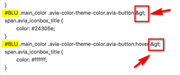
Best regards,
MikeFebruary 18, 2020 at 12:02 pm in reply to: Add icon list on all pages of my website, including product page? #1185610Hi,
Product pages should be working, so you only should need to add the shop and categories pages to the exclusion.Best regards,
MikeHi,
Glad we were able to help, we will close this now. Thank you for using Enfold.For your information, you can take a look at Enfold documentation here
For any other questions or issues, feel free to start new threads in the Enfold forum and we will gladly try to help you :)Best regards,
MikeHi,
Glad we were able to help, we will close this now. Thank you for using Enfold.For your information, you can take a look at Enfold documentation here
For any other questions or issues, feel free to start new threads in the Enfold forum and we will gladly try to help you :)Best regards,
MikeHi,
I took a look at your section, but your container is set to a max-width of 1280px, so adding more space between the columns makes the image smaller. You could go to your layout settings and make the max-width larger which should make the space between larger because it is a percentage of the page width.
How much space do you want?Best regards,
MikeHi,
I believe this is because posts and pages are searched when a 404 is generated, since a breadcrumb doesn’t offer any value on a 404 would you like it hidden?Best regards,
MikeHi,
We will leave this open while you look into this. A couple of places to look would be if your child theme has a /shortcodes/menu/ folder in it, you could rename to something else via FTP as a test, “/menu-old/”
and if your custom css has any reference to “sticky_placeholder” or “sub_menu1”, you could comment out to test.
Also check your child theme functions.php.Best regards,
Mike -
AuthorPosts
