

Forum Replies Created
-
AuthorPosts
-
Hi,
Your script to remove the title attributes “on hover” is actually just removing the title attributes on page load and thus causing your “Empty Link” error. Please remove this script and test.
After testing to ensure this error is corrected, if you want to remove the title attributes “on hover” then try this script instead:function remove_title_attr_on_hover(){ ?> <script> (function($){ $(".av-masonry-image-container").hover(function(){ $(this).removeAttr("title"); }); $("#wrap_all img").hover(function(){ $(this).removeAttr("title"); }); $("#wrap_all a").hover(function(){ $(this).removeAttr("title"); }); })(jQuery); </script> <?php } add_action('wp_footer', 'remove_title_attr_on_hover');Best regards,
MikeHi,
We have many features being developed, but we don’t have a time frame for these. Thanks for your patience.Best regards,
MikeJune 22, 2020 at 11:46 am in reply to: Sections for mobile and not for mobile on 1 page not working #1224562Hi,
Glad we were able to help, we will close this now. Thank you for using Enfold.For your information, you can take a look at Enfold documentation here
For any other questions or issues, feel free to start new threads in the Enfold forum and we will gladly try to help you :)Best regards,
MikeJune 22, 2020 at 5:16 am in reply to: Sections for mobile and not for mobile on 1 page not working #1224470Hey macmutsaers,
Sorry for the late reply and thanks for the login and links. I found that the visibility options looks for the classav-no-previewin the document but the class is not being added to your page. Typically this occurs when an out-of-date header.php is used in a child theme. I see you have a child theme but your theme editor is disabled so I can’t see if you are using an old header.php, please check and test by renaming your child theme header.php to header.php.old, this will allow the current parent theme header.php to load.
After doing this Please clear any cache plugin and your browser cache a couple of times and check.Best regards,
MikeHey Rhodo,
Sorry for the late reply and thanks for the link, I see that some of your masonry items have the classesrcp-is-restricted rcp-no-access, so with the plugin identifying which items to hide we can use this css:.rcp-is-restricted.rcp-no-access { display: none; }Now you want to show these items to some users, so lets add the user role to the body as a class,
Try adding this code to the end of your functions.php file in Appearance > Editor:function add_role_to_body($classes) { global $current_user; $user_role = $current_user->roles; return array_merge( $classes, array( $user_role[0] ) ); } add_filter('body_class','add_role_to_body');So now you can choose which user type can see the content via css classes, such as
administratorlike this:.rcp-is-restricted.rcp-no-access { display: none; } #top.administrator .rcp-is-restricted.rcp-no-access { display: block; }Please try this css in the General Styling > Quick CSS field or in the WordPress > Customize > Additional CSS field
After applying the css, Please clear your browser cache and check.Best regards,
MikeHey callum18,
Sorry for the late reply and thanks for the login, I investigated your issue and found that you have disabled the product tabs with a function so the tab for the product reviews is not created and the element is not shown.
But I found that we have a built-in shortcode to display the product reviews and form:[av_product_review]
So I added this shortcode to your short description for the product you linked to, now the form shows below the description.
Please clear your browser cache and check.Best regards,
MikeHey Rob,
Sorry for the late reply, as I understand your issue, the Masonry Gallery is getting an error notice saying “Empty link: a link contains no text” on each image from an accessibility compliance test.
In my test I found if you can use “Display neither” for the caption and enter the title for each image and it will show as a “title” attribute on the link and the background image container.So to enter the titles, edit your Masonry Gallery element and “edit the gallery” then click on each image to add the titles.

Here you can see the title attributes:

Please try this and let us know if it passes your accessibility compliance test.Best regards,
MikeHi,
Glad to hear this helped and thanks for the kind words. We will close this now, thank you for using Enfold.For your information, you can take a look at Enfold documentation here
For any other questions or issues, feel free to start new threads in the Enfold forum and we will gladly try to help you :)Best regards,
MikeHi,
Sorry for the late reply, thanks for the link to your page but it looks like it was created with the WPBakery plugin so I can’t explain step-by-step, but typically you would try different values until you were satisfied. So 15% is not enough, but 25% is too much, correct?
Please also note that lower sections are typically on top unless you change their z-index.Best regards,
MikeHi,
Sorry for the late reply, we are not sure why you are experiencing this, I did find that our IP is on an email spam blacklist, so perhaps we are on others and perhaps your ISP is using one of these? I’m guessing, but we have not been able to reproduce this.Best regards,
MikeHey dinmix,
Sorry for the late reply, I have tested this function on my localhost and it worked correctly in the Cart and Checkout page. Try adding this code to the end of your functions.php file in Appearance > Editor:add_filter( 'woocommerce_shipping_package_name' , 'woocommerce_replace_text_shipping_to_delivery', 10, 3); function woocommerce_replace_text_shipping_to_delivery($package_name, $i, $package){ return sprintf( _nx( 'Delivery', 'Delivery %d', ( $i + 1 ), 'shipping packages', 'put-here-you-domain-i18n' ), ( $i + 1 ) ); }Then clear your browser cache and check.
Best regards,
MikeHi,
Thank you for the login, so to correct the breadcrumbs for your portfolio items please note this option in the editor sidebar:

From your “T” page the second portfolio item is “J & W”, an item from the “T” category and as you said, from your “T” page the breadcrumbs on the portfolio item “J & W” is Home > T > J&W this is correct so far, now from “J & W” if you click the button to the sister page in the “I” category the breadcrumbs still show the “T” because we were in a “T” category item when we clicked the button.
So what I did for the “I” category item that showed the wrong breadcrumbs was to set the breadcrumbs option above, now no matter how you land on the “I” category item the breadcrumbs will show “I”I believe you only need to set this option on the “I” category items because I don’t see any buttons on those items going to “T” items. As for your menu highlighting, this may correct itself if you go back to the standard menu items, otherwise we can change with css.
Best regards,
MikeHi,
To have a different mobile menu, try creating a mobile menu and then go to Enfold Theme Options > Main Menu > Alternate Menu for Mobile and choose your new menu.

Then clear your browser cache and any cache plugin, and check.Best regards,
MikeJune 21, 2020 at 8:02 pm in reply to: Am I adding my google analytics tracking code correctly? #1224435Hi,
To add a second close button to the mfp popup, try adding this code to the end of your functions.php file in Appearance > Editor:function custom_script(){ ?> <script> (function($) { $(window).click(function(){ $( ".mfp-figure button" ).clone().css({'margin-top': '30px'}).appendTo( ".mfp-bottom-bar .mfp-counter" ); }); })(jQuery); </script> <?php } add_action('wp_footer', 'custom_script');Unfortunately, this will work site-wide because the mfp container is at the very top of the page after the body tag and doesn’t include any attributes of the element being opened, so while you can define the page it will work on, you can’t define the element it will work on. So for your one-page site with many mfp popups, this might not be what you are looking for.
Perhaps your application of the mfp as an overlay is adding attributes or classes to the container and the above script could be modified to work only for those.
Are you using a custom script or adding the mfp-hide class to the elements?
Please link to your page so we can see what you have so far and how to target only the element you wish in the popup.Best regards,
MikeHey MrPoBoi,
Sorry for the late reply, I have taken a look at this using the 2017 Demo, and the issue I find is that the siblings and parents do not retain the same structure as the other menu items and is difficult to transverse because what appears to be a sibling is actually the child of a different parent.
Perhaps if we can see your menu we can find another solution.Best regards,
MikeHey lifefitnessnz,
Sorry for the late reply, so if you leave the YouTube video playing long enough it will eventually play a “up next” video. Unfortunately, this is under the control of YouTube and they have removed the URL options to only play videos from one channel.
But since this is occurring only after long visits do you believe any of your visitors are experiencing this?Another option is to self-host the videos instead of using YouTube.
Best regards,
MikeHi,
a) you can use media queries to size the fonts, like this:@media only screen and (max-width: 375px) { #main a > h3.av_icongrid_title.icongrid_title { font-size: 36px !important; } }b) please see this screenshot that shows adding the link to the advanced tab, then the whole cell is a link.

Best regards,
MikeHey havi,
Sorry for the late reply, when downloading Icon Packs from Flaticon, try extracting the zip and copying the folder “font” to a new location and zipping into an archive and then upload to the “Iconfont manager” in the import option tab.
Here’s what should be in your new zip file:
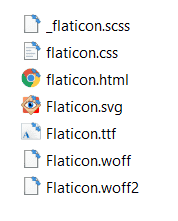
I tested this with this icon pack.
Please note that iconfonts can only be in black & white, color will not work.Best regards,
MikeHey Tobias,
Sorry for the late reply and thanks for the login and link to page. So for some reason, the last image is the wrong thumbnail, please see the two links in the Private Content area. We can correct with this script, Try adding this code to the end of your functions.php file in Appearance > Editor:function custom_script(){ ?> <script> (function($){ $(document).ready(function(){ $("#top.page-id-54732 .grid-entry.post-entry-last img").attr("src","https://engelswimpern.de/wp-content/uploads/trainers_evelyn_k-1-300x300.png"); }); })(jQuery); </script> <?php } add_action('wp_footer', 'custom_script');Then clear your browser cache and check.
Best regards,
MikeHi,
Sorry for the late reply, I believe this was a concept page that was never completed, our color sections do not use SVG and WordPress doesn’t support it by default. Our borders use this css:.avia_transform .av-extra-border-element.border-extra-diagonal .av-extra-border-inner { top: 250px; right: 0; width: 110%; height: 100%; -webkit-transform-origin: right top; transform-origin: right top; -webkit-transform: rotate(5deg); transform: rotate(5deg); position: absolute; }Unfortunately, the person that started this page is no longer with us, so I’m not sure what the compete solution was.
The dev team has many exciting things in the works, but it takes some time to work them out.
Best regards,
MikeHey eee_lala,
Sorry for the late reply, to move the close button, please try this code in the General Styling > Quick CSS field or in the WordPress > Customize > Additional CSS field:div.avia-popup .mfp-close { top: 100% !important; }After applying the css, Please clear your browser cache and check.
Best regards,
MikeHi,
Sorry for the late reply and thanks for the test page, but the login didn’t work. Try adding this code to the end of your functions.php file in Appearance > Editor:function show_quiz_results(){ ?> <script> (function($){ $(window).click(function() { if( $('.wpProQuiz_sending').is(":visible") ){ $('.wpProQuiz_results').css({display: 'block'}); } }); })(jQuery); </script> <?php } add_action('wp_footer', 'show_quiz_results');Then clear your browser cache and check.
Best regards,
MikeHi,
Glad to hear that you have sorted this out. We will close this then unless you had any further questions for @Guenni007Best regards,
MikeHi,
To have your icon grids to have the same height as width, Try adding this code to the end of your functions.php file in Appearance > Editor:function equal_height_icon_grid(){ ?> <script> (function($){ $(document).ready(function() { $(window).on('resize', function() { $('.article-icon-entry').height( $('.article-icon-entry').width() ); }).trigger('resize'); }); })(jQuery); </script> <?php } add_action('wp_footer', 'equal_height_icon_grid');Then clear your browser cache and check.
Best regards,
MikeHey Rob,
Sorry for the late reply, in the thread that you linked to it is explained that “If you do not select a breadcrumb parent page a php session variable will be used to determine which page could be a parent page. The results may vary depending on which page the website visitor views first. If you want a constant breadcrumb (which does not use sessions to “guess” the right parent page based on previously visited pages) you need to select the breadcrumb parent manually.”
When you explain your pages don’t have a parent page and the linking you have between the categories, this makes since when considering the php session variable.
So it seems that the solution is to set the parent for these two pages, but I know that you didn’t want to do this because you wanted them to be independent pages in the menu, you can achieve this by using “custom links” for these two in the menu instead of the standard “menu items”.Best regards,
MikeJune 20, 2020 at 8:31 pm in reply to: WooCommerce – Produkt-Raster – WooCommerce Sorting Options; not working #1224313Hi,
Sorry for the late reply, When I look at your product grid element on your shop page I see that the product grid element settings are “Sorted by newest product”, and then checking the front end it looks like this is true. This seems to be what your wish is, correct?
Your question about the settings at WordPress -> Customizer -> WooCommerce -> Product-Katalog -> Standard Produkt Sortierung these are meant to be a shortcut to the WooCommerce default settings, but the product grid element settings are meant to take priority. When I checked these were set to “Sorted by newest product” and not “Lasse den Benutzer auswählen, indem in einen Dropbox-Menü die Sortieroptionen angezeigt werden”, which you did not want to use. So this seems correct as to your wishes?Best regards,
MikeHi,
Sorry for the late reply, I took a look at your page and believe you would like your extra menu to be level with your logo and to the right.
Please try this code in the General Styling > Quick CSS field or in the WordPress > Customize > Additional CSS field:#nav_menu-2 { top: 80px; padding: 0 !important; z-index: 10; } #nav_menu-2 .menu-header-menu-right-container { float: right; } #nav_menu-2 .menu-header-menu-right-container li { display: inline-block; border-bottom: 1px solid; border-left: none; border-right: none; border-top: none; border-radius: 3px; background-color: #ff6600; border-color: transparent; padding: 10px; } #nav_menu-2 .menu-header-menu-right-container li a { color: #fff; }Please see the screenshot in Private Content area, and then clear your browser cache and any cache plugin, and check.
Best regards,
MikeHi,
Sorry for the late reply, very good then, unless there is anything else we can help with on this issue, shall we close this then?
For anyone thinking of using the Slick Slider js, here is a video that explains how to use it pretty well.Best regards,
Mike -
AuthorPosts
