

Forum Replies Created
-
AuthorPosts
-
Hi,
Please check your staging site “COVID-19 Update” it doesn’t have the custom class “update” as your live site does, without this the css won’t work.Best regards,
MikeSeptember 9, 2020 at 12:31 pm in reply to: H-Headlines / Fontsize-Adjusting for mobile view #1244613Hi,
Thank you for the feedback, please try this css:@media only screen and (max-width: 767px) { #wrap_all #main h3,#wrap_all #main h3 > span { font-size: 12px !important; } #wrap_all #main h1,#wrap_all #main h1 > span { font-size: 14px !important; } }Please adjust the font sizes to suit and clear your browser cache and check.
Best regards,
MikeHi,
Please try this css instead:#top > #wrap_all > #main > .container_wrap_first.fullsize { min-height: 80vh !important; }To not show courses in the blog element try to deselect the course category, or only select the categories you wish to show.
Best regards,
MikeHi,
Thanks for the screenshot, I do understand the space you wish to reduce, and thanks for changing the images to ones with no border, this helped.
So please try this css:.avia-icon-grid-container li .avia-icongrid-wrapper .avia-icongrid-front, .avia-icon-grid-container li .avia-icongrid-wrapper .avia-icongrid-flipback { box-shadow: 0 0 0 10px #fff; background-size: cover !important; }After applying the css, please clear your browser cache and check.
Please see the screenshot in Private Content area.Best regards,
MikeHi,
Glad we were able to help, we will close this now. Thank you for using Enfold.For your information, you can take a look at Enfold documentation here
For any other questions or issues, feel free to start new threads in the Enfold forum and we will gladly try to help you :)Best regards,
MikeHi,
1 & 2: I added this css to your quick css:.responsive #top #header #header_main .inner-container .logo { height: 135px !important; } .html_header_top.html_header_sticky #top #wrap_all #main { padding-top: 192px !important; }3: I adjusted some previous css, now the socket menu shows.
4: On this page your slider had an un-closed tag in the caption title:
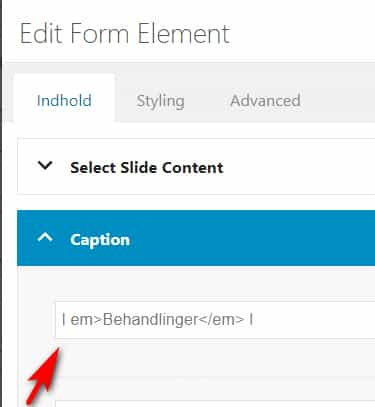
I corrected and now the slider shows.Best regards,
MikeHi,
Please try this code in the General Styling > Quick CSS field or in the WordPress > Customize > Additional CSS field:.menu-item-top-level { height: 60px !important; } .avia-menu.av-main-nav-wrap { padding-top: 40px !important; }After applying the css, please clear your browser cache and check.
Best regards,
MikeHi,
When I check your site the demo looks like the Enfold Startup Business Demo and not the 2017 demo.
Please try running the WP Reset and then import the one 2017 demo.Best regards,
MikeHi,
When I check your flip items the backside seems larger than the front side because the images on the front side have a white border so it adds to the “look” of the borders.
We can make the background color on the backside the same size but this doesn’t change the front side space because there really is no space, it is the white border in the image.
Please try removing the white border from the images first and then we can check again.Best regards,
MikeHi,
Glad we were able to help, we will close this now. Thank you for using Enfold.For your information, you can take a look at Enfold documentation here
For any other questions or issues, feel free to start new threads in the Enfold forum and we will gladly try to help you :)Best regards,
MikeHi,
Thank you, please try this code in the General Styling > Quick CSS field or in the WordPress > Customize > Additional CSS field:.update { position:fixed !important; top:0 !important; z-index:600 !important; width: 100% !important; } #wrap_all { padding-top: 48px !important; }After applying the css, please clear your browser cache and check.
Best regards,
MikeHi,
@andreathebox on this site you are using Enfold v4.5.7 please update to the latest version.
Please follow these steps to update via ftp.Best regards,
MikeHey Lee,
Sorry for the late reply, the more tag is for showing only some content and the more link on the blog page. On the post or page the more tag does nothing.
If you are creating your page with the Advanced Layout Builder then you could try the accordion element, or if you want to do this is a post or text element you could try a plugin like Read More Without RefreshBest regards,
MikeHi,
Glad to hear this helped, unless there is anything else we can assist with on this issue, shall we close this then?Best regards,
MikeHey argentinadelfina,
Sorry for the late reply, mobile devices don’t have a “hover” or “mouse-over” event, there are javascripts that offer “long-touch” and such.
I checked the site you linked to for the “mobile hover” elements but they didn’t work for me, what I found was touching the item would show the title while the page was loading, so the event was a “click”.But if you would like to add a white box with the title to show over your images for mobile, please try this code in the General Styling > Quick CSS field or in the WordPress > Customize > Additional CSS field:
@media only screen and (max-width: 767px) {
.grid-image:before {
  content: attr(title);
  color: red;
  font-size: 1em;
  text-align: center;
  top: 50%;
  left: 50%;
  transform: translate(-50%, -50%);
  position: absolute;
  background-color: #fff;
  width: 50%;
}
.grid-content {
	display: none;
}
}
After applying the css, please clear your browser cache and check.
Best regards,
MikeHi,
Sorry for the late reply, do you want the “COVID-19 Update” to always show or only before scrolling?
Please add a custom class to your div like this:<div class="update" style=”background-color:lightblue; padding-left: 20px”> <span> COVID-19 Update<br> Learn about our expanded patient care options for your health care needs. </span> </div>this will allow us to write some css to correct this.
Best regards,
MikeHi,
Thanks for the login, I changed the main menu links to red in the advanced style and disabled your caching plugin and the changes show fine. I recommend to not use any caching while you are creating your site.Best regards,
MikeHi,
I have seen something similar once when a category slug was the same as a page, perhaps the issue was like that, anyways I’m glad it is sorted out.
Unless there is anything else we can assist with on this issue, shall we close this then?Best regards,
MikeHi,
Well this is odd, so in my testing, I had created a new page called “Paarden2” for the “Main Catalog Page” option then once the Main Catalog Page & product page was showing and I thought I had it sorted out I returned the setting back to “Paarden” and checked the Main Catalog Page, but I didn’t check the product page.
So now when I change the setting back to “Paarden2” both work, please check.

Best regards,
MikeHi,
Sorry @andreathebox I missed some of your messages, so thanks for the host login but it’s not working for me, please check.Best regards,
MikeHi,
I tried installing the plugin eCommerce Product Catalog for WordPress and exporting your products to my localhost, I found two issues, one was the css, I adjusted to this:#top.ecommerce-product-catalog .modern-grid-element.ic-design a { position: initial !important; }second, the shortcode on your /paarden/ page was inside a text block and was wrapped in a link, I removed and added a code block element with the shortcode, it seems to work now.
Please clear your browser cache and check.
Best regards,
MikeHi,
@a212silver, you don’t need to do anything with the child theme, the only changes are with the parent theme via ftp.Best regards,
MikeHi,
Thank you for the new link, please try this code in the General Styling > Quick CSS field or in the WordPress > Customize > Additional CSS field:#top.unselectable > #wrap_all > #main > .container_wrap_first.fullsize { min-height: 80vh !important; }After applying the css, please clear your browser cache and check.
Best regards,
MikeHi,
@a212silver you are using Enfold v4.2 which is a pre WordPress v5 release, you will need to update via ftp to the current version v4.7.6.3The easiest and safest way to do this is to download the newest version from Theme Forest and rename your current theme folder to “enfold-old” via ftp then upload the new “enfold” folder and check that your site is working correctly.
Should for some reason you wish to roll-back to the old version, it’s easy to do, simply rename the new “enfold” folder to “enfold-new” via ftp and then rename “enfold-old” to “enfold” then refresh your page.
Once you are happy you can delete the “enfold-old” folder via ftp, (not the WP theme page)
Please don’t try to overwrite the theme folder, as this will leave old files behind and cause errors.If you have trouble updating please open a new thread and include an admin login and ftp access and a link to your v4.7.6.3 theme download in DropBox or Google Drive, in the private content area so we can take a closer look.
Best regards,
MikeHi,
Glad we were able to help, we will close this now. Thank you for using Enfold.For your information, you can take a look at Enfold documentation here
For any other questions or issues, feel free to start new threads in the Enfold forum and we will gladly try to help you :)Best regards,
MikeHi,
Thanks for the link to your site, to remove the horizontal border between the social icons, Please try this code in the General Styling > Quick CSS field or in the WordPress > Customize > Additional CSS field:#top .social_bookmarks li { border-right-style: none !important; border-right-width: 0px !important; }To remove the extra elements bottom border, please try this css:
#top .av_header_transparency #header_meta {
    border-bottom: 0px none transparent !important;
}
After applying the css, please clear your browser cache and check.
Best regards,
MikeHi,
Glad we were able to help, we will close this now. Thank you for using Enfold.For your information, you can take a look at Enfold documentation here
For any other questions or issues, feel free to start new threads in the Enfold forum and we will gladly try to help you :)Best regards,
MikeHi,
I see you are getting some javascript errors, but I’m not sure the cause, I also see that you are using v4.5.7 with WordPress v5.5.1
Please try the latest Enfold version v4.7.6.3, if this doesn’t help try disabling your plugins and clearing your server cache, if there is one, and your browser cache and check again.Best regards,
Mike -
AuthorPosts
