

Forum Replies Created
-
AuthorPosts
-
Hi,
Alright, I move the css for you, unless there is anything else we can help with on this issue, shall we close this then?Best regards,
MikeHi,
Thanks for the feedback, you can have the text to the right, please see our documentation here, with your code above but you will need specific css to move the “text” & “claim” there for each screen size and it is depending on your header size before and after scroll and the header height for mobile. It would be much easier if we could help on a live site.
I would recommend using “span” instead of a “div” because you will want them to display “inline” instead of “block” for the text to be to the right of the image.
I will try a Header widget solution on my test site and see if that might work out.Best regards,
MikeHi,
I changed the css to thiscontent: "\e8b1";the “U” has to be a backslash for it to work.
I only used WordPress > Customize > Additional CSS so I would not have to add the css to each language Quick CSS field, if you are happy with the results feel free to move the css to each language Quick CSS field.Best regards,
MikeHi,
Thank you Guenni007 for pointing out the lazy load option above in Gallery element 🙂
To remove the border try this css:#top #main .avia-gallery .avia-gallery-big { padding: 0px; border-style: none; border-width: 0px; }The swipe option is still under “new features” in development, so there is no specific time frame.
Try checking with the photoswipe plugin author to see if there is a class that can be added to elements to activate the photoswipe lightbox, we might be able to add the class with a script?Best regards,
MikeHi,
Glad that this helped, as I pointed out above the zoom-gallary thumbnail container has replaced the standard woo thumbnail container, so while we could try stabbing at it, I would recommend asking the plugin author for their recommended solution as they probably had to correct this for other customers.
I would point out that your images are not square, so while that may look good when it’s the featured image as the thumbnail it’s not square. Also note that the “thumbnail” is actually the full-size image, just shown smaller, so there is not a “cropped” thumbnail.Best regards,
MikeHi,
Glad we were able to help, if you have any further questions please create a new thread and we will gladly try to help you. Thank you for using Enfold.Best regards,
MikeHi,
Glad to hear this is helped, to add the icon before the “language” text I added this css to the WordPress ▸ Customize ▸ Additional CSS field:#av-burger-menu-ul>.wpml-ls-menu-item>a>.avia-menu-text>.wpml-ls-native:before { content: "\e821"; font-family: "entypo-fontello"; font-size: 18pt; display: inline-block; margin-right: 0.3em; }please clear your browser cache and check.
Best regards,
MikeHi,
I have tested the Gallery element in a 9 grid layout as you described with the Gallery Style: Big image only, other images can be accessed via lightbox

and each gallery has 5 images

and enabled lazy loading

and only the 9 images that you see on the frontend are loaded, the other 36 images only load once the lightbox is for the specific gallery is opened

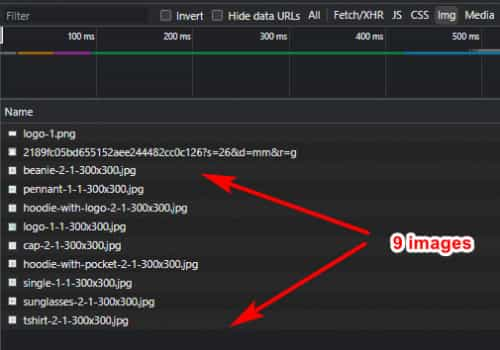
so this achieves what you were describing above without any customization.Best regards,
MikeHi,
Thanks for the google search links but they both pointed to the same thread, thanks for the mockup it helps, but please note that the logo container is wrapped in the link so the image, Topic, Company, and Slogan will all be in the link.
As far as I know, text in SVG is not searchable, if this is only for SEO why not just add title & alt attributes to the logo image to achieve this?
Another option would be to not use the theme logo at all but use a header widget with a html widget so you can add the html layout just as you have in your mockup.Best regards,
MikeMay 10, 2022 at 12:27 am in reply to: Missing Background Image, Search Icon and Burger Menu on Mobile #1351086Hi,
Glad we were able to help, if you have any further questions please create a new thread and we will gladly try to help you. Thank you for using Enfold.Best regards,
MikeHi,
Try this css:#menu-item-122 .sub-menu{ padding-bottom:0px!important; } #menu-item-122 .sub-menu.avia_mega_hr{ padding-top:0px!important; }Best regards,
MikeHi,
Try:#top #avia-menu #menu-item-56 .avia_mega_div.avia_mega2 { width: auto; white-space: nowrap; }After applying the css, please clear your browser cache and check.
Best regards,
MikeHi,
Glad we were able to help, I removed your domain for the solution above, if you have any further questions please create a new thread and we will gladly try to help you. Thank you for using Enfold.Best regards,
MikeHi,
Try adding this css:#top #avia-menu #menu-item-38 a { padding-left: 30px; }and adjust the padding to suit, then clear your browser cache and check.
Best regards,
MikeHi,
If you have the theme option Product gallery set to WooCommerce 3.0 product gallery right now then your plugin Motif Product Image Zoom has replaced the Product gallery because the source code doesn’t match the our theme.
You can try disabling the lightbox for the theme at Enfold Theme Options ▸ Lightbox Modal Window
or try adding this code to the end of your functions.php file in Appearance ▸ Editor:function custom_noLightbox_script() { ?> <script> (function($){ $("#thumbnail-slider a.thumb").addClass("noLightbox").removeClass("lightbox-added"); })(jQuery); </script> <?php } add_action('wp_footer', 'custom_noLightbox_script');Best regards,
MikeHi,
Try this css instead:#top #avia-menu #menu-item-35 .avia_mega_div.avia_mega3 { width: auto; white-space: nowrap; }After applying the css, please clear your browser cache and check.
Best regards,
MikeMay 8, 2022 at 2:17 pm in reply to: When you click on an image included in a Text Block, the caption does not appear #1350945Hi,
Glad we were able to help, if you have any further questions please create a new thread and we will gladly try to help you. Thank you for using Enfold.Best regards,
MikeMay 8, 2022 at 11:52 am in reply to: When you click on an image included in a Text Block, the caption does not appear #1350936Hi,
Thanks for the link to your example page, this page uses the prettyPhoto script, the official page is here, the jQuery based lightbox clone is grouping the galleries together in the script, for example.
Enfold uses the Magnific Popup lightbox script, so each one of the solutions that Ismael linked to, thanks to Guenni007, above would group the galleries together for the Magnific Popup lightbox.
If you would like an easier solution, Guenni007 recently posted this one where he links to hidden galleries, you could use images as the links and they would each open separate galleries.Best regards,
MikeMay 8, 2022 at 1:56 am in reply to: Missing Background Image, Search Icon and Burger Menu on Mobile #1350916Hey classywebsites,
Thanks for the login, your mobile header image in your Quick CSS was pointing to another domain and getting a 404 error, I imagine it was a testing domain, please see the links below.
I corrected to your current domain, please clear your browser cache and check.Best regards,
MikeHi,
I believe that I answered this in another thread you have: how can I disable the lightbox functionality
by default, the gallery lightbox can be removed by changing the Product gallery to WooCommerce 3.0 product gallery instead of Default enfold product gallery at Enfold Theme Options ▸ Shop Options ▸ Product gallery
Please give this a try.Best regards,
MikeMay 8, 2022 at 1:30 am in reply to: When you click on an image included in a Text Block, the caption does not appear #1350914Hi,
Glad this helped, this is as it’s always been, the lightbox pulls from the title field ie: mfp-title

in the gallery element the “caption” field actually is the image “title” field:


Best regards,
MikeHey InSilentio,
Please explain if you are asking for the text & subtext to be below the logo or next to the logo.
Typically the logo container is 90px high on desktops, are you thinking that the logo will be only 45px high to make room for the text and sub-text, or are you going to want the header larger to make room?
Typically since the mobile header and logo are already small the sub-text is hidden, is this what you mean by your solution not working on mobile?
Our documentation has an example, perhaps see this, but I have not seen an example of Logo & text & subtext, perhaps you could link to the solution that you found and your test site so we can see how small your header and logo image and text and sub-text is going to be.Best regards,
MikeHi,
Thank you for your patience, please try this css:#top #avia-menu #menu-item-35 .avia_mega_div.avia_mega3 { width: auto; }After applying the css, please clear your browser cache and check.
Best regards,
MikeHi,
Thank you for your patience, I found another way to add the images without a plugin, I replaced the previous shortcodes with these:
[porsche-logo]
[kadewe-logo]
[fcbayern-referenzen-logo]
[fraunhofer-referenzen-logo]
then I added this function to your child theme functions.phpfunction pure_javascript_image_shortcode() { ?> <script> var elements = new Array(); var elements = document.getElementsByClassName('av-masonry-entry-content'); for (var e = 0; e < elements.length; e++) { var newHTML = elements[e].innerHTML; newHTML = newHTML.replace('[porsche-logo]','<img class="avia_image" src="https://your-site.de/wp-content/uploads/2022/03/porsche-logo.svg" alt="" title="" itemprop="thumbnailUrl" style="height: 150px;margin:auto;">'); newHTML = newHTML.replace('[kadewe-logo]','<img class="avia_image" src="https://your-site.de/wp-content/uploads/2022/03/kadewe-logo.svg" alt="" title="" itemprop="thumbnailUrl" style="height: 150px;margin:auto;">'); newHTML = newHTML.replace('[fcbayern-referenzen-logo]','<img class="avia_image" src="https://your-site.de/wp-content/uploads/2022/03/fcbayern-referenzen-logo.svg" alt="" title="" itemprop="thumbnailUrl" style="height: 150px;margin:auto;">'); newHTML = newHTML.replace('[fraunhofer-referenzen-logo]','<img class="avia_image" src="https://your-site.de/wp-content/uploads/2022/03/fraunhofer-referenzen-logo.svg" alt="" title="" itemprop="thumbnailUrl" style="height: 150px;margin:auto;">'); elements[e].innerHTML = newHTML; }; </script> <?php } add_action('wp_footer', 'pure_javascript_image_shortcode');now the images show without messing up the other elements, please check.
Best regards,
MikeHi,
Thanks for the links to the sites, I see that harrietkrijgh.com has the height set to 800px, while your site is set to 609px:

if you include admin login in the Private Content area so we can investigate why yours is not 800px for desktop.Best regards,
MikeHey Stefano,
Unfortunately, I don’t know of any other plugins like Contact Form DB for Enfold, but in my test this seems to still work. We have not made any changes to the contact form so there would be no reason for the plugin author to update it.Best regards,
MikeHi,
Glad we were able to help, if you have any further questions please create a new thread and we will gladly try to help you. Thank you for using Enfold.Best regards,
MikeMay 7, 2022 at 9:27 pm in reply to: When you click on an image included in a Text Block, the caption does not appear #1350903Hi,
Thanks for your question, to add the lightbox image title you need to add the title to the image, it is not the caption:

the result:

Best regards,
Mike -
AuthorPosts
