

Forum Replies Created
-
AuthorPosts
-
June 14, 2022 at 2:05 pm in reply to: After update to 5.0, buttons on Fullwidth Easy Slider are not working anymore #1355190
Hey Angelo,
Please see this thread for the temp solution until the next update.
If you don’t want to edit the theme files, just uncheck Use first slides caption as permanent caption option and the buttons will work correctly.Best regards,
MikeHi,
Glad to hear that you have this sorted out, if you have any further questions please create a new thread and we will gladly try to help you. Thank you for using Enfold.Best regards,
MikeHi,
Glad we were able to help, if you have any further questions please create a new thread and we will gladly try to help you. Thank you for using Enfold.Best regards,
MikeHi,
Please try creating a new image that is 1280×720, if this doesn’t help then try this new image in the full width slider instead or your current full screen slider, the full screen slider is meant to cover the full screen and in doing so the edges will be cropped.
If we change this to contain to the screen then the image will not be full width unless the image is stretched or the image is the size of the screen, in your case 1280×720.
When I look at your site I can’t see any difference between the backend media library image:

and the frontend slider view at 1280×720:

Perhaps you should try the full width slider instead as it will set the image height based on it’s ratio and always have full width.
To add a screenshot please try using an Screenshot service and pasting the image URL in your post.Best regards,
MikeHi,
It looks like you have changed the image, yesterday the image used was ours-2560-x-1440-1, note the paw:

today the image is ours-2560-x-1440, note the paw:
and today the frontend view matches the new image at 1280×720
So it looks like your image change has corrected, please clear your browser cache and check.Best regards,
MikeHi,
Glad we were able to help, if you have any further questions please create a new thread and we will gladly try to help you. Thank you for using Enfold.Best regards,
MikeHi,
Thank you for the feedback, I examined closer on my demo site and found that by entering the image URL directly the WordPress media library meta fields are not called like they are when a gallery element is, so I don’t see a way to get the title from the link.
But the following script will allow you to add specific titles to each hotspot and show it in the lightbox.
Try adding this code to the end of your child theme functions.php file in Appearance ▸ Editor:function custom_hotspot_title_script() { ?> <script> (function($){ $('.av-image-hotspot-1 a').attr('title','hotspot-1'); $('.av-image-hotspot-2 a').attr('title','hotspot-2'); $('.av-image-hotspot-3 a').attr('title','hotspot-3'); $('.av-image-hotspot-4 a').attr('title','hotspot-4'); $('.av-image-hotspot-5 a').attr('title','hotspot-5'); $('.av-image-hotspot-6 a').attr('title','hotspot-6'); $('.av-image-hotspot-7 a').attr('title','hotspot-7'); $('.av-image-hotspot-8 a').attr('title','hotspot-8'); $('.av-image-hotspot a').magnificPopup({ type: 'image', image: { titleSrc: 'title' } }); })(jQuery); </script> <?php } add_action('wp_footer', 'custom_hotspot_title_script');and adjust the titles to suit, for example for hotspot 1, change
$('.av-image-hotspot-1 a').attr('title','hotspot-1');to$('.av-image-hotspot-1 a').attr('title','custom title for hotspot 1');
I assume that this is your only hotspot element on your site, if not them we can make this script work on this one page only by adding page IDs to it.Best regards,
MikeHi,
Thanks for the login, the font family for this icon is “home”, I corrected and now your google icon shows.
please clear your browser cache and check.Best regards,
MikeHi,
Glad we were able to help, if you have any further questions please create a new thread and we will gladly try to help you. Thank you for using Enfold.Best regards,
MikeJune 13, 2022 at 11:45 pm in reply to: How to make full-screen height element with imagemap #1355106Hi,
Glad we were able to help, if you have any further questions please create a new thread and we will gladly try to help you. Thank you for using Enfold.Best regards,
MikeHi,
Thanks for the feedback, when I test at 1280×720 the bear’s ear and paw are the same as the original image in the inset of the screenshot above:

please compare this to the original image linked below, perhaps the image was cropped when you uploaded it, but your image being used had the edge of the ear & paw to the edge of the screen.
If you uploaded an image with more space away from the ear and paw, try resizing your image to 1280×720 and uploading again.Best regards,
MikeJune 13, 2022 at 5:32 pm in reply to: Open up random ajax portfolio item when the page is loaded #1355072Hi,
Glad we were able to help, if you have any further questions please create a new thread and we will gladly try to help you. Thank you for using Enfold.Best regards,
MikeHi,
Unfortunately, I can not reproduce this, I’m also using the latest versions in my screenshot above.
Perhaps you have another customization or plugin causing this, once you have your site online let us know and we will examine for you, but I can’t blindly advise.Best regards,
MikeJune 13, 2022 at 12:31 pm in reply to: Open up random ajax portfolio item when the page is loaded #1355028Hi,
Try disabling Enfold Theme Options ▸ Page Preloading
Or try this css:#top .avia_loading_icon .av-siteloader { display: none !important; visibility: hidden !important; } #top .avia_loading_icon { background: rgba(0,0,0,0) !important; }After applying the css, please clear your browser cache and check.
Best regards,
MikeHi,
Thanks for the feedback, I added this css:.avia-fullscreen-slider .avia-slideshow>ul>li { background-size: 100vw 100vh !important; background-repeat: no-repeat !important; }compared to the actual image (inset) and the slider image doesn’t seem to be cropped, note the ear and the paw are the same:

please clear your browser cache and check.
If this doesn’t look the same on your desktop please use this link to see your screen resolution and let us know so we can adjust.Best regards,
MikeHi,
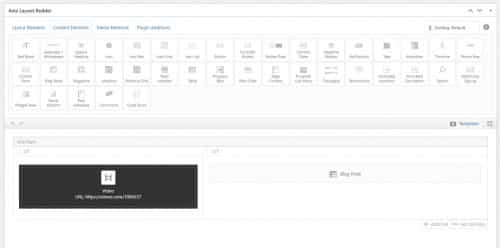
To have a video and blog posts try this setup:
a grid row element, 2/5 + 3/5 with a video element in the 2/5 and a blog element in the 3/5:
frontend results:
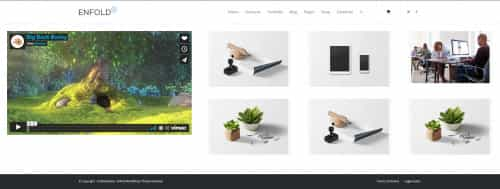
Best regards,
MikeHey HulaSlim,
Thanks for your question I assume that your are referring to the “title” attribute for the images
Try adding this code to the end of your child theme functions.php file in Appearance ▸ Editor:function custom_remove_title_script() { ?> <script> (function($){ $("*").hover(function(){ $(this).removeAttr("title"); }); })(jQuery); </script> <?php } add_action('wp_footer', 'custom_remove_title_script');Best regards,
MikeJune 12, 2022 at 10:46 pm in reply to: How to overwrite the new class-avia-masonry.php using the child theme? #1355001Hi,
Glad that Guenni007 & Günter could help, if you have any further questions please create a new thread and we will gladly try to help you. Thank you for using Enfold.Best regards,
MikeJune 12, 2022 at 10:44 pm in reply to: Different scroll offset of toggles on desktop and mobile view #1354999Hi,
Glad Ismael could help, if you have any further questions please create a new thread and we will gladly try to help you. Thank you for using Enfold.Best regards,
MikeJune 12, 2022 at 10:42 pm in reply to: Footer and header influence each other and socket edition #1354997Hi,
Glad we were able to help, if you have any further questions please create a new thread and we will gladly try to help you. Thank you for using Enfold.Best regards,
MikeHey Ueli,
Thanks for your question, the lightbox has an empty title field for your hotspot images, please try adding your text in the image title field in the media library, or if the hotspot image links were added as html you could add the title attributetitle="your title text"Best regards,
MikeHey virtualbis,
Thanks for your question, in the admin sidebar of the page under Header visibility and transparency choose Hide Header on this page

and in the color section choose At least 100% of Browser Window height and the Background Attachment should be Fixed because “Parallax” adds space for the Parallax effect.
And lastly you had an empty column above the color section which added a white space, I removed this, now the color section and background is covering the full page, please clear your browser cache and check.Best regards,
MikeJune 12, 2022 at 9:27 pm in reply to: Team Member Element – Open Team Member Description in Lightbox #1354989Hey Eleina,
Thanks for your question, for this example I created long team member descriptions and used css to make them hidden (the borders are only for reference):

this is the css for the lightbox popup and to hide the team member descriptions:.white-popup { position: relative; background: #FFF; padding: 20px; width: auto; max-width: 500px; margin: 20px auto; } .white-popup .team-social { border: 7px solid rgba(0, 0, 0, 0.1); position: absolute; font-size: 19px; background: #fff; background: rgba(255, 255, 255, 0.7); opacity: 0; visibility: hidden; top: 0; left: 0; right: 0; bottom: 0; text-align: center; border-radius: 3px; } .avia-team-member .team-member-description { visibility:hidden; }Then I added this code to the end of my child theme functions.php file in Appearance ▸ Editor:
function clone_team_member_to_lightbox_popup() { ?>
  <script>
window.addEventListener('DOMContentLoaded', function() {
(function($){
   $('.avia-team-member').each(function () {
        var copyTeam = $(this).clone().html();
$(this).magnificPopup({
    items: {
        src: $('<div class="white-popup">'+copyTeam+'</div>'),
    },
    type: 'inline'
});
});
})(jQuery);
});
  </script>
  <?php
}
add_action('wp_footer', 'clone_team_member_to_lightbox_popup');
Then on click the team member element opens in a lightbox with the team member description showing.

*recommended css thanks to Guenni007 to have the team member image to the left and content to the right instead of below.mfp-content { display: inline-flex !important; } .white-popup { position: relative; background: #FFF; padding: 20px; width: auto; max-width: 800px; margin: 20px auto; } .white-popup .team-img-container { max-width: 300px; float: left; margin: 0 20px 10px 0 } .white-popup .team-member-name, .white-popup .team-member-job-title, .white-popup .team-member-description { width: 100%; }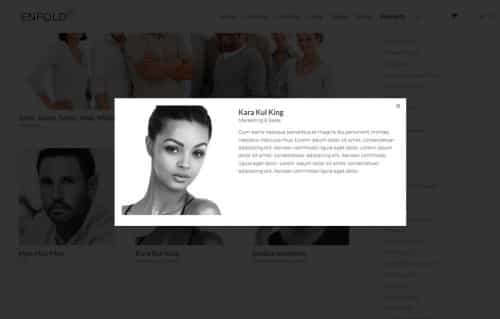
Best regards,
Mike-
This reply was modified 3 years, 7 months ago by
Mike.
Hey rootbranch,
Thank you for your patience, I don’t think that your icon code is correct “uf1a0” because your page source code doesn’t have a “data-av_icon” for that one, please include an admin login in the Private Content area so we can examine the icon zip file that you uploaded and adjust the function, did you download the file from fontello?Best regards,
MikeHey mackfoyt,
Thank you for your patience, the ImageMapPro uses absolute position on the background container, so you will be limited because too much styling makes the map shapes move out of place.
Please try this css in your Quick CSS:#domov > .container { padding: 0; display: block; } .imp-zoom-wrap { width: 90%; margin: auto; }After applying the css, please clear your browser cache and check.
This is the expected results:

Best regards,
MikeHi,
Please link to your page so I can adjust for you, my shop demo is not showing this:

Best regards,
MikeJune 12, 2022 at 4:05 pm in reply to: Footer and header influence each other and socket edition #1354973Hi,
This is the Enfold ▸ General Styling ▸ Quick CSS field that I spoke of, I add the css for you:

please clear your browser cache and check.Best regards,
MikeHi,
Glad we were able to help, if you have any further questions please create a new thread and we will gladly try to help you. Thank you for using Enfold.Best regards,
MikeHi,
For that page try this css:#top.page-id-38 .flex_column.avia-builder-el-2 { overflow: auto; }but on that page the color section that the table is in is hidden on mobile.
If you have multiple tables on multiple pages then I recommend add a custom class to the column that the table is in, if you use the custom class “scroll-table” then you could use this css instead:#top .scroll-table { overflow: auto; }After applying the css, please clear your browser cache and check.
Best regards,
Mike -
This reply was modified 3 years, 7 months ago by
-
AuthorPosts
