

Forum Replies Created
-
AuthorPosts
-
Hi,
Thank you for the link to your pages, but I’m not sure why this is occurring, I linked to my demo page below which is currently “header visible and sticky”, I also tested different header settings and it worked for my demo each time.
Are you manually managing Builder Elements in Enfold Theme Options ▸ Performance ▸ Disable Template Builder Elements?
Please include an admin login in the Private Content area so we can investigate, are there any other pages where this is not working?Best regards,
MikeHi,
Thanks for the feedback, I changed your css to this:.sticky-top { position:fixed!important; top:0!important; z-index:600!important; } .sticky-top-added { position: fixed !important; top: -85px; width: 100%; z-index: 999; opacity: 0; background: #fff; transition: 0.3s all; }and changed the script to this:
function custom_collant_script() { ?>
    <script>
window.addEventListener('DOMContentLoaded', function() {
(function($){
  $(function() {
     var scroll_start = 0;
     var startchange = $('.avia-section.collant');
     var offset = startchange.offset();
     var width = $(window).width()
      if (startchange.length){
     $(document).scroll(function() {
        scroll_start = $(this).scrollTop();
        if((width >= 990) && (scroll_start > offset.top - 85)) {
          document.querySelector('.avia-section.collant').classList.add('sticky-top');
          document.querySelector('#header_main').classList.add('sticky-top-added');
         } else {
          document.querySelector('.avia-section.collant').classList.remove('sticky-top');
          document.querySelector('#header_main').classList.remove('sticky-top-added');
         }
     });
      }
  });
})(jQuery);
});
</script>
    <?php
}
add_action('wp_footer', 'custom_collant_script');
Now when the color section “collant” reaches the header the header hides and the color section sticks to the top of the screen.
Please note that if you are logged in and the admin bar is showing at the top the color section looks like it is under the admin bar, so please test not logged in and you will see that the color section is at the top of the screen.
Please clear your browser cache and check.
Please note that if you are using Safari can be hard to clear the cache, often you need to also clear the history to fully purge the cache, following these steps for Safari and note Step 4 where you will Clear the History.Best regards,
MikeHey smudgedesign,
Thanks for your question, I recently worked on a solution for something similar to this, please review this thread
basically, you add a custom class: waypoint-trigger to an element on the page and when it is in view the script will hide the header.
if you find you need some help setting it up please include an admin login in the Private Content area.Best regards,
MikeJuly 12, 2022 at 12:13 pm in reply to: Show category in Masonry gallery with link to overview posts in that category #1358071Hi,
Thanks for the screenshot, try changing the “/” and adding the line break in the function, like this:

$output .= '<span data-link="'. get_term_link($category->term_id, $category->taxonomy) .'" class="blog__masonry–categorie">' . esc_html( $category->name ) . ' - </span><br/>';Best regards,
MikeHi,
Glad to hear that you have this sorted out, I see that your other post has been addressed, if you have any further questions please create a new thread and we will gladly try to help you. Thank you for using Enfold.Best regards,
MikeHi,
Glad Guenni007 could help, thank you Guenni007, if you have any further questions please create a new thread and we will gladly try to help you. Thank you for using Enfold.Best regards,
MikeHi,
As I understand the topic, this user was using a plugin that had some shortcode which could be used to wrap elements and would show or hide them based on the language, if you are using a plugin that offers a similar shortcode, try adding the button shortcode inside of the translation shortcode, for example:
Best regards,
MikeHi,
Sorry, I don’t understand your last post, please explain further.Best regards,
MikeHi,
I examined the post linked below, and it looks like it is using color sections, wich doesn’t use padding like the grid rows, the edge is created by the max-width being 85%
This css works for this post, but I’m not sure if it will cause issues elsewhere on your site:@media only screen and (max-width: 767px){ .responsive #top #wrap_all #main .container { width: 100%; max-width: 100%; padding-left: 6%; padding-right: 6%; } }give this a try.
Best regards,
MikeHey virtualbis,
Thanks for your question, typically links are case sensitive, your link above and your menu link has a capital “S” but the section ID doesn’t, try this link instead:Best regards,
MikeHi,
Thanks Guenni007 for investigating, probably the easiest solution would be to advise using a minimum custom-height of 99% when using your iPhone solution above
it sounds like it is related to how the Apple navigation bar is calculated, from your comment above, and since it doesn’t occur on Android.
Veronika please try checking your other pages and the color sections you added the bg-fixed solution to try changing the minimum height from 100% to 99% and check on your iPhone.Best regards,
MikeHi,
Thanks for your help @Guenni007,
On the page /biologique-recherche-und-warum-es-suchtig-macht/ I only found two color sections with the class bg-fixed and the minimum height set to 100%, so I added the class fullheight and changed to no minimum height and added the css as suggested.
Hopefully this will help on iPhone, but I can’t check.Best regards,
MikeHi,
Thank you Guenni007 for testing and your example,
I believe the i0.wp.com in image links are from Jetpack’s built-in Image CDN that relies on WordPress.comBest regards,
MikeHi,
The code for the widget called “Enfold latest Portfolio” is at:
\enfold\framework\php\widgets\widget-classes\class-avia-portfoliobox.php
I’m not sure if there are any dependencies that would also need to be adjusted to change this to your CPT.
Please note that files in the \framework\php\ directory can not be included in a child theme, so any changes you make will need to be done for each theme update.Best regards,
MikeHi,
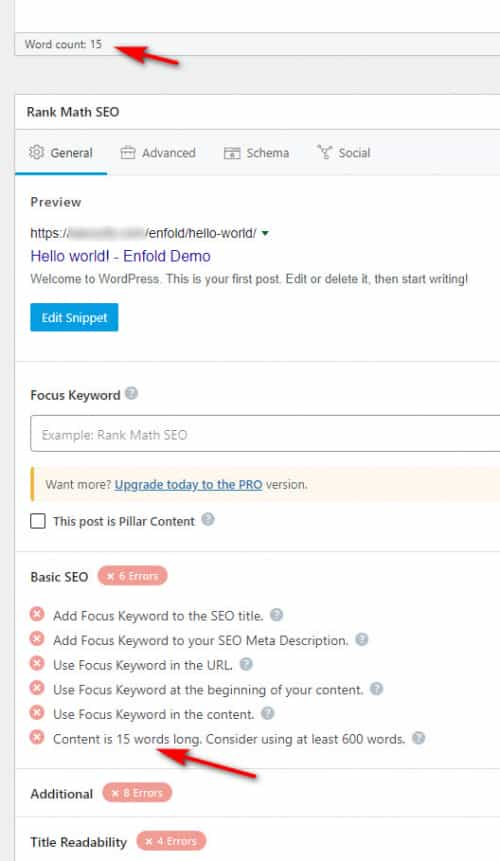
Perhaps you need to enable it in the screen options for your post, when I enable the plugin the Rank Math Integration shows for me:

the word count was also correct:
Best regards,
MikeHi,
Thanks for the screenshots your “weird” editor looks like it was added from a plugin, perhaps TinyMCE Advance, notice the “powered by Tiny” text.

Try finding the plugin and disabling it, this doesn’t occur in the theme with a new install so it is either a plugin or a customization.Best regards,
MikeHey InSilentio,
Thank you for your question, but I don’t think I fully understand because I don’t understand why you would want to create a new CPT that works exactly like the portfolio post type, when you could just use the portfolio post type.
You can use it for your sound instruments and classes and still use the portfolio and masonry element sorting by assigning categories to them, for example if you only want to show the “classes” and “design” categories in a portfolio element, you can just choose those:

then the frontend sort will only show these:

creating a new CPT that works exactly like the portfolio post type and have it recognized in all of the elements and options in the theme just seems like trying to re-invent the wheel.Best regards,
MikeJuly 10, 2022 at 6:36 pm in reply to: Hide top menu and logo, when the scroll reach on particular section. #1357887Hi,
Thank you for the login to your site I believe the issue was that your child theme functions.php was missing the top <?php
I added it back and the script and the css to your child theme stylesheet.
I also adjusted the offset to 10% so the header hides just before the table gets to it.
Please clear your browser cache and check.Best regards,
MikeHi,
Naturally 😃, thank you Shari for figuring this out 🙌 Well Done 🎉
If you have any further questions please create a new thread and we will gladly try to help you, before you can figure it out yourself 😃. Thank you for using Enfold.Best regards,
MikeHi,
Thanks for the feedback, so when I looked at your homepage on mobile the very first image is 100% width, I thought this was desired, then after it are some posts that your screenshot indicated to have the 6% padding, so far good right?
Now below when I see the other two full-width image sections, I assume they are like the top one and should remain full width, correct?
▸ Sind Gesichtssprays wirklich hilfreich?
▸ Sind Neujahrsvorsaetze gemacht um zu scheitern?
plus:
▸ Hier entsteht in Kürze ein Newsletter
Now originally I thought the posts after “Sind Gesichtssprays wirklich hilfreich?” were 6% also, but I see they are not, my mistake.
So for those grid rows I added a custom class paddingsix

and below the grid rows you have color sections with columns, so to include these I added the custom class fakepaddingsix

then I updated the css to this:@media only screen and (max-width: 767px) { .responsive #top #wrap_all #main .av-flex-cells .no_margin:not(.av-zero-column-padding), .responsive #top #wrap_all #main .av-flex-cells .paddingsix .no_margin { padding-left:6% !important; padding-right:6% !important; } .responsive #top #wrap_all #main .av-flex-cells .no_margin.av-zero-padding{ padding-left:0 !important; padding-right:0 !important; } #top .fakepaddingsix { width: calc(100vw - 14%)!important; position: relative !important; left: calc(-44vw + 50%) !important; } }please clear your browser cache and check.
Best regards,
MikeHey Ralph,
Thanks for the link to your site, but it doesn’t look like you have enabled the cookie consent message bar or modal window, so the first step to becoming compliant is to do this, once you enable it you can make the adjustments above in the options, please review our documentation.
Also see our blog post: ENFOLD and the GDPRBest regards,
MikeHi,
Glad we were able to help, if you have any further questions please create a new thread and we will gladly try to help you. Thank you for using Enfold.Best regards,
MikeJuly 10, 2022 at 2:52 pm in reply to: Hide top menu and logo, when the scroll reach on particular section. #1357877Hey qhsedirectory,
Thanks for the link to your page, currently you have an error showing at the top of your page above your menu:/** Add your own functions here. You can also copy some of the theme functions into this file. * WordPress will use those functions instead of the original functions then.*/this is the text in your child theme functions.php, please try removing any changes that you have made to correct.
As for hiding and showing the header when a specific place on the page is in view, I tested on an example page containing many columns with text blocks, and for one text block I added a custom class waypoint-trigger:

this “trigger” element is down a ways on the page so it is not in view on the page load:

then I added this css in the Enfold Theme Options ▸ General Styling ▸ Quick CSS field:.waypoint-hide { position: fixed !important; top: -100px; width: 100%; z-index: 999; opacity: 0; background: #fff; transition: 0.3s all; box-shadow: 0 2px 3px rgba(0,0,0,0.15); } .waypoint-show { top: 0; opacity: 1; transition: 0.3s all; }and this code in the child theme functions.php file in WordPress ▸ Appearance ▸ Editor:
function custom_waypoint_trigger_script() { ?>
  <script>
window.addEventListener('DOMContentLoaded', function() {
(function($){
  var $header = $('#header_main');
  var $things = $('.waypoint-trigger');
  $things.waypoint(function(direction) {
    if (direction === 'down') {
       $header.addClass('waypoint-hide');
       $header.removeClass('waypoint-show');
    }
    if (direction === 'up') {
       $header.addClass('waypoint-show');
       $header.removeClass('waypoint-hide');
    }
  }, {
    offset: '95%'
  });
})(jQuery);
});
</script>
  <?php
}
add_action('wp_footer', 'custom_waypoint_trigger_script');
Note in the script the “offset” is 95%, this will trigger when the element is just in view, you can adjust to suit, such as 50% for when the element is in the middle of the page.
Please give this a try, I linked to my example page below.Best regards,
MikeHi,
Thank you for the link to your site, I added the css to your Quick CSS for both your EN & DE theme options, and it is now working, please clear your browser cache and check.
Please note that WPML creates a theme panel for each language, so often you need to make the changes in both.Best regards,
MikeHi,
Thanks for the login, it looks like your web host is deferring your jQuery, note that the options are not available in your theme options at Enfold Theme Options ▸ Performance ▸ Change WordPress Defaults

these are the options that you should see

You will need to ask your web host to restore the WordPress defaults as they have modified the default install.
Also note that your WordPress ▸ Tools ▸ Site Health says that your Debug mode is enabled, displaying errors on your site which is a critical security issue and recommends that you disable this.

Best regards,
MikeJuly 10, 2022 at 2:52 am in reply to: Mobile Fallback image appears before video on homepage #1357862Hi,
Glad we were able to help, if you have any further questions please create a new thread and we will gladly try to help you. Thank you for using Enfold.Best regards,
MikeHi,
Thank you, but unfortunately, I don’t have an iPhone or iPad to test with and I do not see this on a Galaxy Android, with Firefox, Chrome, or Brave.
But I’m sure we will be able to sort this out, thank you for your patience.Best regards,
MikeJuly 10, 2022 at 2:24 am in reply to: Certains sous-menu du menu principal s'affichent en gros et en violet #1357859Hey Eric,
Merci pour le lien vers votre site, les grandes couleurs violettes du titre du méga menu sont définies dans vos options de thème, si vous regardez dans votre Enfold Theme Options ▸ General Styling vous trouvez-en un qui soit violet. Les titres du méga menu sont traités comme des en-têtes plutôt que comme des liens simples, mais si vous voulez qu’ils ressemblent à des liens simples, essayez ce code dans le champ Style général ▸ CSS rapide ou dans le champ WordPress ▸ Personnaliser ▸ CSS supplémentaire :#top #header #header_main .mega_menu_title a { color: #c6d6be; font-size: 12px; font-weight: 400; } #top #header #header_main .mega_menu_title a:hover { color: #1078ff; }Après avoir appliqué le CSS, veuillez vider le cache de votre navigateur et vérifier.
— Translated with Google —
Thanks for the link to your site, the large purple mega menu title colors are set in your theme options, if you look in your Enfold Theme Options ▸ General Styling you will find one that purple. The mega menu titles are treated like headings rather than simple links, but if you want them to look like simple links please try this code in the General Styling ▸ Quick CSS field or in the WordPress ▸ Customize ▸ Additional CSS field:
#top #header #header_main .mega_menu_title a { color: #c6d6be; font-size: 12px; font-weight: 400; } #top #header #header_main .mega_menu_title a:hover { color: #1078ff; }After applying the css, please clear your browser cache and check.
Best regards,
Mike -
AuthorPosts
