

Forum Replies Created
-
AuthorPosts
-
Hi,
Try this solution, you may need to remove any other custom css for the mobile break point that you have tested, if this doesn’t help then remove this and any other custom css for the mobile break point and link to your site so we can check.Best regards,
MikeHi,
Glad to hear, to change the color of the items in the checkout to all black, try this css:#top.woocommerce-checkout .main_color tr:nth-child(even){ color: #000; }to change the mini-cart “subtotal” to total, try adding this code to the end of your child theme functions.php file in Appearance ▸ Editor:
function custom_mini_cart_total_script() { ?>
  <script>
(function($){
  $(function() {
$( "p.woocommerce-mini-cart__total strong" )
  .text( "Total" );
 });
})(jQuery);
</script>
  <?php
}
add_action('wp_footer', 'custom_mini_cart_total_script');
After making these changes please check, I believe this was all of the items on your list.
Best regards,
MikeHi,
Glad we were able to help, if you have any further questions please create a new thread and we will gladly try to help you. Thank you for using Enfold.Best regards,
MikeHi,
Glad we were able to help, if you have any further questions please create a new thread and we will gladly try to help you. Thank you for using Enfold.Best regards,
MikeHi,
Thank you, I believe this is working now please check.
The solution was$autore = get_post_meta( $the_id, 'autore_articolo', true);
without the $the_id = avia_get_the_id();Best regards,
MikeHi,
Thanks for the login info, but I don’t see the url to your site, please also include.
Please try this:
$autore = get_post_meta( $post->ID, 'autore_articolo', true);
or this:$the_id = avia_get_the_id(); $autore = get_post_meta( $the_id, 'autore_articolo', true);Best regards,
MikeHey Julie,
Thanks for the link to your page, if you want the masonry images to always be a minimum height of 300px, then try adding this css:#donation-gallery .av-masonry-item-with-image { min-height: 300px !important; }After applying the css, please clear your browser cache and check.
If you want the masonry element to set the height of the images based on the screen width and only show one row of images, try removing your custom css:
#donation-gallery {
    min-height: 300px !important;
    max-height: 300px !important;
    overflow: hidden !important;
    padding-bottom: 0 !important;
}
then add this code to the end of your child theme functions.php file in Appearance ▸ Editor:
function custom_donation_gallery_height_script() { ?>
  <script>
(function($){
  	$(window).on('resize', function() {
  	var dg = $('#donation-gallery .av-masonry-image-container').height();
 $('#donation-gallery').css({'height':dg+'px'});
  	}).trigger('resize');
})(jQuery);
</script>
  <?php
}
add_action('wp_footer', 'custom_donation_gallery_height_script');
this script finds the height of the images and then sets the height of the container to match and it adjusts on window resize.
Best regards,
MikeHi,
Glad Nikko was able to help, if you have any further questions please create a new thread and we will gladly try to help you. Thank you for using Enfold.Best regards,
MikeHi,
For the large gap between the header text and the main body of the linked page please try this css:#top.archive .woocommerce-products-header #after_full_slider_2 .template-page { padding-bottom: 0; } #top.archive .template-shop .template-shop.content { padding-top: 0; }After applying the css, please clear your browser cache and check this page and others to ensure that this doesn’t cause a conflict on other pages, if it does please link to these pages so we can check and adjust.
Best regards,
MikeJuly 23, 2022 at 4:30 pm in reply to: Horizontal Gallery on mobile phones: can I jump directly into the lightbox? #1359290Hi,
Thank you for your patience, I check the first Galleria Fotografica on my Android phone with Chrome and for me the horizontal gallery images open in the lightbox on the first tap, I didn’t need to “double tap”.
What phone and browser are you using?Best regards,
MikeJuly 23, 2022 at 4:18 pm in reply to: Maronry Element – hover opacity and positioning issues. #1359289Hi,
Sorry for our delayed response, to remove the opacity from the masonry element on hover, on the page you linked to, please try this css:#top .av-hover-overlay-fade_out .av-masonry-entry:hover .av-masonry-image-container { opacity: 1; }For the second issue please try this css:
@media only screen and (min-width: 768px) and (max-width: 989px){
.responsive.html_mobile_menu_tablet.html_header_top.html_header_sticky #top #wrap_all #main {
    padding-top: 88px !important;
}
}
To center the masonry title please change this css:
/* Title Position and Caption Box Size */
.av-masonry-entry .av-masonry-entry-title {
text-align: center !important;
position: absolute;
bottom: 5px;
padding: 5px;
}
/* Title */
#top .av-masonry-entry-title {
font-size: 120% !important;
color: #555555;
line-height: 1.6;
font-weight: 600;
letter-spacing: .08em;
text-align: left !important;
text-shadow: 2px 2px 0px rgba(133,133,133,.4)!important;
margin-left: 5%;
}
to this:
/* Title Position and Caption Box Size */
.av-masonry-entry .av-masonry-entry-title {
text-align: center !important;
bottom: 5px;
padding: 5px;
}
/* Title */
#top .av-masonry-entry-title {
font-size: 120% !important;
color: #555555;
line-height: 1.6;
font-weight: 600;
letter-spacing: .08em;
text-shadow: 2px 2px 0px rgba(133,133,133,.4)!important;
width: 100%;
}
After applying the css, please clear your browser cache and check.
Best regards,
MikeHi,
Thank you for your patience, as I understand you still have these issues:5. Is there any way to increase the space between the PRICE and the quantity selector?
Please try this css and adjust to suit.#top .woocommerce-variation-price { padding-bottom: 20px; }6. There is a large green box that appears after clicking “Add to Cart”. How can I change the color of that box?
Please try this css and adjust the colors to suit.#top div.woocommerce-message { border-color: #5b61af; background-color: #bbb5f1; color: #eeeeee; }After applying the css, please clear your browser cache and check.
Best regards,
MikeHey Antonio,
Thanks for your question, I tested this solution and found that it still works.
I used this css to hide the metadata and to make the featured image 300px x 215px square:#top.search-results .search-result-counter { padding: 0; } #top.search-results .search-result-counter img { border-radius: 0; height: 100%; } #top.search-results .search-result-counter { height: 215px; width: 300px; background: transparent; } #top.search-results .template-search.content .entry-content-wrapper { height: 215px; } #top.search-results #main .post-meta-infos { display: none; } #top.search-results .entry-content, #top.search-results .post-title { margin-left: 280px; } #top.search-results .post-entry { padding-bottom: 20px; }here was my results:

Best regards,
MikeHi,
Thanks for the login, the jQuery error that I see is:Uncaught TypeError: elem.getClientRects is not a function, my research points to this occuring when scripts written for an older version of jQuery are used with the newer version of jQuery.
I see that you are using Enfold v4.4.1, which is old now compared to our current version 5.0.1, I recommend updating to v5.0.1 and see if this resolves.
If you are concerned about how your site might behave after an update, try creating a staging site and upgrading it first.
The easiest way to create a staging site is if your webhost has the one click staging site option, this is an option in most cPanels to create a staging clone of your site so we can test on it and you site will stay up and running. You can always ask your webhost to help you with setting this up if you want.Here are some screenshots of what it would look like:


Best regards,
MikeHi,
Sorry that we were not able to help more, but glad Ismael was able to address this for you, if you have any further questions please create a new thread and we will gladly try to help you. Thank you for using Enfold.Best regards,
MikeHi,
Glad Nikko was able to help, if you have any further questions please create a new thread and we will gladly try to help you. Thank you for using Enfold.Best regards,
MikeHi,
Glad Nikko was able to help, if you have any further questions please create a new thread and we will gladly try to help you. Thank you for using Enfold.Best regards,
MikeJuly 22, 2022 at 11:09 pm in reply to: Major issue with WP theme defaulting back to Twenty Twenty Two #1359243Hi,
Glad Rikard could help, if you have any further questions please create a new thread and we will gladly try to help you. Thank you for using Enfold.Best regards,
MikeHi,
Thanks for the feedback, we will leave this open for further feedback that you hear from WPMLBest regards,
MikeHi,
Thank you for the link to your site, this error is typically caused by the Smush lazy load option, which is enabled on your site:
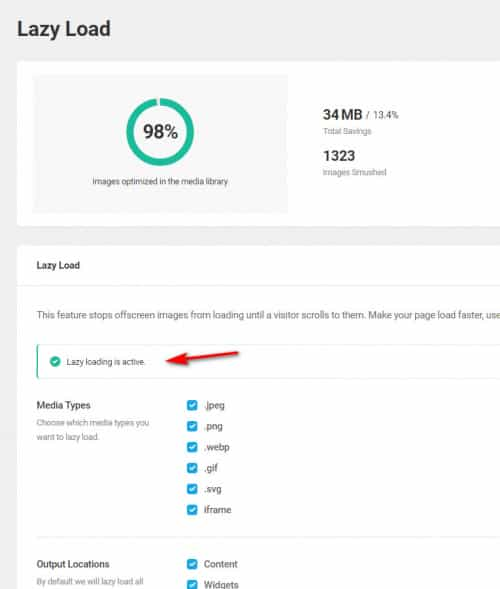
assuming that you don’t want to disable this feature for your whole site, you can disable it for just the front page.

after disabling please clear your browser cache and check.Best regards,
MikeJuly 22, 2022 at 6:19 pm in reply to: Issue with Woocommerce Cart, Product and Checkout pages on MOBILE devices #1359218Hi,
Thank you, please try adding this css to add some space above the product image for mobile devices.@media only screen and (max-width: 767px) { .responsive #top.single-product #main { margin-top: 60px !important; } }After applying the css, please clear your browser cache and check.
Best regards,
MikeHi,
Thanks for the feedback, I checked the page linked below on a mobile phone and did not find anything sticky, the code above is written so that it will only be sticky on screens above 990px, if you are seeing this on an iPad try changing the line:
if((width >= 990) && (scroll_start > offset.top - 85)) {
to:
if((width >= 1440) && (scroll_start > offset.top - 85)) {
if you are testing on a desktop screen and changing the width of the browser window to emulate a mobile phone (425px) then please reload the page before testing because the screen width is determined on the page load.Best regards,
MikeHi,
Glad Ismael could help, if you have any further questions please create a new thread and we will gladly try to help you. Thank you for using Enfold.Best regards,
MikeJuly 22, 2022 at 12:34 pm in reply to: Issue with Woocommerce Cart, Product and Checkout pages on MOBILE devices #1359180July 22, 2022 at 11:50 am in reply to: Issue with Woocommerce Cart, Product and Checkout pages on MOBILE devices #1359162Hi,
Thank you for the link to your site, I believe that your webhost has some caching enabled and it is connected to JetPack because JetPack has this message:
Jetpack is automatically managed for you.
I don’t want to disable to test because typically JetPack requires a specific plugin login to re-enable and I don’t know it.
So if you added JetPack and know the login, please disable, if your webhost added JetPack with a custom WordPress install, please ask them how to disable it and the server caching for testing.
This whole issue could be due to server caching and once cleared it may be solved, I don’t think that this css is part of the default theme because we don’t typically use !important;, I also don’t recognize your site’s caching file /_static/??- so I can’t advise about it.
Please post which host you are using and your host’s reply about JetPack and its caching in the Private Content area for our knowledge to help future users on the same webhost.Best regards,
MikeHi,
Thanks for the feedback, so you have been experiencing this issue for a few years, is the site that you linked to a test site?
I see that you have many plugins and 7 of them a third-party woocommerce addons, so please try disabling all plugins except woocommerce and MyWorks to see if the error is from the MyWorks plugin.
I know above that you said that you tried disabling all the plug-ins we don’t urgently need but this sounds like you may have also left those other 7 plugins activated, if woocommerce and MyWorks doesn’t create the error, try activating the other plugins one at a time until the error does occur.
Please keep in mind that sometimes errors may occur when multiple plugins conflict with each other, even ones that have not caused issues in the past.Best regards,
MikeJuly 21, 2022 at 6:42 pm in reply to: Issue with Woocommerce Cart, Product and Checkout pages on MOBILE devices #1359051Hi,
I can’t see which file it is in because it looks like you are using caching, but here is a screenshot of what I see:

please disable all caching, server and any plugins, and include an admin login in the Private Content area and we will try to disable it for you.Best regards,
MikeJuly 21, 2022 at 1:14 pm in reply to: Issue with Woocommerce Cart, Product and Checkout pages on MOBILE devices #1359025Hi,
Thank you for your link, the reason the image so so close to the top is because this custom css has removed the padding-top on mobile with this css:@media only screen and (max-width: 767px){ .responsive #top #main { padding-top: 0 !important; margin: 0; } }please look for the custom css and remove, then clear your browser cache and any cache plugin, and check.
Best regards,
MikeHey nasiusII,
Thanks for your question, our demo page is created in the Advanced Layout Builder using two blog elements:

The option for the first one is:
Blog Style: Single Author, big preview Pic (no author picture is displayed, feature image is big)
Blog Content length: Full Content

The options for the second one is:
Blog Style: Grid Layout
Define Blog Grid layout: Title and Excerpt

The blog style is set at: Enfold Theme Options ▸ Blog Layout ▸ Blog Styling choose Modern Business

Please try this.Best regards,
MikeHi,
Glad Ismael could help, if you have any further questions please create a new thread and we will gladly try to help you. Thank you for using Enfold.Best regards,
Mike -
AuthorPosts
