

Forum Replies Created
-
AuthorPosts
-
Hi,
Thanks for the login, try this css:@media only screen and (max-width: 767px){ .responsive #header_main_alternate { display: block; } .responsive.html_top_nav_header .av-section-bottom-logo { border-bottom-width: 0px; } .responsive #top #wrap_all .container { width: 100%; max-width: 100%; } #top #header .av-main-nav > li > a { font-size: 10px; } }You will need to make the font size smaller for all of the menu items to fit in a single line on mobile, above is 10px that is for the smallest screens (320px) for larger screens (425px) 15px works. So try adjusting to suit your needs.
After applying the css, please clear your browser cache and check.Best regards,
MikeHi,
Please try this code in the General Styling ▸ Quick CSS field or in the WordPress ▸ Customize ▸ Additional CSS field:#footer-page.footer_color .avia-content-slider .slide-image { background: none; }Please see the screenshot in the Private Content area for the expected results.
Best regards,
MikeHey matthleif,
Please include a link to your site and an admin login in the Private Content area.Best regards,
MikeHey Bernd,
Thanks for your question, to hide the logo and show the desktop menu on mobile Please try this code in the General Styling ▸ Quick CSS field or in the WordPress ▸ Customize ▸ Additional CSS field:@media only screen and (max-width: 767px) { .responsive #top .av-main-nav .menu-item-avia-special { display: none; } } @media only screen and (max-width: 767px) { #top #header .av-main-nav > li.menu-item { display: block!important; } } #top .logo > a { display: none; }Best regards,
MikeHey JeffBianchi,
Thanks for your question, these quotes are added by WordPress, to remove them try adding this code to the end of your child theme functions.php file in Appearance ▸ Editor:add_filter('gettext_with_context', function($translated, $text, $context, $domain){ if($context = 'playlist item title' && $text == '“%s”') $translated = "%s"; return $translated; }, 10, 4);Best regards,
MikeHi,
Glad we were able to help, if you have any further questions please create a new thread and we will gladly try to help you. Thank you for using Enfold.Best regards,
MikeHey domchocolate,
Thanks for the link to your page, unfortunately I don’t see a way to change this without braking the element, the Dev Team added aria-controls to the tab section links to correctly identify them to the correct element, is your testing tool also checking aria functions.Best regards,
MikeHi,
Glad to hear that you have this sorted out, and thanks for sharing your solution if you have any further questions please create a new thread and we will gladly try to help you. Thank you for using Enfold.Best regards,
MikeHi,
Thanks for the feedback, when you create a Advanced Layout Builder post the title is typically added from the Layout admin sidebar with the Title Bar Settings

the categories are not added automatically thus the Post Metadata element, the Blog Layout ▸ Blog Meta Elements is for the default editor posts.
You can test this by enabling or disabling the Blog Layout ▸ Blog Meta Elements ▸ Blog Post Date and note how in the default posts the Blog Post Date is shown or not, but in ALB posts the Blog Post Date is not shown unless you use the Post Metadata element, this is the same for the Blog Post Category, Blog Post Comment Count, etc.Best regards,
MikeHi,
Thank you for your patience, I don’t know about WAI-ARIA Landmarks so I read this article and from what I understand there are only 8 landmarks:
banner
complementary
contentinfo
form
main
navigation
region
search
The main content of your page should be in the main role, this has been applied to the first color section on your page, so to correct it should be moved to the div ID main which is the total main part of the page.
In your post above you wrote that the timeline H2 elements should have a role, but the article I linked to says that the main content should be grouped together:

not individual elements in the main section.
Did you test for WAI-ARIA landmarks on any of your other pages? The ones I checked give the main role to the content in the first color section so all of the other sections are outside the main role and have no role, thus they should also give you an error.
If this is the case we could ask the Dev Team to evaluate this and move the main role.
What tool are you using to test the page, is it something we can test with?Best regards,
MikeHi,
Thanks for the feedback, so looking at your ALB created post /freitas-parkway-terra-linda-hike/ I see that you use a text element to show the title, you could use the Post Metadata element to show the categories:

Best regards,
MikeHi,
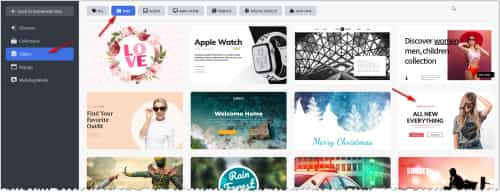
Thank you for the link to the example page, it does look like the Revolution Slider, you could build something similar to this with the LayerSlider, try looking in the LayerSlider demos and import one that you like as a starting point. Go your the LayerSlider dashboard and click Browse Templates

The All New Everything looks similar, try that one and adjust to suit.
Best regards,
MikeHey Alex,
Thanks for the links, I see that you are using v5.1.1 perhaps updating to v5.3.1.1 will correct, if not try disabling your plugins and checking again.
It seems like the pages with no pagination didn’t finish loading, so between pages /archiv/page/29/ & /archiv/page/30/ are there any missing posts?
If so then try changing the missing post status to “draft” so it will not be loaded and see if that corrects, if not change the status of the last post on /archiv/page/29/ and see if that corrects.
There could be an error in some of the pages causing the loop to stop, if we could isolate these posts then we could find what the error is. I’m not seeing errors in the browser console.Best regards,
MikeHi,
I believe the easiest solution for you is to create a language selector in the menu by adding custom links like this:

you can download the flags here, I choose 48px png flag images and uploaded them to my media library:

The Navigation Label that Ismael was talking about is here:

in the Navigation Label add this code:<img src="/wp-content/uploads/sites/19/2023/01/icons8-germany-48.png" width="20px" height="20px">
naturally you will change the image url to your image and change it for each of the flags.
the result should be like this:

Best regards,
MikeHi,
Thank you for the link to your site, I see that when I’m logged in your homepage slider has 3 slides, and when I’m logged out it only has one slide and the Latest Highlights section on your homepage shows shortcode instead of the proper element.
Typically this occurs when your web server is using object-oriented cache such as Memcached, Redis, Varnish, Litespeed, etc. please disable your server cache and flush it, if it is connected to a CDN such as cloudflare disable this also.
Typically these types of cache do not show for logged-in users and they only update once a day.
Once you are done creating your site then you can enable the server cache and CDN.Best regards,
MikeJanuary 7, 2023 at 2:15 pm in reply to: LayerSlider requests licence registration when adding a Shape layer #1377937Hi,
Glad we were able to help, if you have any further questions please create a new thread and we will gladly try to help you. Thank you for using Enfold.Best regards,
MikeJanuary 7, 2023 at 2:13 pm in reply to: Google Font "montserat" lädt trotz lokaler Einbindung #1377936Hi,
It was for a page that Edewoolf posted in private, he didn’t link to it publicly so I don’t think I should post to it.
When you test it on sicher3.de/google-fonts-checker/ you have to wait a few seconds until the popup occurs for it to fail the test.
I have seen this issue with the Popup Maker plugin on other sites so when I saw the popup I knew to look closer at the plugin. This will need to be addressed by the plugin author.Best regards,
MikeJanuary 6, 2023 at 8:33 pm in reply to: LayerSlider requests licence registration when adding a Shape layer #1377899Hey Joris,
Thanks for your question there are a few elements in the layerslider that require a license and are not included with the bundled version, such as Premium Templates and advanced elements such as the new shape element. You can learn more at the layerslider dashboard where it says “Go Premium”
If you wish to use the premium version you will need to disable the bundled version in the theme options and then install the premium layerslider plugin, you can learn more about this in our documentation.Best regards,
MikeHi,
Glad to hear that you have this sorted out, and thanks for sharing your tip. Thank you for using Enfold.Best regards,
MikeJanuary 6, 2023 at 8:13 pm in reply to: Google Font "montserat" lädt trotz lokaler Einbindung #1377893Hi,
Thanks for your patience and the link to your site the google font is being loaded by this css file:/wp-content/uploads/pum/pum-site-styles.css
I believe that it belongs to the Popup Maker plugin, please disable the plugin and test again. Then ask the plugin author how to disable the font.Best regards,
MikeHi,
Thanks for your patience and the link to your site, I see that your PHP ZipArchive Extension is not enabled on your server, this prevents the server from extracting zip files, please ask your webhost to enable it.
In your WordPress ▸ Dashboard ▸ Tools ▸ Site Health I see a warning Outdated SQL server I have not seen this before, your Database server is 5.6.51, do you have any options to update this?
Try changing your PHP time limit from 30 to 300, and your Max input time from 60 to 120
I also recommend disabling all of your plugins before importing the demo files to ensure there are no conflicts.Best regards,
MikeHi,
Glad to hear that you have this sorted out, shall we close this then?Best regards,
MikeHey Heinz,
Thank you for your patience and the link to your site, I see that your footer widget areas are empty, when they are empty the demo widgets will show.
I see that you have created a custom widget area “footerhelp” but I don’t see and code in your child theme functions.php to tell the theme where to show this custom widget area, so I don’t know what your plans for this is. If you wanted to show this custom widget area under your footer then you would add this function to your child theme functions.php:add_action('avia_after_footer_columns','avia_below_footer'); function avia_below_footer(){ dynamic_sidebar( 'footerhelp' ); }But to show widgets in your footer please add the widgets to your footer column one and two.

I see that you have a child theme footer.php & header.php and these do not match the current footer.php & header.php, this will cause errors in your theme. We do not recommend adding these files to your child theme, it is the most common reason for errors when updating. Please remove these files and any customizations you wish to make should be done in your child theme functions.phpBest regards,
MikeHi,
Guenni007, I tested your function above but it didn’t seem to work with the blog post element using single author, small preview, is this element that you tested it with?Best regards,
MikeJanuary 6, 2023 at 12:56 pm in reply to: Serious scrolling problems on mobile devices with boxed layout and bg-image #1377840Hi,
Glad to hear that you have this sorted out, if you have any further questions please create a new thread and we will gladly try to help you. Thank you for using Enfold.Best regards,
MikeHi,
Glad we were able to help, thanks Guenni007, if you have any further questions please create a new thread and we will gladly try to help you. Thank you for using Enfold.Best regards,
MikeHi,
I added this script to your child theme functions.php to get the portfolio page ID and search the portfolio grid entries for matching items and hide them, I tested it on the two pages linked below.function get_single_portfolio_pageid_and_hide_matching_portfolio_grid_item() { ?> <script> window.addEventListener('DOMContentLoaded', function() { (function($){ if ($('body.single-portfolio')){ $("[class*='postid']").each ( function () { var elClasses = $( this ).attr ( 'class' ).split ( ' ' ); for ( var index in elClasses ) { if ( elClasses[index].match ( /^postid-\d+$/ ) ) { var classNum = elClasses[index].split ( '-' )[1]; break; } } var postentry = ('.post-entry-'+classNum); $('#av-sc-portfolio-1').find(postentry).css({'display':'none'}); }); }else{} })(jQuery); }); </script> <?php } add_action('wp_footer', 'get_single_portfolio_pageid_and_hide_matching_portfolio_grid_item');Best regards,
MikeHi,
Glad we were able to help, if you have any further questions please create a new thread and we will gladly try to help you. Thank you for using Enfold.Best regards,
MikeHi,
Glad we were able to help, if you have any further questions please create a new thread and we will gladly try to help you. Thank you for using Enfold.Best regards,
Mike -
AuthorPosts
