

Forum Replies Created
-
AuthorPosts
-
Hey katewoods94,
Thanks for your question, the icons used in the Enfold theme, such as in the icon element, are in a icon-font format and not in a image format that most icons are when you download them.
You can download the icon-fonts from Fontello.com and add them in the theme setting Enfold Theme Options ▸ Import/Export ▸ Iconfont Manager, or you can use icons found elsewhere and convert them into the SVG file type and upload them into Fontello.com and create your own custom icon-fonts. Note that sometimes Fontello can be picky, so here is a way to fix them.
Please note that icon-fonts can not have colors, so if you want to use color icons you should upload the images to your media library and then use css to show the images.
One clever way to do this is to use a built-in icon-font that you would probably never use and then use some css to replace it with your icon image, see this thread.Best regards,
MikeHey biggsuccess,
I added this CSS to the top of your Enfold Theme Options ▸ General Styling ▸ Quick CSS field:@media only screen and (max-width: 767px) and (orientation: landscape) { .responsive #top #wrap_all #main { padding-top: 119px !important; } }and tested on my Android device, please clear your browser cache and check.
Please note that testing with iPhones can be hard to clear the cache, often you need to also clear the history to fully purge the cache, following these steps for Safari and note Step 4 where you will Clear the History.Best regards,
MikeHi,
Glad to hear that you have this sorted out, if you have any further questions please create a new thread and we will gladly try to help you. Thank you for using Enfold.Best regards,
MikeHi,
Try checking out the plugin as it allows you to customize the options

Best regards,
MikeHi,
Glad we were able to help, if you have any further questions please create a new thread and we will gladly try to help you. Thank you for using Enfold.Best regards,
MikeHi,
Would you be doing this on the same server or a different server? As you recall I copied you page using the Avia Layout Builder Debugger so the page shortcode for the single page could be copied.
You could easily test using this method, try creating a new WordPress install on a test subdomain, install Enfold and then copy the one page by Enabling the Avia Layout Builder Debugger and check if the error occurs, if it does and it’s the same server, try the same steps on a different server and check again.
I restored my precious test page of your page if you want to review again.Best regards,
MikeDecember 22, 2023 at 1:56 pm in reply to: Images in masonry gallery automatically cropped.. they appeared blurred #1428753Hey laboiteapixels12,
Thank you for your question, the no scaling (original width x original height) option in the Masonry Gallery element is for the image that in shown on the frontend, to have the lightbox image also show the original image try adding this code to the end of your child theme functions.php file in Appearance ▸ Editor:function change_lightbox_size($size){ return "full"; } add_filter('avf_avia_builder_masonry_lightbox_img_size', 'change_lightbox_size', 10, 1);Best regards,
MikeHey mirr,
Try this CSS in your Enfold Theme Options ▸ General Styling ▸ Quick CSS field:#top .av_header_transparency.av_alternate_logo_active .logo { height: 90px; width: 190px; padding-top: 0; }After applying the css, please clear your browser cache and check.
Best regards,
MikeHey integritive,
Thanks for your question, the Advanced Layout Builder (ALB) text element uses the WordPress TinyMCE editor, so you could use a plugin like Advanced Editor Tools aka: TinyMCE Advanced to add items to the toolbar

or perhaps other plugins will also add items, but we don’t have a specific way to do this only of the ALB.
If you don’t want to use a plugin, perhaps you cound use the TinyMCE documentation to create your own items.Best regards,
MikeHi,
Sorry we were not more help, I do not know what could be causing this. Are you using a object-oriented cache such as Memcached, Redis, Varnish, Litespeed, etc?
If so try disabling this and check again.
Unfortunately we were not able to reproduce this on our test site, and you site still does this with all of your plugins disable and no custom code in your child theme functions.php
So it is very strange. We will keep this thread open should we or you having any ideas.Best regards,
MikeHi,
Glad Ismael could help, if you have any further questions please create a new thread and we will gladly try to help you. Thank you for using Enfold.Best regards,
MikeHi,
Please note in our documentation Custom Elements Advanced Options about the opton: Custom Elements For Subitems which by default is set to All sub-items use the same custom element template for button rows you will want to change this to Individually select subitem custom element templates
Please scroll down to this part of the documentation for Button Rows and review.
I have done this for you on your test page:
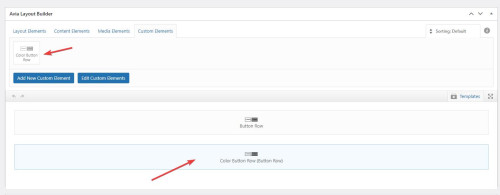

Best regards,
MikeHi,
If you are using Enfold v5.6.9 you don’t need to use a plugin to use webP images, I have tested two webP images as logos and a transparent header with no issues.
Try ensuring that you are using this version and disabled the plugin and check again, also check if you have any custom css that could be causing a conflict.
If you continue to experience this issue please open a new thread and include a admin login so we can examine, as this is not your thread, posting your admin login here will not be private and you will not see our comments in the Private Content area.
This thread is quite old so we will close it and look for your new thread, if you have further issues.Best regards,
MikeDecember 20, 2023 at 12:15 pm in reply to: Size bodytext in blogposts not in the same size than rest of the website #1428590Hi,
Glad Rikard could help, if you have any further questions please create a new thread and we will gladly try to help you. Thank you for using Enfold.Best regards,
MikeHi,
Typically when you add a new social profile following the documentation this is the correct code snippet that you should add to your child theme functions.php:// Register new icon as a theme icon function avia_add_custom_icon($icons) { $icons['line'] = array( 'font' =>'icomoon', 'icon' => 'ue900'); return $icons; } add_filter('avf_default_icons','avia_add_custom_icon', 10, 1); // Add new icon as an option for social icons function avia_add_custom_social_icon($icons) { $icons['Line'] = 'line'; return $icons; } add_filter('avf_social_icons_options','avia_add_custom_social_icon', 10, 1); // Add new icon to sharebox add_filter('avia_social_share_link_arguments', 'avia_add_social_share_link_arguments', 10, 1); function avia_add_social_share_link_arguments($args){ $tiktok = array('line' => array("encode"=>true, "encode_urls"=>false, "pattern" => "https://line.me/", 'label' => __("Share on Line",'avia_framework'))); $args = array_merge($line, $args); return $args; }and then you would choose the new social profile from the options”

and then it will show on the front end:

I have done this for you.Best regards,
MikeHi,
That is strange… I see that you are using a plugin called Co-Authors Plus with the description:
Allows multiple authors to be assigned to a post.

This plugin is what allows you to add co-authors to posts.
We are limited to support for third-party plugins, but I tested this plugin on my test site and tested a code snippet that the plugin recommends to show all authors:add_filter( 'the_author_posts_link', function( $markup ) { if ( ! function_exists( 'coauthors_posts_links' ) ) { return $markup; } ob_start(); coauthors_posts_links(); $output = ob_get_contents(); ob_end_clean(); return $output; } );And it changed the default single author name and link to show the co-author also:

If you are not going to use a child theme on your site, I recommend the WPcode plugin this plugin supports PHP code snippets, JavaScript code snippets, & CSS code snippets for your customizations.
Try adding the above snippet in a new WP Code snippet and ensure that you use the PHP Snippet option:

Best regards,
MikeDecember 19, 2023 at 11:48 pm in reply to: Tab section on mobile has recently stopped working properly #1428532Hi,
Glad we were able to help, if you have any further questions please create a new thread and we will gladly try to help you. Thank you for using Enfold.Best regards,
MikeHi,
It looks like your lightbox plugin is not recognizing the class for the masonry image, but above it looks like you added all of the correct classes.
I tried to login and check the classes but you have F2A enabled so I couldn’t, please disable so we can examine closer.Best regards,
MikeDecember 19, 2023 at 5:42 pm in reply to: Display of active anchor link menu items doesn’t work anymore #1428507Hi,
Thanks, the reason this is not working correctly is because the class for the active menu item (current-menu-item) is not being adding to the menu items.
When I examine the menu in the browser Dev Tools I can see the menu items classes flashing as if they are trying to change, but they don’t change, so something is preventing the class from updating. I’m not sure what is blocking this, but it is not occurring on my test site.
So it is standard to try to eliminate any possible conflicts by disabling plugins and custom code snippets.Best regards,
MikeDecember 19, 2023 at 5:21 pm in reply to: Tab section on mobile has recently stopped working properly #1428506Hi,
Thank you for your patience and explaining further with the screenshot, the error seems to come from a line of numbers in the first tab:
29.06./30.06./31.08./01.09./05.10./06.10./16.11./17.11.2024
on the mobile screen size this line is not wrapping so the first tab section is stretching into the second tab, please see the screenshot in the Private Content area.
I believe the reason for this is that there are no spaces in the line, so there is no natural place for a line break and wrap the text.
Please add a space somewhere in the line, perhaps after each date.Best regards,
MikeHi,
Please see our documentation for: How to add Custom Social Icons to Enfold options.Best regards,
MikeHi,
If you disable your caching plugin does the css above work for the width of the blog?Best regards,
MikeHi,
Glad we were able to help, if you have any further questions please create a new thread and we will gladly try to help you. Thank you for using Enfold.Best regards,
MikeDecember 18, 2023 at 6:32 pm in reply to: Display of active anchor link menu items doesn’t work anymore #1428437Hi,
I checked your live site and all of the Change WordPress Defaults: options are there correctly, so this missing option error is only in the staging site.
But earlier when I tested your live site menu to match my test site, you live site didn’t work correctly, at that time I thought that it could be due to a plugin, which is why we were testing with a staging site.
But now I’m not sure, do you want to try creating the staging site again, or can we put your live site into maintenance and test it?
Do you have another test host? It odd that this seems to work on my host and not yours.Best regards,
MikeHi,
Thanks for the login, I tested both of your custom buttons:
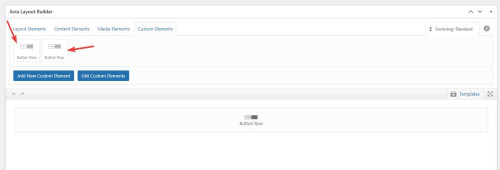
and they both show the add more button option:
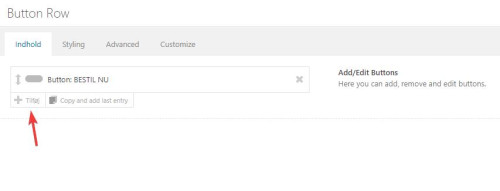
so I added more buttons and saved your page:
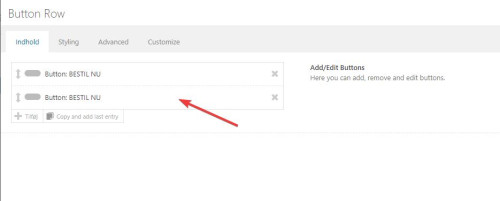
please check, if you still are unable to add buttons then please try the login you posted for us.Best regards,
MikeDecember 18, 2023 at 11:17 am in reply to: Display of active anchor link menu items doesn’t work anymore #1428385Hi,
Some webhosts offer a optimized WordPress install that they have customized, and often in these cases they have added some custom code to disable jQuery Migrate and load jQuery in the footer, in these cases the options are removed from the theme options. Often these are on “WordPress Managed” hosting and the user is limited to making server changes.
In the past the webhost corrected the issue but I don’t know what they did.Best regards,
MikeHey Heinz,
I believe that this deprecation warning was added by the Dev Team as a part of the apply_filters_deprecated, the warning is shown while the new filter is applied, The warning is added so the theme is backward compatible. I assume that you are seeing this because you have wp_debug enabled, so you can ignore this warning.Best regards,
MikeHey ausgesonnen,
Typically you can add your javascript into your child theme functions.php with this function:function custom_script() { ?> <script> /* your javascript here */ </script> <?php } add_action( 'wp_footer', 'custom_script', 99 );If you are not using a child theme I recommend the WPcode plugin this plugin supports PHP code snippets, JavaScript code snippets, & CSS code snippets.
Best regards,
MikeHi,
Glad we were able to help, if you have any further questions please create a new thread and we will gladly try to help you. Thank you for using Enfold.Best regards,
Mike -
AuthorPosts
