

Forum Replies Created
-
AuthorPosts
-
Hi,
Try explaining your issue further and perhaps some screenshots would help, we don’t use the Polylang Pro plugin, is this import feature only available in the Pro version?Best regards,
MikeHi,
Sorry I don’t know what the errors ‘unable to locate resource ‘under nextgen format’ are about, have you tried disabling your plugins like wp optimise?
Or try disabling the theme Enfold Theme Options ▸ Performance ▸ JS & CSS file merging and compression
Sometimes having a second plugin do the file merging and compression can cause errors, so try either disable the theme cache or the caching plugin.
nextgen sounds like a server error, I’m not seeing this on my demo site, but I use a simple cpanel host.
Perhaps this is due to MIME Type Sniffing, try using this tool to check and this guide to correct. I’m taking a guess.Best regards,
MikeMarch 25, 2024 at 10:41 pm in reply to: Menu on mobile remains open when I return to the previous page #1438308Hi,
When the menu is open this class is added:is-active

I don’t really understand why you are doing this, but I think it has to do with your custom button with the scriptonclick="window.history.back()it seems like if you didn’t use that you would not have this issue, correct?
Try using a button with a proper link.Best regards,
MikeHi,
1: try changing the date format at WordPress ▸ Settings ▸ General ▸ Date Format
2: Try adding this code to the end of your child theme functions.php file in Appearance ▸ Editor:add_filter('avia_social_share_link_arguments', 'avia_add_social_share_link_arguments', 10, 1); function avia_add_social_share_link_arguments($args) { if (isset($args['square-x-twitter'])) { $args['square-x-twitter']['label'] = __("Share on X", 'avia_framework'); } if (isset($args['twitter'])) { $args['twitter']['label'] = __("Share on X", 'avia_framework'); } return $args; }This will probably not show in German, feel free to adjust “Share on X” in the code above to German
3: try this css:#top #socket .social_bookmarks .social_bookmarks_mail { display: none; }4: try this css:
#top .avia-post-nav {
	display: none;
}
Please note that we kindly ask that each thread is for a single topic, it is hard to manage threads with many questions, typically it causes confusion when other Mods try to help or when clients answer but are not so clear, Thank you for your patience and understanding and for using Enfold.
Best regards,
MikeHi,
This looks like it is part of a plugin “wp-realty” try disabling this plugin and see if that helps.
You could also try this CSS in your Enfold Theme Options ▸ General Styling ▸ Quick CSS field:#div_forms { display: none; }After applying the css, please clear your browser cache and check.
Best regards,
MikeMarch 23, 2024 at 11:59 pm in reply to: Need to replace home page slider with full wide image with text #1438099Hi,
In your text element that you are using for the “slider” you have inline style of padding-left 20%, so on mobile it pushs the text too far. You should remove this.

Best regards,
MikeHi,
Try this CSS in your Enfold Theme Options ▸ General Styling ▸ Quick CSS field:.avia-timeline-container .av-milestone-icon-inner { background-color: #e85c2e !important; }After applying the css, please clear your browser cache and check.
Please note that often there are a set of theme settings for each language, so ensure that you are adding this css for the correct language, if this still doesn’t work then add it to the WordPress ▸ Customize ▸ Additional CSS and clear your cache a couple of times.Best regards,
MikeHi,
In Safari the question mark is a warning that the logo is insecured, it is not a https url.
I don’t see a double logo image on FireFox on my Mac, I also checked on Windows in Chrome, Firefox, & Edge and found no issues.Best regards,
MikeHi,
Thanks for your patience and the link to your site, it looks like your CZ page is missing some HTML, here you can see the structure of your EN page for the first parallax image that doesn’t show on your CZ page:

note the div “av-parallax” with the div “av-parallax-inner”, that is what shows the image
Now on your CZ page both are missing:

I have not see this before, perhaps when the plugin translated the page it broke the page shortcode, try duplicating the working EN page:

and then manually change the text and set it as your CZ homepage and see if the images then show.Best regards,
MikeHi,
Glad to hear that this helped, an easy way to change the color of your widget items is add this CSS in your Enfold Theme Options ▸ General Styling ▸ Quick CSS field:#top.single-post .widget_recent_entries a { color: #444444; }After applying the css, please clear your browser cache and check.
Best regards,
MikeMarch 23, 2024 at 9:45 pm in reply to: Parallax column Animation without big emty space at the bottom? #1438088Hey Monika,
Thanks for the link to your page but I don’t find “auch nice” or a large gap, is this only on certain screen sizes? Do you mean the “Was haben wir gemacht?” section?
Typically with parallax you also need to use negative margins for the items up more so as the top items more up they show the item under.
Give this a try and if you use the duplicate feature and create a test page with an admin login we can demonstrate how the negative margin could help.
Perhaps a screenshot would help us know where the gap is.Best regards,
MikeHey carmen,
Thank you for the link to your site, I downloaded your video and it looks like the top and bottom black bars are in your video, so you will need to edit your video to crop these out:

For the form drop downs try this CSS in your Enfold Theme Options ▸ General Styling ▸ Quick CSS field:#top .entry-content-wrapper select.wpcf7-form-control { border-radius: 10px; }After applying the css, please clear your browser cache and check.
Best regards,
MikeMarch 23, 2024 at 9:14 pm in reply to: The “avia-head-scripts” error persists despite trying all recommendations #1438085Hi,
Try using the search feature:

for my demo it was in the XX_options table, I recommend backing a full backup before deleting anything in the database.Best regards,
MikeHi,
Thank you for the link to your site, the problem is that you are creating your posts with the Advanced Layout Builder with color sections, so the widget area is at the bottom of your page after the last color section. I recommend adding a widget element in a column to show your widget. I did this for you in one of your posts linked below to show how it works:

Now the wiget shows on the frontend:

Best regards,
MikeMarch 23, 2024 at 8:26 pm in reply to: Old folder /uploads/avia_posts_css causes error that breaks site? #1438079Hi,
I have seen your other therads but each one is about the WP Rocket cache and in each case clearing the cache solves. We are not able to reproduce the error without the plugin, and if I was using the plugin I would clear the cache when making changes, it seems simple.Best regards,
MikeHey Katja,
Thank you for the link to your site, on your first level menu items they are blue until mouse-over then they are yellow, but the backend of the second level is already yellow so what colors do you want the mouse-over and active page second level menu items to be?
mobile devices don’t have a mouse-over function, if you want the first level active menu items to have a yellow background you could try this CSS in your Enfold Theme Options ▸ General Styling ▸ Quick CSS field:#top #wrap_all #av-burger-menu-ul li.current-menu-item a { background-color: #fff236; }but second level mobile menu items all share the same background color.
To add the header image to your category pages try the Unique Headers plugin.
For your search field try this CSS in your Enfold Theme Options ▸ General Styling ▸ Quick CSS field:#top .header_color .avia-search-tooltip input[type='text']#s { background-color: #fff; color: #30302f; }Fot your widget item, try this CSS in your Enfold Theme Options ▸ General Styling ▸ Quick CSS field:
#top #wrap_all .main_color .tribe-events-widget-events-list__header-title {
    color: #c3512f;
    text-align: left;
    font-size: 16px;
    font-weight: 600;
}
#top .main_color .tribe-events-widget-events-list__header-title {
    border-style: solid;
    border-width: 1px;
    border-color: rgb(235, 232, 226);
    padding: 10px 0;
    border-left: none;
    border-right: none;
    margin-bottom: 15px;
}
For your last question, some items have text some don’t they are not the same.
Please note that we kindly ask that each thread is for a single topic, it is hard to manage threads with many questions, typically it causes confusion when other Mods try to help or when clients answer but are not so clear, Thank you for your patience and understanding and for using Enfold.Best regards,
MikeMarch 23, 2024 at 6:49 pm in reply to: WPML Automatic Translation doesn’t translate special heading #1438075Hey ergates,
Thanks for your patience, but unfortunately these items must be manually translated, please see this postBest regards,
MikeMarch 23, 2024 at 6:41 pm in reply to: Old folder /uploads/avia_posts_css causes error that breaks site? #1438074Hey Alwin,
This looks similar to your other thread
In this case versions before 5.3 had a different directory structure, typically updating the theme should have corrected this, but you were using WP Rocket cache which contenued to look the file in the old location, so when you cleared the cache it was solved.
Deleting the old folder also caused WP Rocket to rebuild it’s cache, I don’t believe that this was necessary it was just another way around the WP Rocket cache, but it still comes back to clearing the WP Rocket cache, because the theme on it’s own would not be looking for the wrong file location.
So I also recommend clearing your WP Rocket cache as Ismael pointed out in your other thread.Best regards,
MikeMarch 23, 2024 at 5:57 pm in reply to: Menu on mobile remains open when I return to the previous page #1438069Hey greg47,
Thanks for the video, the first thing that I notice is that you entered a second html & head tag ino your page with the script that ChatGPT gave you:

typically when ChatGPT gives you this it is to point out that the script goes into the head of your page, I recommend not adding this.
So it looks like you are creating a event that will click the burger menu, the check to see if the menu is open is missing the class is-active so the script will run in all cases, even if it is alread closed.
Try changing this line:var menuButton = document.querySelector('.av-hamburger.av-hamburger–spin.av-js-hamburger.av-inserted-main-menu');
to thisvar menuButton = document.querySelector('.av-hamburger.av-hamburger–spin.av-js-hamburger.av-inserted-main-menu.is-active');
Then it should only click the menu if it is open.
Best regards,
MikeHey JurrienSpr,
Thanks for your patience, we don’t have experience with the Polylang Pro plugin but here in their documentation it says you also need Polylang for WooCommerce.
If you need further help with the plugin, their support will be better help as we can not test or offer support for the Polylang Pro plugin.Best regards,
MikeHey Jason,
Try this CSS in your Enfold Theme Options ▸ General Styling ▸ Quick CSS field:.flex_column.avia-builder-el-12 { display: flex; justify-content: center; }But I recommend adding a custom class to the column like “center-column” and then adjust the css:
 .center-column {
    display: flex;
    justify-content: center;
 }
Best regards,
MikeHey Jason,
Thanks for your patience, the blog element layout is dependent on the Enfold Theme Options ▸ Blog Layout ▸ Blog Styling
it looks like you are using the Modern Business

you also could use Elegant

and Default (Business)

So I recommend choosing the one that is closest to your overall goal, which in this case seems to be Default (Business) and then adjust from there. So in this example it looks like we only need to move the date above the title, I recommend using jQuery in your child theme functions.php instead of customizing the element php file in your child theme, \enfold\config-templatebuilder\avia-shortcodes\postslider\postslider.php, because future features may not work correctly if you use an older version of the file.
For example:function custom_move_time_script() { ?> <script> (function($){ $( '.slide-entry' ).each(function() { $( this ).find( 'time.slide-meta-time' ).insertBefore( $(this).find('header')); }); })(jQuery); </script> <?php } add_action( 'wp_footer', 'custom_move_time_script', 99 );
Then you can make the rest of the adjustments with css, like hiding the comments, making the date larger & gold, adding top padding, making the read more gold, etc..slide-content .slide-meta { display: none; } .slide-content .slide-meta-time { font-size: 14px; color: gold; } .slide-content .slide-entry-title { font-size: 28px; padding-bottom: 10px; } .slide-content { padding-top: 20px; } .slide-content .read-more-link a { color: gold; }
So give this a try and if you need further help please create a test page so we can examine your element and offer more help.Best regards,
MikeMarch 23, 2024 at 1:48 pm in reply to: Fixed images displaying with fixed scroll affect on a mobile #1438042Hey M-Graphics24,
Thanks for your patience, you can try this CSS in your Enfold Theme Options ▸ General Styling ▸ Quick CSS field:.avia_mobile #top .avia-full-stretch { background-attachment: fixed !important; }but please note that this will not work for all iPhones or iPads, and may behave oddly, this is due to a limitation on these devices that can not be changed, so to offer a uniform experience across devices the background-attachment was changed to scroll on mobile devices.
If this doesn’t work for you then it’s best to not use it.Best regards,
MikeHi,
It was working in the secondary menu for me above:
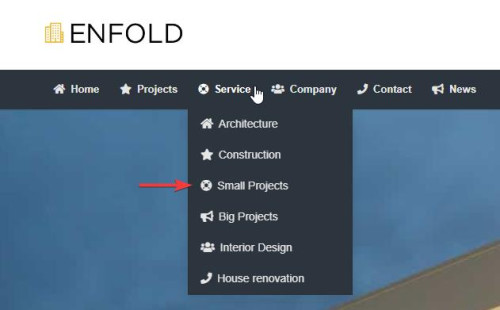
If you mean the Fullwidth Sub Menu element, then you must choose a existing menu to use:
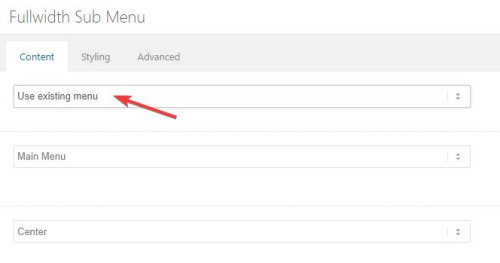
Otherwise check the steps carefully and if you still have trouble open a new thread with an admin login so we can check, posting a admin login here will not be private because this is not your thread.Best regards,
MikeHi,
Glad we were able to help, if you have any further questions please create a new thread and we will gladly try to help you. Thank you for using Enfold.Best regards,
MikeHi,
I was explaining why the featured image and newsbox images were not showing on the single post because you asked for an explanation of WHY. Now if you don’t want the newsbox image to show anywhere use this css:.avia-widget-container.newsbox .news-thumb { display: none; }If you don’t have a featured image and don’t want the gray box to show on single posts use this css:
.single-post .small-preview:not(.lightbox-added) {
	display: none;
}
To remove the left margin of the featured image and add some bottom margin to add space brfore the post title you would need to adjust your custom css in the WordPress ▸ Customize ▸ Additional CSS

I did this for you, feel free to adjust to suit.

Best regards,
MikeHi,
Thank you for your patience, I see that these images are grid cell background images which do not have a height in the same way as a image, typically the background image fills the grid but the grid height comes from the grid content, which in this case there is no content. Nonetheless I have added this css to your Quick CSS and this seems to heml for mobile devices. please clear your browser cache and check.@media only screen and (max-width: 767px) { .responsive #top #wrap_all #welcome.av-flex-cells .no_margin.flex_cell.avia-full-stretch.avia-builder-el-1 { height: 550px !important; } .responsive #top #wrap_all #meet.av-flex-cells .no_margin.flex_cell.avia-full-stretch.avia-builder-el-21 { height: 420px !important; } .responsive #top #wrap_all #events.av-flex-cells .no_margin.flex_cell.avia-full-stretch.avia-builder-el-23 { height: 420px !important; } .responsive #top #wrap_all #meetillustratror.av-flex-cells .no_margin.flex_cell.avia-full-stretch.avia-builder-el-47 { height: 420px !important; } .responsive #top #wrap_all #recent.av-flex-cells .no_margin.flex_cell.avia-full-stretch.avia-builder-el-62 { height: 420px !important; } .responsive #top #wrap_all #contact.av-flex-cells .no_margin.flex_cell.avia-full-stretch.avia-builder-el-64 { height: 420px !important; } }Best regards,
MikeHi,
Thank you for your patience try choosing a difference image size for your gallery element, or use No Scaling (Original Width X Original Height)

It looks like you are using the Square 180px size right now.Best regards,
MikeHi,
Glad to hear that you have this sorted out, if you have any further questions please create a new thread and we will gladly try to help you. Thank you for using Enfold.Best regards,
MikeHi,
Thank you for your patience, first the reason your post featured image is not showing is three fold, first you are using the setting Enfold Theme Options ▸ Blog Layout ▸ Single Post Options ▸ Single Post Style ▸ Single post with small preview image (featured image)

This shows a small square box on your single post:

second you used this css to hide it:div.blog-meta { display:none; }
third, now why is this a gray box and not the featured image, and why do the featured image thumbnails in the news box not show? Because you have this custom function in your functions.php:

disabling it solves all of your issues:

Best regards,
Mike -
AuthorPosts
