

Forum Replies Created
-
AuthorPosts
-
November 17, 2017 at 4:13 pm in reply to: Make logo area with navigation only show up on mobile phones #878148
Hey Wendy,
Please provide a link to the site in question so we can look and see exactly whats going on.
Best regards,
Jordan ShannonHi,
If you need additional help, please let us know here in the forums.
Best regards,
Jordan ShannonHi,
Are you using PHP7 or as close to it as you can get?
Best regards,
Jordan ShannonHi,
Did you need further help, or shall we close this thread?
Best regards,
Jordan ShannonHey bonsaimedia,
Which version were you updating from?
Best regards,
Jordan ShannonHey PLAIN_IT_AG,
Are you running any plugins that may be causing a conflict? Try disabling all active plugins.
Best regards,
Jordan ShannonHi,
Add this to quick css:
time.av-magazine-time.updated{
display:none!important;
}
Best regards,
Jordan ShannonHey med,
Are you using the latest version of Enfold. If not, please attempt to update.
Best regards,
Jordan ShannonHey jelle,
Please provide a link to the site in question.
Best regards,
Jordan ShannonHi,
If you need further help, please let us know here in the forums.
Best regards,
Jordan ShannonHey Ripoll,
If you can please provide the link to the page in question. However, this should work:
.read-more-link{display:none !important;}Best regards,
Jordan ShannonHi,
Add the following to quick css:
#top .social_bookmarks li{
margin:0 5px!important;
}
Best regards,
Jordan ShannonHey Ripoll,
You can switch off comments with the standard WP setting:
Dashboard -> Settings -> Discussion -> Default article settings checkbox “Allow people to post comments on new articles”
You can disable it for each post by opening the post for editing and uncheck “Allow comments.” in the discussion meta box.
Best regards,
Jordan ShannonHey Ripoll,
Using the Simple Image Sizes plugin should work i think, have you tried it? the size to edit will depend on your layout settings.
Best regards,
Jordan ShannonHi,
Add this to quick css:
.noLightbox.social_bookmarks.icon_count_3:first-of-type{
display:none!important;
}
Best regards,
Jordan ShannonHi,
The LayerSlider that is bundled with Enfold is not always the latest, nor is it promised or guaranteed to be. They aren’t always updated at the same time.
Best regards,
Jordan ShannonHey otavioef,
Please refer to the following:
Best regards,
Jordan ShannonHi,
In that case it may be a matter of tailoring the % to fit different screens using media queries within the css.
Best regards,
Jordan ShannonHi,
Apologies for the delay. Please provide admin info and I will look into this further to see if I can let you know the exact cause.
Best regards,
Jordan ShannonHi,
Please simply follow this:
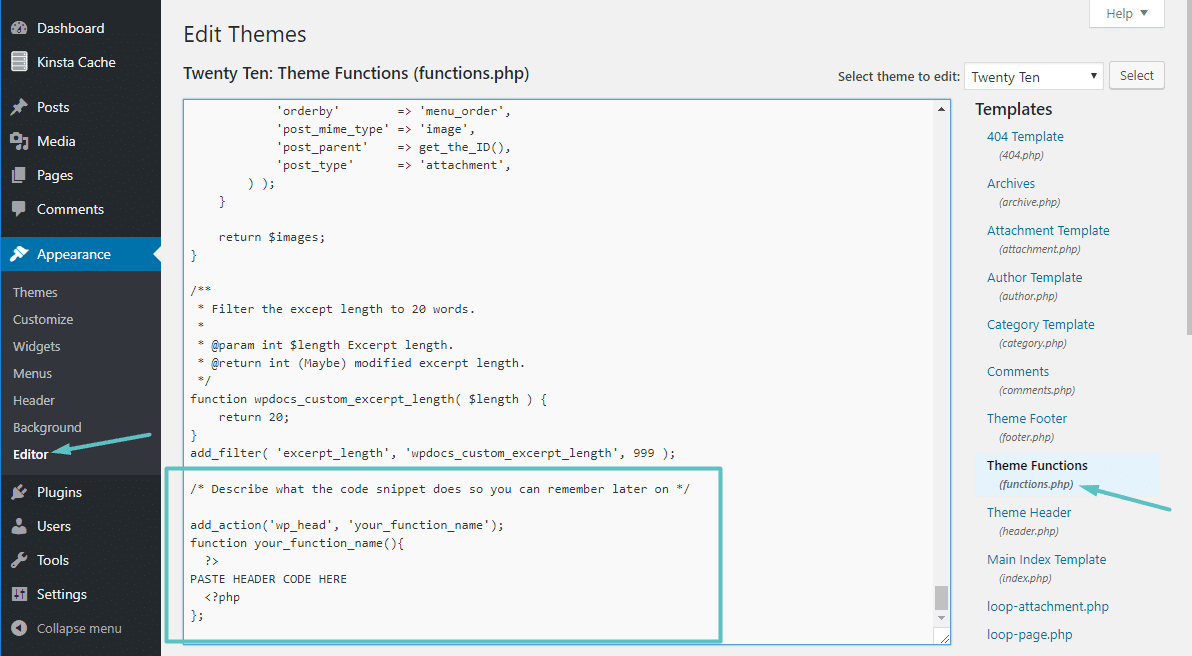
To add code to your header, use this code snippet:
/* Describe what the code snippet does so you can remember later on */
add_action('wp_head', 'your_function_name');
function your_function_name(){
?>
PASTE HEADER CODE HERE
<?php
};
Once you have the relevant code snippet(s) ready, you need to add them to the functions.php file of your child theme. You can either edit this file by connecting to your site via FTP. Or, you can go to Appearance → Editor and select the functions.php file. Then, paste your code at the end of the file:
Best regards,
Jordan ShannonHi,
Try adding the following to quick css:
.main_menu{
left:1%!important;
position:relative!important;
}
Best regards,
Jordan ShannonHi,
Have you set a default bg? The following should work:
.header_bg { background: transparent !important; }
#main { margin-left: 0px !important; }
But it’s still showing another white bg.
Best regards,
Jordan ShannonHi,
Do you still have this css running?:
.avia-menu.av-main-nav-wrap {
left: -50%;
}
Best regards,
Jordan ShannonNovember 17, 2017 at 2:33 pm in reply to: Adding returns / spaces between items on numbered or bulleted list #878068Hi,
That is what you would put in quick css to increase the spacing. Its general because we need to see the page to get the exact classes, ids, etc.
Best regards,
Jordan ShannonHi,
If you remove the css I provided, I can take another look.
Best regards,
Jordan ShannonHi,
Did you make sure to hard clear your cache. Also be sure you are adding the suggested css above all other custom css.
Best regards,
Jordan ShannonHi,
Perhaps this may work via quick css:
.av_dropcap1 { font-size: 50px; }Best regards,
Jordan ShannonHi,
I see, apologies, but to properly target with css I would need to see the actual classes an id’s involved. I don’t have that site unseen.
Best regards,
Jordan ShannonHi,
You need to use the dropcap shortcode.
<blockquote>[ av_dropcap1]"[/av_dropcap1]Click here to add your own text</blockquote>[ av_dropcap1]"[ /av_dropcap1]Or you can bring the default wordpress blockquote styling.
blockquote {
background: transparent url('../images/skin1/quotes.png') no-repeat top left;
}
You need to supply the image for quotes.png.
Best regards,
Jordan ShannonHi,
Add this to quick css:
.noLightbox.social_bookmarks.icon_count_3{
display:none!important;
}
Best regards,
Jordan Shannon -
AuthorPosts
