

Tagged: woo commerce breadcrumbs
-
AuthorPosts
-
March 1, 2026 at 2:57 pm #1495636
hi
I need some help with woo commerce breadcrumbs.
I have a product grid on the page below, and want that to be in the breadcrumb for the product pages.
Right now since I don’t have a shop page set in the woo settings, it just is home/category/product name.
I’d like it to be prints/category/product name (or home/prints/category/product name).
If I set the PRINTS page to be the shop page, then I lose the advanced layer builder.
There isn’t a breadcrumb on the categories pages – can that be added?thanks
nancyMarch 1, 2026 at 5:45 pm #1495640Hey Munford,
To add breadcrumbs to the category pages go to Theme Options > Header > Header Layout > Header Title and Breadcrumbs
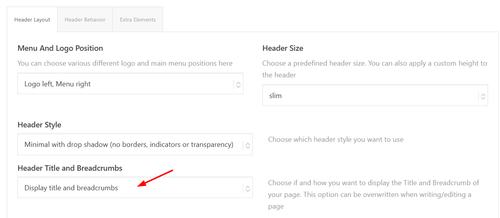
It shows on my site:

Since you are not using the Shop page, try creating a blank “Prints” page and then go to WooCommerce > Settings > Products > General > Shop page and choose it. Then “Prints” will show in the breadcrumbs on the category pages:

and on the product pages:

Or you could add a new product category “Prints” and make it the parent of any other category that you wish:
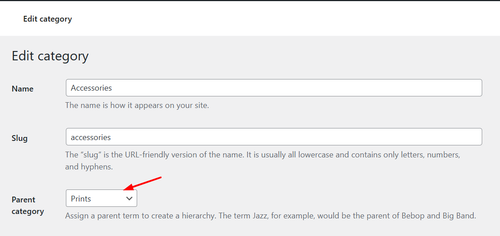
and will also show in the breadcrumbs:

Best regards,
MikeMarch 1, 2026 at 6:15 pm #1495643Hi MIke
If I set my custom page as the shop page, then it shows up blank since the advanced layer builder gets disabled.
If I add a parent category, then that works but I can’t control the layout of the page. (see below)
thanks
Nancy-
This reply was modified 3 days, 16 hours ago by
Munford.
March 1, 2026 at 8:20 pm #1495645Hi,
I can not view your page as it is maintenance mode. You can not use the advanced layer builder on category pages.
But we can change the Prints link in the breadcrumb to your prints page instead of the new prints page that you want to use as a custom category page.
So the first step is to add a new product category “Prints” and make it the parent of any other category that you wish for it to show in the breadcrumb trail.
Then add this code to your child theme functions.php if you are not using a child theme you could use the WP Code plugin then add a new snippet, in the top right corner use the PHP snippet as the code type: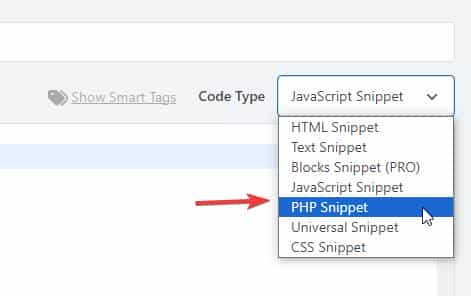 then add the code below and save.
function change_breadcrumb_trail() { ?> <script> document.addEventListener('DOMContentLoaded', function() { const printsLink = document.querySelector('.breadcrumb-trail a[href="http://enfold.test/product-category/prints/"]'); if (printsLink) { printsLink.href = 'http://enfold.test/prints/'; } }); </script> <?php } add_action( 'wp_footer', 'change_breadcrumb_trail', 99 );Ensure that you change the URLs in the code above to your site, and make sure to use the full URL.
Best regards,
Mike -
This reply was modified 3 days, 16 hours ago by
-
AuthorPosts


- You must be logged in to reply to this topic.