

-
AuthorPosts
-
September 19, 2025 at 5:53 pm #1489405
Dear Colleagues,
I see there have been various requests for a BlueSky icon. Is there any progress from Fontenello? Your work-arounds are quite complicated, and it would be so helpful to have a simple icon one could add.
-
This topic was modified 7 months ago by
BlewWeb.
September 21, 2025 at 11:23 pm #1489434Hey BlewWeb,
You could download the icon here and upload it to your Enfold Theme Options ▸ Import/Export ▸ SVG Iconset and Iconfont Manager
Then add this snippet to your child theme function.php file or if you are not using a child theme you could use the WP Code plugin then add a new snippet, in the top right corner use the PHP snippet as the code type:
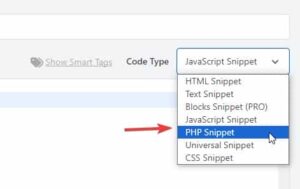
then add this code and save.function avia_add_custom_icon($icons) { $icons['bluesky'] = array( 'font' =>'fontello', 'icon' => 'ue800'); return $icons; } add_filter('avf_default_icons','avia_add_custom_icon', 10, 1); function avia_add_custom_social_icon($icons) { $icons['BlueSky'] = 'bluesky'; return $icons; } add_filter('avf_social_icons_options','avia_add_custom_social_icon', 10, 1); add_filter('avia_social_share_link_arguments', 'avia_add_social_share_link_arguments', 10, 1); function avia_add_social_share_link_arguments($args){ $bluesky = array('bluesky' => array("encode"=>true, "encode_urls"=>false, "pattern" => "https://bluesky.com/", 'label' => __("Share on BlueSky",'avia_framework'))); $args = array_merge($bluesky, $args); return $args; }Then add this css to your Enfold Theme Options ▸ Quick CSS
#top #wrap_all .av-social-link-bluesky:hover a {
	  color: #fff;
    background-color: #1185FE;
}
Then choose the icon in your Enfold Theme Options ▸ Your Social Profiles
You can also vote for this feature here.Best regards,
Mike -
This topic was modified 7 months ago by
-
AuthorPosts


- You must be logged in to reply to this topic.