

Tagged: ausblenden, Produkte, woocommerce
-
AuthorPosts
-
October 30, 2025 at 6:56 pm #1490772
Hallo Zusammen, bei Woocommerce kann man ja einstellen, wo ein Produkt gezeigt werden soll.
Im Shop und den Suchergebnissen, Nur im Shop, nur Suchergebnisse oder ausgblendet.
Leider funktioniert das nicht für die Enfold Suche und bei Ähnlichen Produkten wird es auch angezeigt, wenn man es zb auf ausgeblendet setzt. Ich habe es jetzt mit CSS gelöst, aber vielleicht könnte man das ja mit einem Update in Zukunft mal besser lösen?Danke und Gruß KiM
October 31, 2025 at 6:37 am #1490787Hey Blatze,
Thank you for the inquiry.
Try to add this code in the functions.php file to adjust the search query for products:
function ava_pre_get_posts_mod( $query ) {
    if ( ! is_admin() && $query->is_search() && $query->is_main_query() ) {
        if ( class_exists( 'WooCommerce' ) && ( $query->get( 'post_type' ) === 'product' || isset( $_GET['post_type'] ) && $_GET['post_type'] === 'product' ) ) {

            $meta_query = (array) $query->get( 'meta_query' );

            $meta_query[] = array(
                'key'     => 'catalog_visibility',
                'value'   => array( 'hidden', 'exclude-from-search' ),
                'compare' => 'NOT IN'
            );

            $query->set( 'meta_query', $meta_query );
        }
    }
}
add_action( 'pre_get_posts', 'ava_pre_get_posts_mod', 20 );
Let us know the result.
Best regards,
IsmaelOctober 31, 2025 at 4:43 pm #1490819Hi Ismael,
danke für die schnelle Hilfe, falls dies das ausgeblendete Produkt auch bei ähnliche Produkte und in der Enfold Suche ausblenden sollte, dann funktioniert der Code nicht. Habe es gerade mit einem Produkt getestet und es wird bei beidem noch angezeigt.
DankeHi Ismael,
Thanks for your quick help. If this is supposed to hide the hidden product from similar products and the Enfold search, then the code isn’t working. I just tested it with a product and it’s still showing up in both places.
ThanksNovember 3, 2025 at 1:20 pm #1490887Hi,
Thank you for the inquiry.
The code is supposed to fix the hidden product issue on the search page. If this is not working, we may need to view and access the site to check the issue further. Please provide examples of the hidden products that are not supposed to display on the search page, then include the login details in the private field.
Best regards,
IsmaelDecember 5, 2025 at 6:09 pm #1492185Hello, and first of all, sorry for the late response. 🙏
I have now created this product as a test:
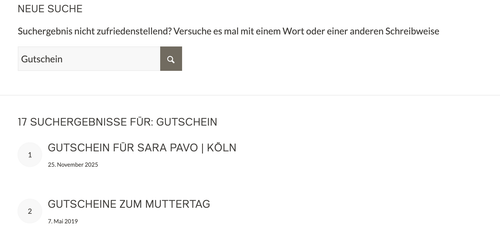
It is hidden everywhere via the WooCommerce settings. I added your code to functions.php, but the product still shows up in the search. It says: Gutschein für Sara Pavo | Köln (Test), with the word TEST in brackets at the end!
I have created a login link for you that will be valid for one week. If you need more time, please let me know and I will adjust it. Thank you!
Best regards KiM
December 8, 2025 at 8:19 am #1492239Hi,
Thank you for the info.
Are you referring to the search icon in the header? If so, please replace the previous code with the following filter:
function ava_avf_ajax_search_query_mod( $query_string ) {
    parse_str( $query_string, $query_args );

    if ( class_exists( 'WooCommerce' ) && ( isset( $query_args['post_type'] ) && $query_args['post_type'] === 'product' ) ) {
        $meta_query = isset( $query_args['meta_query'] ) ? (array) $query_args['meta_query'] : array();

        $meta_query[] = array(
            'key'     => 'catalog_visibility',
            'value'   => array( 'hidden', 'exclude-from-search' ),
            'compare' => 'NOT IN',
        );

        $query_args['meta_query'] = $meta_query;
        $query_string = http_build_query( $query_args );
    }

    return $query_string;
}
add_filter( 'avf_ajax_search_query', 'ava_avf_ajax_search_query_mod' );
Best regards,
IsmaelDecember 11, 2025 at 10:58 am #1492407Hi Ismael,
thank you for the new code. I added it to my site, but it did not work for me.
Any idea why?
December 12, 2025 at 8:00 am #1492447Hi,
Thank you for the update.
We slightly adjusted the condition in the filter. Please make sure to purge the cache before testing.
function ava_avf_ajax_search_query_mod( $query_string ) {
    parse_str( $query_string, $query_args );

    if ( class_exists( 'WooCommerce' ) ) {
        $tax_query = isset( $query_args['tax_query'] ) ? (array) $query_args['tax_query'] : array();

        $tax_query[] = array(
            'taxonomy' => 'product_visibility',
            'field'    => 'name',
            'terms'    => array( 'exclude-from-search', 'hidden' ),
            'operator' => 'NOT IN',
        );

        $query_args['tax_query'] = $tax_query;

        $query_string = http_build_query( $query_args );
    }

    return $query_string;
}
add_filter( 'avf_ajax_search_query', 'ava_avf_ajax_search_query_mod' );
Best regards,
IsmaelDecember 12, 2025 at 4:31 pm #1492466Did not work. :(
Did purge cache of my site and my Browser. Did you test it?Thanks for your help.
December 15, 2025 at 7:37 am #1492510Hi,
Yes, we did test it. The product “gutschein-fuer-sara-pavo-koeln-test” no longer displays in the AJAX search. Please make sure to purge the cache, then try it again.
Best regards,
IsmaelDecember 15, 2025 at 2:21 pm #1492530I deleted the cache, see:
[video src="https://sarapavo.com/wp-content/uploads/2025/12/Video-DELETE-AFTER.mp4" /]
December 16, 2025 at 8:18 am #1492550Hi,
Thank you for the short clip.
We were referring to the AJAX search. For the actual search results page, we removed the pre_get_posts hook and added this filter instead.
add_filter( 'the_posts', 'ava_filter_search_results', 10, 2 );
function ava_filter_search_results( $posts, $query ) {

    if (
        is_admin()
        || ! $query->is_main_query()
        || ! $query->is_search()
        || ! class_exists( 'WooCommerce' )
    ) {
        return $posts;
    }

    foreach ( $posts as $key => $post ) {
        if ( $post->post_type !== 'product' ) {
            continue;
        }

        $product = wc_get_product( $post->ID );

        if ( ! $product ) {
            continue;
        }

        if ( ! $product->is_visible() ) {
            unset( $posts[ $key ] );
        }
    }

    return array_values( $posts );
}
Best regards,
IsmaelDecember 16, 2025 at 10:54 am #1492557Awesome! Thank you! 🙏
Would be nice, if this would appear in one of the coming updates.
Best KiM :)
SOLVED ❤️
December 17, 2025 at 8:25 am #1492597 -
AuthorPosts


- The topic ‘Woocommerce Produkte ausblenden’ is closed to new replies.