

-
AuthorPosts
-
February 2, 2026 at 7:56 pm #1494599
Hi Mike,
I’m glad you were able to access the WP dashboard.
But what do you mean by “Theme Editor and Plugins” are disabled?
Maybe it’s because the store is under the main Akhurst network (in a multisite environment)?About the code …
I understand what you said about the snippet running before the template theme. Ok.
But should I change it directly in the theme’s functions.php file or tweak the code itself using the WPCode plugin?
I did some research and found that you can “hooks”. Does it make sense?I never place any code without using the WPCode plugin, because I’m always afraid of messing with the theme’s functions.php file.
Do I just need to paste this “hook” wrapping your code??
https://snipboard.io/qKb8y6.jpg
https://snipboard.io/eCM7KQ.jpgI did what Ismael asked me to in the beginning, but it’s not working ;(
Quick CSS + PHP snippet (using the hook with WP Code.
https://shop-ca.akhurst.com/product/onc60123mc/Mike,
You can totally do whatever you need to do on your end to make this happen.
I’m not an expert and super scared of doing something wrong that will break the website.Thank you so much!
LeoFebruary 2, 2026 at 11:05 pm #1494604Hi,
The code running in the WPCode plugin is running too late, please add it to the child theme functions.php file, it should work correctly then. Since the code is meant to run at “init” = “(add_action(‘init’,’ava534345953_init’, 50);”
which is before the theme and plugins, it now running in a plugin after the theme will not work. I see no other solution.
This solution works on my localhost, your site or login is limited and I can not test there, so you will need to test.Best regards,
MikeFebruary 3, 2026 at 2:04 am #1494607Next message updated!
-
This reply was modified 1 month, 4 weeks ago by
akhurst_machinery.
February 3, 2026 at 7:13 pm #1494632Hi Mike!
I made it!
The reason you’re not seeing the theme editor file is that we’re under a Multisite Environment.I placed the code right at the beginning, and it worked! The sidebar is on the right side, but that’s ok!
We’ll keep the navigation on the left and the product page to the right. No problem.Now I need your help to make it look like the default sidebar ;)
I wish I could bring it to the top like other pages, without that empty gap above “SEARCH HERE”
https://snipboard.io/PTOXnf.jpghttps://shop-ca.akhurst.com/product/onc57360/
https://shop-ca.akhurst.com/shop/parts/THANK YOU, Leo
-
This reply was modified 1 month, 4 weeks ago by
-
This reply was modified 1 month, 4 weeks ago by
February 4, 2026 at 9:01 pm #1494710Hi,
Glad that this helped, try this css:#top.single-product .sidebar { padding-top: 0; }Best regards,
MikeFebruary 4, 2026 at 9:07 pm #1494711Hi Mike!
The widget moved up ok!
But not the separate line ….https://snipboard.io/BZKqky.jpg
Leo
-
This reply was modified 1 month, 4 weeks ago by
February 5, 2026 at 2:43 pm #1494748Hi,
Thank you for the screenshot.
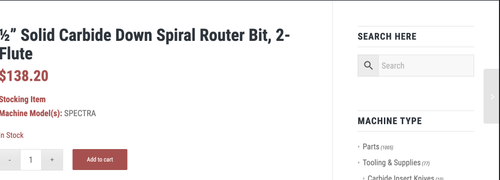
To move the separator up, try o add this css code:
.single-product .template-shop.sidebar_right {
    padding-top: 0;
}

#top.single-product .template-shop.sidebar_right .product > div, #top.single-product .template-shop.sidebar_right .product > .sidebar {
    padding-top: 50px;
}
Result:
Best regards,
IsmaelFebruary 5, 2026 at 5:53 pm #1494761I worked just fine!!!!!
Thank you so much, Mike!
You’re the best!https://snipboard.io/QW37pa.jpg
I need some extra help regarding the search bar, but do I ask here or open another thread?
February 5, 2026 at 8:41 pm #1494767Hi,
Glad that we could help, if you have further questions please open a new thread and we will try to help. Thanks for using Enfold.Best regards,
Mike -
This reply was modified 1 month, 4 weeks ago by
-
AuthorPosts


- The topic ‘WooCommerce Features not working’ is closed to new replies.