

Tagged: Accordion, horizontal gallery
-
AuthorPosts
-
March 5, 2026 at 1:35 pm #1495776
Please see:
Among other pages that use this interface (see the bottom section of that page, green background), there’s a “Horizontal Gallery” that, when clicked (which is already strange because I have to click twice), should take me to the “Accordion” item. Not only does it sometimes work incorrectly, but it also takes me to the item description instead of displaying the item title (subsequent images don’t even take me to the item). I request that you review this issue, please.
March 6, 2026 at 6:12 am #1495802Hey tchamp77,
Thank you for the inquiry,
This is to be expected, since the default behavior when clicking an inactive Horizontal Gallery item is to navigate or slide it to the center. This behavior overrides the anchoring to the Accordion items. Once the image is centered, the anchor should work without issue.
To override this behavior, you can try this script in the functions.php file:
<?php
add_action( 'wp_footer', 'ava_wp_footer_script_mod', 99 );

function ava_wp_footer_script_mod() {
    ?>
    <script>
    // override default horizontal gallery clicks behavior to open accordion and scroll to title
    (function($) {
        $(document).on('click', '.av-horizontal-gallery-slider a[href^="#toggle-id-"]', function(e) {
            e.preventDefault();
            e.stopImmediatePropagation();

            var targetId = $(this).attr('href').slice(1);

            setTimeout(function() {
                var $title = $('#toggle-toggle-' + targetId);
                var $wrap  = $('#' + targetId);

                if (!$title.length) return;

                if (!$wrap.hasClass('active_tc')) $title.trigger('click');

                setTimeout(function() {
                    $('html, body').animate({ scrollTop: $title.offset().top - 80 }, 500);
                }, 50);
            }, 50);
        });
    })(jQuery);
    </script>
    <?php
}
Best regards,
IsmaelMarch 6, 2026 at 1:42 pm #1495818I added the specified PHP code, but the behavior hasn’t changed. It’s still user-unfriendly and confusing.
In addition to still needing to double-click the image above, the second click doesn’t always take me to the corresponding Accordion item.
Please review it and let me know if you need FTP access.March 9, 2026 at 12:36 pm #1495881Hi,
Thank you for the update.
We tried accessing the page to check on the script behavior, but we’re currently not able to view the site because the SSL certificate appears to be invalid or expired. We would d need that resolved before we can properly test and debug the issue on our end.
Could you please contact your hosting provider to get the SSL certificate corrected? Once the site is accessible over https, we can take a closer look at what’s happening with the horizontal gallery and the accordion anchor behavior and adjust the script accordingly.
Let us know once the certificate issue has been fixed.
Best regards,
IsmaelMarch 10, 2026 at 2:23 pm #1495910You can’t get the site cause was moved during last weeked. Please repoint to:
(see private Content) with the same credentials as I sent youMarch 11, 2026 at 5:50 am #1495934Hey!
Thank you for the info.
We tried logging to the site but the previous credentials are invalid.
We adjusted the script a bit so it properly intercepts the click at the .av-horizontal-gallery-wrap level, check if the clicked target is an anchor pointing to a toggle or accordion item and override the default gallery behavior.
Please replace the existing script in functions.php with this updated version:
add_action( 'wp_footer', 'ava_wp_footer_script_mod', 99 );

function ava_wp_footer_script_mod() {
    ?>
    <script>
    (function($) {
        $(document).on('click', '.av-horizontal-gallery-wrap', function(e) {
            var $anchor = $(e.target).closest('a[href^="#toggle-id-"]');

            if (!$anchor.length) return;

            e.preventDefault();
            e.stopImmediatePropagation();

            var href = $anchor.attr('href');
            var targetId = href.slice(1);
            var $title = $('#toggle-toggle-' + targetId);
            var $wrap = $('#' + targetId);

            if (!$title.length) return;

            if (!$wrap.hasClass('active_tc')) {
                $title.trigger('click');
            }

            setTimeout(function() {
                $('html, body').animate({ scrollTop: $title.offset().top - 80 }, 500);
            }, 300);
        });
    })(jQuery);
    </script>
    <?php
}
Please make sure to purge the cache before testing. Let us know the result.
Best regards,
IsmaelMarch 11, 2026 at 2:23 pm #1495951No, the problem hasn’t fixed
Please review the pageand see its erratic behavoir
In Private Content adding access information
March 15, 2026 at 4:52 pm #1496032Hi,
I changed the script to this:function disable_horizontal_gallery_image_nav() { ?> <script> document.addEventListener('DOMContentLoaded', function() { document.querySelectorAll('.av-horizontal-gallery-wrap').forEach(function(wrap) { const link = wrap.querySelector('a[href^="#toggle-id-"]'); if (!link) return; const href = link.getAttribute('href'); wrap.style.cursor = 'pointer'; wrap.addEventListener('click', function(e) { e.stopPropagation(); const toggleId = href.replace('#', ''); const toggleTrigger = document.querySelector('[data-fake-id="' + href + '"], [href="' + href + '"], #' + toggleId + ' .toggler, .toggle-title[href="' + href + '"]'); if (toggleTrigger) { toggleTrigger.click(); let scrollTimer = null; window.addEventListener('scroll', function onScroll() { clearTimeout(scrollTimer); scrollTimer = setTimeout(function() { window.removeEventListener('scroll', onScroll); window.scrollBy({ top: -250, behavior: 'smooth' }); }, 300); }); } else { window.location.hash = href; } }); link.addEventListener('click', function(e) { e.preventDefault(); e.stopPropagation(); }); }); }); </script> <?php } add_action( 'wp_footer', 'disable_horizontal_gallery_image_nav', 99 );Give it a try.
Best regards,
MikeMarch 18, 2026 at 6:00 pm #1496137That works perfectly. Many many Thanks!
March 18, 2026 at 6:07 pm #1496138This reply has been marked as private.March 18, 2026 at 7:53 pm #1496142Hi,
This is a sidebar widget:
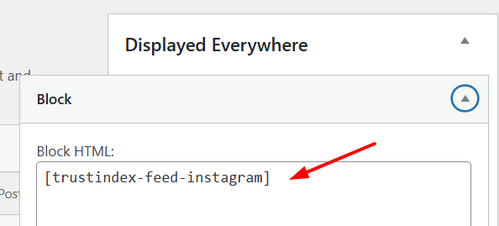
You can remove the widget shortcode or use this css to hide it:.single-product .sidebar #block-7 { display: none; }Let us know if this helps, if you have any further questions please open a new thread and we will try to help, we ask that each thread stays on one topic to be easier for everyone.
Best regards,
MikeMarch 18, 2026 at 8:02 pm #1496146Thank you! That worked perfect :D
March 18, 2026 at 8:11 pm #1496148Hi,
Glad that we could help, if you have further questions please open a new thread and we will try to help. Thanks for using Enfold.Best regards,
Mike -
AuthorPosts


- The topic ‘The “Horizontal Gallery” and “Accordion” combination is malfunctioning.’ is closed to new replies.