

-
AuthorPosts
-
February 5, 2026 at 7:43 pm #1494765
I’m reaching out to see if anyone else has had the same issue I am having with icon fonts added via Enfold’s Theme Options SVG Iconset and Iconfont Manager.
I have never had a problem with creating icons using this feature of Enfold, and the problem I am currently having is not the fault of the theme. But, I need to know if anyone else has had the same experience that I am having with their icon fonts disappearing from their website. Not all the icons. Just the ones that I have added via the SVG Iconset and Iconfont Manager.
Three of our websites built with Enfold are hosted on GoDaddy Managed WordPress hosting. GoDaddy recently began migrating their Managed WordPress hosting customers to what they are calling Managed WordPress Hosting 2.0.
After they migrated our websites to the new environment, all the links to our custom icon fonts were broken – and they appeared to be pointing back to the previous hosting environment.
Using the Enfold Theme Options dashboard, I deleted all the icon fonts and removed their zip files from the media library. I then imported them all again, which restored all the font icons. Problem solved. I did this exact same procedure for all three of our websites.
The next day, when I checked our websites, all the icons were gone again. When I used the Chrome browser’s “Inspect” feature, I could see that the links to the icon fonts appeared to be incorrect again. I had done nothing else to the website after fixing the icons.
I sent a support request to GoDaddy 20 days ago and have had a long back and forth conversation with them. I have asked them if there is any way that their hosting processes are overwriting our database or modifying it – because no matter what I do to fix the icons (I have reimported them about 15 times now) my repairs do not last. Eventually, the icons will disappear from the website.
If anyone has experienced something similar, or if you have any suggestions for what I should be discussing with the support team for our Managed WordPress hosting at GoDaddy, please share it here. Thank you for any help you can offer.
February 6, 2026 at 5:21 am #1494777Hey promosapien,
Thank you for the inquiry.
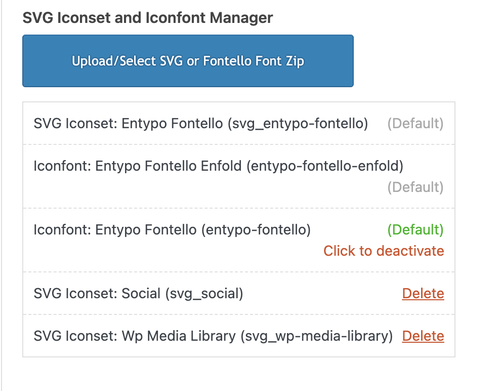
After reimporting the icons, have you tried performing a search and replace in your database? Also, instead of just deleting the zip files, you may need to remove them from Enfold > Import/Export > SVG Iconset and Iconfont Manager before reuploading the icons. After that, you may also need to reconfigure the pages to use the new icon set.
Best regards,
IsmaelFebruary 6, 2026 at 4:10 pm #1494797Hi Ismael,
Thank you for the quick response. Each time I reupload the icon fonts again, I first start by deleting them from the SVG Iconset and Iconfont Manager in the Theme Options, as well as deleting the zip files from the media library. After they’re deleted from both places, I begin uploading them again.
I performed this deletion and reuploaded all the icons for all three websites yesterday, which immediately fixed all instances of the icons throughout the websites. I have done this over a dozen times, though, over the last few weeks.
The main issue is whether that repair will last more than a day or two – and it never does. After I fix the icons by deleting and reimporting them, I don’t do anything else to the website – but within a day or two, the links to the icons get broken somehow. The only explanation I can think of would be some kind of automated maintenance script that the web host runs that is reverting our database or overwriting the changes I’m making. I have no idea why that would be happening, but I don’t know what else could keep causing this to happen.
I have not tried performing a search and replace in the database yet.
I appreciate you offering your thoughts on this. If you come across anyone else with a similar problem and/or a solution, please let me know.
February 9, 2026 at 6:25 am #1494873Hi,
Thank you for the update.
We couldn’t find any icons added to the Iconfont Manager, so we uploaded some “browser” icons and added them to a test page. Please check the private field.
Where did you add the icons? Please create a test page and let us know if the browser icons we added disappear after a day or two. We got the icons from https://fontello.com/.
Best regards,
IsmaelFebruary 9, 2026 at 4:19 pm #1494887Hi Ismael,
Thank you for doing this test, and I’m able to see them on the test page. I will let you know if they are still visible in a day or two.
I added my icons with the SVG Iconset and Iconfont Manager in the Import / Export section of the Theme Options. They are still listed there, but are no longer visible in the icons accessible through the page builder or on the front end of the website.
This is the problem I can’t solve. When I first import the icons, you can find them with the other icon sets in the page builder and they are visible on the front end of the website where I have placed them. But this only lasts a day or two. The last time I posted here on February 6, everything worked because I had just imported the font icons again. But a day or two later, the links to them are broken so they don’t show up in the page builder or on the pages of the site where I placed them.
Have you ever seen anything like this before? Thank you for the help.
February 9, 2026 at 7:43 pm #1494897Hi Ismael,
I appreciate you helping me with this issue. It turned out to be a security setting with our GoDaddy Managed WordPress hosting. We have never had any issues with our iconfonts at all for the last few years we’ve used GoDaddy Managed WordPress hosting. They recently moved our hosting to new servers, and that’s when the problem started happening.
I’m sharing the note from GoDaddy support, in case anyone else has a similar problem with their iconfonts:
Thank you for contacting Support and for your patience while we investigated this.
Our Engineering team has been working and had discovered what was the issue, they have recommended to reimport now the icons and this time should not be removed.
The issue was caused due to security settings in our hosting, these settings do not allow php executions on specific folders such as wp-content/uploads however, our engineering team has reviewed these and has done some changes to allow them to not be removed or changed.
Please, let us know if after the reimport, you have any issues so we can review further.
-
This reply was modified 1 month, 3 weeks ago by
promosapien.
February 9, 2026 at 8:56 pm #1494899Hi,
Thank you for sharing your solution, this should help other users. Shall we close this thread?Best regards,
MikeFebruary 9, 2026 at 9:33 pm #1494901Yes, thanks very much for the assistance. Best wishes!
-
This reply was modified 1 month, 3 weeks ago by
-
AuthorPosts


- The topic ‘SVG Iconset and Iconfont Manager’ is closed to new replies.