

Tagged: default blog-thumbnail
-
AuthorPosts
-
January 30, 2026 at 11:56 pm #1494533
Looking for a snippet to show a deafult image in blog views – but NOT Single view (there only images should be shwon, which are uplaoded with the post).
I tried it like this:function enfold_fallback_thumb_url( $size = ‘enfold-blog-thumb’ ) {
// Deine Fallback-ID (anpassen!)
$fallback_id = 4283;
return wp_get_attachment_image_url( $fallback_id, $size );
}// Enfold-kompatibler Filter: Nur Übersicht, kein Single
function enfold_fallback_thumbnail_html( $html, $post_id, $post_thumbnail_id ) {
global $post;// Admin/Single/hat Bild: überspringen
if ( is_admin() || is_singular() || $post_thumbnail_id ) {
return $html;
}// Nur Posts in Übersichten
if ( ! is_home() && ! is_archive() || $post->post_type !== ‘post’ ) {
return $html;
}// Fallback-Bild rendern (Enfold-Size)
$fallback_html = ‘<img src=”‘ . enfold_fallback_thumb_url( ‘enfold-blog-thumb’ ) . ‘”
alt=”‘ . esc_attr( get_the_title( $post_id ) ) . ‘”
class=”attachment-enfold-blog-thumb wp-post-image fallback-thumb” />’;return $fallback_html;
}
// Filter aktivieren
add_filter( ‘post_thumbnail_html’, ‘enfold_fallback_thumbnail_html’, 10, 3 );But it doesn’t work. Any advices? Thakns
TimFebruary 2, 2026 at 5:39 am #1494576Hey slikslok,
Thank you for the inquiry.
Are you trying to hide the featured image on the single post page or view? You can try this css code instead of using the filter above.
.single .big-preview.single-big {
    display: none;
}
Let us know the result.
Best regards,
IsmaelFebruary 2, 2026 at 10:26 am #1494586Hi Ismael,
thanks this works. But it is just a dirty hack.
Loading images in DOM to then not show it ist not a clean solution, isn’t?
Can you please give me a clean php-solution?
Where is the error in my php-snippet above?Thanks
TimFebruary 3, 2026 at 6:12 am #1494617Hi,
Thank you for the update.
Another option is to use the Layout > Feature Image settings in the post editor — see the screenshot below for reference.
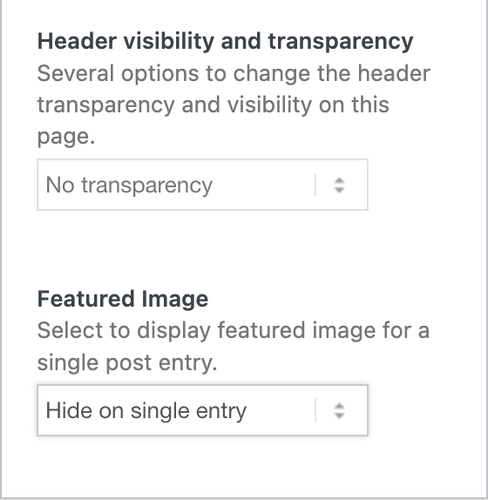
If you want to completely remove it by editing the template files, open the includes > loop-index.php file and remove the block of code, found on lines 256 and 430.
if( ! in_array( $blog_style, array( 'bloglist-simple', 'bloglist-compact', 'bloglist-excerpt' ) ) )
		{
			//echo preview image
			if( strpos( $blog_global_style, 'elegant-blog' ) === false )
			{
				if( strpos( $blog_style, 'big' ) !== false )
				{
					if( $slider && false === $ignore_image_links )
					{
						if( $link_lightbox )
						{
							$slider = '<a ' . $lightbox_attr . ' ' . $featured_img_title . '>' . $slider . '</a>';
						}
						else
						{
							$slider = '<a href="' . $link . '" ' . $featured_img_title . '>' . $slider . '</a>';
						}
					}

					if( $slider )
					{
						echo '
<div class="big-preview ' . $blog_style . '" ' . avia_markup_helper( array( 'context' => 'image', 'echo' => false ) ) . '>' . $slider . '</div>
';
					}
				}

				if( ! empty( $before_content ) )
				{
					echo '
<div class="big-preview ' . $blog_style . '">' . $before_content . '</div>
';
				}
			}
		}
Unfortunately, you cannot use the filter above to hide the featured images.
Best regards,
IsmaelFebruary 4, 2026 at 10:39 am #1494665Hello Ismael,
first solution is not functional as the editors will forget to disable the img…
The second solution neither: I’m not using a child-theme, I’m using code snippets which ist the cleaner way. So can you please change the php, so that it will override the lines in the loop-index.php?
I’m wondering that this function isn’t a wp or theme-feature, because I saw many people asking this function…Thanks.
February 5, 2026 at 3:03 pm #1494752Hi,
Thank you for the inquiry.
Unfortunately, it’s not possible to disable the slider in the post using the hook above. You’ll need to either edit the templates we mentioned above directly or create a copy of them in your child theme to override the parent theme’s templates.
You can also try this script in the functions.php file:
add_action( 'wp_footer', function () {
    ?>
    <script type="text/javascript">
        jQuery(document).ready(function ($) {
            $('.big-preview.single-big').remove();
        });
    </script>
    <?php
}, 999);
Best regards,
IsmaelFebruary 11, 2026 at 11:07 am #1494983Doesn’t work….
February 11, 2026 at 11:10 am #1494984Oh, sorry, small correction: it does work – after a while. So the img is renderred and AFTER Rendering its getting deleted. Thats as dirty like your css-hack above. I need a solution for the functions.php that prevends the laoding at all! Like descirbed at the beginning of my question… Thanks
February 11, 2026 at 11:17 am #1494985.single .big-preview.single-big {
display: none;
} and the php-hack above. doesn’t show ANY img.
But to be clear: it should only (!) doesn’t show the img if it was the deafault image – for posts with no media/img.If there is a individual img set by the editors it ouf course should be shown!
February 12, 2026 at 6:00 am #1495008Hi,
As mentioned above, it’s not possible to use the filter or hook to hide the featured image. You will need to either add the suggested custom script or modify the template directly. For further customization, we recommend hiring a freelance developer or reach out to Codeable — link below.
— https://kriesi.at/contact/customization
Best regards,
Ismael -
AuthorPosts


- You must be logged in to reply to this topic.