

Tagged: search, Search Bar, search icon
-
AuthorPosts
-
January 14, 2026 at 12:38 am #1493884
Hi there!
I’ve just come across an issue when viewing our website on laptop+smaller screens, where the search icon has disappeared from the header menu. May someone please help me with this?
Laptop missing search icon – https://www.dropbox.com/scl/fi/gblncuezz0wd6ynws70cm/Signosaur_home_laptop-searchmissing.png?rlkey=b8rpd74c39nf4bml17ox42twm&dl=0
Search icon displaying on larger screen – https://www.dropbox.com/scl/fi/tabvk4c2hi3rv5dw6pkng/Signosaur_home_monitor-searchvisible.png?rlkey=t89wwlh0jdtabxpm95txd3e9w&dl=0
It was definitely there previously, so I’m not sure if it’s been in a recent update it’s disappeared and we just haven’t noticed. I’ve tried looking through all the theme settings to bring it back, but I can’t seem to find anything
Is there a menu setting I’m missing, or is there a code snippet I could use to bring it back please?
If you need any further info please let me know
Really appreciate your help on this one, thank you so much in advance! :)
Cheers
SarahJanuary 14, 2026 at 4:45 am #1493885Hey sarahd167,
Thank you for the inquiry.
The search icon is not displaying on smaller screens because of this css modification.
@media only screen and (max-width: 1366px) {
  .responsive #top .av-main-nav .menu-item {
    display: none !important;
  }
}
To fix it, replace the code with:
@media only screen and (max-width: 1366px) {
  .responsive #top .av-main-nav .menu-item {
    display: none !important;
  }

  .responsive #top .av-main-nav #menu-item-search {
    display: block !important;
    top: 4px;
  }
}
Best regards,
IsmaelJanuary 15, 2026 at 12:31 am #1493928Hey Ismael,
Thank you so much for your reply, that has kind of worked! :)
It’s now displaying when I’m logged in, but isn’t displaying for regular users (when not logged in)
Is there anything that would be preventing this please?
I’ve cleared the cache but still no luck :/ I could give it a day or two just in case maybe? If there’s not some larger piece holding it back?
Cheers
SarahJanuary 15, 2026 at 5:24 am #1493937Hi,
Thank you for the update.
The search icon is visible even when we are not logged in as shown in the screenshot below.

Please try to clear the browser cache or check the site in incognito mode.
Best regards,
IsmaelJanuary 15, 2026 at 5:42 am #1493942Hey Ismael,
Thank you for your reply, but unfortunately it’s not – what you’re seeing is the full size, and that was always working. When the my account / login buttons are visible, this is the full size
The search icon still isn’t visible on smaller screens (i.e when the hamburger menu is in use) – I’ve cleared all cache, tried incognito mode, and also tried a different browser but it’s still not visible (https://www.dropbox.com/scl/fi/3jftsql2o77qfkonnqt2c/Signosaur_home_laptop-searchmissing-withcode.png?rlkey=9exzi4fdgzc8x2h1l2g1l4p8v&dl=0)
Is there something else I may be able to try please? :)
Cheers
SarahJanuary 15, 2026 at 5:47 am #1493944Hi,
Thank you for the clarification.
The search icon is not visible due to these css modifications.
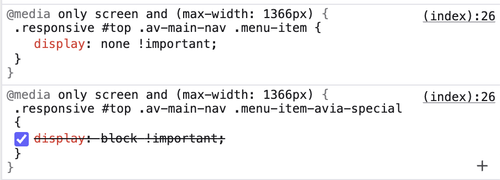
Make sure to place the css code that we suggested below the css rules shown in the screenshot.
Best regards,
IsmaelJanuary 15, 2026 at 6:52 am #1493949Hey Ismael,
Thank you, I did already put that code in via Code Snippets earlier, and it does display when I’m logged in, but isn’t displaying for regular users (when not logged in)
If I should instead not be doing this via Code Snippets and into the actual css, what file should I be looking for please? I’m not a developer and I’ve just gone to look through the file manager and there are numerous css files – I’ve checked files with titles related to ‘theme’ and that original code doesn’t display
Thank you so much
Cheers
SarahJanuary 15, 2026 at 9:32 am #1493959Hi,
If you are getting different results depending on your logged in status, then the problem is likely caching. Please try to clear and/or turn off all caching to see what happens then.
Best regards,
RikardJanuary 19, 2026 at 1:18 am #1494053Hey Rikard,
Thank you for your reply – I’d already cleared the cache and have left it a few days, but the issue persisted. I’ve now put WP Rocket into safe mode and gone through their checklist, and looks like it was WP Rocket playing games. This code is now working as it should, hurrah!
Thank you everyone for your help, hope you have a great week! :)
Cheers
SarahJanuary 19, 2026 at 6:13 am #1494060 -
AuthorPosts


- The topic ‘Search icon missing on smaller screens?’ is closed to new replies.