

-
AuthorPosts
-
March 16, 2026 at 10:41 pm #1496087
Sabina
GuestStill having problems registering. I entered the purchase code and got the link, but the link took me to wordpress for which I am using a different email that I used to purchase your template. So I can still not really get into the support forum to ask a question, hence the presale route.
The main question I have right now other than above is that the title picture keeps showing up fuzzy / unfocused. I am using the restaurant template. The many pics I tried are in focus and sharp, they just don’t look like it once I put them into that spot. I’ve even downloaded a stock pic, and that has the same issue. How can I get that picture to look sharp and focused? it’s the first thing prospects see and needs to look good. Thanks.March 17, 2026 at 5:53 am #1496088Hey Sabina,
Thank you for the inquiry.
Regarding the registration issue, you will need your Themeforest purchase code to register on our support forum. You can find this in your Themeforest account under your downloads. Once you have it, please use it to register here:
— https://kriesi.at/support/register/
For the image quality issue, we would need to take a closer look at your site to diagnose what’s happening. The blurriness could be caused by a few things, such as the image being scaled up beyond its original dimensions, css filters applied to the section, or the image compression settings in WordPress.
Could you share a link to your site or a screenshot so we can check it out? Please post the link or screenshot in the private field below.
Let us know if you have more questions.
Best regards,
IsmaelMarch 18, 2026 at 12:46 am #1496117Thanks for the reply Ismael.
I deactivated plugins that optimize (had Optimole), but this is happening whether I use an optimized pic or the original. I also inserted the spagetti pic that was originally there and it is no longer showing focused/sharp. The same is also happening with the pic in the ‘team’ section.I was able to log in under my old login from the last site I bought from you. (I did enter the purchase code and got the link, but the link took me to wordpress for which I am using a different email then that I used to purchase your template. Since it works with the old login, not an issue at the moment – thanks ).
March 18, 2026 at 6:01 am #1496120Hi,
Thank you for the update.
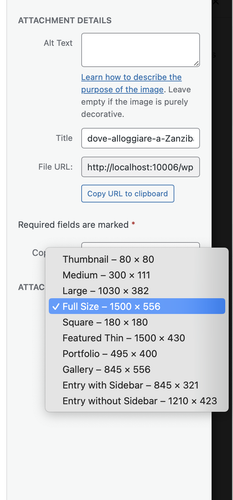
When you insert an image from the Media Library as background for a Color Section, make sure you select “Full Size” from the size dropdown before inserting it. The default selection is often a smaller cropped or resized version, which will appear soft or blurry when stretched to fill a full-width section.
Please give that a try and let us know if the image looks sharper after switching to full size.
Best regards,
IsmaelMarch 23, 2026 at 10:49 pm #1496275The title pic is working but I am now having entire sections disappearing from the botton of the home page. First part of the team section was gone and then the whole section. I have since added new sections, I have cloned above section and everything disappears. Sometimes I can click on visit site but when I go to make more edits its either gone or disappears after the edit and clicking on visit site.
March 24, 2026 at 3:30 pm #1496293Hey,
Thank you for the update.
Sections disappearing from the page is usually caused by invalid html in one of the layout builder elements. If any Text Block or Code element on the page contains an unclosed html tag or malformed markup, it can break the structure of the entire page and cause sections below it to collapse or disappear entirely.
Could you check if you have added any custom html or script tags inside any of the elements on that page? If so, please make sure all tags are properly opened and closed. For example, a missing closing tag like div or section can silently break everything below it.
A quick way to test this is to temporarily disable elements one by one (starting from the top of the page) until the missing sections reappear. That will help narrow down which element is causing the issue.
If you are not sure where to start, please share your login credentials in the private field below and we will take a look directly.
Let us know the result.
Best regards,
IsmaelMarch 25, 2026 at 12:31 am #1496310I’ve only used html for a couple of paragraphs on the homepage, custom ccs to change case and get rid of the top right enfold logo and the issues started well after. And I have issues with the contact page – the form disappears after I fill it out instead of it giving me “message sent. and I never see the form submissions in my inbox. I put no custom html or script tags inside any of the elements on pages. I’d appreciate if you can check it out. Thanks
March 25, 2026 at 2:11 pm #1496319Hi,
Thank you for the update.
We saved the content of the Welcome page as a template called “welcome temp a”, applied it to another page, and added new elements, but we are unable to reproduce the issue. Please try editing the page in the private field to see if you can reproduce the issue there.
Best regards,
Ismael -
AuthorPosts


- You must be logged in to reply to this topic.