

-
AuthorPosts
-
December 4, 2025 at 5:34 pm #1492126
Dear Support.
Can you recommend a solution or PlugIn to create a feature similar to this website: https://immosell.ch/
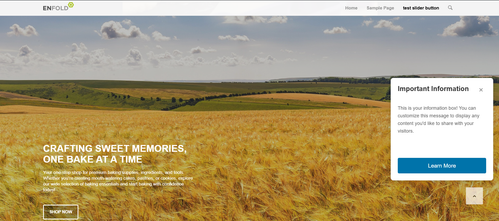
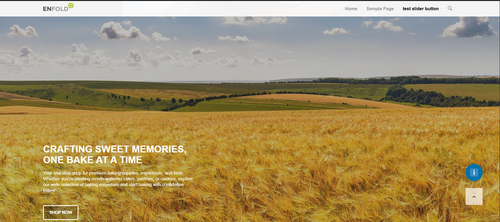
Also once the box is closed there is an information Icon that can bring the box back. Also on my page I am using your scroll to the top icon which I would like to keep under the box if the box is showing and next to the Information icon once the box is closed.Thanks for advise.
Regards
StefanDecember 4, 2025 at 10:20 pm #1492140Hey ti2media,
Try adding this snippet to your child theme functions.php:function add_sticky_info_box() { ?> <style> .sticky-info-box { position: fixed; bottom: 120px; right: 20px; width: 300px; height: 300px; background: #ffffff; border: 1px solid #ddd; border-radius: 8px; box-shadow: 0 4px 12px rgba(0,0,0,0.15); z-index: 9999; display: flex; flex-direction: column; padding: 20px; box-sizing: border-box; transition: opacity 0.3s ease; } .sticky-info-box.hidden { display: none; } .sticky-info-box-header { display: flex; justify-content: space-between; align-items: flex-start; margin-bottom: 15px; } .sticky-info-box-title { font-size: 20px; font-weight: bold; color: #333; margin: 0; flex: 1; } .sticky-info-box-close { background: none; border: none; font-size: 24px; color: #999; cursor: pointer; padding: 0; width: 30px; height: 30px; display: flex; align-items: center; justify-content: center; transition: color 0.2s ease; } .sticky-info-box-close:hover { color: #333; } .sticky-info-box-message { flex: 1; color: #666; font-size: 14px; line-height: 1.6; margin-bottom: 20px; overflow-y: auto; } .sticky-info-box-button { background: #0073aa; color: white; border: none; padding: 12px 24px; border-radius: 4px; font-size: 16px; cursor: pointer; text-decoration: none; display: inline-block; text-align: center; transition: background 0.2s ease; } .sticky-info-box-button:hover { background: #005a87; } .sticky-info-toggle { position: fixed; bottom: 120px; right: 50px; width: 50px; height: 50px; background: #0073aa; color: white; border: none; border-radius: 50%; font-size: 24px; cursor: pointer; box-shadow: 0 4px 12px rgba(0,0,0,0.15); z-index: 9998; display: none; align-items: center; justify-content: center; transition: background 0.2s ease; } .sticky-info-toggle:hover { background: #005a87; } .sticky-info-toggle.visible { display: flex; } </style> <div class="sticky-info-box" id="stickyInfoBox"> <div class="sticky-info-box-header"> <h3 class="sticky-info-box-title">Important Information</h3> <button class="sticky-info-box-close" id="closeInfoBox" aria-label="Close">×</button> </div> <div class="sticky-info-box-message"> <p>This is your information box! You can customize this message to display any content you'd like to share with your visitors.</p> </div> <a href="/your-page-url" class="sticky-info-box-button">Learn More</a> </div> <button class="sticky-info-toggle" id="infoToggle" aria-label="Show information">ℹ</button> <script> (function() { var infoBox = document.getElementById('stickyInfoBox'); var closeBtn = document.getElementById('closeInfoBox'); var toggleBtn = document.getElementById('infoToggle'); // Close the info box closeBtn.addEventListener('click', function() { infoBox.classList.add('hidden'); toggleBtn.classList.add('visible'); }); // Show the info box again toggleBtn.addEventListener('click', function() { infoBox.classList.remove('hidden'); toggleBtn.classList.remove('visible'); }); })(); </script> <?php } add_action('wp_footer', 'add_sticky_info_box');Then adjust the title, message, buttone text & link to suit. You can also adjust the CSS to change colors, etc.
It places the box & info button 120px from the bottom so they are above the scroll-top button, ratio than have them move if the scroll-top shows, which would not be so good.
Best regards,
MikeDecember 4, 2025 at 11:45 pm #1492142Hey Mike…
this is absolutely amazing. Almost perfection. So great! Thanks.
One last question…Is it possible to keep the status, even if I click on other subpages. It reloads and opens again, even I closed it once. Once closed it would be great that it stays close while navigating within the site.
Also is it possible to have one in German and also have one for English since the site is multi language.
Regards
StefanDecember 5, 2025 at 6:33 am #1492150Hi,
Thank you for the update.
We can set a custom cookie to persist the info-box status across the entire site. Please locate the existing script block and replace it with the following code:
<script>
(function() {

    function setCookie(name, value, days) {
        var expires = "";
        if (days) {
            var date = new Date();
            date.setTime(date.getTime() + (days * 24 * 60 * 60 * 1000));
            expires = "; expires=" + date.toUTCString();
        }
        document.cookie = name + "=" + (value || "") + expires + "; path=/";
    }

    function getCookie(name) {
        var nameEQ = name + "=";
        var ca = document.cookie.split(';');
        for (var i = 0; i < ca.length; i++) {
            var c = ca[i];
            while (c.charAt(0) == ' ') c = c.substring(1, c.length);
            if (c.indexOf(nameEQ) === 0) return c.substring(nameEQ.length, c.length);
        }
        return null;
    }

    var infoBox = document.getElementById('stickyInfoBox');
    var closeBtn = document.getElementById('closeInfoBox');
    var toggleBtn = document.getElementById('infoToggle');

    if (getCookie('av-infobox-closed') === '1') {
        infoBox.classList.add('hidden');
        toggleBtn.classList.add('visible');
    }

    // Close the info box
    closeBtn.addEventListener('click', function() {
        infoBox.classList.add('hidden');
        toggleBtn.classList.add('visible');
        setCookie('av-infobox-closed', '1', 30);
    });

    // Show the info box again
    toggleBtn.addEventListener('click', function() {
        infoBox.classList.remove('hidden');
        toggleBtn.classList.remove('visible');
        setCookie('av-infobox-closed', '0', 30);
    });

})();
</script>
To add a DE version, replace the code with the version below and make sure to include both the existing style block and the updated script block.
function add_sticky_info_box() {
    $locale = get_locale();

    if ( $locale === 'en_US' ) {
        $title      = "Important Information";
        $message    = "This is your information box! You can customize this message to display any content you'd like to share with your visitors.";
        $buttonText = "Learn More";
        $buttonLink = "/your-page-url";
    }

    elseif ( $locale === 'de_DE' ) {
        $title      = "DE Important Information";
        $message    = "DE This is your information box! You can customize this message to display any content you'd like to share with your visitors.";
        $buttonText = "DE Learn More";
        $buttonLink = "/your-page-url";
    }

    else {
        $title      = "Information";
        $message    = "Here is an information box.";
        $buttonText = "More";
        $buttonLink = "/";
    }
    ?>

    // style block here
<div class="sticky-info-box" id="stickyInfoBox">
<div class="sticky-info-box-header">
<h3 class="sticky-info-box-title"><?php echo esc_html($title); ?></h3>
<button class="sticky-info-box-close" id="closeInfoBox" aria-label="Close">×</button></div>
<div class="sticky-info-box-message">

<?php echo esc_html($message); ?>

</div>
<a href="<?php echo esc_url($buttonLink); ?>" class="sticky-info-box-button">
            <?php echo esc_html($buttonText); ?>
        </a></div>
<button class="sticky-info-toggle" id="infoToggle" aria-label="Show information">ℹ</button>

    // script block here
<?php
}
Best regards,
IsmaelDecember 5, 2025 at 3:07 pm #1492177Dear Ismael. This worked like a charm.
Great Support!
Thanks a lot.December 5, 2025 at 9:46 pm #1492188Hi,
Glad that we could help, if you have further questions please open a new thread and we will try to help. Thanks for using Enfold.Best regards,
Mike -
AuthorPosts


- The topic ‘Recommendation for Infobox / PopUp that works with Enfold and scroll-up feature.’ is closed to new replies.