

-
AuthorPosts
-
February 16, 2026 at 3:56 pm #1495132
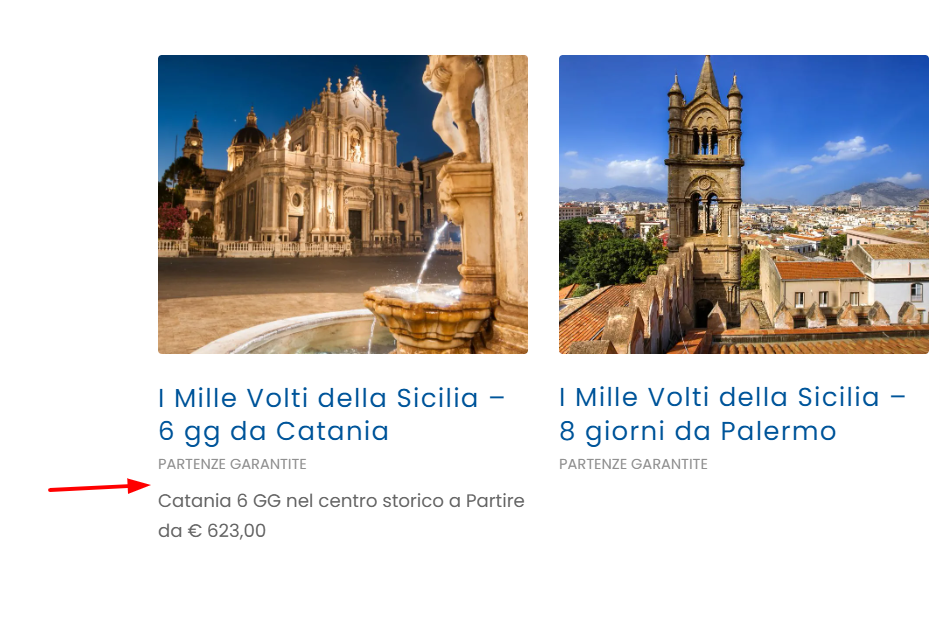
Salve vorrei sapere se c’è la possibilità di ridurre lo spazio tra le colonne nel caso in cui viene visualizzato elenco degli articoli come griglia, in maniera da avere + spazio e ingrandire le immagini
e la distanza tra la categoria dell’articolo e il riassunto.-
This topic was modified 1 month, 1 week ago by
daninap.
February 16, 2026 at 7:19 pm #1495136This reply has been marked as private.February 17, 2026 at 5:37 am #1495149Hi,
Thank you for the inquiry.
Are you using the Blog Posts element with the Grid Layout enabled? Please provide a link to the page so we can properly check the issue. In the meantime, try to add a 1/1 Column element, then move the Blog Posts element inside this column. Let us know the result.
Best regards,
IsmaelFebruary 17, 2026 at 8:48 am #1495162di seguito il link. potete controllare ?
Mi interessa diminuire la distanza del riassunto dalla categoria dell’articolo e lo spazio tra una colonna e l’altra.
Ho già utilizzato Colonna 1/1February 17, 2026 at 5:39 pm #1495168This reply has been marked as private.February 18, 2026 at 5:37 am #1495184Hi,
Thank you for the update.
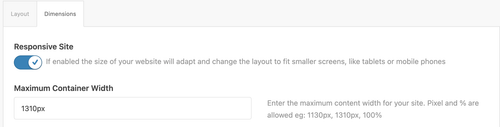
Looks like you didn’t use a Color Section element on the page, which allowed the theme to automatically create one without container constraints. Make sure to move the columns or content inside a Color Section container so they don’t go full width. You can then set the Maximum Container Width value in Enfold > General Layout > Dimensions as shown in the screenshot below.
Best regards,
IsmaelFebruary 18, 2026 at 4:34 pm #1495194credo non vada bene..
potete aiutarmi a far salire il riassunto di una riga ?February 19, 2026 at 3:40 pm #1495237Hi,
Thank you for following up.
Did you try our suggestion above? Please provide the login details in the private field so we can check the elements further.
Best regards,
IsmaelFebruary 19, 2026 at 5:27 pm #1495239This reply has been marked as private.February 20, 2026 at 6:47 am #1495256Hi,
Thank you for the info.
We moved the 1/1 Column element with the Blog Posts inside a Color Section, then set the “Larghezza massima Contenitore” value from 2100px, which is a little wide, to a more normal container width, 1310px. Please make sure to purge the cache before testing.
You can also add this css code if you want to further decrease the space between the blog post items.
div .av_one_fourth {
    margin-left: 2%;
    width: 23.5%;
}
Best regards,
IsmaelFebruary 20, 2026 at 8:50 am #1495259inserendo il codice non vedo nessuna modifica.. la posizione resta uguale.
come vi dicevo deve salire di un rigo. quindi attaccato alla visualizzazione della categoria..February 20, 2026 at 11:16 am #1495275Hi,
We have already moved the 1/1 column inside a color section, which should constrain the blog posts to the maximum-width container, also reducing the space between the items. Would you mind providing a screenshot of the changes you’d like to make? You can use platforms like FreeImage, ImgBB, PostImages or Dropbox to upload and share the screenshot. Here are the steps to follow:
1.) Visit the website of your chosen platform, such as Savvyify, ImgBB, PostImages or Dropbox.
2.) Locate the option to upload a file or an image.
3.) Select the screenshot file from your computer or device and upload it to the platform.
4.) After the upload is complete, you will be provided with a shareable link or an embed code.
5.) Copy the link or code and include it in your message or response to provide us with the screenshot.Thank you for taking the time to share the screenshot. It will help us better understand the issue you’re facing and provide appropriate assistance.
Best regards,
IsmaelFebruary 20, 2026 at 12:00 pm #1495282This reply has been marked as private.February 22, 2026 at 7:04 pm #1495345 -
This topic was modified 1 month, 1 week ago by
-
AuthorPosts


- You must be logged in to reply to this topic.