

Tagged: menue
-
AuthorPosts
-
December 3, 2025 at 12:33 pm #1492060
Dear Support.
I tried to customise the menue based on threads in this forum. Almost there but some stuff is broken / does not work as described.
If you go to the start page using a laptop, the menu items should be blue, on hover = white and active=white.For some reason reason “über mich” is white, but it’s not active. Home and the chosen language should be active (white) but they are not.
Also I tried to format the height of the space the elements are in as well as giving “Kontakt” a different background color.
I used this, but deactivated it for now – since the page is live.#menu-item-167 {
background-color:#8b8c89;
}.The Problems are:
1. If you are visiting the start page with a laptop it’s ok at first.
2. If you scroll down the header shrinks and has on purpose a different background color, but the button background should also change to white and the link to the #8b8c89.
3. Also once you scroll there is no active color which should be the corporate blue.
4. The height of the items is only ok once you scroll. Before that it’s too high – see screenshots.Thanks for help.
December 4, 2025 at 7:05 am #1492095Hey ti2media,
Thank you for the inquiry.
You can adjust the initial height of the header in the Enfold > Header > Header Layout > Header Size settings. To correct the menu color issue including the active state color on a scrolled header, please add this css code.
.header_color.header-scrolled .main_menu ul:first-child > li.current_page_item > a {
    color: #ffffff !important;
}

.header_color.header-scrolled .main_menu ul:first-child > li > a {
    color: #0d3c63 !important
}

.header_color .main_menu ul:first-child > li.menu-item-language > a {
    color: #0d3c63;
}

.header_color.header-scrolled .main_menu ul:first-child > li.menu-item-language > a {
    color: #ffffff;
}
Let us know the result.
Best regards,
IsmaelDecember 4, 2025 at 5:01 pm #1492121Hi Ismael,
thanks for the reply. Unfortunately none of the issues was solved with your code.
Also I don’t want to change the height of the whole menu. I just want to change the height of the background of the highlighted button and the separator.Please advise.
Regards
StefanDecember 5, 2025 at 7:09 am #1492154Hi,
Thank you for the update.
We just tested the code again and it seems to be working as it should.

Have you tried removing this css code?
#top #header.header-scrolled a {
    color: #ffffff !important;
}
Please provide a screenshot of the element that you’d like to change. You can use platforms like Savvyify, ImgBB, PostImages or Dropbox.
Best regards,
IsmaelDecember 5, 2025 at 1:32 pm #1492173Dear Ismael.
Thanks for your reply. I didn’t know that you weren’t able to see my screenshots. Sorry. Find the desired solution in the private link.
Regards
StefanDecember 8, 2025 at 8:35 am #1492240Hi,
Thank you for the screenshot.
Have you tried removing this css code?
#top #header.header-scrolled a {
    color: #ffffff !important;
}
If you can provide the login details in the private field, we’ll take a closer look.
Best regards,
IsmaelDecember 8, 2025 at 1:19 pm #1492250Here you go
December 9, 2025 at 7:35 am #1492279Hi,
Thank you for the info.
We get the following error when we try to access the wp-admin or wp-login page. Did you change the login URL? Please include it in the private field.
Du bist leider nicht berechtigt, auf diese Seite zuzugreifen.
Would you mind posting the screenshot again using freeimage.host? The one above is not loading on our end.
Best regards,
IsmaelDecember 9, 2025 at 10:34 am #1492290Sorry. Should work now
December 10, 2025 at 8:10 am #1492324Hi,
Thank you for the screenshot.
To adjust the color of the active language menu item and the hover state of the default menu items, add this css code.
.header_color .main_menu ul:first-child > li a:hover {
    color: #ffffff;
}

.menu-item-language-current a:after {
    color: #ffffff;
}

.header-scrolled .menu-item-language-current a:after {
    color: #0e3c63;
}
For the Kontakt menu item, go to Appearance > Menus and set the Menu Style to Button Style (colored).
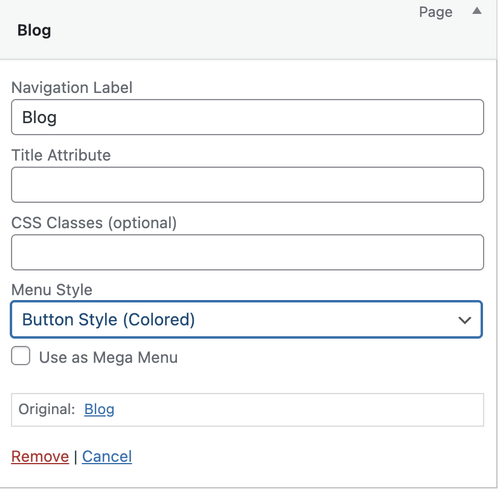
Let us know the result.
Best regards,
IsmaelDecember 10, 2025 at 6:12 pm #1492361Hi Ismael,
thanks a lot. The result is mixed. What’s still an open issue:
If you click on German / Startpage
– “Über mich” is still highlighted although it is not active, instead of home
– The highlight of the language works if you are within GermanIf you click on English / Startpage
– The menuelinks are all white instead of blue. The colors are inverted combined to German.
– Although the color is not correct “Home” is highlighted this time, but the wrong language is highlighted.On both menues the color of active is not changing when you scroll down and reach an anchor.
I don’t know if this is a feature, but I have seen on other websites that when you scroll to a section with an id/anchor like https://zuerich-living.ch/#objekte shouldn’t the responding menue item change color to active?Your login should work. It would be great if you can help.
Regards
StefanDecember 11, 2025 at 8:19 am #1492382Hi,
Thank you for the update.
Please add this code to fix the “uber mich” issue.
.header_color .main_menu ul:first-child > li > a {
    color: var(--enfold-header-color-color) !important;
}

.header_color.header-scrolled .main_menu ul:first-child > li > a {
    color: var(--enfold-header-color-meta) !important;
}
Then use this code to adjust the color of the active menu on scroll.
.header_color.header-scrolled .main_menu ul:first-child > li.current-menu-item > a {
    color: #0d3c63 !important;
}
Make sure to add this code to the bottom of the previous code.
Best regards,
Ismael -
AuthorPosts


- You must be logged in to reply to this topic.