

Tagged: Masonry Gallery, masonry titles, titles below images
-
AuthorPosts
-
February 4, 2026 at 4:57 pm #1494693
HI
Is it possible to place the titles / excerpts below the images in masonry galleries and grids?
I’d like to be able to see the whole image.
Thanks
NancyFebruary 4, 2026 at 8:25 pm #1494709See : https://webers-testseite.de/masonry-with-captions/
but there is a second snippet – but:
Different Solution – even the captions will have the same height on perfect Grid
However, this does not look so good in some cases if the captions are of too different sizes.February 4, 2026 at 10:32 pm #1494715HI
That first code worked on this page but it’s missing the vertical spacing between the rows: https://imgur.com/fcnSJDO
Not sure what it causing that? I am using the perfect grid.
I don’t understand what the “different solution” is?
Is that a solution for the masonry gallery?
thanks for your help
Nancy-
This reply was modified 1 month, 3 weeks ago by
Munford.
February 4, 2026 at 11:35 pm #1494717If you make the browser window a little bigger or smaller, you will see that it works. It seems to be a timing problem affecting your page.
So try changing the timings:Try to change inside the snippet the values of :
// Initial loading: Wait longer for images
$(window).on('load', function() {
    setTimeout(fixAllMasonryModes, 600);  // 300 → 600ms
});

// After events: A little more time
$(document).on('av-masonry-complete', function() {
    setTimeout(fixAllMasonryModes, 250);  // 100 → 250ms
});

$('body').on('av-isotope-finished', function() {
    setTimeout(fixAllMasonryModes, 250);  // 100 → 250ms
});
by the way:
Different Solution – even the captions will have the same height on perfect Grid
However, this does not look so good in some cases if the captions are of too different sizes.I’ll remove that because it doesn’t make sense. As soon as one caption is very long in all Masonries, all the others are pulled up to the height of that caption—it doesn’t look good.
It would be different if he adjusted the same caption heights in a row—but I can’t think of a way to do that.February 4, 2026 at 11:38 pm #1494718so in total : replace the snippet by:
( btw. i changed the code on my page too – if you hover the snippet there is on top right of the codeblock a copy button)/** * Enfold Masonry Caption Fix - NUR für Perfect Grid * Schiebt die Caption unter das Bild, ohne es zu verdecken. */ function enfold_masonry_perfect_grid_caption_fix() { ?> <style> /* ======================================== PERFECT GRID CSS ======================================== */ /* Erlaubt der Caption, über den Container hinauszuragen */ #top .av-masonry.av-fixed-size.av-masonry-gallery .av-inner-masonry, #top .av-masonry-gallery.av-masonry-gallery-fixed figure.av-inner-masonry { overflow: visible !important; } /* Positioniert die Caption direkt unter das Bild-Quadrat */ #top .av-masonry.av-fixed-size.av-masonry-gallery .av-inner-masonry-content, #top .av-masonry-gallery.av-masonry-gallery-fixed figcaption.av-inner-masonry-content { position: relative !important; top: 100%; background: #ffffff; /* Hier ggf. deine Wunschfarbe für den Hintergrund */ } /* Korrektur für Tablets */ @media only screen and (min-width: 767px) and (max-width: 989px) { .responsive .av-masonry-gallery .av-masonry-entry .av-masonry-entry-title + .av-masonry-entry-content { display: block !important; } } </style> <script> (function($) { 'use strict'; function fixPerfectGrid() { // Nur für Masonry Galerien mit festem Raster (Perfect Grid) $('.av-masonry-gallery.av-masonry-gallery-fixed, .av-masonry.av-fixed-size.av-masonry-gallery').each(function() { var $gallery = $(this); var columnCount = 1; // Spaltenanzahl ermitteln if ($gallery.hasClass('av-masonry-col-2')) columnCount = 2; else if ($gallery.hasClass('av-masonry-col-3')) columnCount = 3; else if ($gallery.hasClass('av-masonry-col-4')) columnCount = 4; else if ($gallery.hasClass('av-masonry-col-5')) columnCount = 5; else if ($gallery.hasClass('av-masonry-col-6')) columnCount = 6; if ($gallery.hasClass('av-masonry-col-flexible')) { var $items = $gallery.find('.av-masonry-item-with-image:visible'); if ($items.length >= 2) { var firstTop = $items.eq(0).offset().top; var itemsInFirstRow = 1; for (var i = 1; i < Math.min($items.length, 10); i++) { if (Math.abs($items.eq(i).offset().top - firstTop) < 10) { itemsInFirstRow++; } else { break; } } columnCount = itemsInFirstRow; } } // Maximalhöhe der Captions finden, damit die Zeilen gleichmäßig bleiben var maxCaptionHeight = 0; $gallery.find('.av-masonry-item-with-image').each(function() { var $caption = $(this).find('figcaption.av-inner-masonry-content, .av-inner-masonry-content'); if ($caption.length && $caption.is(':visible')) { maxCaptionHeight = Math.max(maxCaptionHeight, $caption.outerHeight(true)); } }); // Abstand unten einfügen, damit das Masonry-Layout Platz für die Caption lässt if (maxCaptionHeight > 0) { $gallery.find('a.av-masonry-entry, .av-masonry-item-with-image').css('margin-bottom', maxCaptionHeight + 'px'); } }); // Layout neu berechnen $('.av-masonry-gallery.av-masonry-gallery-fixed, .av-masonry.av-fixed-size.av-masonry-gallery').isotope('layout'); } // ======================================== // INITIAL LOAD - Nur auf Bilder warten, nicht auf die ganze Seite // ======================================== (function() { var $gallery = $('.av-masonry-gallery'); if ($gallery.length && typeof $.fn.imagesLoaded === 'function') { // Wartet NUR auf die Bilder in der Galerie $gallery.imagesLoaded(function() { setTimeout(fixPerfectGrid, 200); }); } else { // Fallback für den Notfall setTimeout(fixPerfectGrid, 600); } })(); // Nach Enfold Events $(document).on('av-masonry-complete', function() { setTimeout(fixPerfectGrid, 250); }); // Bei Größenänderung $(window).on('debouncedresize', function() { // Reset Margin $('.av-masonry-gallery.av-masonry-gallery-fixed .av-masonry-item-with-image, .av-masonry.av-fixed-size.av-masonry-gallery .av-masonry-item-with-image').css('margin-bottom', ''); fixPerfectGrid(); }); })(jQuery); </script> <?php } add_action('wp_footer', 'enfold_masonry_perfect_grid_caption_fix', 999);i also replaced the on load event by:
// Run initially
$(window).on('load', function() {
    $('.av-masonry-gallery').imagesLoaded(function() {
        setTimeout(fixAllMasonryModes, 200);
    });
});
and implemented the enfold debounceresize function on performance reasons.
February 5, 2026 at 12:09 am #1494719Have you tried making changes yourself using CSS? Because the spacing between the images is not the Enfold standard spacing when set to “large gap.”
February 5, 2026 at 8:25 am #1494726But i’m currently try to optimise the snippet for the masonry that goes to a 1 Column layout on small screen – so wait for a complete solution – i try my best.
February 5, 2026 at 8:41 am #1494727This seems like more trouble than it’s worth maybe?
It would be great to have that option but it’s not super important.
thanks for your help
NancyFebruary 5, 2026 at 8:58 am #1494728Hmm – you’re giving up early. I’ve now created the final version and inserted it above; or rather, I’ve made it available on my page for copy & paste. As you can see, it works for me – and even when Masonry switches to a single-column layout, the perfect grid now looks like the flexible grid. Image by image with the captions underneath.
Your decision.I cleaned up the snippet a little, as the flexible Masonry Grid option already behaved this way! (Captions below the image)
February 5, 2026 at 9:55 am #1494729thanks for your help – I will check it out.
Does this change the masonry gallery as well?February 5, 2026 at 10:05 am #1494730it is only for masonry gallery – not for masonry entries !
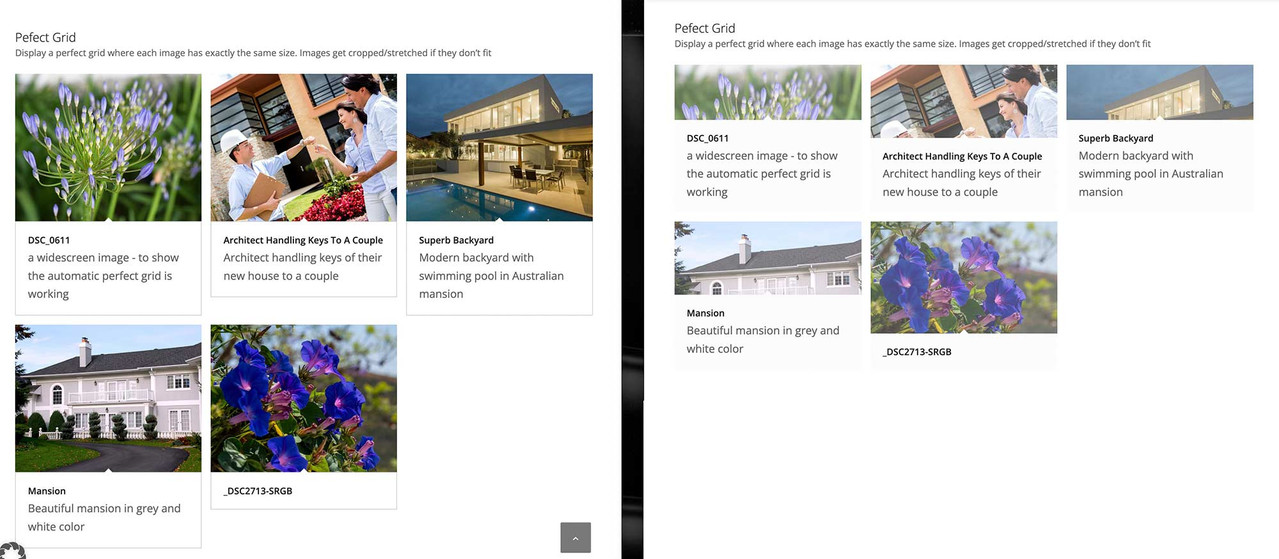
by the way: see the difference on one page with that snippet – the other without
the flexible masonry is identical to the other page – but grid and automatic grid :
https://webers-testseite.de/masonry-with-captions/
https://webers-testseite.de/masonry-with-captions-2/
 February 5, 2026 at 10:21 am #1494731
I see.
Is there an (easy) way to do the same on the masonry entries as well?February 5, 2026 at 4:35 pm #1494756Please be as specific as possible in your questions. You explicitly asked about the gallery. Based on your screenshot, it was impossible for me to see what the issue was.
February 5, 2026 at 4:39 pm #1494757My first question was about moving the titles/excerpts to underneath the images in both the masonry gallery and masonry, as I use both on my site.
February 5, 2026 at 4:52 pm #1494758… in masonry galleries and grids
Anyway – maybe it will help another participant to handle the masonry galleries.
February 6, 2026 at 10:48 am #1494788This reply has been marked as private. -
This reply was modified 1 month, 3 weeks ago by
-
AuthorPosts


- The topic ‘masonry titles below images’ is closed to new replies.