

Tagged: burger menu overlay, logo z-index
-
AuthorPosts
-
February 16, 2026 at 12:07 pm #1495129
Dear people at the support forum,
I have an issue I need your help with:
A website I am creating is using a burger menu (also on big screens) and when activated, the website logo stays on top of the menu overlay instead of being covered by the overlay like the rest of the page.
Website (temporary domain):I know this issue is created because I am using this code in the customizer:
#top div .logo {
    z-index: 101;
    position: relative;
}
This code is necessary because I am using a custom layout for the header:
menu icon left – logo middle – Instagram icon right.
When I remove the z-index: 101 rule, the logo isn’t clickable anymore in normal circumstances (burger menu overlay not activated).So, is there a possibility to move the logo underneath the burger menu overlay, without loosing the normal functionality of the logo when the overlay is not active?
This is the CSS code I use for the header layout:
#top div .logo {
    z-index: 101;
    position: relative;}

.responsive #top #wrap_all .main_menu {
    display: flex !important;}

#top .main_menu,
#top .avia-menu {
  width: 100%;}

#avia-menu #menu-item-search {
  position: absolute;
  right: 0;
  left: auto;}

#top #wrap_all .av-hamburger-inner {
  display:block;
  top: 0;
  margin-top: 4px;}

.html_header_top #top #wrap_all .av_logo_right #header_main .logo {
  position: relative;
  left: 50%;
  right: auto;
  margin-left: unset;
  margin-right: unset;
  transform: translateX(-50%);
  width: auto;}

.responsive #top #wrap_all  .main_menu {
  width: 100%;
  display: flex !important;
  flex-flow: row nowrap;
  justify-content: space-between;
  height: inherit;}

#top #wrap_all .menu-item-avia-special {
  display: block ;}

.responsive #top #wrap_all #header .main_menu ul.social_bookmarks {
    display: flex;}

#top #wrap_all .main_menu ul.social_bookmarks li a {
  height: 30px;}

#top .main_menu .social_bookmarks li {
  width:40px;
  margin-left:5px;}

@media (max-width: 767px) {
	#top .main_menu .social_bookmarks li {
	margin-top: -5px;}
}

#top .main_menu .social_bookmarks li.avia-svg-icon img[is-svg-img="true"],
#top .main_menu .social_bookmarks li.avia-svg-icon svg:first-child {
  height:1.1em;
  width: auto;
  margin-top: 4px !important;}

@media and (max-width: 767px) {
  .responsive #top #wrap_all .container {
    width: 95%;
    max-width: 95%;}

  .html_header_top #top #wrap_all .av_logo_right #header_main .logo {
    max-width: 200px;
    transform: translateX(-57%);  /* depends on how many social icons are present */ }
}

#top #wrap_all .social_bookmarks li a {
width: 40px!important;
line-height: 40px!important;
min-height: 40px!important;
font-size: 26px!important;}

#top #wrap_all .social_bookmarks li {
height: 40px!important;
width: 60px!important;}

#top #wrap_all .social_bookmarks {
  height: 60px!important;}

#top #wrap_all .social_bookmarks, #top #wrap_all .social_bookmarks a, #top #wrap_all .social_bookmarks li {
	    margin-right: -16px;}

.social_bookmarks > li:hover > a {
       color: #ffffff !important;
 background: #1e251b !important;}

.social_bookmarks a:visited {
    color: #1e251b !important;
    background: #ffffff !important;}
Your help will be greatly appreciated!
February 16, 2026 at 7:45 pm #1495140Hey pelgrimrat,
I’m not sure that I can see the problem on your site, could you post a screenshot highlighting it please?
Best regards,
RikardFebruary 17, 2026 at 6:55 am #1495158first – your logo is already on top with that z-index of 101. But the logo could not be seen due to that dark overlay background. Not enough contrast. – you see it if you set a background-color for it
.logo.avia-standard-logo {
  background-color: #d5d9d3
}
so – my first thought is to replace that png by a svg logo – where you can change the fill color by the status of the hamburger open or not.
e.g. take this svg instead for logo: https://webers-testseite.de/logo-femke-boschker.svg
and set for the change :
svg .fb {
  transition: all 0.3s linear;
}
.av-burger-overlay-active .fb {
  fill: #FFF;
}
____________
Or: why don’t you place an image (your logo image) inside the menu?
you can do that replacing the home menu-item or add an additional home menu item and replace that: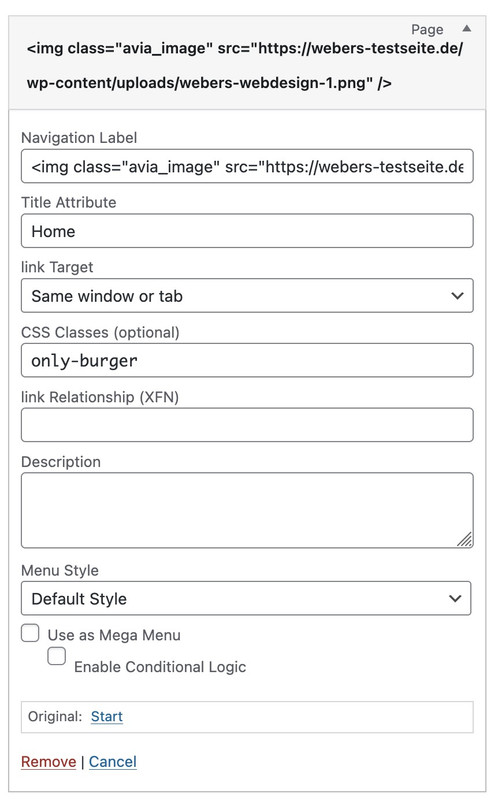
for navigation label you put in a standard img tag
<img class="avia_image" src="https://www.maartenwebsites.nl/dev-femke/wp-content/uploads/2026/02/logo-femke-boschker-scaled.png" />PS: because you do not need to differ here between burger-menu and desktop text menu – you do not need that extra class.
PPS: maybe you use in this case a white alternative logo.
February 18, 2026 at 4:45 pm #1495195Dear @Guenni007,
Thank you so much for all the effort you put in your answer!
Only, I think I have not been clear enough in describing the issue:
I do NOT want the logo to be on top of the menu overlay. I want it to be under the overlay.
The problem is, when I change the z-index: 101 rule, the logo isn’t clickable anymore when the overlay is NOT activated.Please let me know if I should elaborate more and sorry for the effort you made.
Thanks so much!February 18, 2026 at 4:57 pm #1495196Since you can hardly see it anyway, I would first remove it from Click event as follows:
If that’s not enough, you just need to increase the z-index of the overlay.
.av-burger-overlay-active .logo > a {
  pointer-events: none;
}

.av-burger-overlay-bg {
  z-index: 102;
}

.av-burger-overlay-scroll {
  z-index: 103;
}
If you want to prevent the content from scrolling under the overlay:
html.av-burger-overlay-active {
  overflow-y: hidden;
}
February 19, 2026 at 2:43 pm #1495225Thanks again Guenni!
The issue is resolved, using your first piece of code and code I found here:
The z-index rules you suggested didn’t make a difference.
In the end, I made the PNG unclickable with your code and made it the same color as the overlay, using this code:
.av-burger-overlay-active .logo > a {
  pointer-events: none;
}

.av-burger-overlay-active .logo > a {
  overflow: hidden;
  filter: drop-shadow(0px 1000px 0 #151515);
  transform: translateY(-1000px);
}
Thanks alot!
This topic can be marked as resolved.Best regards,
Maarten -
AuthorPosts


- The topic ‘issue: logo stays on top of burger menu overlay’ is closed to new replies.