

-
AuthorPosts
-
February 24, 2026 at 10:43 pm #1495452
Hi, I have an image that links to a Vimeo Video and, although I’ve set the URL manually to the Vimeo URL, and then set the image to open in “same window”, it does not open in a lightbox, which is typical; can’t seem to figure out why it’s not working. I did make sure that the Lightbox Modal Window is turned on in Theme Options.
Help?
Thank you!February 24, 2026 at 10:53 pm #1495454maybe this helps you on that:
only to show that you can have video, websites or images in one lightbox group.
INFO: due to GDPR ( DSGVO in Germany ) i can not show the working script for video content – it is hard to block this – playing videos from a masonry or from an image linked to a video.
or not only for masonries:
https://kriesi.at/support/topic/lightbox-pdf-not-working-shows-up-black-multiple-solutios/#post-1495451February 24, 2026 at 11:01 pm #1495455but btw. why don’t you use the video element and set your image as preview /fallback image on that element?
On advanced privacy settings (on the video element itsself) you can choose to show the video in the lightbox.February 27, 2026 at 3:44 pm #1495574Hi Guenni007, Thank you so much, as always for assisting me! I have added the code you provided in the link, your first response. It’s there now and I am still using an image with the video link, attempting to have it open in a lightbox. Unfortunately, it did not work. Might you have any suggestions ?
My reason for not using the Video element is that the Preview/Fallback image gets cut off – it makes it horizontal, when the image is actually vertical.
So my Child Theme functions.php file now looks like this, but the video still won’t open in a lightbox…. Might you have any additional suggestions?
<?php
function lightbox_with_mixed_content_type() {
?>
<script type=”text/javascript”>
window.addEventListener(“DOMContentLoaded”, function () {
(function($){
$(‘.mixed-contenttype a’).each(function(){
var anchorLink = $(this).attr(‘href’);
if (/\.(jpg|png|gif|webp|jpeg)$/.test(anchorLink)) {
//console.log(anchorLink + ” is an image link”);
} else {
$(this).attr(‘rel’, ‘lightbox’).addClass(‘mfp-iframe’);
}
});
})(jQuery);
});
</script>
<?php
}
add_action(‘wp_footer’, ‘lightbox_with_mixed_content_type’, 999);
/*
* Add your own functions here. You can also copy some of the theme functions into this file.
* WordPress will use those functions instead of the original functions then.
*/If you don’t think it’s possible to do this, I will make a horizontal image for the preview/fallback (doesn’t look quite as nice in terms of filling up the space), just thought I’d give it one more try.
-
This reply was modified 1 month, 1 week ago by
Eleina_Shinn.
February 27, 2026 at 9:21 pm #1495578Hi,
I tested Guenni007’s solution and it is working for me. It looks like you forgot to add the custom class mixed-contenttype to the image element.
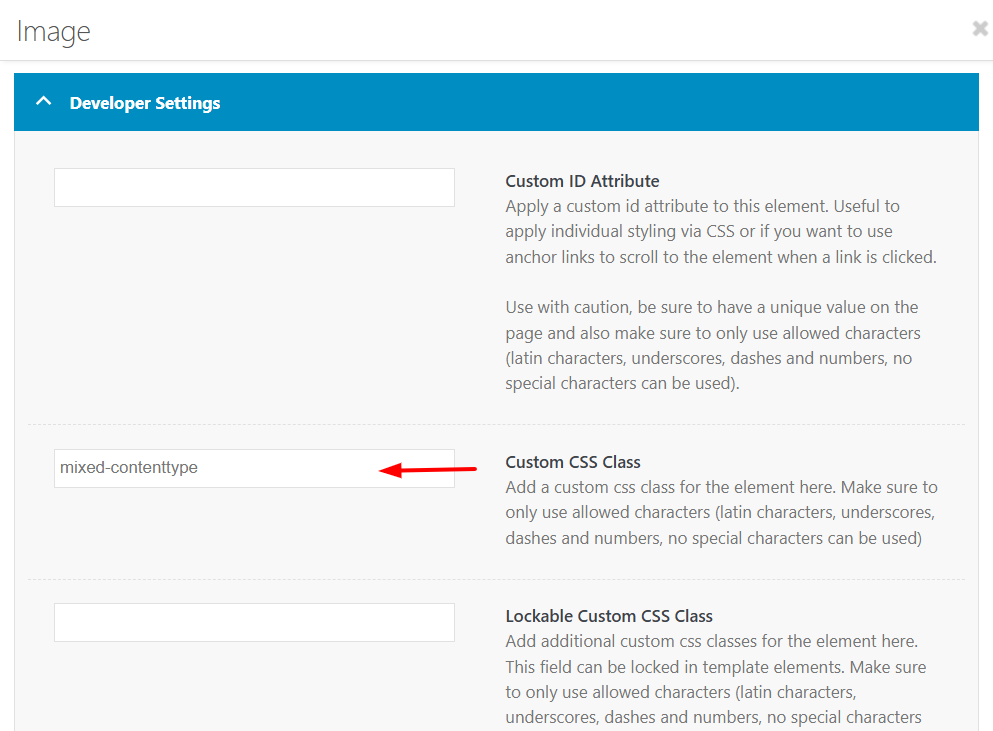
Best regards,
MikeMarch 2, 2026 at 5:00 pm #1495663That worked, so sorry and thank you!
March 2, 2026 at 9:18 pm #1495671Hi,
Glad that we could help, and thanks to Guenni007 for the solution. If you have further questions please open a new thread and we will try to help. Thanks for using Enfold.Best regards,
Mike -
This reply was modified 1 month, 1 week ago by
-
AuthorPosts


- The topic ‘Image does not open video in Lightbox’ is closed to new replies.