Viewing 6 posts - 1 through 6 (of 6 total)
  • Author
    Posts
  • #1495666

    Hi I want my page sidebar menu items seen on this page, to match the main hedaer navigation order.

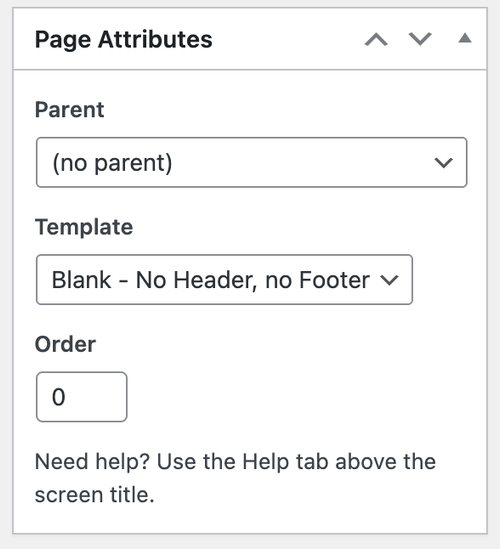
    There used to be a page attributes section for each page where as well as defind the parent you would give a number to signify the order the child menu items should run.

    I can;t find this anymore, can you advise?

    Many thanks

    #1495677

    Hey JennyGr,

    Thank you for the inquiry.

    You might be referring to the Enfold > Sidebar Settings > Page Sidebar Navigation option. When enabled, this option displays sidebar navigation containing the nested subpages of the active page. Let us know the result.

    qBRFJWJ.md.png

    Best regards,
    Ismael

    #1495687

    Yes thta’s what I’m referring to and that is activated.

    My query is how I reorder the nested subpages. There used to be page attributes section for each page where as well as define the parent of that page you would give it a number to signify the order the nested menu items should run. I can no longer see the option to number the order of the nested subpages

    #1495716

    Hi,

    Thank you for the inquiry.

    You can find the Order field in the page editor. Edit the page, then look for the Page Attributes box.

    qC3biUQ.md.png

    Let us know if you need more info.

    Best regards,
    Ismael

    #1495733

    Hi Ismael that is my issues, there is no Page Attributes box

    #1495754

    Hi,

    Thank you for the update.

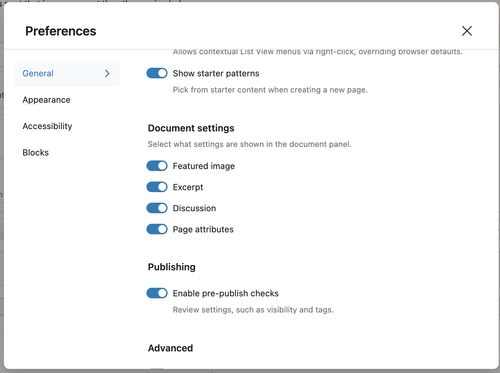
    Are you using the default Block Editor? Please open the Preferences panel, and make sure that General > Document settings > Page attributes is enabled.

    qCL8Vlp.md.png

    This documentation should help: https://wordpress.org/documentation/article/preferences-overview/

    Best regards,
    Ismael

Viewing 6 posts - 1 through 6 (of 6 total)
  • You must be logged in to reply to this topic.