

Tagged: google font, heading font, montserrat
-
AuthorPosts
-
March 2, 2026 at 2:52 pm #1495660
Dear Kriesis,
on this website https://railservice.de I’ve set the heading fonts to Google Font Montserrat in the theme options. I ‘ve also set all headings to font weight 800 in the advanced styling. At the frontend the Montserrat Thin Regular is rendered what is not what I want (it’s too thin). I need Montserrat ExtraBold 800 (alternatively SemiBold 600).What can I do?
Best regards AnneMarch 3, 2026 at 5:33 am #1495679Hey annevoelkel,
Thank you for the inquiry.
The site is currently in maintenance mode, so we’re not able to check it. Please provide the login details in the private field and if possible, share a screenshot as well. In the meantime, you can try using a plugin such as Fonts Plugin to configure existing fonts or add additional fonts to your installation.
— https://wordpress.org/plugins/olympus-google-fonts/
Best regards,
IsmaelMarch 3, 2026 at 11:27 am #1495688You are using the Montserrat Font from the drop downlist of Enfold Typos?
Are you familiar with inspecting your page with a browser dev tools? Then you can check if this Montserrat font has all those font-weights you like to use.
Or do you have uploaded your own Montserrat font by self hosting it? What kind of Montserrat did you upload then – the static files or the varialble Font?March 3, 2026 at 11:46 am #1495689Hello everybody,
thanks for your quick reply and I love Kriesi’s support. I solved my issue this way:
I uploaded montserrat-v31-latin-600.woff2 as a self-hosted font in the Theme Options (and uploads), because that is the heading font I need. I am now testing other options with different Montserrat font styles and assigning them in style.css. My main problem has been solved for now.
Thank you very much and best regards
AnneMarch 3, 2026 at 12:41 pm #1495692I would generally recommend hosting the fonts yourself. And even turning off Enfold support for Google Fonts.
It’s more flexible because you can choose the font styles you specifically need, and this is probably the only correct way to be GDPR compliant.
To hamper Google Fonts Support on Enfold – put this to your child-theme functions.php:function my_output_google_webfonts_script( $activate ){ return false; } add_filter( 'avf_output_google_webfonts_script', 'my_output_google_webfonts_script', 10, 1 );For selfhosted Fonts – use the Enfold Font Manager – with its upload.
You upload zip files to that font-manager f.e.:
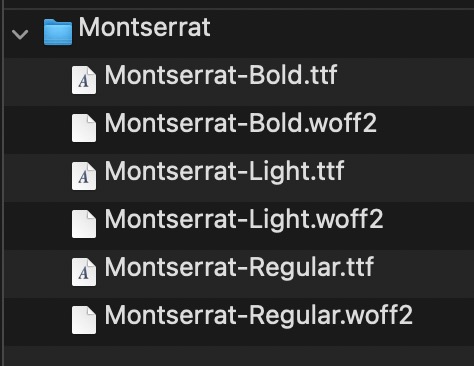
my recommendation is to use definitly woff2 fonts – but maybe as fallback the ttf Variants.
On zipping the Folder (Montserrat) – pay attention if you do that on Mac OSX. Because there are hidden files in there. You had to avoid that.March 3, 2026 at 5:02 pm #1495698 -
AuthorPosts


- You must be logged in to reply to this topic.