Viewing 5 posts - 1 through 5 (of 5 total)
  • Author
    Posts
  • #1492258

    I have a Fullwidth Easy Slider on my Main Page.

    I want to Align text to left (or right) and add a contact form on the opposite side.

    is that doable?

    #1492270

    I think the easiest way is to remove the fullwidth slider and do a color section with image and a second column with contact form etc.

    Would that be correct? If so, what’s the appropriate way to input the image, set as background?

    #1492275

    Hi,

    Thank you for the inquiry.

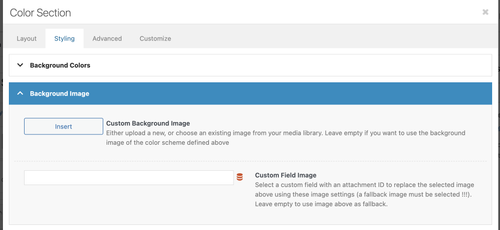
    Yes, you can use the Color Section element instead of the slider if you need to include additional content inside. The image can be applied as a background in the Styling > Background Image panel.

    fArYmFI.md.png

    Hope this helps.

    Best regards,
    Ismael

    #1492297

    Thats what I did, how do I set :

    Background Attachment: Fixed ?
    Background Image Position: ?
    Background repeat: ?

    It looks good on my desktop, but awful on mobile.

    #1492323

    Hi,

    Thank you for the inquiry.

    You can set them as follows:

    Background Attachment: Fixed ( this won’t matter on mobile view because it will default to scroll )
    Background Image Position: Center Center ( adjust depending on which part of the image you want to focus on )
    Background Repeat: Stretch to fit ( set to Stretch to fit (cover) to make sure the image fills the entire container, or Scale to fit (contain) if you want the entire image to remain fully visible )

    Hope this helps.

    Best regards,
    Ismael

Viewing 5 posts - 1 through 5 (of 5 total)
  • You must be logged in to reply to this topic.