

-
AuthorPosts
-
February 23, 2026 at 10:16 am #1495363
Hello Enfold Support,
We are currently building a fullscreen “coming soon” teaser for the homepage.
Originally we implemented it inside the Avia Layout Builder (using a blank template and code block elements). However, we ran into the following issues:
1. SVG and custom markup were partially filtered or not rendered reliably inside Codeblock/Textblock elements.
2. Even when using a blank template, the Enfold header/navigation briefly flashes before our fullscreen teaser takes over.
3. If JavaScript is delayed or disabled, users may only see a black overlay (because the animation controls visibility states via JS).To avoid these issues, we moved the entire teaser injection into functions.php (hooked late in wp_footer), which gives us full control and avoids SVG filtering.
However, we would like to ask:
What is the recommended Enfold approach for implementing a true fullscreen custom homepage experience that:
• Completely suppresses header/navigation output (no flash at all)
• Does not rely purely on JavaScript for initial visibility
• Allows a clean no-JS fallback (static version of the page)
• Avoids content filtering issuesWould you recommend:
• A fully custom page template that replaces the theme output entirely?
• A specific Enfold hook that runs before header rendering?
• Or another best-practice approach inside a child theme?We want to stay as close as possible to Enfold standards while maintaining full control over rendering order and fallback behavior.
Thank you very much for your guidance.
Best regards,
TFebruary 24, 2026 at 5:48 am #1495404Hey cktanju,
Thank you for the inquiry.
Have you tried setting the page’s Page Attributes > Template to Blank – no header, no footer? This should remove everything from the page, including the header and footer.
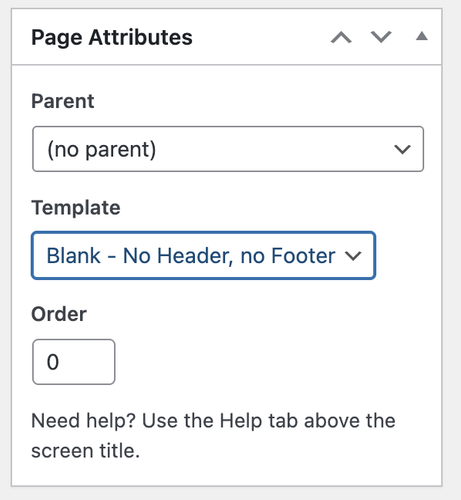
Best regards,
IsmaelFebruary 24, 2026 at 7:36 am #1495410Hi Ismael,
yes, we tested the Blank – no header, no footer template.
It removes:
• header
• footer
• sidebar
• the main Enfold wrapperHowever, it does not affect:
• Enfold’s internal filtering
• shortcode rendering
• script loading order
• potential SVG sanitizing
• the initial layout flash we experiencedSince we are running a full-screen SVG + GSAP animation, we need predictable script execution and no layout flash.
Is there any recommended way within Enfold to:
• prevent SVG filtering in Code Block elements
• avoid the initial layout flash
• control script loading order cleanlyThanks.
KR
TFebruary 24, 2026 at 7:32 pm #1495446February 25, 2026 at 6:48 pm #1495497Hi Guys, this is unusual. Wanted you quickly ask again for a response please, kr T
February 27, 2026 at 7:09 pm #1495576Hi,
🙋 huhhuuuuuuu – anyone there! 😂
I’d be happy to have a answer.KR
TanjuMarch 3, 2026 at 5:46 am #1495682Hi,
Sorry for the delay. The header or footer should not display or flash if this option is enabled because they are not rendered in the document at all. Please make sure to purge the cache or check the site on incognito mode.
We’ll need access to or at least be able to view the site. Please provide the site URL and login details in the private field. If possible, also include a short video clip or screenshots of the issue.
Best regards,
IsmaelMarch 3, 2026 at 9:25 am #1495684Hi Ismael,
thanks for your reply.
In the meantime we refactored the implementation and moved the SVG + GSAP logic outside of the content area to avoid any interaction with Enfold’s internal rendering and script handling.
With that adjustment the issue is resolved on our side, so no further investigation is required.
Appreciate your support.
Best regards,
TMarch 4, 2026 at 6:25 am #1495717 -
AuthorPosts


- The topic ‘Fullscreen Homepage Teaser Implementation’ is closed to new replies.