

-
AuthorPosts
-
January 8, 2026 at 11:22 am #1493713
There is a problem whit the filter on my website on mobile devices.
On a PC website the filters are working directly, but on mobile you can not click the filter button.
The button is there but no action when you click it.
Op PC it’s working
But on mobile (or if you reduce the screen on PC) the filter button is there but not clickableJanuary 8, 2026 at 3:45 pm #1493720Hey safariinkenia,
Did you try to temporarily deactivate all plugins and custom code to see what happens then?
Best regards,
RikardJanuary 8, 2026 at 7:30 pm #1493733I now have installed Mobile Flyout, made a button and this works!
But now I want to get rid of the filter that is Alway’s online on PC/Tablet on the left side.
What do I have to do to make that happen, so customers can use the new button from now on?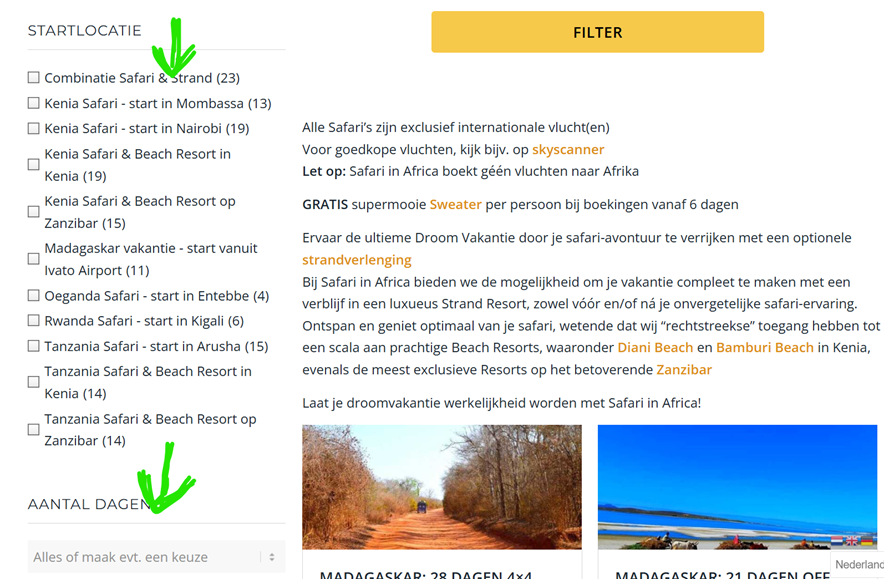 January 9, 2026 at 9:02 am #1493760
Hi,
Thanks for the update. Do you want to hide the elements that you indicated in the screenshot? On which page can we see them? I couldn’t find it on the page that you linked to.
Best regards,
RikardJanuary 9, 2026 at 9:20 am #1493763Hello Rikard,
Thanks for replay.
Yes, because now we have a seperate “Filter” button, I want to hide the automatic made filters that are alway’s showing on PC/Tablet on the lefthand site.
This you can see on this page on PC:
www. safariinafrica.nl/safari-boeken/I have put one space between www. and the rest ;-)
-
This reply was modified 2 months, 3 weeks ago by
safariinkenia.
-
This reply was modified 2 months, 3 weeks ago by
January 9, 2026 at 1:28 pm #1493772Hi,
Thanks for the clarification. Please try the following in Quick CSS under Enfold->General Styling:
.safari-left {
  display: none;
}
Best regards,
RikardJanuary 9, 2026 at 1:37 pm #1493773yes, this is hiding the filter, but now the space is unused.
Can I make that space usable also? January 10, 2026 at 11:05 am #1493787
Hi,
Please try this instead:
#post-216 .safari-left {
  display: none;
}

#post-216 .safari-right {
  width: auto;
}
Best regards,
RikardJanuary 10, 2026 at 11:51 am #1493790Good morning Rikard,
Yes, this is the solution I was hoping for 😊
This works like I wanted.
Many, many thanks!January 10, 2026 at 4:01 pm #1493794Hi,
Glad that Rikard could help, if you have further questions please open a new thread and we will try to help. Thanks for using Enfold.Best regards,
Mike -
This reply was modified 2 months, 3 weeks ago by
-
AuthorPosts


- The topic ‘Filter is’t working on mobile’ is closed to new replies.