

-
AuthorPosts
-
January 19, 2026 at 2:16 am #1494055
My client hired a company to run an accessibility review and one of the items they flagged was the Icon Circles Element on https://abodecommunities.org/about/purpose/ — they’re worried about keyboard users not being able to access the content revealed on-hover. Do you know of any workaround for this? Thanks and lmk if you have any questions!
January 19, 2026 at 6:09 am #1494058Hey sky19er,
Thank you for the inquiry.
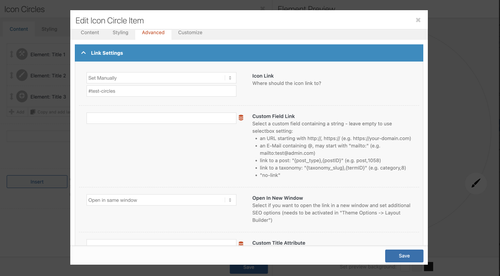
You can set each item’s Advanced > Link Settings > Icon Link to Set Manually, then add arbitrary anchor links to make the circles tabbable. Let us know the result.
Best regards,
IsmaelJanuary 19, 2026 at 10:37 pm #1494076Thanks so much, Ismael — that seems helpful to at least get them to show the focus / get them in the tab index — I guess it’d be pretty tricky to get the content to show on-click, eh?
January 20, 2026 at 5:21 am #1494079Hi,
It’s possible, but you’ll need to modify the enfold/config-templatebuilder/avia-shortcodes/icon_circles/icon_circles.js file. Unfortunately, this is beyond the scope of our support. Let us know if you have any other questions.
Best regards,
IsmaelJanuary 21, 2026 at 1:25 am #1494115Got it — any other ideas for how to get this element to meet accessibility guidelines?
January 21, 2026 at 6:18 am #1494126Hi,
Thank you for the update.
In icon_circles.js file, you’ll find event listeners for mouseenter and mouseleave. You can duplicate those and change the events to mouse clicks. If you need help implementing this, we recommend hiring a freelance developer or contact our partner, Codeable.
— https://kriesi.at/contact/customization
Hope this helps.
Best regards,
IsmaelJanuary 22, 2026 at 1:19 am #1494146Nice — thank you so much! This seemed to work for me: to just duplicate the event listener for mouseenter, change mouseenter to click, and comment out the event listener for mouseleave (see below). Do I have to minify the file and overwrite icon_circles.min.js? And do I have to re-implement this every time I update the theme, or is there a way to handle it through the child theme?
logos.on( 'mouseenter', function() { logos.removeClass('active'); logoText.removeClass('active'); var logo = $(this).addClass('active'); logo.next().addClass('active'); container.addClass('active-container'); }); logos.on( 'click', function() { logos.removeClass('active'); logoText.removeClass('active'); var logo = $(this).addClass('active'); logo.next().addClass('active'); container.addClass('active-container'); }); /* container.on( 'mouseleave', function() { logos.removeClass('active'); logoText.removeClass('active'); container.removeClass('active-container'); });*/January 22, 2026 at 5:34 am #1494150Hi,
Yes, you’ll need to minify the file only when compression is enabled in the theme. We’ll forward this to our channel. For now, please keep the modification in the file.
Best regards,
IsmaelJanuary 22, 2026 at 11:44 pm #1494202OK, thanks again, Ismael! Feel free to close this thread.
-
AuthorPosts


- The topic ‘enfold icon circles element accessibility’ is closed to new replies.