

-
AuthorPosts
-
December 17, 2025 at 8:04 am #1492587
Hello. I installed the theme update, and since then the native WordPress editor isn’t working. The content of all pages is stuck in “recovery mode.” How can I fix this?
Best regards
AnnaDecember 17, 2025 at 8:07 am #1492589Hey Luckyredsun,
Thank you for the inquiry.
We tried logging in, but the account above is invalid. Please check the info carefully. Which editor are you using, the classic editor or the block editor? Please try to reselect the editor in Enfold > Theme Options > Select Your Editor, located at the very bottom.
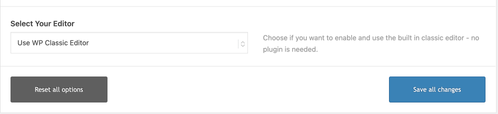
Let us know the result.
Best regards,
IsmaelDecember 17, 2025 at 8:09 am #1492590Try checking the homepage in particular. I also tried creating a blank page – same result. Some older pages open correctly.
December 17, 2025 at 8:15 am #1492592It s block editor. Not working your solution….
I’ve changed the password for your account. It should work now.
December 17, 2025 at 8:34 am #1492598Hi,
Thank you for the info.
On the home page, did you switch from the Advanced Layout Builder to the Block Editor? What were the type of elements in recovery mode? We tried creating a new page, but we couldn’t reproduce the same issue. Please check the link in the private field.
Best regards,
IsmaelDecember 17, 2025 at 8:41 am #1492599Check you link. Its in recovery mode now and I don’t switch from the advance layout builder to the block editor
December 17, 2025 at 10:23 am #1492604Hi,
You are using an old PHP version on your server. Please try updating to 8.2 or higher.
Best regards,
RikardDecember 22, 2025 at 7:44 am #1492735Hello, I’m now using PHP 8.2, but that hasn’t changed anything. My homepage and many others are in recovery mode. If I create a test page, save it, close it, and then reopen it – same problem, it’s in recovery mode.
December 23, 2025 at 1:40 pm #1492932Hi,
Please try to temporarily deactivate all plugins and remove any custom code you might have added to see what happens then.
Best regards,
RikardDecember 23, 2025 at 1:45 pm #1492946Hi,
Also, you are still using an unsupported PHP version, please update it to 8.2 or higher.
Regards,
RikardJanuary 5, 2026 at 2:26 pm #1493656Hello, I wish you a happy new year.
I’m sorry, but I’m contacting you again about my problem. I’ve updated the site to PHP 8.2, but the result is the same. There’s no access to the content (see the homepage) – a “recovery attempt” message is displayed throughout the editor.
How can I fix this, please?January 5, 2026 at 3:37 pm #1493657Hi,
Thanks for the update. Since you have created your content using the WordPress block editor, it’s very likely not related to the theme that you are running. You can test that out by temporarily activating a different theme under Appearance in the WordPress menu. I would recommend that you try recreating your content on a different page, to see what happens then.
Best regards,
Rikard -
AuthorPosts


- You must be logged in to reply to this topic.