

-
AuthorPosts
-
February 10, 2026 at 11:11 pm #1494940
Hello,
I have a display problem between a computer and a smartphone.
My page is divided in 2 vertically. Title on the left and picture on the right. Next line : Title on the right, image on the left, …On computer (it’s OK) :
A (title) – B (image)
B (image) – A (title)On smartphone:
A (title)
B (image)
B (image)
A (title)Is it possible to have this combination:
A (title)
B (image)
A (title)
B (image)Thank you in advance for your help.
Have a good day.
February 11, 2026 at 6:02 am #1494953Hey edwinbaes,
Thank you for the inquiry.
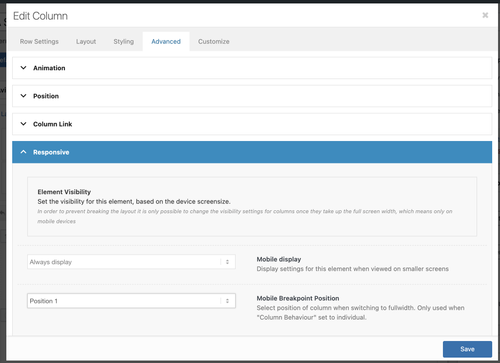
Are you using the Column element? If so, you can adjust the Mobile Breakpoint Position in the Advanced > Responsive panel, as shown in the screenshot below. This option is also available for Grid Row cells.
Best regards,
IsmaelFebruary 15, 2026 at 5:50 pm #1495105Hello,
This isn’t working.
I have a grid with 2 columns and another grid below it with 2 columns.
I set positions 1 and 2.
Next row, positions 1 and 2.
It still doesn’t work. What can I do?
Thanks in advance.
February 16, 2026 at 7:27 am #1495112Hi,
Thank you for the update.
You need to set the position of the next row to 2 and the other to 1 to reverse their order in the mobile view. Let us know the result.
Best regards,
IsmaelFebruary 16, 2026 at 7:57 pm #1495142Hi,
It’s still not working.
A – B (Position 1 – 2)
B – A (Position 2 – 1)What else can I do?
Thanks for your feedback.
February 17, 2026 at 6:26 am #1495157Hi,
This is working correctly on our end. Please create a test page and provide the login details in the private field so we can check the issue properly.
Best regards,
IsmaelFebruary 18, 2026 at 3:34 pm #1495190Hi
I don’t have access credentials to provide yet because the site is currently under development using MAMP.I can’t find a solution.
February 23, 2026 at 6:39 am #1495360 -
AuthorPosts


- You must be logged in to reply to this topic.