

Tagged: Custom Post Type, image size
-
AuthorPosts
-
February 24, 2026 at 3:18 pm #1495429
Dear Enfold Theme,
We are currently implementing a gallery page where a lightbox opens in a gallery with additional data and the image. Unfortunately, the image is only displayed partially. We are using the following function for this:$grid = new avia_post_grid( array( 'linking' => ‘’, ‘columns’ => ‘3’, ‘contents’ => ‘title’, ‘sort’ => ‘no’, 'paginate' => ‘yes’, ‘set_breadcrumb’ => false, ‘preview_mode’ => ‘auto’, ‘image_size’ => ‘full’ )); $grid->use_global_query(); echo $grid->html( ‘’ );Highlighted in bold that the full images should actually be used. However, this does not seem to work.
February 24, 2026 at 5:15 pm #1495441i guess you only want to influence the lightbox images source. And because Enfold uses on default the large image. This does not always uses the original aspect ratio.
I would not influence the thumbnail sizes of the gallery. Only the lightbox source image.
If you are usiing the gallery element try:function custom_alb_lightbox_image_size( $size, $context ){ if( $context == ('av_gallery' || 'avia_masonry') ){ return 'original'; } return $size; } add_filter( 'avf_alb_lightbox_image_size', 'custom_alb_lightbox_image_size', 10, 2 );February 25, 2026 at 5:41 am #1495459Hi,
Thank you for the inquiry.
Adding this filter in the functions.php file might also help.
add_filter( 'avf_avia_builder_helper_lightbox_size', function( $size, $context, $post_id, $responsive_lightbox ) {
    return 'full';
}, 10, 4 );
Let us know the result.
Best regards,
IsmaelFebruary 25, 2026 at 1:50 pm #1495489Thank you for the quick answers and the provided code examples.
Sorry for the misunderstanding. My intention was to show a full size image In the post grid, not in the lightbox itself. Is there any chance I can achieve that with the avia_post_grid object?February 26, 2026 at 5:52 am #1495509Hi,
Thank you for the clarification.
How did you add the Portfolio Grid? Did you create a custom element? Try setting the preview_mode to custom to ensure that the image_size does not revert to the default.
Best regards,
IsmaelFebruary 26, 2026 at 7:10 am #1495519Your description of the whole thing is quite unclear.
Which Enfold element did you use? Portfolio Grid? ( When I searched for avia_post_grid in the Enfold folder, I only found portfolio.php as an element with such an entry. )Then you selected “Open in Lightbox” for link handling.
You can set the preview image size in the “Styling” tab – Grid settings:
To do this, you must first select “Select the grid image size manually” under “Portfolio Grid Image Size”—a second drop-down menu will then open where you can specify the grid image size.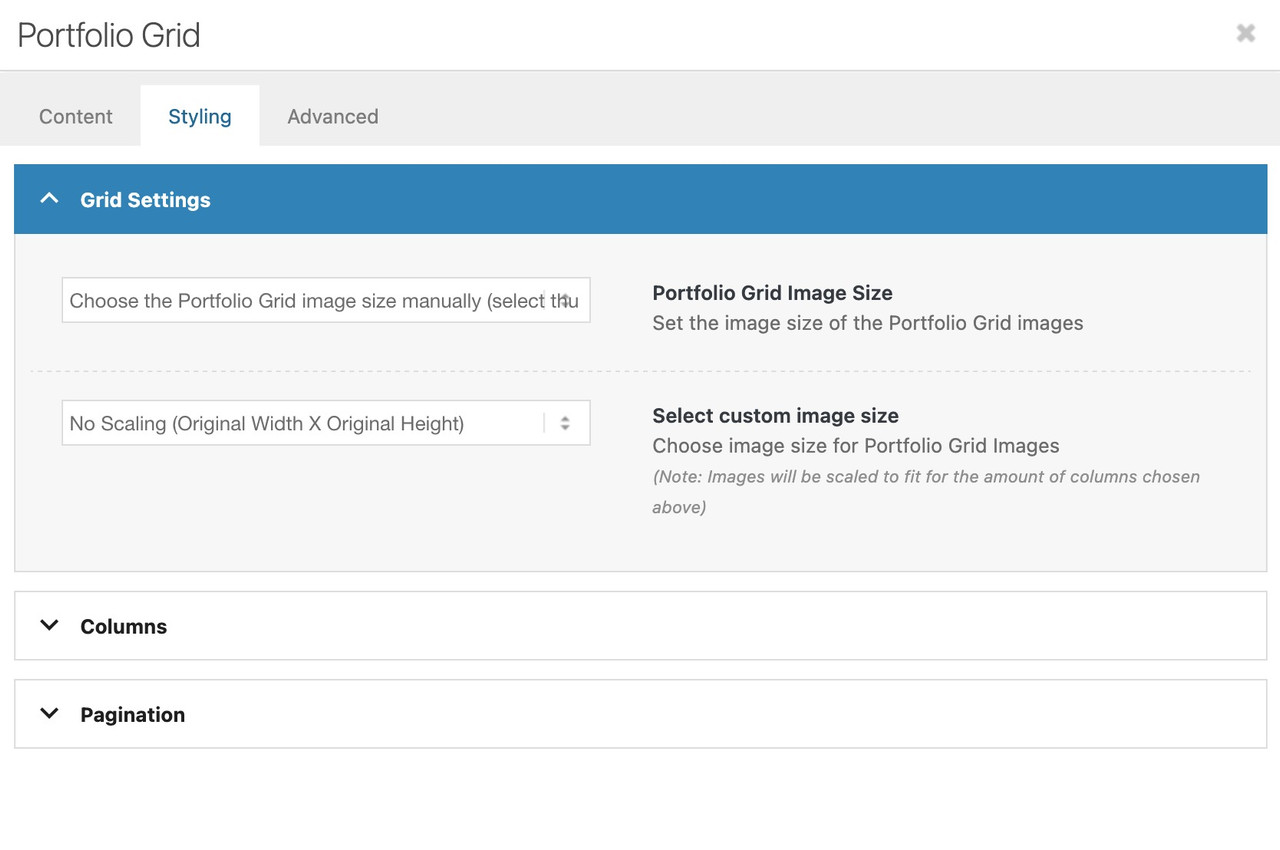
Do you like to change something on the lightbox images – or the bottom-bar text?
February 26, 2026 at 5:44 pm #1495545Thank you, that was exactly what I was looking for.
For further clarification: I am using a Custom Post Type in a child theme. The avia_post_grid I am using in own version of taxonomy.php for this custom post type’s category. This is the temporary dev link if you want to have a further look: https://galerievalentin.renzcom.de/artist/boehringer-volker/
February 27, 2026 at 6:39 am #1495558 -
AuthorPosts


- The topic ‘Cropped images in Lightbox’ is closed to new replies.