

-
AuthorPosts
-
September 16, 2019 at 12:26 pm #1138789
Hey there,
as soon as I change anything in the html-code in a text box, even though it’s just a simple break, those changes won’t stay saved – means as soon as I close and re-open the text box, they are gone.
This is extremely annoying as I have content on my website, which needs to be shown with html-Code (it’s a homepage about a XML-scheme).
What is there to do to save the problem? In my opinion, this seems like a bigger bug and it must have been noticed by other users before – I’m grateful for every help!
Thank you a lot
AnjaSeptember 17, 2019 at 10:04 am #1139036Hey guys!
I’d really appreciate an answer here.September 17, 2019 at 1:08 pm #1139097Hi,
Thanks for the login details. On which page can we see and reproduce this problem?
Best regards,
RikardSeptember 17, 2019 at 2:12 pm #1139117September 18, 2019 at 2:15 pm #1139490Hi,
Thanks for that, but I can’t see any code blocks in the content of your front page. Could you try to explain a bit further where we can see and reproduce this problem please?
Best regards,
RikardSeptember 18, 2019 at 3:46 pm #1139535Oh okay, sure. I thought you just needed the link to the front page and you would click yourself through it. Here’s an example of code blocks I use: https://www.parsx.de/schema/customizing/
September 22, 2019 at 12:06 am #1140513Hi,
Sorry for the late reply, it looks like your code blocks are created with the EnlighterJS plugin, I installed this on my localhost and experimented so as to not destroy your page. The text element in the Advanced Layout Builder uses TinyMCE which in “visual” mode wants to convert angle brackets to > so one option is to turn off the visual editor in your user profile
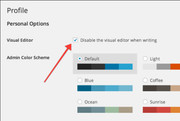
The other option, and probably the best for your case is to use the code block element for your code blocks, it preserves the code even after re-editing the page

As a side note, I tested the plugin on the default WordPress theme but when trying to re-edit the page the site crashed and I had to re-start the server, probably why the plugin includes the warning “Enlighter Plugin Gutenberg is still BETA software and may have some serious bugs!”Best regards,
Mike -
AuthorPosts


- You must be logged in to reply to this topic.