I can’t seem to change teh background on this page. can you please tell me how to change it to a plain white background?
Hey melanie308,
If you want to remove the backgrounds on that page, then you can do so in the Slider and Color Section element options.
Best regards,
Rikard
i don’t see that as an option? can you please tell me where to find that?
Hi,
Thank you for the inquiry.
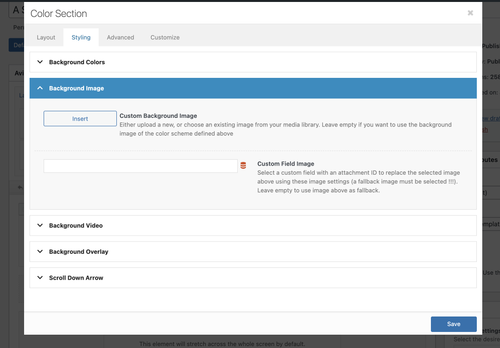
The background option for the Color Section is located under Styling > Background Image. You can remove the background image there or replace it with another one.
If you need to apply a solid background color, simply go to the Background Colors panel, as shown in the screenshot.
Best regards,
Ismael

so it seems i somehow have a color section on this page but i can’t find that element to find those options! can you help guide me how to find the color section on this page pls?
